
An audio proofing workflow is the repeatable path a mix, master or podcast episode takes from your first draft to the client’s written sign-off. It covers how you share the file, how reviewers leave notes, how you track versions and revision rounds, and how approval gets confirmed before delivery. Do it well and a project closes in two or three rounds. Do it badly and you are digging through email threads, text messages and voice memos to work out which version someone meant.
This guide is about proofing in the sense of review and approval, not soundproofing a room. It walks through each stage in order, with the checks that keep rounds short.
TL;DR
- Proofing has six stages: prepare, share, collect notes, organize revisions, resolve conflicts and approve, then hand off.
- Send full-quality audio through one link, so every reviewer hears exactly what you exported.
- Ask for timestamped notes in one place. “The vocal feels off” is useless without a position in the file.
- Set the number of revision rounds before the first mix goes out, and name one person who gives final sign-off.
- Lock the approved version, record who approved it, and only then deliver or send to mastering.
Table of Contents
- What an audio proofing workflow covers
- Stage 1: Prepare the file and the brief
- Stage 2: Share it so people actually listen
- Stage 3: Collect precise, timestamped feedback
- Stage 4: Organize comments, versions and revision rounds
- Stage 5: Resolve conflicting feedback and confirm approval
- Protecting files and keeping communication clear
- Stage 6: Hand off approved audio for delivery or mastering
- Try the workflow in Audome
- FAQ
- Sources
What an audio proofing workflow covers
Proofing is everything between “here is a draft” and “this is final.” It applies equally to a mixing engineer sending a rough mix to a band, a mastering engineer sending a reference to a label, and a podcast producer sending an episode to a host and a sponsor.
The workflow has six stages:
- Prepare the file and the context around it.
- Share it in a way that preserves quality and works for non-technical reviewers.
- Collect feedback tied to specific moments.
- Organize comments, versions and revision rounds.
- Resolve conflicting notes and confirm approval.
- Hand off the approved audio for delivery or mastering.
Most revision pain comes from skipping one of these. Notes arrive without timestamps because nobody asked for them. Versions pile up because nothing tracks them. Approval is a vague “sounds good!” in a chat thread because nobody defined what approval means. Each stage below fixes one of those failure points.
Stage 1: Prepare the file and the brief
Proofing starts before you press send. Two things need to be ready: the audio and the context.
The audio. Export from your session at the quality you actually worked in. If you tracked and mixed at 96 kHz/24-bit, review the same file rather than a heavily compressed copy, because a lossy preview can hide or introduce problems your client then reacts to. Name the file so it explains itself: project, version number and a short descriptor, such as Project_Mix_v03. Never overwrite an earlier version with the same name.
The brief. Write two or three lines to go with the file:
- What this version is (first rough mix, revision after round one, final candidate).
- What you changed since the last version, if any.
- What you want from the reviewer this round (overall balance only, or vocal level and low end).
That last line matters. A reviewer asked “is the vocal sitting right?” gives a better answer than one asked “thoughts?” It also keeps early rounds from turning into a debate about the snare when you are still setting levels.
If you want a structured way to capture the requests that come back, our guide on the fields every mix note needs lays out what to ask for so each note is actionable.
Stage 2: Share it so people actually listen
How you share decides how good the feedback is. Three problems show up repeatedly: the file is degraded, the reviewer has to create an account or install something, and the audio sits somewhere with no context.
A good review link:
- Plays the real file. The reviewer hears your export, not a thumbnail of it.
- Needs no login. Clients who are busy or not technical will skip anything that makes them sign up. A link they can open and listen to gets a response.
- Is private. Unreleased music and unaired episodes should sit behind a password or a private link, not a public page.
- Controls downloads. Decide whether the reviewer can download this version. Early rounds are often stream-only; the final is downloadable after approval.
- Looks like you. A branded page makes a freelancer or small studio look established, and tells the client where to go next.
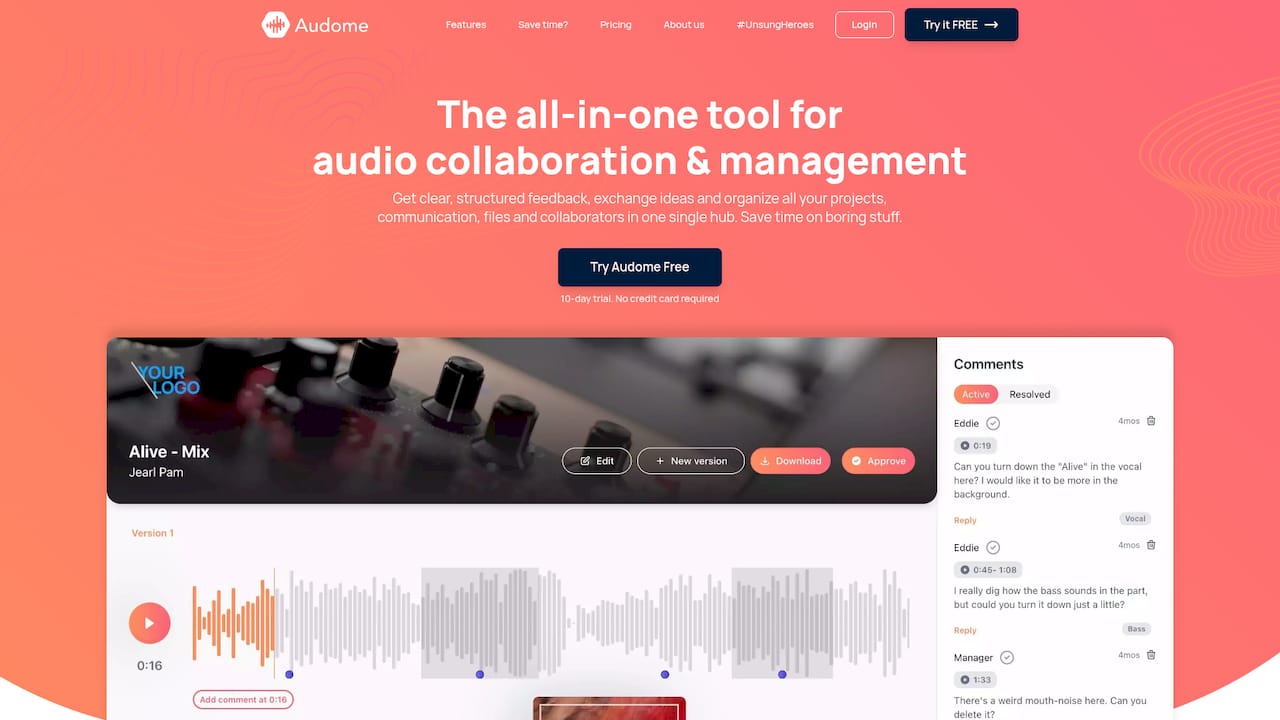
This is what we built Audome to do: unlimited high-resolution uploads up to 96 kHz/24-bit, password-protected and branded client portals, download controls, and collaboration where your client does not need to log in. You can use any setup that meets the list above, but one link per version beats attachments scattered across email.
Why email attachments and chat threads fail
Large files bounce or get compressed. Notes arrive in a different channel from the audio. The client replies to an old message and refers to “the new one,” and you are guessing. Moving the audio and the conversation into one place removes that guessing.
Stage 3: Collect precise, timestamped feedback
Vague notes cost the most time. “Make the chorus bigger” could mean the drums, the vocal stack, the reverb or the whole mix. A note tied to a position in the waveform narrows it immediately: “1:42, the second harmony is too loud against the lead.”
Here is how to get notes like that:
- Tell reviewers how to comment. One sentence in your brief: “Click the point in the waveform and write your note there.”
- Ask for one issue per comment. A note that mixes three requests gets half-done.
- Ask for what they hear and what they want. “The guitar is hard to hear in the verse” is more useful than “turn the guitar up 3 dB,” because it leaves the fix to you.
- Ask for references when needed. If the client wants it “like” another track, ask which part of that track: the low end, the width or the vocal level.
- Set a feedback window. Say how long they have to listen and respond, so one stray reviewer does not hold up the project for weeks.
Timestamped comments on the waveform let a client point at the exact second and let you jump straight to it. That is the core of Audome’s feedback system, and it replaces long emails of “around the second chorus, maybe.”
Tell reviewers to listen on more than one system if they can: headphones, car, laptop speakers. Notes that come from a single bad speaker are a common source of requests you will later need to reverse.

Stage 4: Organize comments, versions and revision rounds
Once notes arrive, the job becomes bookkeeping. Three things need tracking.
Comments
Triage every note into one of four buckets:
- Do it: clear, low-risk, in scope.
- Clarify: ambiguous, so ask a question before touching the session.
- Conflict: contradicts another reviewer’s note.
- Out of scope: a new request outside what was agreed.
Mark each note as done once you have addressed it, and reply on the same comment so the history stays in one place. Our guide to centralizing client feedback in an afternoon covers how to set this up.
Versions
Every export gets a version number, and the review page should show the order. When a client says “I preferred the old chorus,” you should be able to play v02 and v03 back to back. Automated version tracking does this without you maintaining a spreadsheet. For deeper habits, see how audio engineers handle revisions like pros.
Revision rounds
Agree the limit up front: for example, two rounds included, further rounds billed. Put it in the proposal or invoice, then repeat it in the brief for each version (“This is round 1 of 2”). Clients rarely resent a limit they saw at the start. They do resent one that appears on round three.
If you bill for extra rounds, make it simple to pay. Audome supports revision limits and Stripe-based billing for paid revisions, so the charge and the extra round happen in the same place as the audio. For a fuller look at the principles, read our producer’s guide to revisions in music production and the guide to mix revision management.
Stage 5: Resolve conflicting feedback and confirm approval
When more than one person reviews, notes will clash. The vocalist wants the vocal louder; the manager thinks it is already too loud. The host wants a segment cut; the sponsor wants it longer.
What works:
- Name a decision-maker before round one. One person speaks for the client. Everyone else’s notes go to them, not to you.
- Surface the conflict, do not pick a side. Quote both notes with timestamps and ask the decision-maker to choose. If it helps, send two short A/B alternatives rather than describing the difference.
- Offer your professional recommendation. You are paid for your ears. A producer’s job is often to represent the listener’s experience for the artist. T Bone Burnett has described a producer as a proxy for the audience who gives artists feedback they can trust. In a proofing round, that means saying “I’d keep the vocal where it is, because the verse needs the lyric to carry” rather than only executing whatever came last.
- Keep the tone collaborative. Studio relationships run on trust and respect, and clear communication is part of how creative work gets made. The Recording Academy’s Nashville Chapter has pointed to mutual respect and strong communication as central to the creative process in the studio.
What counts as approval
Define it in advance. A usable definition is: the named decision-maker states approval in writing, on a specific version, inside the review page or a reply you can point to. “Sounds great, thanks!” in a text thread two weeks later is not approval of v04.
For a plain checklist you can reuse, see the mix approval checklist and our no-fluff guide to the mix approval process.
Protecting files and keeping communication clear
Proofing involves unreleased work, so a few habits protect it and keep everyone aligned.
- Password-protect review links for anything unreleased, and share the password separately from the link.
- Limit downloads until the work is approved or paid for. Streaming lets the client judge the mix without walking away with a final master.
- Keep one channel for notes. If feedback comes by phone or message, paste it into the review page so the record is complete.
- Confirm in writing after calls. Send a two-line recap: what was agreed, which version, which round.
- Archive each round. When a project closes, keep the versions, comments and approval together so you can answer “what did we agree?” months later.
- Do not reuse links across clients. One project, one link.
The studio approval process is also where payment and delivery meet. Our piece on how to lock final files until paid explains how to keep full-resolution deliverables back until the invoice clears.
Stage 6: Hand off approved audio for delivery or mastering
Approval ends the creative back-and-forth. Handoff makes the result usable.
Before mastering:
- Export the approved mix from the exact session state that was approved. Do not “touch up” afterward.
- Use the highest quality your session supports, with the sample rate and bit depth you worked in, and leave headroom rather than slamming a limiter on the master bus.
- Include a short note for the mastering engineer: reference tracks, any known issues, anything the client was particular about.
- Send alternates if the project needs them: instrumental, a cappella, TV mix, clean version.
Before delivery to the client:
- Confirm the approval record is attached to the version you are delivering.
- Name final files clearly, with a version tag such as
FINALand the date. - Enable downloads on the approved version, or release the files once payment is confirmed.
- Keep your own archive of the session and the stems.
For podcasts, the handoff may include the final episode file, a loudness-compliant version for the host platform, and cleaned-up show assets. Check each destination’s specification before export, and send what that destination asks for.
Our perspective
We built Audome around a simple observation: most proofing trouble is not about taste, it is about scattered information. The audio is in one place, the notes in another, the approval in a third. Every time a client has to hunt for something, the project slows down.
That is why we think the review page should do the whole job. Full-quality files up to 96 kHz/24-bit, so your client hears what you hear. Time-stamped comments on the waveform, so a note points at a moment instead of a vibe. Automatic version tracking, so nobody argues over which mix they meant. A client who does not need to log in, because the easiest review link is the one that gets used.
We also believe you should be paid for your work without awkward conversations. Revision limits and Stripe-based billing for paid revisions turn a boundary you already have into a process the client can see. Your portal can carry your branding and a password, so it reflects the studio you run.
A proofing workflow should feel like part of your craft, not a second job. If your client can listen, comment and approve in one place, you get your evenings back.
Kreg
Try the workflow in Audome
If you want this entire workflow in one place, Audome gives you branded, password-protected client portals, timestamped waveform feedback, version tracking and revision billing. Plans start with Studio at $12.50 per month or $150 per year. Pro is $48 per month or $576 per year. You can start with a free trial and see the details on the pricing page, or look at the Audome home page to see how it fits your setup.
If you are comparing tools, our rundown of audio approval software alternatives explains what to look for, and our producer client workflow guide shows how proofing fits into the rest of a client project.
FAQ
How many revision rounds should I offer?
Two included rounds is a common starting point for mixes, with additional rounds billed. The right number depends on the project’s size and your rate, so state it in your proposal and repeat it in each version’s brief. What matters most is that the client knows the limit before round one.
What is the best way to get specific feedback on a mix?
Ask reviewers to comment at the exact point in the waveform and to give one issue per note. A timestamped comment lets you jump straight to the moment. Adding a line to your brief about what you want them to focus on keeps the notes relevant.
Should clients be able to download a mix during review?
Usually not until it is approved or paid for. Streaming is enough to judge a mix, and holding downloads protects unreleased work and your payment. Turn on downloads for the final approved version when you deliver.
How do I handle two reviewers who disagree?
Ask the client to name one decision-maker at the start. When notes conflict, show both with timestamps, add your recommendation, and let that person decide. If it is a matter of balance, sending two quick alternates often settles it faster than discussion.
What should I do once a mix is approved?
Lock that version, record who approved it and when, then export from the approved session for delivery or mastering. Include a short note for the mastering engineer. Do not make further changes without opening a new, clearly numbered round.
Sources
- Good To The Bone, Grammy.com
- Lauren Daigle, Parker Millsap, Kathie Lee Gifford and others talk the creative process, Grammy.com