
A solid mix approval checklist covers five areas before any file leaves your hands: sonic acceptance, technical specs, playback testing, delivery and metadata, and written sign-off. Send it with every mix, attach a review window of about one week, and you have a repeatable process that protects your work and your invoice.
Minimum valid sign-off requires all five:
- Sonic check: balance, tone, dynamics, and automation confirmed
- Technical check: sample rate, bit depth, headroom, and loudness verified
- Playback check: auditioned on at least three different systems
- Delivery and metadata: files named, tagged, and securely transferred
- Written sign-off: approver name, role, date, and version number captured
Pro Tip: Send this checklist alongside the mix file and include a few specific listening prompts. “Focus on the vocal level in the chorus” gets you faster, more useful feedback than an open-ended “let me know what you think.”
Key Takeaways
A complete mix approval checklist covers sonic, technical, playback, delivery, and written sign-off in that order, and every step should be confirmed before the file leaves your hands.
| Point | Details |
|---|---|
| Headroom target | Leave −3 to −6 dBFS of pre-master headroom before sending to mastering. |
| Revision limits | Set two or three rounds in the contract; bill additional work as new scope. |
| Written sign-off | Capture approver name, role, date, and exact version before invoicing. |
| Playback testing | Audition on at least three systems: monitors, earbuds, and a phone speaker. |
| Audome | Centralizes timestamped feedback, version history, and paid revision billing in one workspace. |
Table of Contents
- What does the mix approval checklist actually cover?
- Sonic checks: what to confirm before you send
- Technical checks: the numbers that matter
- How to run playback tests before sign-off
- File naming, deliverables, and secure delivery
- How to request revisions, track versions, and record sign-off
- Tools and workflow examples for faster approvals
- Ready-to-use templates you can copy right now
- Compliance with client and platform-specific requirements
- Why Audome makes this checklist easier to run
- Why disciplined approvals protect more than just your time
- Sources
- FAQ
What does the mix approval checklist actually cover?
The checklist is a formal agreement tool, not just a quality-control pass. The person who signs off should be the authorized client contact: the artist, the A&R rep, or the producer named in the contract. A label assistant forwarding notes is not an approval.
Attach the checklist to your delivery email or project page and state the response window clearly. Including a clear approval deadline in both the delivery message and the contract is standard practice; absent feedback within that window, the mix is considered approved. Send a midpoint follow-up around halfway through the review window to keep the clock running.
- Confirm the approver’s name and role before delivery
- State the deadline in the subject line, not buried in the body
- Include two or three listening prompts that direct attention to the most important decisions
- Specify what counts as approval: a reply email, a portal checkbox, or a signed PDF
Pro Tip: Bundle your listening prompts with the checklist. Something like “Pay attention to the low-end on earbuds and the vocal in the second verse” cuts vague feedback by giving the client a specific job to do.
Sonic checks: what to confirm before you send
Creative sign-off is where most revision cycles start. Nail these before delivery and you cut the back-and-forth in half.
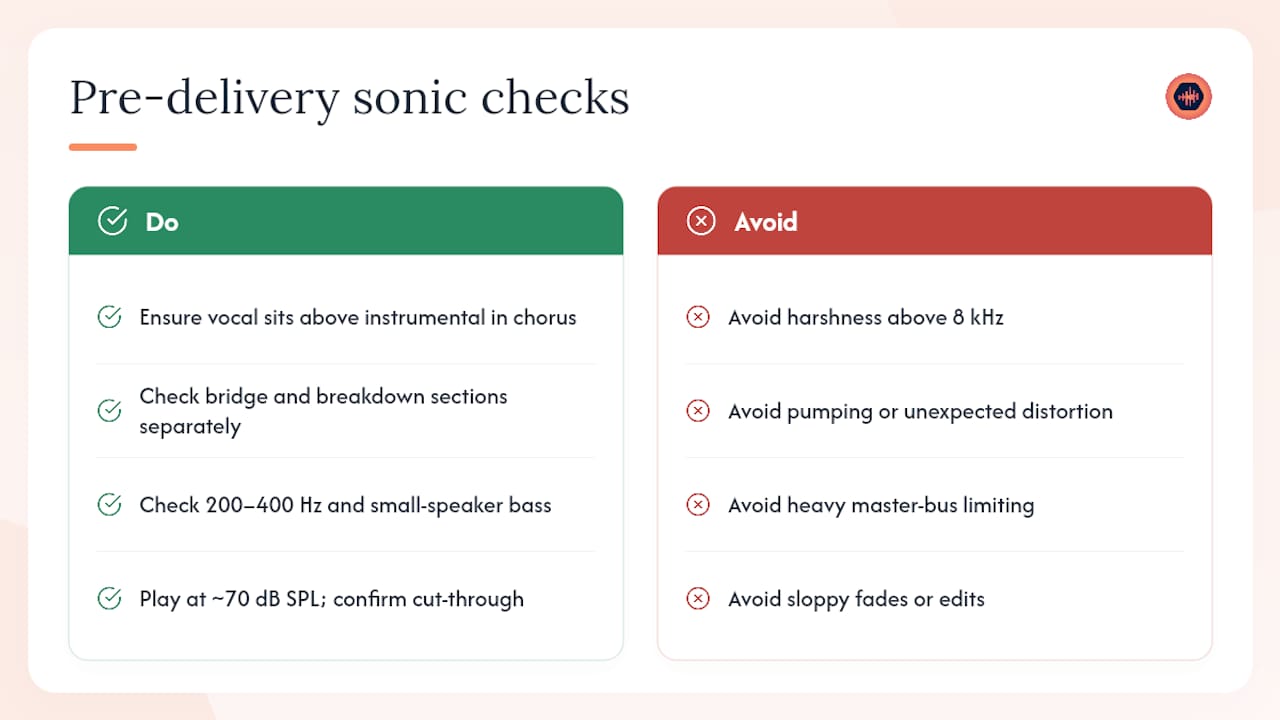
Level and balance. The vocal should sit clearly above the instrumental bed in the chorus. Verse levels can sit lower, but the relative balance between lead elements and supporting parts should feel intentional, not accidental. Check the bridge and any breakdown sections separately.
Tone and EQ. Listen for buildup in the 200–400 Hz range that muddies the midrange, and confirm bass definition is audible on small speakers. Harshness above 8 kHz is the most common client complaint after delivery.
Dynamics and processing. Compression should be transparent on the master bus unless the style calls for obvious limiting. Pumping or distortion that wasn’t there in the session is a red flag.
Automation and edits. Every fade should be clean. Automation passes should be confirmed against the session notes. Transitions between sections need a final listen at full volume.
Artistic intent. Compare the mix to the agreed reference tracks. Does it hit the emotional target? Are the stylistic choices you discussed actually in the mix?
Pro Tip: Play the mix at low volume, around 70 dB SPL. If the vocal and kick still cut through, the balance is solid. If anything disappears, it needs work before delivery.
Technical checks: the numbers that matter
These are the confirmable yes/no items. Every one should be ticked before the file is packaged.
Pre-delivery checks should confirm sample rate, bit depth, and headroom; the standard pre-master headroom target is −3 to −6 dBFS, and a delivery notes file listing specs and file contents should accompany every package.
- Sample rate matches the agreed session rate (44.1 kHz, 48 kHz, or 96 kHz)
- Bit depth is 24-bit for pre-master delivery
- Peak level sits between −3 and −6 dBFS; true-peak compliance checked if the platform requires it
- Loudness target confirmed with the mastering engineer (integrated LUFS, not just peak)
- Mono compatibility verified: fold to mono and confirm the kick, bass, and vocal hold
- Phase issues checked on critical elements (kick/bass, double-tracked guitars)
- No unintentional dithering or normalization applied to the bounce
- File integrity confirmed: play the file from start to finish in a fresh session before sending
Loudness note. Streaming platforms have their own normalization targets. Mastering engineers typically want a clean, unclipped bounce with headroom intact. Do not hand a limited, loud master to a mastering engineer unless they specifically asked for it.
How to run playback tests before sign-off
Studio monitors tell you what’s there. Consumer speakers tell you what the listener hears. You need both.
Three-system minimum:
- Studio monitors at mix position
- Consumer earbuds or closed-back headphones (Apple AirPods or Sony WH-1000XM5 are common reference points)
- Phone or laptop speaker at arm’s length
Reference-track comparison. Load one or two agreed reference tracks into your DAW alongside the mix. Match perceived loudness, then compare spectral balance. The low end and the top end are where most mixes drift from the reference.
Step-by-step playback test the client can run:
- Listen on earbuds first, no EQ, no spatial audio
- Note any element that feels too loud or too quiet at the 1:00 and 2:30 marks
- Switch to a phone speaker and check vocal intelligibility
- Fold to mono if your phone allows it and confirm nothing disappears
- Send timestamped notes: “1:23 — kick feels thin on earbuds”
Pro Tip: Ask the client to listen in the car. Car speakers are the most honest consumer reference most people have, and a mix that translates there usually translates everywhere.
File naming, deliverables, and secure delivery
A short delivery checklist and a clearly named file package upfront save time and reduce repeat requests for missing stems or alternate mixes.
Standard filename pattern:
ArtistName_SongTitle_MixVersion_YYYYMMDD_SampleRate.wav
Example: JaneDoe_Midnight_Mix_v2_20260315_48k.wav
Baseline deliverables:
- Stereo WAV at session sample rate, 24-bit
- Limited and unlimited versions if mastering is downstream
- Instrumental, a cappella, and vocal-up/vocal-down alternates if contracted
- Stems when agreed in writing before the session
Metadata to include in the delivery notes file:
Secure delivery. Use password-protected links or a project portal with download controls. Keep session files for a minimum of 90 days post-delivery so you can pull stems or alternates if a client comes back.
Pro Tip: Name your delivery notes file the same way as the audio: JaneDoe_Midnight_DeliveryNotes_v2.txt. Clients who receive multiple projects from multiple engineers will thank you.
How to request revisions, track versions, and record sign-off
A producer contract should define revision rounds, review windows, acceptance criteria, and payment triggers tied to milestones. Without that language, every project risks stalling.
Set a clear revision limit up front, commonly two or three rounds, and require timestamped, consolidated notes. Work beyond that limit is billed as new scope.
Version control rules:
- Number every version: Mix_v1, Mix_v2, Mix_v3
- Write a one-line changelog for each round: “v2: vocal up 1.5 dB in chorus, kick tightened”
- Never overwrite a previous version; keep all files so the client can revert
Revision request wording (copy and send):
Final sign-off fields:
- Approver name and role
- Date of approval
- Exact version approved (filename)
- Statement: “I approve Mix_v2 of [Song Title] for mastering/distribution.”
- Delivery method: email reply, portal checkbox, or signed PDF
Get written approval before sending final masters; a signed email or portal checkbox protects both parties and triggers final invoicing.
Pro Tip: Use revision management resources to build changelog templates and revision-limit language directly into your contract before the first session.
Tools and workflow examples for faster approvals
Two workflows cover most studio situations.
Workflow A: Asynchronous delivery. Upload the mix to a password-protected project page. Attach the checklist and listening prompts. Set a 7-business-day deadline. The client leaves timestamped comments directly on the waveform. You review consolidated notes and deliver v2. Live shared playback and timestamped comments make feedback more specific and cut vague requests that cause multiple rounds.
Workflow B: Live review session. Schedule a 60-minute call. Play the mix in real time, take notes together, and make changes on the spot. Live mix review sessions collapse revision rounds from days into minutes, and a single session often replaces two or three async rounds.
Platform capabilities worth requiring:
- Waveform-level timestamped comments
- Automatic version history with changelogs
- Password-protected project pages
- Download controls that unlock only after payment
- Integrated payments for paid revisions (Stripe Connect or equivalent)
Ready-to-use templates you can copy right now
Delivery email (copy and customize):
Subject: [Song Title] — Mix v1 Ready for Review
Hi [Client Name],
Mix v1 of “[Song Title]” is ready. Download link: [secure link] | Password: [password]
Please review by [date]. Listening prompts: (1) Vocal level in the chorus. (2) Low-end on earbuds. (3) Overall energy vs. reference track.
Reply with timestamped notes or use the comment tool on the project page. This project includes [X] revision rounds.
Revision request email (copy and send):
Subject: [Song Title] — Revision Notes for Mix v1
Hi [Engineer Name],
Notes for v1 (timestamps reference the WAV file):
- 0:45 — snare feels thin
- 1:20 — vocal slightly buried under guitars
- 2:10 — outro fade starts too early
Please confirm receipt and expected turnaround. Thanks.
Downloadable checklist template contains: printable sign-off checklist, editable delivery and revision email templates, and a version-change log sheet. Use it inside your project portal: attach the checklist PDF to the project page, share the link with the client, and collect sign-off via the portal’s checkbox or a reply email.
Pro Tip: Number your email subjects: “Mix v1 Ready,” “Mix v2 Ready.” Clients who search their inbox for your project will find every round instantly.
Compliance with client and platform-specific requirements
Some projects carry requirements that sit outside the standard sonic and technical checks. Catch these before delivery, not after.
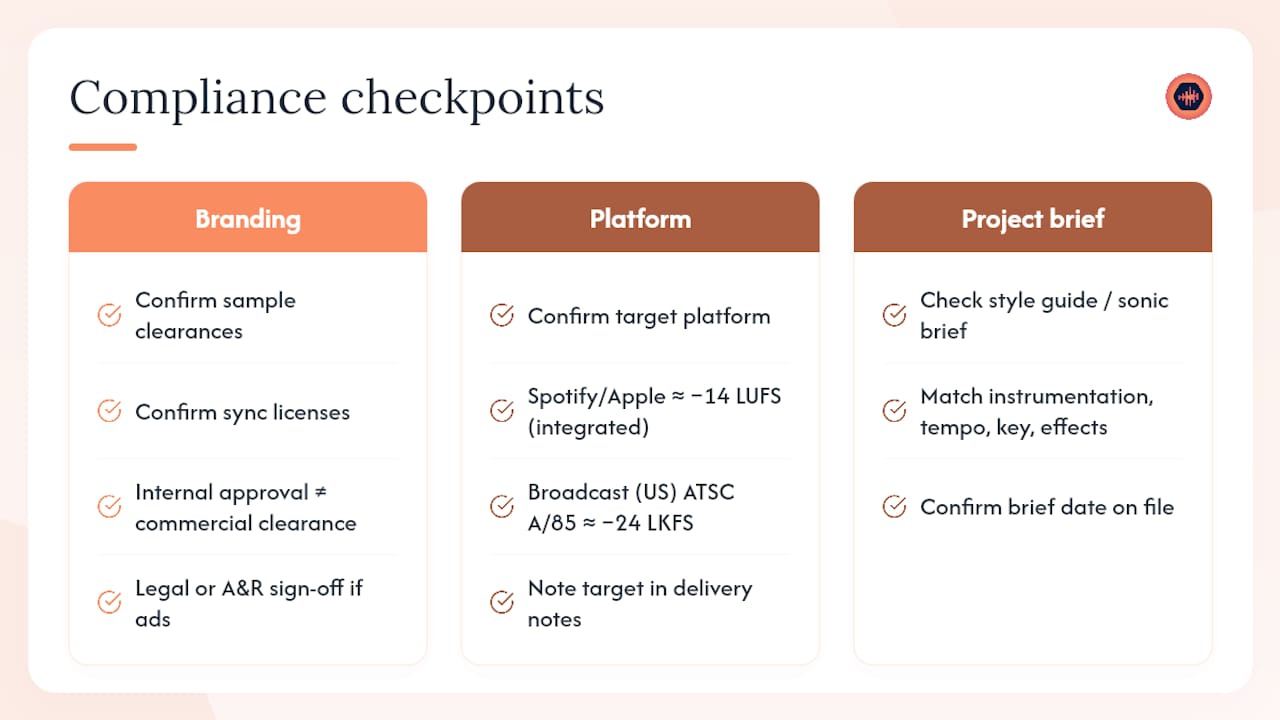
Branding and usage rights. Confirm whether the client holds all sample clearances and sync licenses before the mix is approved for distribution. A mix approved for internal review is not automatically cleared for commercial release. If the project involves brand content, advertising, or sync placement, the client’s legal or A&R team may need to sign off separately.
Platform specifications. Podcast platforms, streaming services, and broadcast networks each carry their own loudness and format requirements. Spotify and Apple Music normalize to approximately −14 LUFS integrated; broadcast standards in the US follow ATSC A/85, which targets −24 LKFS. Confirm the target platform before the mastering engineer receives the file, and note the target in the delivery notes.
Project-specific requirements. Some clients provide a style guide or sonic brief at the start of a project. Before final sign-off, confirm the mix matches every item in that brief: instrumentation, tempo, key, and any agreed effects or production choices. A checklist item that reads “Confirmed: mix matches approved creative brief dated [date]” closes this loop cleanly.
Why Audome makes this checklist easier to run
Running a mix approval checklist across email, Dropbox, and text threads is where the process breaks down. Feedback gets lost, versions get confused, and payment gets delayed.

Audome is built specifically for audio professionals who need the checklist to actually work in practice. Clients leave timestamped comments directly on the waveform, so “1:23 — vocal feels buried” is pinned to the exact moment, not buried in an email thread. Version history is automatic. Project pages are password-protected. Download controls prevent unpaid file access, and Stripe Connect lets you charge for additional revision rounds without an awkward invoice conversation. Clients never need to create an account.
Audome and run your next mix delivery through a single, organized workspace instead of five disconnected tools.
Why disciplined approvals protect more than just your time
Most engineers treat the approval process as an afterthought, something that happens after the real work is done. That’s the wrong frame. The approval process is where the project either closes cleanly or bleeds into unpaid revision cycles that erode your rate and your schedule.
A standardized checklist does something a verbal agreement never can: it creates a shared record of what was reviewed, who approved it, and when. That record is what you point to when a client comes back three weeks after sign-off asking for changes they claim were “always part of the deal.” Without it, you’re negotiating from memory against someone who has every incentive to remember things differently.
The studios that run the tightest approval processes are also the ones that get referrals fastest. Clients remember the experience of working with someone organized. They remember getting a clear delivery, a specific deadline, and a professional sign-off. That reputation compounds.
Sources
- Mix Engineer Client Approval: End the Post-Delivery Silence
- How to Handle Mix Revisions Without Endless Rounds
FAQ
What is a mix approval checklist?
A mix approval checklist is a structured sign-off document that confirms sonic quality, technical specs, playback testing, file delivery, and written client approval before a mix is sent to mastering or distribution.
How many revision rounds should I include in a project?
A small number of revision rounds is the common practice; additional work should be billed separately. Define the limit in the contract before the first session.
What headroom should I leave on a pre-master mix?
Leave between −3 and −6 dBFS of peak headroom on a pre-master bounce so the mastering engineer has room to work without clipping.
How do I get written sign-off from a client?
A reply email confirming the version and approving it for mastering or distribution is sufficient. A portal checkbox or signed PDF works equally well and creates a cleaner paper trail.
Can Audome handle the approval workflow?
Yes. Audome collects timestamped waveform comments, tracks version history automatically, locks downloads behind payment, and lets you charge for additional revision rounds through Stripe Connect, all without requiring the client to create an account.