
The best sound design collaboration combines four things: early involvement, clear role boundaries, agreed technical standards, and one centralized workspace where all feedback lives. Get those four right and the rest of the workflow falls into place. Miss any one of them and you’ll spend the back half of a project untangling version conflicts, chasing scattered notes, and re-recording things that should have been locked weeks ago.
Here’s the short checklist your team can apply immediately:
- Involve sound at the script stage — not after picture lock. The earlier a sound designer reads the script, the better the temp mix and the fewer ADR sessions you’ll need.
- Assign ownership before day one — who delivers stems, who signs off on Foley, who owns the mix session. Write it down.
- Agree on a file-naming convention —
ProjectName_Scene_Element_Version_Date_Authorbefore anyone exports a single file. - Set revision limits in writing — define what counts as a revision versus a new scope request, and put a number on it.
- Pick one feedback channel — timestamped comments on the waveform, not a mix of emails, DMs, and verbal notes from the parking lot.
Research on cooperative sound design confirms that rapid sketching methods, including vocal and Foley-based sketching, accelerate ideation in early stages by letting teams generate and test sonic ideas before committing to any recording session. That means the checklist above isn’t just organizational hygiene — it’s the foundation that makes creative speed possible.
Key Takeaways
Effective sound design collaboration requires early involvement, clear role ownership, agreed technical standards, and one centralized workspace — teams that get all four right spend less time fixing problems and more time making better work.
| Point | Details |
|---|---|
| Start at the script stage | Involving sound at script review reduces ADR sessions and late-stage reworks. |
| Assign role ownership in writing | Every deliverable needs a named owner before production begins. |
| Lock technical standards on day one | Agree on sample rate, bit depth, naming conventions, and delivery specs before any files are created. |
| Use timestamped waveform feedback | Written, time-coded comments replace scattered DMs and prevent ambiguous revision cycles. |
| Audome centralizes the workflow | Audome handles timestamped feedback, version history, revision limits, and Stripe billing in one workspace built for audio professionals. |
Table of Contents
- Who does what, and when do you hand off?
- How do you keep feedback from turning into noise?
- What technical standards should every team agree on before day one?
- Which tools do pro teams actually use for collaboration?
- Do research-backed sketching methods actually speed up sound design?
- How do you protect margins when scope keeps expanding?
- What are the most common pitfalls that break sound collaborations?
- What does a well-run studio collaboration actually look like?
- Audome keeps your sound projects organized from first sketch to final delivery
- Useful sources and further reading
- FAQ
Who does what, and when do you hand off?
Role confusion is where most collaborative sound projects quietly fall apart. Two people assume the other is handling the Foley session notes. Nobody owns the plugin list. The re-recording mixer gets a session that won’t open on their system.
Core roles and what they own:
- Production sound mixer — clean dialogue, room tone, and wild lines from set; delivers ISO tracks and a production report
- Sound designer — sound effects, ambiences, designed elements; owns the SFX session and stems
- Composer — score, stems, and any hybrid sound-design elements; delivers stems at agreed sample rate and format
- Foley artist/editor — footsteps, cloth, props; delivers synced Foley stems
- Dialogue editor — ADR, production dialogue cleanup; delivers a clean dialogue stem
- Effects editor — BG, hard effects, cut effects; delivers cut effects session
- Supervising sound editor — coordinates all departments, owns the pre-dub session, signs off on handoffs
- Re-recording mixer — final mix, deliverables; receives all stems in agreed format
- Post supervisor — schedule, budget, delivery specs; the person who enforces the handoff checklist
Handoff checklist before any session moves to the next stage:
- Archive the current session as a major version before touching anything
- Apply the agreed file-naming template to every exported file
- Include a DAW session notes document: software version, sample rate, bit depth, and any non-standard routing
- Attach a plugin list with version numbers — not just names
- Confirm who has signed off (supervising sound editor or post supervisor) before the next stage begins
A practical handoff sequence looks like this: the sound designer exports stems at 48kHz/24-bit, named ProjectName_SFX_Stem_v03_20260415_JSmith.wav, drops them into the shared project folder with a revision note, and pings the supervising sound editor for sign-off. The re-recording mixer doesn’t touch the session until that sign-off is logged.
How do you keep feedback from turning into noise?
The most common communication failure in sound post isn’t a lack of feedback. It’s too much feedback arriving through too many channels at once. A director texts a note, the producer emails a different note, and the sound designer gets a verbal comment in the hallway. None of them match. All of them are urgent.
The fix is a meeting cadence with a defined purpose for each touchpoint:
- Kickoff — align on creative direction, delivery specs, and revision policy before any work begins
- WIP reviews — sound designer shares reference mixes at agreed milestones; director gives written feedback only
- Director reviews — full playback of the current mix; notes logged in the project workspace, not in a separate email thread
- Technical syncs — post supervisor, supervising sound editor, and re-recording mixer confirm specs, schedule, and outstanding issues
Written, timestamped feedback on the waveform is the standard that separates professional workflows from chaotic ones. When a director can click on a specific moment in the audio and type “this effect is too aggressive at 1:23,” the sound designer knows exactly what to fix. Verbal notes and scattered DMs produce the opposite: ambiguous instructions that generate more rounds of revision, not fewer. A home studio client feedback workflow built around timestamped comments cuts approval cycles significantly.
Pro Tip: Lock the picture before opening a feedback round on effects. “Open frame” scenes — where the cut is still changing — should be flagged explicitly so the sound designer doesn’t spend time designing to a frame that will move. One sentence in the project brief (“Scenes 12–15 are open frame as of [date]”) prevents hours of rework.
Feedback anti-patterns to eliminate immediately:
- Verbal-only notes with no written follow-up
- Feedback sent to multiple people with no single owner
- Notes that describe a feeling without a timecode (“the whole third act feels off”)
- Approvals given verbally that are later disputed
The one-sentence protocol to adopt right now: All feedback goes into the project workspace as a timestamped comment; verbal notes are summarized in writing within 24 hours by whoever gave them.
What technical standards should every team agree on before day one?
Technical disagreements mid-project are almost always avoidable. They happen because nobody had the conversation at the start. Agree on these before any files are created:
Minimum agreed standards:
- Sample rate: 48kHz for film/TV/games; 96kHz for projects requiring high-resolution delivery
- Bit depth: 24-bit minimum for all working files; 32-bit float for recording sessions where headroom is critical
- DAW session consolidation: all media copied into the session folder before handoff; no external references
- Naming convention:
ProjectName_Scene_Element_Version_Date_Author— applied to every exported file without exception - Metadata fields: project name, scene, take, sample rate, bit depth, creator, and date in the file’s embedded metadata
Version control rules:
- Archive the current session as a new major version before starting any revision
- Use a revision log (a simple text file in the session folder works) noting what changed and who approved it
- Never overwrite a file — increment the version number instead
Delivery specs:
- Loudness targets: -23 LUFS integrated for broadcast (EBU R128); -24 LUFS for streaming platforms per their current specs; -16 LUFS for short-form content
- File formats: WAV (BWF) for all stems and deliverables; MP3 only for reference/approval files
- Stems required: dialogue, music, effects (DME) as a minimum; full stem package for international delivery
- Immersive formats: confirm channel order and bed/object structure before the mix begins
File-naming template:
ProjectName_Scene_Element_Version_Date_Author
Example: Sinners_Sc042_Ambience_v02_20260301_KThompson.wav
Version control is one of the most common failure points in collaborative sound work. Archive major versions before starting revisions, and use consistent naming so assets are quickly located and accidental overwrites don’t happen. The mix revision management guide from Audome covers operational tips for keeping sessions clean across multiple handoffs.
Which tools do pro teams actually use for collaboration?
No single tool does everything. Professional teams typically run a stack of three to four categories, each solving a different problem in the workflow.
Tool categories and what they solve:
- Centralized project workspaces with timestamped comments — replace scattered email and DM feedback with a single source of truth; Audome is built specifically for audio professionals, handling unlimited high-resolution file uploads (up to 96kHz/24-bit), waveform-level timestamped feedback, version history, and revision billing in one workspace
- Real-time remote DAW sync — tools that let two engineers work in the same session simultaneously; useful for co-writing and editing sessions across time zones
- Sound library search — AI-enabled audio-to-audio and text-to-audio search changes how teams discover effects; Sony AI and Audiokinetic’s Similar Sound Search, integrated into Wwise, lets designers search by sonic quality rather than filename metadata
- Middleware for interactive projects — Wwise (Audiokinetic) handles adaptive audio logic for games and interactive media; not relevant for linear film but essential for game cinematics and VR
- Sound library providers — Pro Sound Effects and BOOM Library are the two most-used professional SFX libraries in US post-production; Pro Sound Effects’ structured dataset powered the AI model behind Sony AI’s Similar Sound Search, which is why the search results are production-ready rather than approximate
Choosing by project type:
For linear film and TV, the priority is a centralized workspace with strong version control and client-facing feedback tools. For game audio, middleware integration (Wwise) and AI-powered library search matter more. For location-recording-heavy shows, the focus shifts to production sound coordination and a clear handoff protocol from set to post.
Centralized, secure workspaces beat scattered file sharing on every axis that matters for a professional team: they reduce ambiguous feedback, enforce revision limits, and give everyone a single place to find the current version. The types of audio collaboration tools guide breaks down the trade-offs across categories for remote and hybrid workflows.
A note on AI search: the value of audio-to-audio search depends entirely on the quality of the underlying library. Pro Sound Effects’ dataset was chosen specifically because large, well-structured, professionally recorded libraries produce better AI models and more reliable search results.
Do research-backed sketching methods actually speed up sound design?
Yes, and the evidence is specific enough to be useful. Cooperative sketching research shows that vocal and Foley-based sketching lets teams generate and iterate sound ideas quickly under tight constraints — the kind of constraints that define every real production schedule. The method works because it removes the technical barrier between an idea and its sonic representation. A sound designer can hum a texture, slap a surface, or drag an object across a table and immediately communicate a sonic direction to a director without opening a DAW.

The Invoke VR study (ACM) explored collaborative spatial-audio production in a VR environment and found genuine potential for immersive sound work, but flagged real design challenges: collaboration control, voice-drawing ergonomics, and the cognitive load of learning a new spatial interface under time pressure. The takeaway for most teams is that VR tools are promising for spatial audio exploration but not yet a drop-in replacement for conventional sketching workflows.
Multi-touch tabletop prototypes showed a different profile. Research on multi-touch collaborative sound design found that shared interfaces increased engagement and experimentation. Study participants familiar with synthesizers reported the tools were musically inspiring and fostered collaborative flow. The practical limits were navigation complexity and awareness issues — it wasn’t always clear who was controlling what.
| Method | Best for | Key limit |
|---|---|---|
| Vocal/Foley sketching | Early ideation, director alignment | Outputs need archiving before they disappear |
| Multi-touch tabletop | Experimental texture exploration | Navigation and shared-control complexity |
| VR spatial audio tools | Immersive/spatial sound prototyping | Ergonomics and learning curve under time pressure |
How to run a 60-minute vocal/Foley sketching session:
- Assign one person as the recorder (phone or portable recorder is fine)
- Work from a scene description or script excerpt, not a picture cut
- Each participant sketches a sonic idea using voice, body percussion, or found objects
- Record every sketch, even the bad ones
- At the end of the session, the sound designer imports the best sketches into a DAW session as reference audio, labeled with the scene and the contributor’s name
Pro Tip: For remote teams, run vocal sketching sessions over a video call with a shared screen showing the script excerpt. Ask each participant to record their own audio locally at 48kHz/24-bit and upload it to the project workspace immediately after the call. You lose some spontaneity but gain clean recordings and a permanent archive.
How do you protect margins when scope keeps expanding?
Scope creep in sound post usually starts with a single phrase: “Can you just try one more thing?” Without a documented revision policy, that phrase repeats until the project is unprofitable.
The fix is a written revision policy agreed upon before work begins. Define what counts as a revision (a change to existing work within the agreed brief) versus a new scope request (a change that requires new recording, new design work, or a structural change to the mix). Put both definitions in the contract.
Sample contract language studios can adapt:
- “This agreement includes [X] rounds of revisions. A revision is defined as a change to existing delivered work. New recording sessions, structural mix changes, or additions not included in the original brief are billed at [$Y] per hour.”
- “Additional revisions beyond the included rounds are billed at [$Z] per revision round, invoiced before work begins.”
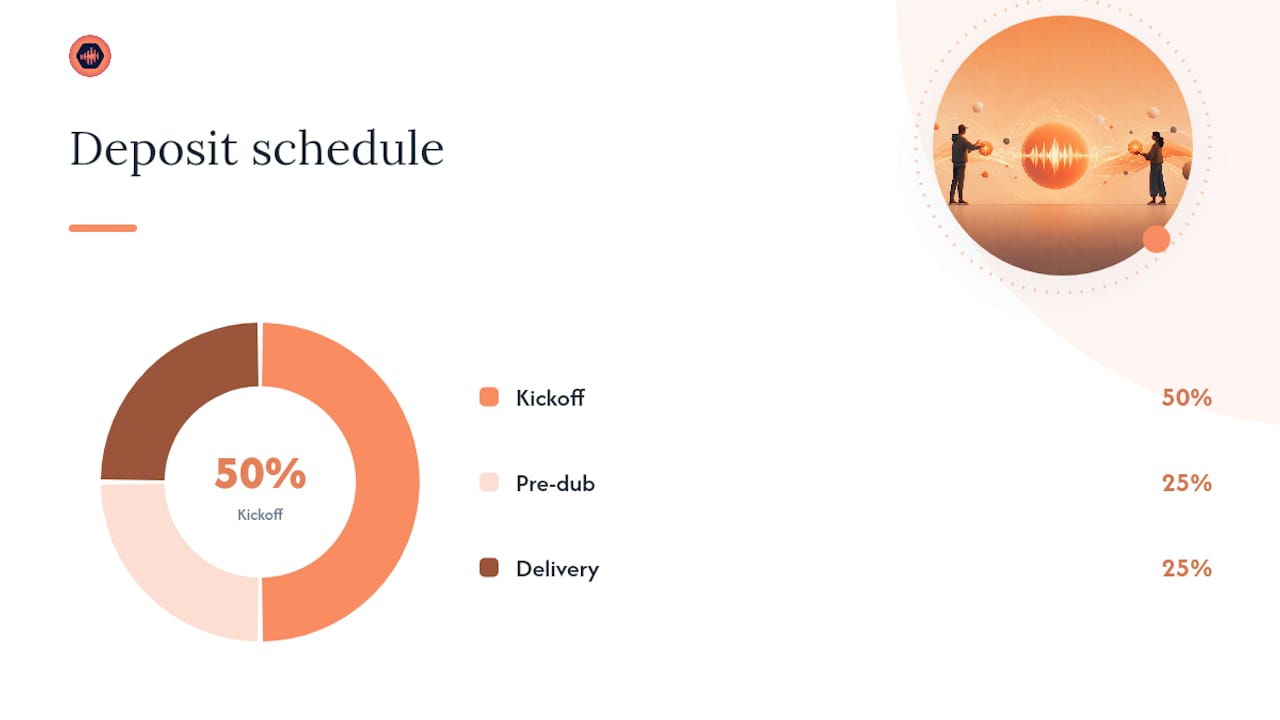
Pricing shape changes with timing. A sound designer brought in at the script stage can price a project as a flat fee with a clear scope. A designer brought in after picture lock on a rush schedule should charge a rush premium — typically 25–50% above standard rates — because the compressed timeline increases risk and limits creative options. Staged deposits (50% on kickoff, 25% at pre-dub, 25% on delivery) protect cash flow and give clients a natural checkpoint to reassess scope before the final stage.
Operationally, version history and automated revision billing remove the awkward conversation about extra charges. When the system logs every revision and automatically triggers a charge after the included rounds are exhausted, the policy enforces itself. The audio engineer revision guide covers the step-by-step mechanics of managing this in practice.
For deeper contract language and revision policy templates, the music production revisions guide has copy-ready clauses organized by project type.
What are the most common pitfalls that break sound collaborations?
Most collaboration failures are predictable. Here are the ones that show up most often, and what to do the moment you spot them:
- Unclear sign-off — nobody knows who has final creative authority. Fix: name one decision-maker in the contract and require written approval before any stage closes.
- Scattered feedback — notes arriving via email, text, DM, and verbal comments simultaneously. Fix: declare one feedback channel on day one and refuse to act on notes that arrive outside it.
- Missing plugin lists — the re-recording mixer opens the session and half the plugins are missing or on a different version. Fix: include a plugin list with version numbers in every handoff document.
- Inconsistent sample rates — one department delivers at 44.1kHz, another at 48kHz, and the mix session is at 96kHz. Fix: agree on sample rate in the kickoff document and confirm it in every handoff checklist.
- No version archives — someone overwrites the only copy of a mix session. Fix: archive a major version before touching anything, every time, without exception.
Warning signs a project is slipping:
- Feedback rounds are increasing in length rather than decreasing
- The director is giving notes on elements that were approved two rounds ago
- Files are arriving without version numbers or with names like “FINAL_FINAL_v2”
- The sound designer is receiving conflicting notes from two different stakeholders
When you see “FINAL_FINAL” in a filename, the version control system has already broken down. Stop the project, archive everything, reset the naming convention, and confirm who has sign-off authority before continuing.
What does a well-run studio collaboration actually look like?
The gap between a good collaboration policy and a functional one is daily habit. A studio lead running a two-week deliverable with locked picture typically starts each day by reviewing timestamped comments from the previous session, triaging them into “fix today” and “flag for director review,” and updating the revision log before opening the DAW. That 15-minute routine prevents the end-of-week scramble where nobody can remember what was approved and what was just discussed.
On a project with open picture — scenes still being cut while sound design is in progress — the rhythm shifts. The sound designer checks for picture updates every morning, flags any scenes that have moved by more than a few frames, and holds off on detailed design work for those scenes until the cut stabilizes. It’s a discipline that feels slow in the moment but saves a full day of rework by the end of the week.
Ethan Van der Ryn and Erik Aadahl, whose long-term partnership at the top of Hollywood sound design is well documented, describe the alchemy of their collaboration as partners acting as each other’s hardest critics — pushing past the first instinct toward sounds that produce genuine emotional resonance rather than repeating tropes that worked on a previous project. That dynamic only works when the operational side of the collaboration is solid. If you’re spending creative energy on version conflicts and missing files, you have nothing left for the harder conversation about whether a sound is actually good.
Skywalker Sound’s approach to feature post reinforces the same principle from a production angle: the creative ambition of the work is only possible because the workflow underneath it is disciplined. Early involvement, clear handoffs, and a single source of truth for feedback aren’t constraints on creativity. They’re what make it possible.
Audome keeps your sound projects organized from first sketch to final delivery
Sound teams that centralize collaboration stop losing hours to scattered feedback and version confusion. Audome is built specifically for that problem, and it goes further than generic file sharing in three ways that matter directly to the workflow described in this article.

Timestamped waveform comments replace ambiguous verbal notes with precise, time-coded feedback that lives next to the audio file. Version history and naming templates give every handoff a clean paper trail, so the re-recording mixer always knows which file is current. And revision limits with Stripe Connect billing mean the revision policy you wrote into your contract actually enforces itself: clients see exactly how many rounds remain, and additional rounds trigger a payment request automatically before work continues.
The result is fewer approval cycles, fewer version conflicts, and a client experience that feels professional rather than chaotic. Studios using Audome report faster sign-offs and a cleaner boundary between included work and billable extras.
Start your free trial at Audome and run your next sound project from first sketch to final delivery in one place.
Useful sources and further reading
| Resource | Why it matters |
|---|---|
| Cooperative sound design (University of Milan) | Academic foundation for vocal/Foley sketching methods; apply in pre-production ideation sessions to accelerate creative alignment. |
| Multi-touch tabletop sound design prototype (arXiv) | Shows how shared interfaces increase engagement and collaborative flow; relevant for experimental texture sessions and co-design workshops. |
| Sony AI + Audiokinetic Similar Sound Search announcement | Explains how audio-to-audio AI search works in Wwise; read before evaluating AI-powered SFX discovery for game or interactive projects. |
| Why Sony & Audiokinetic chose Pro Sound Effects | Explains the library-quality requirements behind production-ready AI search; useful for evaluating SFX library investments. |
| Ethan Van der Ryn and Erik Aadahl on the alchemy of sound | Industry interview on long-term creative partnerships; read for perspective on how top-tier collaborators structure creative critique. |
| Skywalker Sound on Sinners | Behind-the-scenes case example of early sound involvement on a feature; use to make the case for script-stage inclusion to directors and producers. |
| How collaboration transforms sound design projects (Audome) | Practical guide to structured collaboration, version control, and communication protocols; start here for operational setup. |
| Sachin Sudhakaran and Hariharan Muralidharan interview (The Hindu) | Award-winning designers on compressed schedules and the value of sync sound; relevant for productions with tight post timelines. |
FAQ
Who are the most respected sound designers working today?
Ethan Van der Ryn and Erik Aadahl are among the most cited names in Hollywood sound design, known for their long-term creative partnership and work on major studio features. Skywalker Sound, as a facility, has produced some of the most recognized sound work in film history and continues to set the standard for feature post-production.
Is there an Oscar for best sound design?
The Academy Awards currently present one award in this category: Best Sound, which covers both sound mixing and sound design. The Academy merged the former Best Sound Editing and Best Sound Mixing categories into a single award recently.
Which AI tools are most useful for sound design discovery?
Sony AI’s Similar Sound Search, integrated into Wwise (Audiokinetic), is currently the most notable AI-powered tool for professional sound design. It enables audio-to-audio and text-to-audio search, letting designers find effects by sonic quality rather than filename keywords.
How much does it typically cost to hire a sound designer?
Rates vary widely by project type, experience level, and market. Freelance sound designers in the US typically charge day rates ranging from a few hundred to several thousand dollars depending on the scope. Feature film supervising sound editors command significantly higher fees. Rush schedules and late-stage involvement generally carry a premium above standard rates.
How do you manage revisions in a collaborative sound project?
Define revision limits in the contract before work begins, specify what counts as a revision versus a new scope request, and use a platform that logs every version and can trigger billing for additional rounds automatically. Audome handles all three: revision limits, version history, and Stripe-based billing for extra rounds.