
A hybrid, audio-first stack with Audome as your collaboration hub gives you the best balance of low-latency live sessions, DAW-friendly routing, and professional client delivery. If you’re tracking, mixing, or delivering masters remotely, that combination covers every stage without stitching together five disconnected apps.
Every production-ready remote stack needs three things: a low-latency audio stream for live work, solid routing so your DAW output reaches collaborators cleanly, and a project workspace that handles versions, notes, and client approvals in one place. Miss any one of those and you’re either dropping sessions or chasing feedback across Discord threads.
- Tracking and live co-writing: You need the live low-latency path plus a shared workspace for notes and stems.
- Mixing and client delivery: You need lossless file transfer, timestamped waveform feedback, and gated downloads tied to payment.
Pro Tip: Before your first remote session, run a 2-minute looped click track through your DAW and stream it to your collaborator. Measure the perceived round-trip lag while talking over talkback. That single test tells you whether your routing and buffer settings are session-ready or need adjustment.
Table of Contents
- Which collaboration approach is right for your project?
- What features should every producer evaluate?
- How do you choose the right collaboration tool?
- Three workflow stacks that actually work
- How to set up a low-latency live session
- Why Audome fits producers: a feature breakdown
- Key Takeaways
- The gap most producers don’t see until it costs them
- Audome makes the post-session workflow as solid as the session itself
- Useful sources
- FAQ
Which collaboration approach is right for your project?
Remote sessions need clear routing, lossless audio streaming, and a project workspace for revision and version management — and the right approach depends on what you’re actually trying to do. There are three distinct modes, and mixing them up is where most producers waste time.
Live low-latency sessions
Real-time jamming, live vocal tracking, and instant feedback calls. Both sides hear each other with minimal delay, which means your audio interface, buffer size, and network connection all have to be dialed in. This is the hardest mode to execute well, but it’s the only one that feels like being in the same room.
Best for: co-writing camps, live tracking with a remote vocalist, real-time A/B feedback during a mix.
DAW cloud session syncing
One producer shares a project file via a cloud-synced folder (iCloud, Dropbox, or a dedicated DAW cloud service), and collaborators open the same session on their own machine. No live stream required. The tradeoff is that both sides need the same DAW version, the same plugins, and a clear handoff protocol so nobody overwrites the other’s work.
Best for: multi-producer writing sessions, beat handoffs, remote co-production where schedules don’t align.
Asynchronous file-based workflows
You export stems or a mix pass, upload them, and your collaborator reviews and responds on their own schedule. This is the most reliable mode for client work because it doesn’t depend on anyone’s internet connection holding steady during a creative moment. Centralized project workspaces and enforced rituals reduce tool sprawl and improve turnaround; proxies and off-hours syncs protect bandwidth for live sessions.
Best for: client mix reviews, mastering approvals, podcast production, any project where the client is non-technical.
| Approach | Latency requirement | Audio fidelity | Client ease-of-use | Best use case |
|---|---|---|---|---|
| Live low-latency | Sub-20ms round-trip | Compressed stream | Requires setup | Tracking, co-writing |
| DAW cloud sync | Not real-time | Lossless project files | Moderate (DAW needed) | Multi-producer sessions |
| Async file-based | None | Lossless uploads | High (browser review) | Client delivery, mastering |
What features should every producer evaluate?
A tool that looks good in a demo can fall apart on a real session. Here’s what to actually check, in priority order.
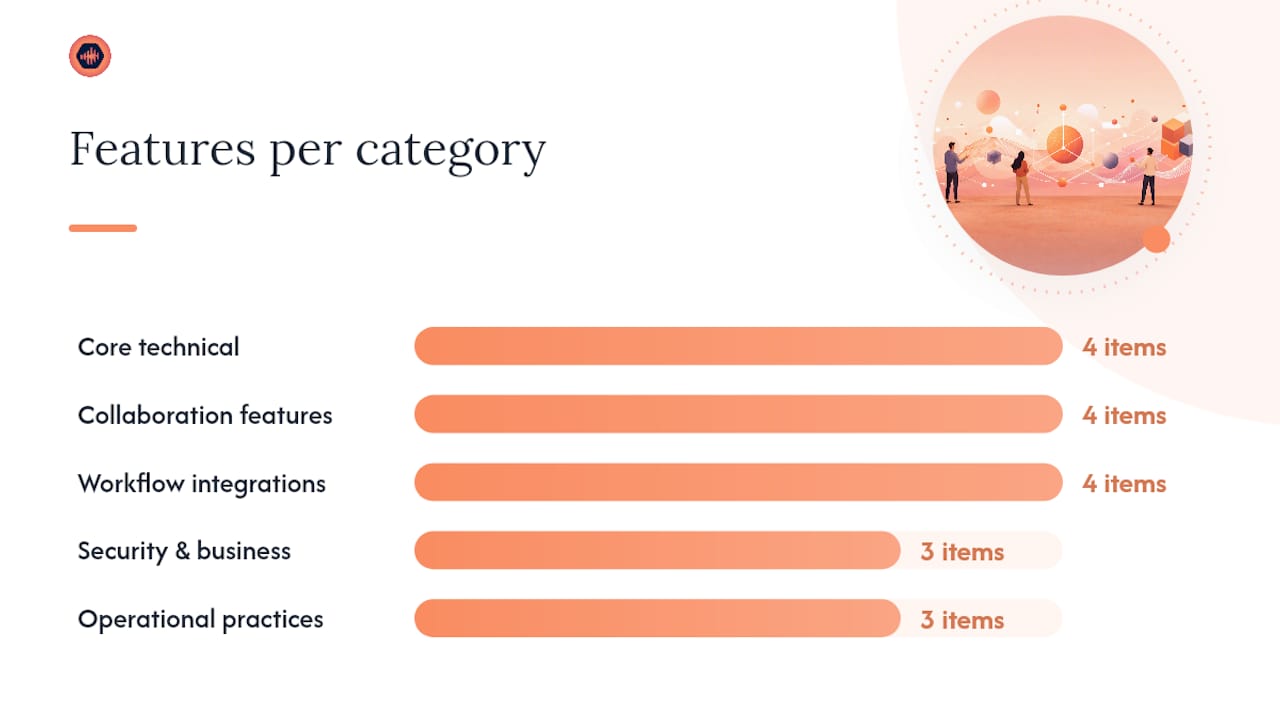
Core technical features:
- Low-latency streaming with configurable buffer sizes
- Sample rate support up to at least 48kHz/24-bit for professional work; 96kHz/24-bit for mastering
- Lossless file transfer (no re-encoding on upload or download)
- Session recording and stems export without quality loss
Collaboration features:
- Timestamped waveform feedback so clients can mark exactly where a note applies
- Version history with named passes (not just “v1, v2, v3”)
- No-login client review links — clients shouldn’t need an account to leave feedback
- Permission controls that separate what clients can download versus what collaborators can edit
Workflow integrations:
- DAW compatibility or at least clean export/import for your primary DAW
- Cloud storage sync (Google Drive, Dropbox, or native storage)
- Connection to PM tools like Notion or ClickUp for non-session tasks
- Payment and delivery controls so final files are gated behind approval or payment
Security and business features:
- Password-protected project pages
- Download controls that prevent unauthorized access to final files
- Revision limits with the ability to charge for additional rounds
Standardized remote playbooks, checklists, and timecard practices scale remote production and help maintain consistent quality. The same logic applies to audio: a checklist you run before every session catches 80% of the problems before a client ever hears them.
Pro Tip: Check whether a tool’s “no-login” client link actually works on mobile without prompting an app download. Many platforms claim frictionless client access but redirect to an app store on the first tap.
How do you choose the right collaboration tool?
Turn the checklist above into a decision. Here are eight questions to ask during any demo or trial, plus a one-session test that takes 10–20 minutes.
Eight diagnostic questions
- What is the measured round-trip latency at your recommended buffer size, on a standard broadband connection?
- How does the platform handle routing when a DAW output needs to reach a streaming app simultaneously?
- Can a client leave timestamped feedback without creating an account?
- What is the maximum file size and sample rate for uploads, and does the platform re-encode on download?
- Does payment integration (Stripe or equivalent) gate the final download, or is it a separate manual step?
- How many versions can you store per project, and can you restore a previous version in one click?
- What export formats does the platform support for stems and session files?
- Are project pages password-protected by default, or is that a paid-tier feature?
The one-session test
Run this before committing to any tool. Set your DAW buffer to 128 samples, route your output into the platform’s stream, and have a collaborator join from a different network. Play a 2-minute click track with a reference mix underneath. Combining cloud collaboration with AI transcription and editing speeds review cycles for distributed teams — but first, the basics have to hold. If the stream drops, clips, or drifts noticeably during those two minutes, the tool fails the live-session test regardless of its feature list.
Pass criteria for a professional studio workflow:
- No audible artifacts at 128-sample buffer on a wired gigabit connection
- Client review link opens in a browser within 10 seconds, no account required
- File upload of a 24-bit/96kHz WAV completes without re-encoding
- Version restore works in one click from the project dashboard
Remote producing playbooks with checklists, roles, and stand-up rituals help distributed projects finish faster and keep quality consistent. Document your pass/fail results from this test and use them as your baseline for every tool you evaluate. For more on building a client-facing workflow, the producer client workflow guide covers billing practices and handoff templates in detail.
Three workflow stacks that actually work
Workflow A: Remote tracking session
- Set your audio interface buffer to 64–128 samples and confirm sample rate alignment with your DAW (44.1kHz or 48kHz for tracking).
- Route your DAW monitor mix into your streaming app using a virtual audio router (Loopback on Mac, VoiceMeeter on Windows).
- Send the vocalist or instrumentalist a low-latency stream link; keep talkback on a separate channel.
- Record locally to your DAW while the remote performer monitors through the stream.
- After the take, upload a proxy MP3 to your project workspace for quick review; sync the full-resolution WAV during off-hours.
Outcome: The remote performer hears a clean, low-latency cue mix. You capture lossless audio locally. The proxy upload keeps the review cycle moving without eating session bandwidth.
Workflow B: Remote mixing session
- Export stems from your DAW as 24-bit WAVs and upload them to your project workspace.
- Share a no-login review link with your collaborator; they leave timestamped notes directly on the waveform.
- Work through the notes, render a new mix pass, and upload it as a named version (not an overwrite).
- Repeat until the collaborator approves. Every pass is preserved in version history.
Pro Tip: Name each mix pass with a date and a one-word descriptor (“2026-03-12_vocalup”) rather than “v1, v2, v3.” When a client asks to go back two versions, you’ll know exactly which file they mean.
Outcome: Fewer back-and-forth emails. Every note is tied to a timestamp, so “the chorus feels thin around 2:14” is a click, not a paragraph.
Workflow C: Client delivery and approvals
- Upload the final master or mix to a password-protected project page.
- Set a revision limit (e.g., two free rounds) and configure paid revision billing through Stripe Connect.
- Send the client a no-login review link. They listen, leave timestamped notes, and submit feedback.
- Once approved, gate the final download behind payment. The file unlocks automatically when the invoice clears.
Outcome: No more “can you just tweak one more thing” after the project closes. The revision limit makes the scope clear from the start, and the gated download means you get paid before the file leaves your workspace. For a detailed walkthrough of this delivery process, the sending mixes to clients guide covers every step.
How to set up a low-latency live session
Minimum hardware checklist
- Audio interface with low-latency ASIO or Core Audio drivers (Focusrite Scarlett, Universal Audio Apollo, or equivalent)
- Studio monitors or closed-back headphones for monitoring during the stream
- Dedicated webcam (1080p minimum) for visual communication during sessions
- Virtual audio routing software: Loopback (Mac) or VoiceMeeter Banana (Windows)
Network best practices
- Use a wired gigabit connection. Wi-Fi introduces jitter that compounds with audio buffer latency.
- Enable QoS on your router and prioritize your DAW machine’s MAC address.
- Schedule large file syncs for off-hours. Record to redundant local media and sync high-resolution assets during off-hours to protect live-session bandwidth.
- Keep a mobile hotspot as a fallback. A session that drops because your ISP hiccupped is a client relationship problem.
DAW and routing settings
- Set your DAW buffer to 64–128 samples for live sessions (256 for mixing-only work).
- Match sample rates across your DAW, audio interface, and streaming app. A mismatch causes pitch drift that’s hard to diagnose mid-session.
- Route your DAW master output to a virtual audio device, then point your streaming app at that device as its input source.
- Keep your talkback mic on a separate channel so it never bleeds into the recorded track.
Pro Tip: Run your full routing chain for five minutes before the client joins. Play music through it, talk over talkback, and confirm the stream sounds clean on a second device. Routing is the most common failure point in remote producer workflows — catching it before the session starts costs two minutes; catching it after costs the session.
For a hardware checklist tailored to home studios, the tools every home studio needs guide covers interface selection, webcam recommendations, and signal routing in detail.
Why Audome fits producers: a feature breakdown
Most remote stacks leave a gap between the live session and the client delivery side. A low-latency streaming tool handles the session. A cloud drive handles the files. An email thread handles the feedback. And then someone has to reconcile all three. Audome closes that gap by handling the post-session half of the workflow in one place.
| Dimension | Entry-level file-sharing tools | Enterprise platforms | Audome |
|---|---|---|---|
| Best for | Simple file drops | Large broadcast teams | Audio studios, freelance producers |
| Latency / live capability | None | High (broadcast-grade) | Async-first; integrates with live stack |
| Audio quality / max sample rate | Varies (often re-encoded) | Broadcast-grade | Up to 96kHz/24-bit, lossless |
| Timestamped waveform feedback | No | Rarely | Yes, native |
| No-login client review | No | No | Yes |
| Payment and download gating | No | No | Yes (Stripe Connect) |
| Revision limits and billing | No | No | Yes |
| Password-protected projects | Sometimes | Yes | Yes |
| Version history | Basic | Yes | Yes |
Specific workflows Audome enables:
- A client receives a no-login link, listens in their browser, and drops a timestamped note at 1:42 saying “the snare is too bright here.” You see it in your project dashboard alongside every other note from every other pass. No email thread required.
- You set two free revisions on a mixing project. When the client requests a third round, Audome automatically charges them via Stripe Connect before you start work. The scope conversation happens once, at project setup, not after the fact.
- A mastering engineer uploads 96kHz/24-bit masters to a password-protected page. The client can preview but not download until payment clears. The file never leaves the platform unprotected.
Use-case callouts:
- Freelance producer: Replaces Dropbox + email + Venmo with one workspace. Clients get a cleaner experience; you get paid before delivery.
- Mid-size studio: Manages multiple active projects with named version history and per-project revision limits. Reduces the “which file is final?” confusion that kills turnaround time.
- Mastering engineer: High-resolution upload support (up to 96kHz/24-bit) means no quality compromise. Gated downloads protect masters until payment is confirmed.
For a deeper look at how versioning and client delivery work together, the digital collaboration guide walks through the full review-to-delivery cycle.
Key Takeaways
A hybrid stack combining low-latency live routing with an audio-first project workspace like Audome gives producers the most reliable path from session to paid delivery.
| Point | Details |
|---|---|
| Routing is the top failure point | Test your full signal chain for five minutes before every client session. |
| Match your workflow to the mode | Use live low-latency for tracking, async file-based for client approvals. |
| Clients need zero friction | No-login review links and browser-based playback remove the biggest client drop-off point. |
| Revision limits protect revenue | Setting paid revision thresholds at project start prevents scope creep after delivery. |
| Audome as the collaboration hub | Audome handles lossless uploads up to 96kHz/24-bit, timestamped feedback, and Stripe-gated downloads in one workspace. |
The gap most producers don’t see until it costs them
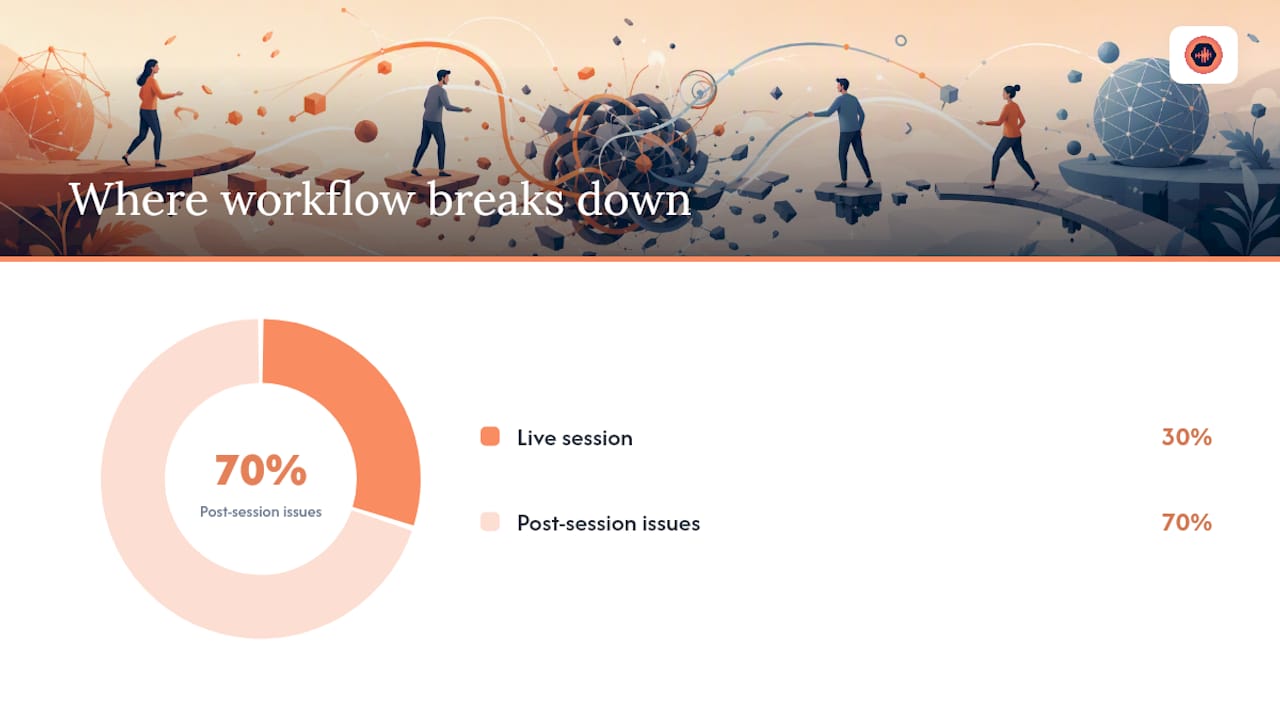
The conventional wisdom on remote collaboration for producers focuses almost entirely on the live session side: get your latency low, fix your routing, buy a better interface. That advice is correct, but it addresses maybe 30% of where remote work actually breaks down.
The other 70% happens after the session ends. A client gets a Dropbox link, listens on their phone, sends a voice memo with vague feedback, and you spend 20 minutes figuring out which bar they’re talking about. Or a mix goes through six rounds of revisions because there was never a clear limit, and you’ve now worked three extra hours for free. Or a client downloads the final file before paying because nothing was gating it.
The tools that fix the live session problem are mature and well-documented. The tools that fix the post-session problem are where most producers are still stitching together workarounds. A platform built specifically for audio studios, with timestamped waveform feedback, revision billing, and gated downloads, isn’t a luxury add-on to a remote stack. For anyone running a professional studio, it’s the part that makes the whole thing financially sustainable.
The producers who figure this out early stop chasing feedback and start protecting their time. The ones who don’t keep adding tools and wondering why the workflow still feels broken.
Audome makes the post-session workflow as solid as the session itself
Fixing your routing and latency gets you to a clean live session. What happens after that session is where most studios lose time and money. Audome handles the entire post-session side: lossless uploads up to 96kHz/24-bit, timestamped waveform feedback your clients can leave without creating an account, revision limits that automatically trigger Stripe billing when a client exceeds their included rounds, and password-protected project pages that gate final downloads until payment clears.

The setup takes one project. Invite a client, upload a mix pass, and send them a no-login review link. Watch where they leave notes. Then set a revision limit on the next project and see how much faster the approval cycle moves. Start a free trial at Audome and run that test in your next session.
Useful sources
- How to collaborate remotely with other music producers and musicians: 6 Essential Tools – Magnetic Magazine
- Remote Film Crews: Tools & Rituals for 2025 Success – Artfolio
- Remote Creator Workflows 2026 — Multi-Destination Checklist – Freelance.live
- Mastering Remote Production: Tools & Techniques 2026 – Descript Live
- StudioCloud — Cloud Production Switcher | Evrideo
- LiveU Studio — LiveU
- Audome | The all-in-one tool for audio collaboration & management
FAQ
What is the best remote collaboration setup for music producers?
A hybrid stack works best: a low-latency audio interface and virtual routing software for live sessions, combined with an audio-first project workspace like Audome for file sharing, timestamped feedback, and client delivery.
How do you test latency before a remote session?
Stream a 2-minute looped click track from your DAW to your collaborator and measure the perceived round-trip lag while talking over talkback. If the drift is audible at 128-sample buffer on a wired connection, adjust your routing before the session starts.
Do clients need an account to review mixes remotely?
With Audome, no. Clients receive a no-login link, open it in any browser, and leave timestamped feedback directly on the waveform without creating an account or downloading an app.
How do revision limits work in a remote studio workflow?
Set a free revision count at project start. When a client exceeds that number, the platform (via Stripe Connect in Audome’s case) automatically charges for the additional round before work begins, removing the scope conversation from the creative process.
What audio quality does remote collaboration support?
Async file-based platforms like Audome support lossless uploads up to 96kHz/24-bit. Live streaming sessions are typically compressed, which is why the recommended workflow records locally and syncs the full-resolution file after the session.