
TL;DR:
- Most remote audio workflows require separate tools for live communication, feedback, and asset sharing to prevent quality and efficiency issues. Using purpose-built platforms for each category ensures accurate sound, clear feedback, and secure file management, leading to professional results. Audome offers an all-in-one solution that integrates lossless sharing, timestamped feedback, and version control to optimize remote audio collaboration.
Working on audio projects remotely gets messy fast when your tools don’t match your workflow. The wrong choice means latency that wrecks mix decisions, compressed audio that kills your reference accuracy, and feedback buried in email chains nobody can find. Audio collaboration tools for professionals fall into three functional categories: real-time audio communication, async collaboration and review, and file sharing for asset exchange. Understanding the types of audio collaboration tools, and what each one actually does well, is the difference between a clean remote workflow and constant damage control.
Table of Contents
- Understanding the three types of audio collaboration tools
- Real-time audio communication tools: Stay in sync without the crap
- Async collaboration and work review platforms: Nail feedback and approvals hassle-free
- File sharing and asset exchange tools: Keep your stems and sessions safe
- Comparing the top audio collaboration tools: Features, pros, and cons
- Choosing the right tools for your audio workflow: Practical recommendations
- Why most audio teams still get remote collaboration wrong
- Find your all-in-one audio collaboration solution at Audome
- Frequently asked questions
Key Takeaways
| Point | Details |
|---|---|
| Three main tool types | Audio collaboration tools fall into real-time communication, async review, and file sharing categories with distinct roles. |
| Avoid generic tools | Generic conferencing tools have high latency and poor audio quality, causing workflow headaches for pros. |
| Separate live and async work | Effective workflows use real-time tools for creative capture and async platforms for detailed feedback and approvals. |
| Secure, high-quality file sharing | Use platforms built for audio files to ensure safe, lossless transfers and controlled access. |
| Plan your workflow | Design collaboration processes around tool strengths to avoid common pitfalls and wasted effort. |
Understanding the three types of audio collaboration tools
Before you spend money or frustration on the wrong platform, you need a mental map of how these tools actually divide up. Most audio pros pile everything into one conferencing app and wonder why their sessions feel broken. The reason is that audio tools fall into three buckets: real-time communication, async review, and file sharing. Each solves a different part of the problem.
Here is what each category actually handles:
- Real-time audio communication tools handle live conversations, virtual jam sessions, and recording captures where timing and audio quality during the session are critical.
- Async collaboration and review platforms let team members leave time-coded, trackable feedback on audio files without needing to be in the same virtual room at the same time.
- File sharing and asset exchange platforms manage the secure transfer and storage of large audio files, stems, and full sessions between collaborators.
Understanding these three types of collaboration tools for audio is not academic. It directly shapes which tools you pick and when you use them. A podcast producer juggling remote guests and an editor in a different time zone needs all three layers working cleanly. Check out these audio collaboration workflow tips for a broader view of how these layers connect in practice.
Real-time audio communication tools: Stay in sync without the crap
The most common mistake in remote audio work is using a standard video conferencing app to make creative decisions. Zoom, Google Meet, and Teams all apply aggressive audio processing and compression to keep calls stable. That is great for HR meetings. For a mixing session where you are trying to judge transient punch on a snare, it is disqualifying.
Latency makes accurate mix decisions unreliable in live sessions, and that is not a minor inconvenience. It affects timing judgments, dynamic range perception, and even whether a vocal feels in tune. The problem compounds when multiple people are listening through different monitoring setups over compressed audio.
Purpose-built real-time tools built for audio professionals include:
- Audiomovers LISTENTO: Sends uncompressed audio directly from your DAW to a browser-based listener. Clients and collaborators hear exactly what you hear in your studio session.
- SyncDNA: Designed specifically for remote co-production, handling multi-track sync with low latency and high audio fidelity.
- JamKazam: Targets live musicians playing together remotely, prioritizing latency reduction over bandwidth efficiency.
These platforms are not perfect. They require stable, fast internet connections. Some are expensive for casual use. But for serious digital collaboration for audio pros, they are worth the investment over generic tools that compress your work.
Pro Tip: Separate your live creative capture from your detailed review session. Use real-time tools for inspiration and directional decisions. Then send the actual files to an async review platform where your collaborators can evaluate at full quality, on their own monitoring setup, without time pressure.
Async collaboration and work review platforms: Nail feedback and approvals hassle-free
Async review is where a lot of professional audio workflows are quietly broken. Engineers send a mix via email, a client replies with “can we make it bigger,” and three days later no one remembers which version that referred to. Async platforms built for audio and video fix this with time-coded comments tied directly to specific moments in the file.
Async review platforms like Filestage manage file comments and approvals at the specific points in a track where feedback belongs. Instead of “the chorus feels off,” you get a comment stamped at 1:34 that says “the snare is too forward in this section.” That is actionable.
Good async tools for audio include:
- Filestage: Supports video and audio review with frame-accurate comments and approval workflows.
- QuickReviewer: Handles audio and video with annotation tools and version tracking.
- DAW-native sharing features: Some DAWs now include built-in share links for collaborating on projects directly, though these are still limited in client-facing scenarios.
Here is a comparison of the leading async review tools by key feature:
| Platform | Time-coded comments | Version control | Audio playback quality | Client login required |
|---|---|---|---|---|
| Filestage | Yes | Yes | Compressed preview | Yes |
| QuickReviewer | Yes | Yes | Compressed preview | Optional |
| Audome | Yes | Yes | Lossless up to 96kHz/24-bit | No |
The login requirement row matters more than people realize. Sending a client a link and then having them hit a login wall before they can hear your work adds friction, delays approvals, and makes you look disorganized. Clean mix approval workflows avoid that entirely.
Pro Tip: Set a clear comment format before you share a file for review. Ask collaborators to timestamp every piece of feedback and distinguish between “must fix” and “nice to have.” This one habit cuts revision cycles in half.
File sharing and asset exchange tools: Keep your stems and sessions safe
Here is something that gets overlooked constantly. File sharing is a separate category from collaboration. Dropping a 500MB Pro Tools session into a Google Drive folder is not a file sharing strategy. It is a liability.

File sharing software is a distinct layer from your recording and review workflow. It handles the actual movement and storage of audio assets, and it needs to do that without corrupting files, compressing audio, or losing track of versions.
Common issues with generic cloud storage for audio:
- No audio-specific preview that maintains file integrity
- No access control beyond basic folder permissions
- No version history that makes sense for iterative mix builds
- No download toggling to control who can pull the actual files
When choosing a file sharing platform for audio projects, look for:
- Support for lossless formats including WAV, AIFF, FLAC, and high-resolution files up to 96kHz/24-bit
- Password protection for individual projects or files
- Download controls so you can share for listening without giving away final stems
- Version tracking that logs every upload and lets collaborators compare iterations
- Large file support without forcing you to zip and split session folders
For context on what this looks like in practice, exploring file transfer alternatives for audio-specific needs shows how far behind general-purpose tools actually are.
Comparing the top audio collaboration tools: Features, pros, and cons
Purpose-built audio platforms offer sample-accurate playback, lossless audio, and DAW integration that generic conferencing tools simply cannot match. The comparison below maps the top tools across all three categories so you can evaluate them side by side.
| Tool | Category | Audio quality | Async feedback | File security | Best for |
|---|---|---|---|---|---|
| Audiomovers LISTENTO | Real-time | Lossless from DAW | No | Limited | Live studio listening sessions |
| SyncDNA | Real-time | High-fidelity | No | Moderate | Remote co-production |
| JamKazam | Real-time | Low-latency | No | Basic | Live remote jamming |
| Filestage | Async review | Compressed | Yes | Moderate | Video/audio approval workflows |
| QuickReviewer | Async review | Compressed | Yes | Moderate | Content review teams |
| Audome | Review and sharing | Lossless 96kHz/24-bit | Yes (timestamped) | High | Full audio project management |
| Google Drive | File sharing | No processing | No | Basic | General file storage only |
A few takeaways from this picture:
- No single generic tool covers all three categories at professional quality
- Real-time tools shine for live sessions but offer nothing for review or secure storage
- Most async review tools use compressed audio previews, which affects feedback accuracy
- Specialized platforms that cover review plus sharing at lossless quality are rare
Your stack should probably include at least one tool from each category, or a single platform that handles review and file sharing at the level your work actually demands.
Choosing the right tools for your audio workflow: Practical recommendations
Knowing the categories is one thing. Knowing which to use and when is what actually saves your projects. Remote collaboration works best when you plan which decisions happen live and which move to async review with full-quality audio and structured feedback.
Here is a practical framework for putting your stack together:
- Identify where your real-time needs actually are. Not every session needs to be live. If you are mixing for a client who will review on their own time, you do not need a low-latency real-time tool for them. You need a clean sharing and review setup.
- Pick a real-time tool based on your session type. Remote co-production with musicians requires low-latency audio. Client listening sessions during mix revisions work fine with a browser-based stream like LISTENTO.
- Set up an async review platform before your first revision cycle. Do not wait until you have three versions and a chain of voice notes that no one can parse.
- Use a dedicated audio file sharing platform for all asset exchange. This protects your files, your versions, and your client relationships.
- Audit your stack every few months. The best audio collaboration tools in 2026 are not the same ones that worked in 2022. Platforms evolve fast, and your needs change with your projects.
Pro Tip: For music collaboration workflows involving multiple contributors across time zones, create a single shared project hub where every version, every comment, and every file lives in one place. Switching between five tools mid-project guarantees something gets lost.
Why most audio teams still get remote collaboration wrong
The honest answer is that most teams under-invest in workflow design and over-rely on whatever app they already have open. A conference call on a consumer app becomes the default creative session. Files get shared in chat threads. Feedback lives in voice memos. And then everyone wonders why the mix revision process takes three weeks.
Generic conferencing tools are actively bad for creative audio decisions, not just suboptimal. When a client hears your mix through compressed audio on a laptop speaker via a video call, they are not hearing your mix. They are hearing a degraded version of it. Their feedback will reflect that, and you will chase problems that do not exist in the actual file. Even with the best podcast tech, subtle production damage is possible, and verifying what you’re actually delivering rather than trusting platform promises is non-negotiable.
AI post-processing is making this worse in a specific way. Platforms that automatically clean up audio or remove background noise are getting more common. But they can also remove room characteristics, alter consonant clarity, and change the tonal balance of a performance. An engineer who does not know the platform applied those changes will spend an hour chasing a problem that was introduced in transit, not in the session.
The most effective remote audio teams share one habit: they plan their workflow before the project starts. They know which tool handles which job. They verify flawless remote collaboration tips before a session goes live. They check that local recordings are captured correctly, not just that the platform says they are. That kind of deliberate setup is what separates consistent professional results from project-to-project chaos.
Find your all-in-one audio collaboration solution at Audome
If rebuilding your tool stack around three separate platforms sounds exhausting, that is because it is. Most of the friction in remote audio work comes from stitching together tools that were never designed to work together.
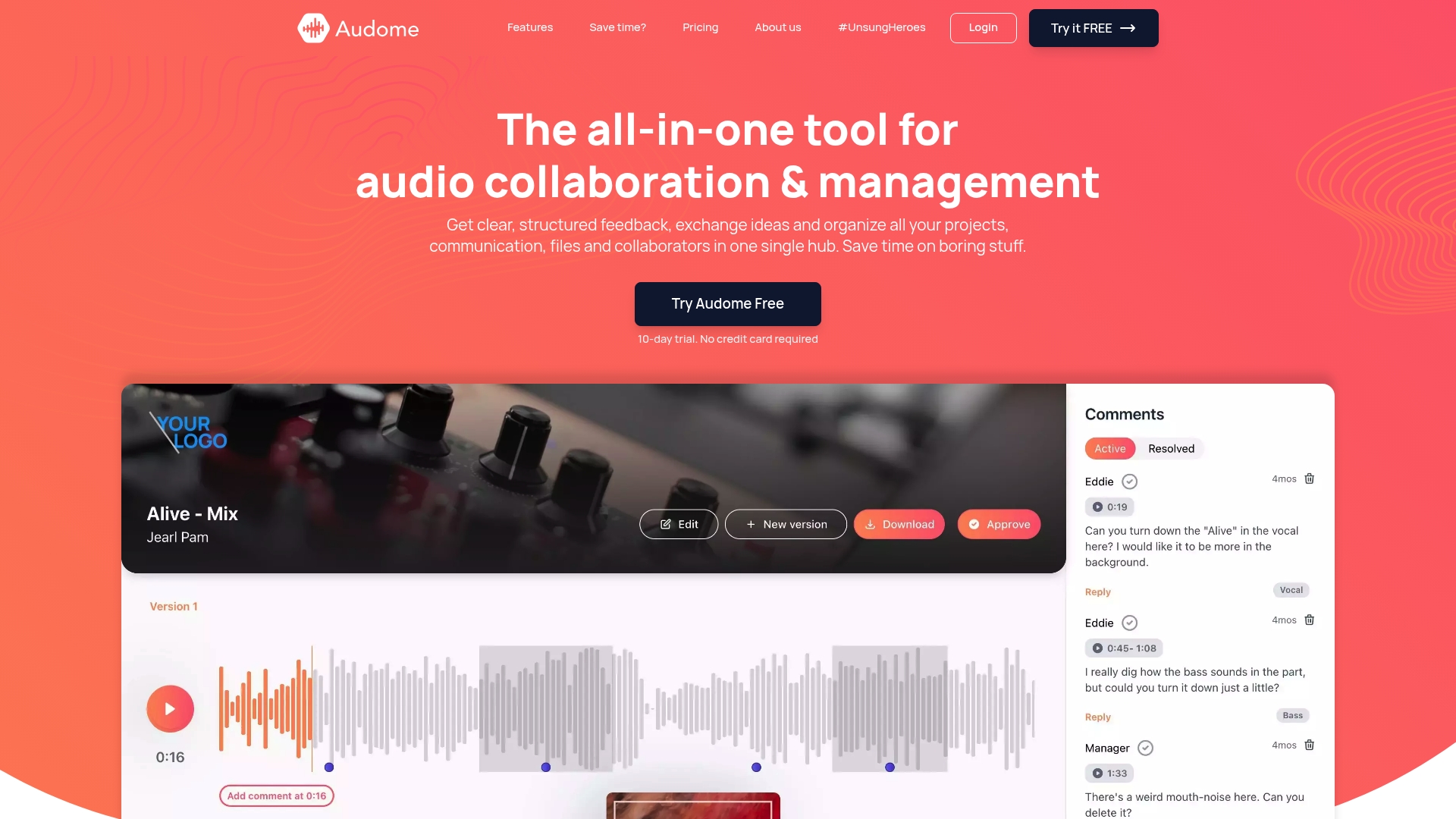
Audome is built specifically to replace that fragmented stack. It handles lossless audio sharing at up to 96kHz/24-bit, timestamped feedback tied directly to your tracks, version control across every revision, and project-level security controls including password protection and download toggling. Collaborators and clients can leave precise feedback without creating an account, which removes the biggest friction point in most review workflows. If you are managing serious audio projects and need one place where files, feedback, and versions all live securely, Audome is worth a real look.
Frequently asked questions
What are the main types of audio collaboration tools?
They mainly include real-time audio communication tools, asynchronous collaboration and feedback platforms, and file sharing solutions for audio assets. Audio tools fall into three buckets: real-time communication, async work review, and file sharing for asset exchange.
Why is latency a problem in real-time audio collaboration?
Latency introduces delays that make judging timing, dynamics, and mix balance unreliable during live sessions. Latency makes accurate mix decisions unreliable in real-time environments, particularly for critical listening and creative direction.
Can I use generic video conferencing tools for audio collaboration?
Generic tools apply audio compression and processing that distorts what collaborators actually hear, making them a poor choice for professional creative decisions. Generic conferencing tools have compressed audio and variable latency that are unsuitable for precise audio work.
How do async collaboration platforms help in audio projects?
They let team members leave time-coded, trackable feedback on specific moments in a file without everyone needing to be available at the same time. Async review platforms like Filestage manage file comments and approvals efficiently for audio review cycles.
Why verify local recordings in remote podcast setups?
Relying solely on what a platform records online risks glitches, compression artifacts, and sync errors that only appear after the session ends. Subtle production damage is possible even with reputable platforms, so checking your local tracks gives you a clean backup regardless of what happened in the cloud.