
TL;DR:
- Effective post-production collaboration relies on clear communication, defined roles, and centralized workflows to prevent project collapse. Utilizing tools like Audome for file sharing, timestamped feedback, and version control streamlines the process and minimizes misunderstandings. Building a team culture that emphasizes accountability and specific feedback is essential for seamless audio project delivery.
Bad gear doesn’t kill projects. Bad collaboration does. If you’ve ever dug through three versions of a mix trying to figure out which one the client actually approved, or gotten feedback that just says “make it punchier”… you already know what post-production collaboration chaos feels like. Understanding what is post-production collaboration and how to actually do it right is the difference between a smooth delivery and a project that slowly implodes from miscommunication. This guide cuts the fluff and gets into what actually works for podcast producers, mixing engineers, and anyone trying to survive audio post.
Table of Contents
- Key Takeaways
- What post-production collaboration really means for audio
- Why post-production teamwork goes off the rails
- A practical framework for tight collaboration workflows
- Tools that actually make collaboration less painful
- Real-world application: before and after
- My honest take on why most collaboration advice misses the point
- Stop fighting your workflow, start with Audome
- FAQ
Key Takeaways
| Point | Details |
|---|---|
| Collaboration beats gear | Communication and workflow failures sink projects faster than any technical limitation. |
| Roles must be clear upfront | Defining who owns feedback, approvals, and revisions from day one prevents delays. |
| Version control is non-negotiable | Standardized file naming and revision logs keep everyone working on the right file. |
| Timestamped feedback saves time | Time-coded notes replace vague requests and cut unnecessary revision rounds dramatically. |
| One platform beats five apps | Centralizing files, feedback, and versions in one place removes the confusion that kills deadlines. |
What post-production collaboration really means for audio
Let’s be blunt. Post-production collaboration is not just “working together.” It’s the organized, intentional process of coordinating every role, file, decision, and piece of feedback that happens after the recording is done. For audio pros, that means the editor, mixer, producer, and client all functioning as one unit instead of a dysfunctional group text.
The post-production workflow for audio covers everything from raw file delivery to final approved master. That includes editing, noise reduction, mixing, mastering, loudness checks, and for podcasters, content repurposing. Every single one of those stages involves at least two people making decisions. And when those people aren’t synced up, the whole thing falls apart.
Here’s who typically shows up in post-production teamwork for audio projects:
- The producer or project lead. Owns the vision and final creative call.
- The audio editor. Cleans up recordings, cuts content, and handles structural flow.
- The mixing engineer. Balances levels, applies processing, and shapes the final sound.
- The mastering engineer. Delivers the polished, broadcast-ready output.
- The client. Approves everything and is somehow always surprised by what they asked for.
This is distinct from the recording phase, where the job is capturing sound. In post, the job is shaping, refining, and approving sound. That requires a completely different kind of teamwork. One that’s less about performance and more about process, communication, and accountability.
Why post-production teamwork goes off the rails
Here’s the real talk. Communication is the main bottleneck in post-production, not the mixing itself. Not the plugins. Not the DAW. The way people talk to each other about the work.
These are the four places where projects most commonly break down:
- Feedback chaos. Notes scattered across emails, voice memos, Slack threads, and a PDF the client sent three weeks ago. Nobody can find anything, and revisions start getting missed.
- Versioning hell. You’ve got Mix_final_v3_ACTUALFINAL_USE THIS.wav on the drive and no idea which session it came from.
- Tool mismatch. The engineer uses one system, the producer uses another, and the client just keeps replying to the original email chain.
- Unclear roles. Nobody agreed who gives the green light, so revisions come from three people at once and contradict each other.
Clear approval channels defined from day one prevent most of this. Most teams skip that conversation because it feels like administrative work. It’s not. It’s the foundation that determines whether your project finishes on time or spirals into extra unpaid revision rounds.
Pro Tip: Before any post-production work begins, send a one-page document outlining who can request revisions, who gives final approval, and what feedback format you require. Three sentences per person in that meeting is worth ten hours of rework later.
Repurposing content adds even more pressure. Editing one podcast episode takes 1 to 6 hours, and repurposing that same episode into clips, transcripts, and show notes adds another 2 to 4 hours. When your team isn’t synchronized, all of that time is at risk.
A practical framework for tight collaboration workflows
The fix for collaboration chaos isn’t more meetings. It’s a system. Here’s one that actually works in real audio post-production environments.
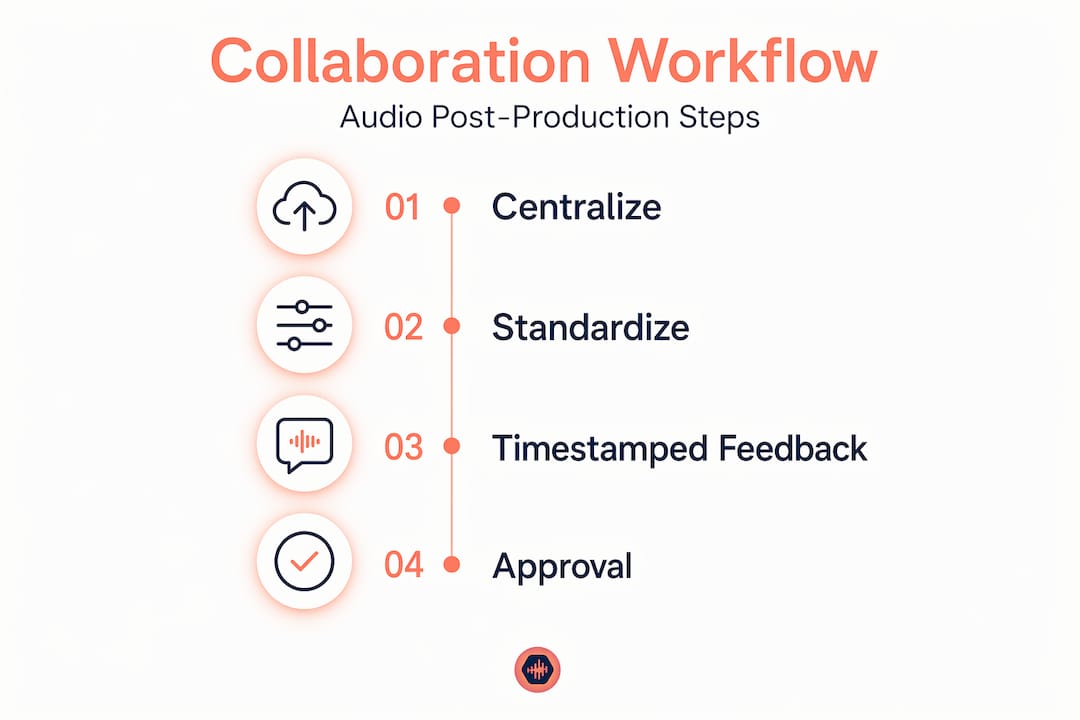
Step 1: Centralize everything in one place.
Move away from email threads. Project boards prevent version failures by giving the whole team one place to see current status, latest files, and open feedback items. Notion, Asana, or purpose-built audio platforms all work. The tool matters less than the commitment to actually using it consistently.
Step 2: Standardize your file naming and version control.
Standardized file naming like MixV1, MixV2, and MixV3 keeps everyone working from the right file. Pair that with a simple revision log: a text file or shared doc that notes what changed between each version, who requested it, and when.
Step 3: Require timestamped, written feedback.
No more “it needs more vibe.” Timestamped feedback tied to timecodes forces clients and collaborators to be specific. “At 1:42, the vocal is burying the guitar” is fixable. “The chorus feels weird” is not.
Step 4: Lock down your approval process.
One decision maker gives final sign-off. Everyone else provides input to that person, not directly to the engineer. This single change prevents the most common revision spiral in the business.
Here’s how a centralized approach compares to the typical fragmented one:
| Aspect | Fragmented workflow | Centralized workflow |
|---|---|---|
| Feedback location | Scattered emails, Slack, texts | One platform, one thread |
| Version tracking | File name guessing games | Numbered versions with revision logs |
| Approval clarity | Anyone can request changes | One designated approver |
| Revision rounds | 6+ rounds common | 2 to 3 rounds average |
| File integrity | Overwritten files, wrong exports | Audit trail with date and change notes |
Pro Tip: Keep a revision log for audio as a plain text file in the same folder as your session. Date it, note what changed, and reference the feedback item it addressed. It takes two minutes per revision and saves hours of back-and-forth.
A single organized revision record that includes date, change notes, and which feedback it addresses is your audit trail. When a client comes back six weeks later asking why something sounds a certain way, you can show them exactly what was requested and when.
Tools that actually make collaboration less painful
Not all tools are created equal for audio post-production teams. Here’s an honest breakdown of what’s out there and where each one actually fits.
- Audome. Built specifically for audio professionals. Supports lossless 96kHz/24-bit file sharing, timestamped comments, version control, and private collaborator spaces. No login required for clients, which removes the biggest friction point in the feedback loop. It’s the closest thing to a purpose-built audio collaboration hub that exists right now.
- Frame.io. Originally built for video teams but widely adopted by audio pros working with picture. Strong on visual timecode review but not optimized for audio-only workflows.
- Notion. Excellent for project management and episode tracking for podcast teams. Not built for audio file sharing or feedback, so you’ll need a second tool alongside it.
- Audiomovers and Evercast. Built for real-time remote mix reviews. These are session monitoring tools, not collaboration management tools. Useful for specific moments but not a full workflow solution.
- Cloud storage (Google Drive, Dropbox). Fine for file sharing. Terrible for feedback, version control, or any kind of collaborative accountability.
Choosing based on team size matters. A solo mixer with one client can get away with a simple setup. A podcast team running multiple shows with editors, producers, and clients simultaneously needs something that actually tracks episode status, files, and approvals without falling apart. Project tracking for audio teams becomes non-negotiable at that scale.
Real-world application: before and after
Consider a podcast production team running four weekly shows. Before they fixed their workflow, every episode had its own email thread, editors were sometimes working from old recordings, and clients were approving mixes that had already been revised twice. Chaos.

After moving to a centralized platform with defined roles, the picture changed fast. The producer owns episode status. The editor delivers clean files to a shared project space. The mixing engineer pulls only the latest version, adds timestamped notes on any issues, and uploads the finished mix to the same hub. The client reviews and leaves time-coded feedback directly on the file.
Here’s what a healthy collaborative workflow looks like from the engineer’s side:
- Receive a clearly labeled, versioned file with brief notes from the previous stage.
- Review any open feedback items from the client or producer before starting.
- Make changes, export with a new version number, and add a two-line note to the revision log.
- Upload to the shared project space. Notify the approver. Done.
No emails. No text messages. No digging through Dropbox folders at midnight.
Pro Tip: For effective post-production communication, require all revision requests to include three things: the timecode, the problem, and the desired outcome. “At 2:10, the guitar is too loud, bring it down to sit under the vocal” gives an engineer everything they need to act.
Common traps to sidestep: assuming everyone knows their role without it being stated, letting clients contact multiple team members directly, and treating version control as optional until something goes wrong. Organizing around projects rather than apps is the mindset shift that makes all of this stick.
My honest take on why most collaboration advice misses the point
I’ve been in sessions where the mix was incredible and the project still bombed because nobody could agree on which file was final. I’ve also worked with teams running mediocre gear who delivered flawlessly because they had their communication locked in tight.
Here’s what I actually believe: the advice floating around about post-production collaboration is mostly focused on tools. Get this app, use this platform, sync this folder. And tools help. But tools don’t fix a team where the client thinks they can bypass the engineer and email the editor directly. They don’t fix a producer who gives contradictory notes to three different people. Culture and accountability fix those problems.
The engineers who act as creative partners instead of just technical service providers tend to have way smoother projects. They set expectations, ask for specific feedback upfront, and treat their revision process like a discipline rather than a necessary evil. That’s what actually separates the pros who thrive from the ones who burn out on their seventh revision round of a podcast episode.
Version control specifically is something I treated as optional for way too long. One corrupted session taught me more than any article ever could. Now everything gets a version number before it leaves my machine. No exceptions.
Treat collaboration as a skill you develop, not a problem you solve once with a new app.
— Kreg
Stop fighting your workflow, start with Audome
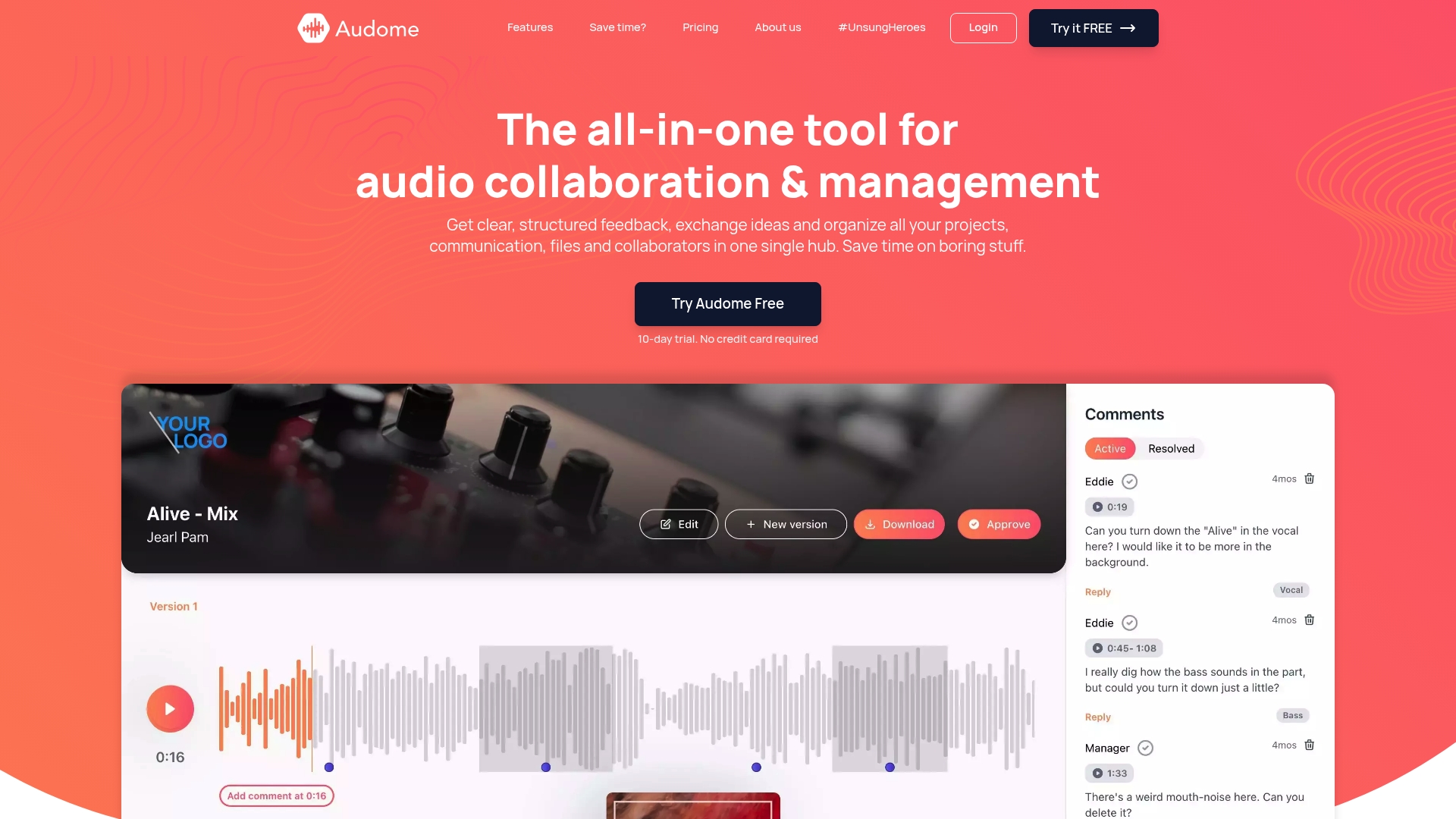
If any part of this article made you think “yeah, that’s exactly what’s happening on my projects right now”… the answer isn’t another productivity app stapled to your existing mess. Audome was built specifically for audio professionals who need centralized file sharing, timestamped feedback, and version control in one place, without making clients create accounts or jump through hoops to leave a comment.
Podcast producers can track episode status and manage feedback from editors, clients, and producers in one hub. Mixing engineers can share lossless files up to 96kHz/24-bit, collect time-coded revision notes, and maintain a clear version history without a single email thread. It replaces the four fragmented tools most teams are currently using and actually works the way audio workflows do.
Try Audome at Audome.com and see what a collaboration setup built for your work actually feels like.
FAQ
What is post-production collaboration in audio?
Post-production collaboration is the coordinated process where editors, mixing engineers, producers, and clients work together after recording to shape, revise, and approve the final audio. It covers everything from file sharing and feedback to version control and final delivery.
Why does post-production teamwork fail so often?
Communication gaps are the primary cause of post-production breakdown, not technical issues. Scattered feedback, unclear approval chains, and poor version control are the most common culprits.
How do you manage versions in audio post-production?
Use standardized file naming like MixV1, MixV2, and maintain a revision log that notes what changed in each version and what feedback it addressed. Never overwrite a previous version.
What makes feedback effective in a post-production workflow?
Timestamped, written feedback tied to specific timecodes is far more useful than vague notes. “At 0:45 the vocal is clipping” gives the engineer something to act on immediately.
What tools work best for audio post-production collaboration?
Purpose-built audio platforms like Audome are the most direct fit, offering lossless file sharing, timestamped comments, and version control without requiring client logins. Project boards like Notion work for task tracking but need a separate tool for audio feedback.