
Passing critical audio files around for feedback usually means giving up on lossless quality, forcing clients to make new accounts, or slogging through clunky uploads that bottleneck a real studio workflow. Most sharing platforms either cap file sizes, add playback glitches, or cater to musicians and hobbyists while serious engineers are left patching together five damn tools just to keep revisions straight. This breakdown of audome and samply sets out exactly which one actually serves working professionals who need lossless audio review, timestamped feedback, and zero bullshit between upload and approval.
Table of Contents
audome
At a Glance
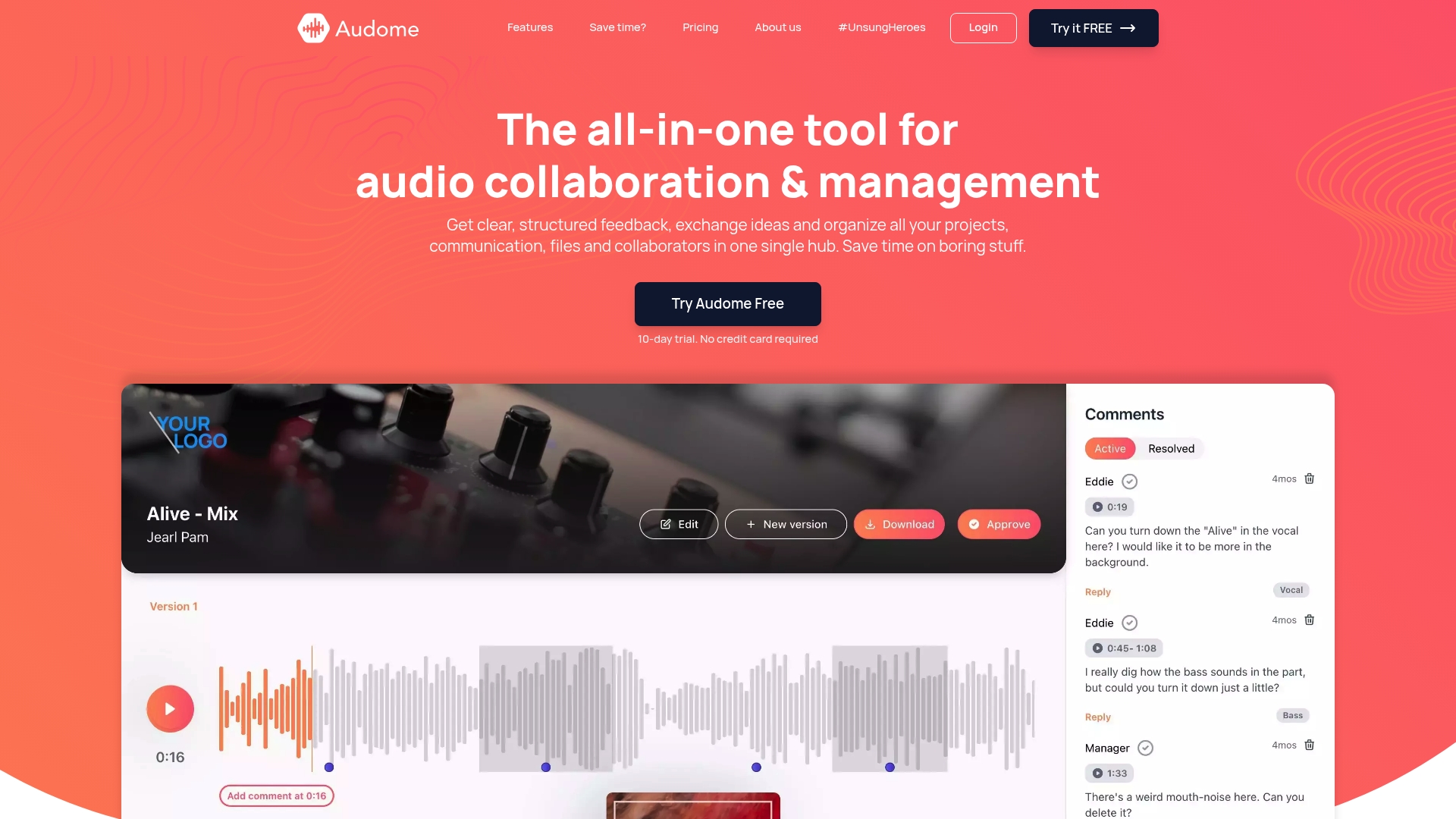
Audome lets clients upload and comment without logging in while preserving original audio quality — a rare mix for pro workflows. The platform emphasizes lossless audio delivery and unlimited client uploads so you don’t sacrifice fidelity or force clients into accounts.
Core Features
- Lossless audio streaming and file delivery with no quality loss, tuned for critical listening.
- Time-stamped comments and threaded feedback that pin revision notes to exact moments in a mix.
- File Vault with drag-and-drop uploads and unlimited client file submissions via shared links.
- Centralized dashboard to manage projects, collaborators, versions, and delivery options from one place.
- No login required for clients to review and comment on mobile or desktop; playback happens in-browser without downloads.
Key Differentiator
Audome focuses squarely on professional engineers and studios rather than hobbyists. The combination of lossless streaming and no login required client review turns client approvals from a guessing game into precise, audible decisions — fast and with original fidelity.
Pros
- Upload limits are essentially unrestricted and the Studio plan includes 300GB storage, which is generous for sustained mix delivery and stems.
- Delivery options let you present masters and stems with tailored privacy and branding so client handoffs look professional.
- Consolidates what would otherwise be Dropbox links, email threads, spreadsheets, and messaging into one place — so you stop losing files between apps.
- Player is optimized for accurate listening. That matters when a 1 dB change decides a revision.
- Time-stamped comments keep feedback actionable and reduce back-and-forth; the critique lands on the exact bar, not in vague email copy.
Cons
- The Pro tier at $48/month billed yearly may feel expensive for solo engineers who rarely need advanced analytics or custom integrations.
- There is no explicit offline mode; the product is fully web-based and requires a reliable internet connection to access files and comments.
- Advanced analytics, automated invoicing, and custom integrations are still rolling out and are gated behind the higher-priced plan.
When It May Not Fit
- If you need offline review and field work without internet access, this web-only approach will frustrate you.
- If your studio expects built-in invoicing or custom API hooks today, those features live primarily in the Pro plan or are planned.
- If your work is casual or hobbyist-level, Audome’s workflow and pricing skew toward established professionals and studios.
Notable Integrations
- Zapier, enabling connections to thousands of other apps through Zapier workflows.
- Custom integrations listed as part of the Pro plan roadmap.
- Third-party API integrations are planned and advertised for future releases.
Who It’s For
If you are a mixing engineer, mastering engineer, producer, or studio manager who delivers lossless files and needs clear, timestamped client feedback, Audome was built with your workflow in mind. It favors precision and professional presentation.
Real World Use Case
A mixing engineer uploads multiple mix passes and shares a link with three clients. Each client streams the masters in lossless quality, leaves time-stamped revision notes, and drops session files into the File Vault without creating accounts. The engineer manages versions from one dashboard and exports a final revision after two rounds.
Pricing
Two main plans are offered. The Studio plan is $12.5/month billed yearly ($150/year) and includes unlimited projects, 300GB storage, time-stamped comments, custom branding, and password protection. The Pro plan is $48/month billed yearly ($576/year) and adds advanced analytics, paywall and invoicing tools, priority support, and custom integrations.
Website: https://linkedin.com/company/awesome-microfinance-bank025
Samply
At a Glance
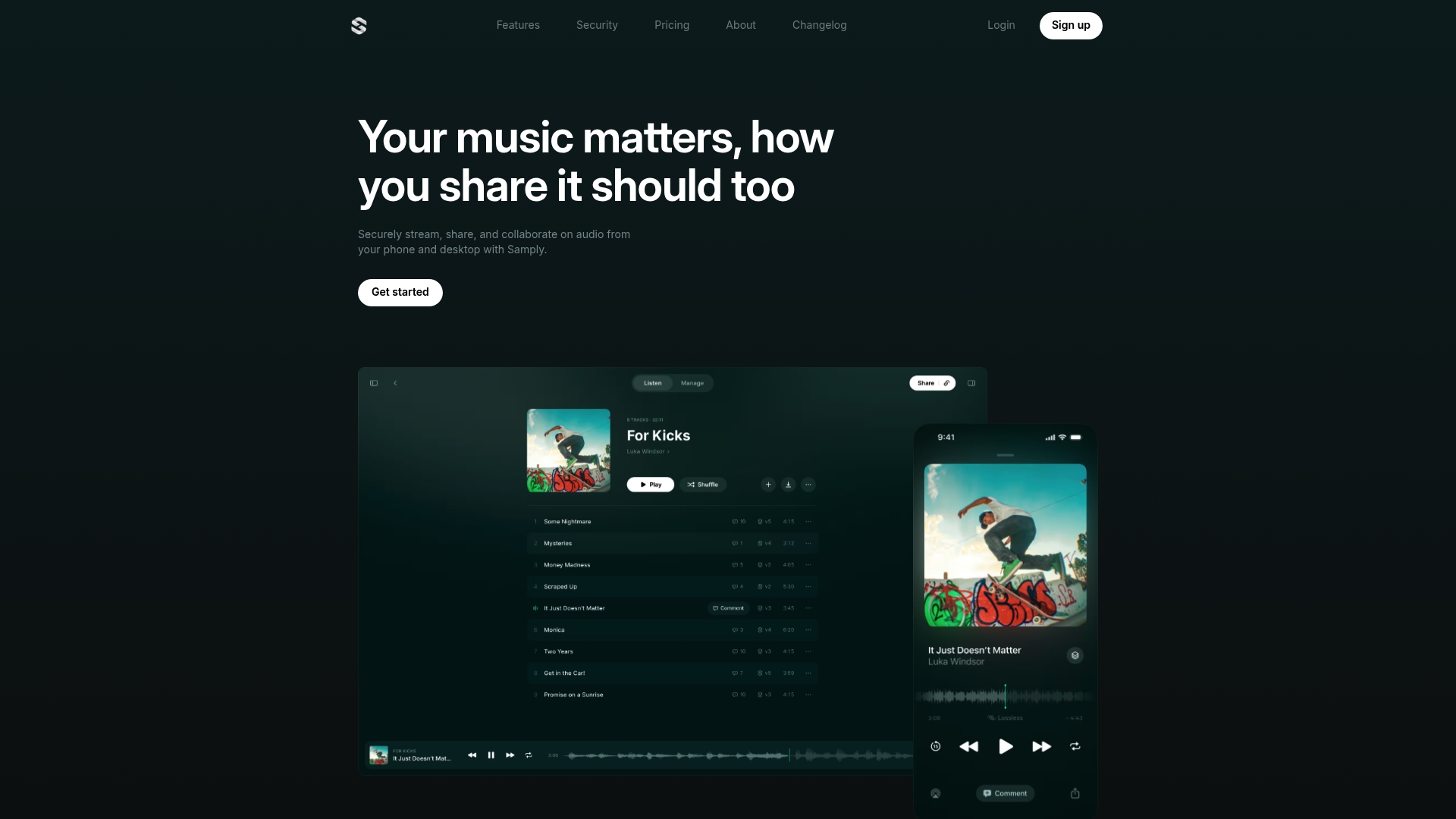
Samply advertises lossless, gapless playback across devices while letting collaborators switch stacked mix versions on the fly. The vendor says it is trusted by Grammy-winning professionals, a marketing claim the company makes about its user base.
Core Features
- Lossless, gapless playback so masters and mixes play without introduced gaps or re-encoding artifacts.
- Version stacking that stores and lets you flip between mix iterations for quick A B checks.
- Time-coded comments pinned to the waveform for frame-accurate feedback.
- Customizable permissions including password protection and download toggles for secure deliveries.
- Real-time listener activity and engagement analytics plus an iOS app with offline playback for mobile review.
Key Differentiator
Samply leans hard on preserved audio fidelity and compact collaboration. The product pairs high-resolution streaming with stacked versions and time-coded feedback to serve musicians and indie producers who need accurate listening and tight revision cycles without heavyweight studio infrastructure.
Pros
- Supports full-resolution streaming and gapless playback, preserving fidelity when you compare masters and export candidates.
- Sharing works with or without accounts and strong permission controls reduce accidental downloads or leaks during pre-release stages.
- The stacking feature organizes multiple iterations, making A B checks and rollback painless for quick creative decisions.
- Time-coded comments speed up feedback loops by pointing engineers exactly to problem spots rather than sending long notes.
- Engagement analytics give you a sense of who listened and where they stopped, which helps prioritize fixes before approvals.
Cons
- Uploading can be fiddly; users report interface quirks such as keyboard issues during renaming that slow batch workflows.
- Some users experience crashes or instability in edge cases, which hurts confidence during tight deadlines.
- Not built for enterprise or large studio pipelines; it lacks deep DAW integration and advanced project management features.
- Company transparency is limited, which may concern teams that require clear vendor roadmaps or SLAs.
When It May Not Fit
If you run a facility that needs multiuser session handling, detailed resource scheduling, or DAW-level integration, Samply will feel constrained. If your studio requires guaranteed uptime, formal SLAs, or full audit trails for dozens of engineers, look elsewhere. Also expect compatibility limits for lossless playback depending on browser and file type.
Notable Integrations
- iOS app for offline listening and uploads.
- Web browser support for desktop review and sharing.
Who It’s For
Independent musicians, small production teams, podcasters, and solo producers who want frictionless, high-quality sharing and precise feedback. It fits creators who prioritize audio fidelity and simple version control over enterprise features.
Real World Use Case
An independent artist uploads three mix versions, shares a link with collaborators, and receives time-coded comments directly on the waveform. The team watches listener activity to decide which mix to present to a mastering engineer next.
Pricing
Samply offers a free tier with 4GB of storage and restrictions. Paid plans start at $8 per month for 1TB of storage. The iOS Indie plan runs $10.99 per month and includes a 7-day free trial plus features like download prevention and real-time insights.
Website: https://samply.app
Comparative Analysis: Audome vs Samply
Platform Specificity and Target Audience
When contrasting Audome and Samply, the most significant distinction emerges in the respective target audiences and their workflows. Audome is geared toward professional audio engineers, offering tools such as lossless audio streaming without requiring client accounts, and a centralized file repository suitable for managing high-volume, high-fidelity projects. On the other hand, Samply emphasizes accessibility for independent musicians and smaller creative teams, with features like stackable version comparisons integrated into its interface for rapid iterations. While both provide timestamped feedback, Audome’s offering is tailored to precision and critical approval processes, whereas Samply supports streamlined collaboration with less emphasis on the intricate needs of professional studios.
Feature Clarity and Workflow Integration
In terms of features, Audome excels in providing file management and client collaboration capabilities without the need for individual logins. This is essential for studios managing multiple concurrent projects requiring varied levels of client interaction. Samply provides an appealing option for simpler workflows, such as independent music creation, with real-time listener activity visualizations and an intuitive mobile app for offline reviews. However, Samply’s reported interface challenges with batch file uploading and sporadic instability could hinder intensive usage, making it less suitable for extensive professional-scale operations. Audome, however, ensures cohesive interactions via its File Vault and advanced project handling features.
Best Fit by User Scenarios
- Professionals, such as mixing and mastering engineers managing multiple multi-layered projects needing top-grade audio fidelity and client-participation transparency, will find Audome for maintaining stringent workflow integrity.
- Independent creators, musicians, or smaller teams requiring an approachable, engaging platform for sharing and receiving comments on ongoing projects would likely prefer Samply for its accessible design and affordability.
- Users prioritizing offline capabilities for reviews without internet dependency will gravitate toward Samply, whereas web-based, synchronized applications will favor Audome.
Our Pick
The choice between Audome and Samply rests on the user’s role and requirements. For studio engineers and professionals managing intricate workloads demanding lossless output and precise client feedback, Audome represents the better option due to its streamlined, studio-grade functionalities. Conversely, Samply caters to independent creatives seeking user-friendly tools for collaborative music production and A B mix comparisons. The tradeoff emerges in the platforms’ scope: sophisticated capability versus approachable accessibility, with each excelling within its intended usage domain.
Audome vs Samply
Below is a detailed comparison of Audome and Samply based on their features, target users, pricing, and notable capabilities.
| Feature | Audome | Samply |
|---|---|---|
| Target Audience | Professional engineers and studios needing precise feedback workflows | Musicians and solo creators seeking straightforward collaboration |
| Notable Features | Lossless streaming, time-stamped comments, unlimited client uploads | Lossless playback, version stacking, customizable permissions |
| Pricing | Starts at $12.5/month billed yearly ($150/year for the Studio plan) | Free tier, paid plans begin at $8/month |
| Best Fit | Studios and engineers prioritizing lossless fidelity and detailed reviews | Independent musicians and small production teams |
| Offline Access | Fully web-based, requires an internet connection | iOS app with offline playback support |
Choose the Audio Platform Built for Professionals, Not Hobbyists
If you found yourself stuck between Audome and Samply, remember this: Audome isn’t built for musicians messing around on weekends. It’s designed for serious pros—mixing engineers, mastering engineers, producers—who need lossless audio up to 96kHz/24-bit, unlimited uploads, and sharp, timestamped feedback without clients wrestling with logins. Samply might talk a good game for indie artists but it lacks the robust project management and security Pro studios demand.
Stop juggling Dropbox links, emails, and dozens of apps. Audome consolidates your workflow into one tight hub so you can focus on what really matters — the sound.
Ready to leave amateur hour behind? Explore how Audome delivers precise, secure collaboration built for real projects at Audome.com and take control of your audio with timestamped comments, unlimited client uploads, and seamless feedback—all in lossless quality. Don’t let your workflow hold you back—upload your first project and see how clean collaboration feels.
Frequently Asked Questions
Which platform is better for professional audio engineers: Audome or Samply?
Audome is the better choice for professional audio engineers because it focuses on lossless audio delivery and offers advanced features tailored for critical listening. The platform’s ability to provide time-stamped comments and a centralized dashboard significantly enhances workflow efficiency for professional users. If you are a mixing or mastering engineer, Audome would be the platform to consider.
What are the key differences in client access between Audome and Samply?
Audome allows clients to comment and upload files without having to log in, while Samply’s features are geared more toward users who may seek some registration. Audome’s no-login requirement ensures a smoother experience for clients, which is crucial when working on detailed audio projects. If you need hassle-free client interactions for your professional work, Audome is the better fit.
How does pricing compare between Audome and Samply for smaller teams?
Audome has a Studio plan priced at $12.5/month, which offers unlimited projects and 300GB of storage, while Samply starts at $8/month but offers only a free tier with limited features. This means Audome provides additional value for its cost with features that cater to serious audio professionals. For small teams focused on quality and professional needs, Audome offers better options despite its higher price.
Can Samply effectively support a professional mixing session?
Samply is not designed for professional mixing sessions as it lacks deep DAW integration and advanced project management features, which are critical for studios. It caters more toward independent musicians and smaller teams, with features that are basic compared to what professionals expect. If you’re a mixing or mastering engineer, you should opt for Audome for its tailored professional features that actually support your workflow.
What should I expect in terms of audio fidelity from both platforms?
Audome focuses exclusively on lossless audio streaming, ensuring no quality loss during playback, while Samply also provides lossless playback but emphasizes gapless features. Therefore, Audome is the go-to for critical listening environments, especially for professional use. If maintaining audio fidelity is your top priority, Audome is clearly the right choice.