
TL;DR:
- Using timestamped waveform feedback, version tags, and no-login access streamlines revision processes and reduces project delays. Building a structured, platform-enforced workflow increases client retention and ensures clear, actionable feedback. Automating revision limits and payment gates with platforms like Audome safeguards revenue and enhances review efficiency.
Use a timestamped waveform feedback loop, strict version tags (v01, v02), and no-login client access. That combination collapses revision rounds, kills “which version?” confusion, and keeps projects moving. Studios that build systematic feedback loops retain clients 30–40% longer than those reacting to scattered comments. Start today: upload one review mix, share a timestamped feedback link, and set a 48-hour review window.
Table of Contents
- What does a home studio client feedback workflow look like step by step?
- Which platform features actually shorten the revision process?
- How do you set revision limits and enforce payment gates?
- How do you ask for feedback that is actually usable?
- When should you run a live review session?
- What does a realistic revision timeline look like?
- What should you set up today? Templates and file naming
- What are the most common pitfalls and how do you fix them?
- Key Takeaways
- The part most producers skip
- Audome puts this workflow into practice for home studios
- Useful sources
- FAQ
What does a home studio client feedback workflow look like step by step?
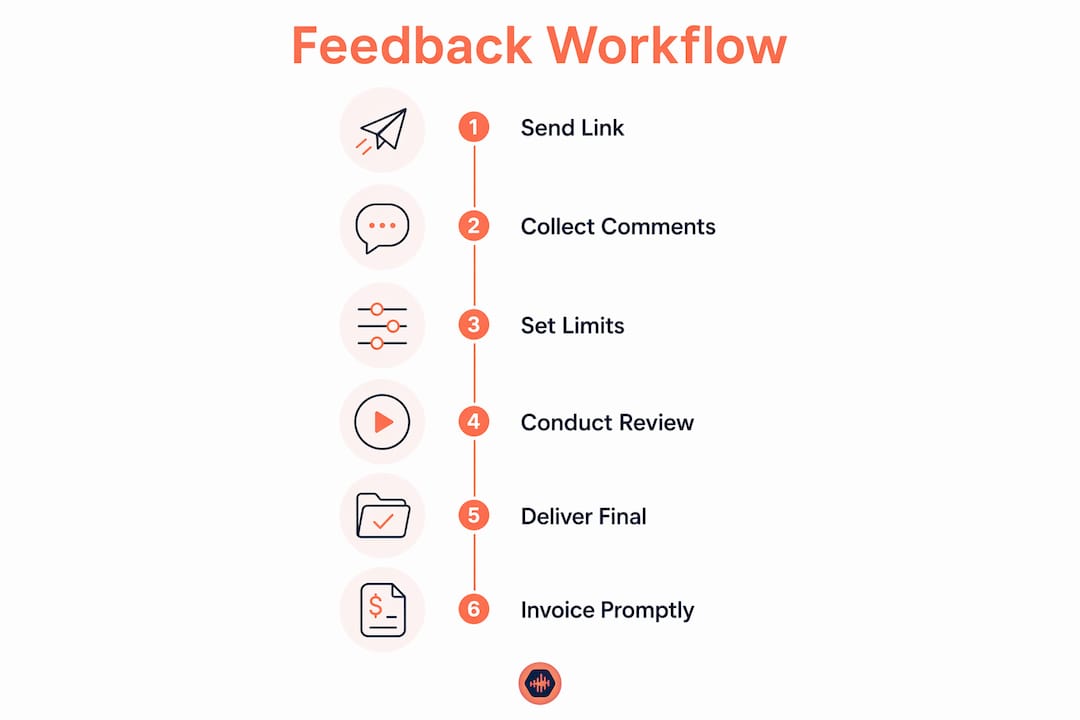
A tight, ordered process from first deliverable to final download:
- Export one review mix. Name it
v01_mix_artist_song_48k_24b.wav. One file, one version, no alternates floating around. - Upload to a timestamped feedback platform. Enable no-login commenting so clients can leave notes without creating an account.
- Send a focused request. Tell the client exactly what to listen for: three prompts maximum, a clear 48-hour review window, and the approval trigger (written sign-off or checkbox).
- Capture feedback. Require timestamped notes pinned to the waveform. One decision-maker, one consolidated round per revision.
- Execute revisions. Apply time-locked action items, increment to
v02, upload the next review. - Approve and deliver. Require written sign-off before the final download unlocks. Trigger the payment gate if one is set.
Pro Tip: Send the review link within 24 hours of completing the mix. Feedback engagement is highest immediately after a milestone delivery, so timing the request right keeps the project moving.
Which platform features actually shorten the revision process?
Generic file-sharing tools were not built for audio review. Dropbox comments, email threads, and Discord DMs scatter feedback across five places and guarantee version confusion. Audio-focused platforms solve this with a specific feature set:
- Timestamped waveform comments: Clients click the exact moment they mean. “The snare at 1:23 is too bright” replaces “the snare sounds weird in the chorus.” Pinned waveform feedback removes ambiguity entirely.
- Version history: Every upload is logged. You always know which mix a client approved.
- No-login client access: Requiring an account adds friction that delays responses by days. A no-login portal converts that wait into minutes.
- Lossless audio support: Clients hear what you actually delivered, not a compressed preview.
- Password-protected project pages: Secure delivery without exposing files publicly.
- Stripe Connect payment integration: Charge for extra revisions automatically. Require payment before the final file downloads.
Live or near-real-time review sessions take this further. Integrating live review into the workflow significantly reduces revision duration because both parties hear the same mix simultaneously and resolve ambiguity on the spot.
How do you set revision limits and enforce payment gates?

Define your policy before the project starts, put it in writing, and enforce it through the platform.
Sample revision policy (paste into your contract or project brief):
This project includes two rounds of revisions. A revision round is one consolidated set of notes submitted within the 48-hour review window. Additional rounds are billed at $75 per round for mix tweaks or $150 per round for stem-level changes. Final files are released only after the balance is paid in full.
Pricing shapes that work for home studios:
- Flat fee per extra round: Simple, predictable, easy to explain.
- Hourly surcharge: Better for complex projects where scope varies.
- Scaled fee by complexity: Mix tweaks at one rate, stem rebuilds at another.
Review window rules matter as much as pricing. If a client misses the 48-hour window, the project moves forward automatically. State this explicitly: “No response within 48 hours constitutes approval of the current version.” That one sentence prevents projects from stalling indefinitely.
Pro Tip: A consolidated offboarding step, including a final review session, delivery summary, and immediate invoice, protects cash flow and closes the project cleanly.
How do you ask for feedback that is actually usable?
A feedback problem is almost always a request design problem. Vague questions produce vague answers. Structured requests that force specificity produce notes you can act on in minutes.
Three prompts per review round:
- Balance: “Is anything too loud or too quiet relative to the rest of the track? Note the timestamp.”
- Clarity: “Can you hear every element clearly in the chorus? If not, which instrument is getting lost?”
- Arrangement: “Does the energy build and release where you expect it to? Flag any moment that feels off.”
Plus one optional free-text field: “Any big-picture notes not covered above?”
Rules that keep feedback usable:
- One decision-maker signs off. No committee notes.
- One consolidated round per revision, not a drip of comments over three days.
- Waveform-pinned comments only. No email follow-ups counted as a revision.
Pro Tip: Send a one-paragraph brief before the review session telling the client what to listen for. A focused listener gives you structured, actionable notes instead of impressions.
When should you run a live review session?
Live review is the single fastest way to collapse revision rounds. Use it for first mix approvals, major arrangement decisions, and final sign-offs.
Session checklist:
- Send the mix link 30 minutes before the call so the client can listen once alone.
- Confirm playback settings (headphones vs. speakers, streaming quality).
- Listen through the track together on a shared call.
- Use focused prompts to avoid scope creep: “Let’s address balance first, then arrangement.”
- Make changes in real time where possible. Confirm each edit verbally before moving on.
Keep sessions to 10–30 minutes. Longer than that and focus drifts. A simple agenda: 5 minutes of context, 15 minutes of listening and notes, 10 minutes of live edits or action-item confirmation.
Pro Tip: Use the live session to convert vague phrases into timestamped edits. When a client says “the chorus feels flat,” ask them to flag the exact moment in the platform while you are both listening. That pin becomes your edit target.
For projects that include synced media, aligning your audio review points with the music video production workflow prevents mismatched approvals between audio and picture stakeholders.
What does a realistic revision timeline look like?
| Phase | Async (email/Dropbox) | With live review |
|---|---|---|
| Client review window | 48 hours | 30 minutes |
| Engineer revision time | 2–3 business days | Same day or next day |
| QA pass | 24 hours | 1–2 hours |
| Total per round | 5–6 days | 1–2 days |
Ways to compress schedules further: no-login feedback portals remove the account-creation delay, prioritized action-item lists keep revisions surgical, and live review eliminates the back-and-forth interpretation cycle entirely.
What should you set up today? Templates and file naming
Setup checklist (one session):
- Create a project page with a password-protected link.
- Upload
v01_mix_artist_song_48k_24b.wavas the review file. - Set versioning rules: every upload increments (v01, v02, v03).
- Enable no-login commenting.
- Set the 48-hour review window and approval trigger.
- Configure the payment gate for final download.
File naming convention:
| File type | Example name |
|---|---|
| Review mix | v01_mix_artistname_songtitle_48k_24b.wav |
| Revised mix | v02_mix_artistname_songtitle.wav |
| Stems archive | v02_stems_artistname_songtitle.zip |
Review request email template:
Hi [Client], your mix is ready for review. [Link] — no account needed, just click and listen. Please leave timestamped notes directly on the waveform by [date/time]. Two revision rounds are included; additional rounds are billed at the rate in your contract. Reply to this email or check the approval box in the platform when you are satisfied.
What are the most common pitfalls and how do you fix them?
Version soup. Clients receive final_v2_REAL_def.wav and have no idea what changed. Fix: enforce version tags in the platform and use a single project page as the source of truth. No files sent over email.
Vague feedback. “It sounds off” is not an edit target. Fix: structured prompts and waveform-pinned comments. If a comment is still unclear, schedule a 10-minute call to clarify before touching the mix.
Client access friction. Requiring an account login delays feedback by days. Fix: no-login feedback links. Password-protect the download, not the listening experience.
Quick fixes for common red flags:
- Late responses: Remind clients of the 48-hour window in the initial email. Auto-approval language removes the stall.
- Multiple reviewers: Name one decision-maker in the contract. All notes must come through that person.
- Scope creep: New requests after sign-off trigger a new revision round at the extra-round rate.
Key Takeaways
Studios that build a structured, platform-enforced feedback loop cut revision time from days to hours and protect revenue with automatic payment gates.
| Point | Details |
|---|---|
| Single review mix | Upload one versioned file per round to eliminate “which version?” confusion. |
| Timestamped comments only | Waveform-pinned notes turn vague impressions into surgical edit targets. |
| Two included revisions | Define revision limits in writing; charge automatically for additional rounds. |
| No-login feedback link | Removing account friction converts days-long waits into minutes of usable notes. |
| Audome for enforcement | Audome bundles timestamped feedback, version history, no-login access, and Stripe Connect payment gates in one platform built for audio studios. |
The part most producers skip
The workflow above works. The part producers consistently skip is the enforcement layer. Writing “two revisions included” in a contract means nothing if the client can email you a third round of notes and you feel obligated to act on them. The policy only holds when the platform enforces it automatically.
That shift, from a policy you manage manually to one the platform manages for you, is where the real time savings come from. It also changes the client dynamic. When a payment gate appears before the final download, clients consolidate their notes more carefully the first time. The revision quality goes up because the cost of a careless round becomes visible.
Audome puts this workflow into practice for home studios
Every step in this playbook maps directly to a feature in Audome. Clients leave timestamped waveform comments without creating an account. Version history logs every upload automatically. Password-protected project pages keep deliverables secure. Stripe Connect charges for extra revisions and holds the final download until payment clears.

Audome replaces the Dropbox links, email threads, and Discord DMs with one workspace built specifically for audio collaboration. Upload up to 96kHz/24-bit files, set your revision limits, and let the platform handle the rest. Start your first project on Audome and run the full feedback loop on a current job today.
Useful sources
- Timestamped Feedback Process for Audio Pros: 2026 Guide — step-by-step waveform feedback setup with practical examples.
- Producer Client Workflow: A Practical Guide for Audio Pros — end-to-end workflow from inquiry to payment, including live review and offboarding.
- Feedback Collection Workflow for Audio Pros That Works — how to centralize notes and prioritize fixes.
- Sending Mixes to Clients: A Step-by-Step Guide — messaging templates and approval steps; includes copyable email language.
- Revisions in Music Production: A Producer’s 2026 Guide — revision policies, common pitfalls, and sample contract language.
- Music Video Production Workflow: A Filmmaker’s Guide — aligning audio review points with video production for sync projects.
FAQ
What is the fastest way to collect client feedback on a mix?
Share a no-login timestamped feedback link immediately after delivery and set a 48-hour review window. Clients leave pinned waveform comments without creating an account, and you get consolidated, actionable notes in one round.
How many revision rounds should a home studio include?
Two rounds is the standard for most mix and mastering projects. Define this in your contract, charge a flat fee for additional rounds, and use a platform like Audome to enforce the limit automatically.
How do you stop clients from sending feedback over email?
State in your project brief that only waveform-pinned comments count as an official revision round. Email notes are acknowledged but not acted on until the client submits them through the platform.
Does live review actually reduce revision rounds?
Yes. Live review sessions resolve ambiguity in real time, converting vague impressions into confirmed edit targets during the call. These sessions routinely replace multiple asynchronous rounds.
How do you prevent clients from downloading files before paying?
Use a platform with a payment gate tied to the final download. Audome integrates Stripe Connect to hold the file until the client’s payment clears, removing the need to chase invoices manually.