
TL;DR:
- Professional audio delivery involves three formats: a native 24-bit session WAV, a dithered 16-bit distribution WAV, and a 320kbps MP3 reference for clients. Using an auditable platform with timestamped comments, password protection, and payment gating ensures clear communication, proper version control, and secure file transfer. Precise file naming, thorough QC, and structured feedback streamline revisions and protect the engineer’s work from disputes.
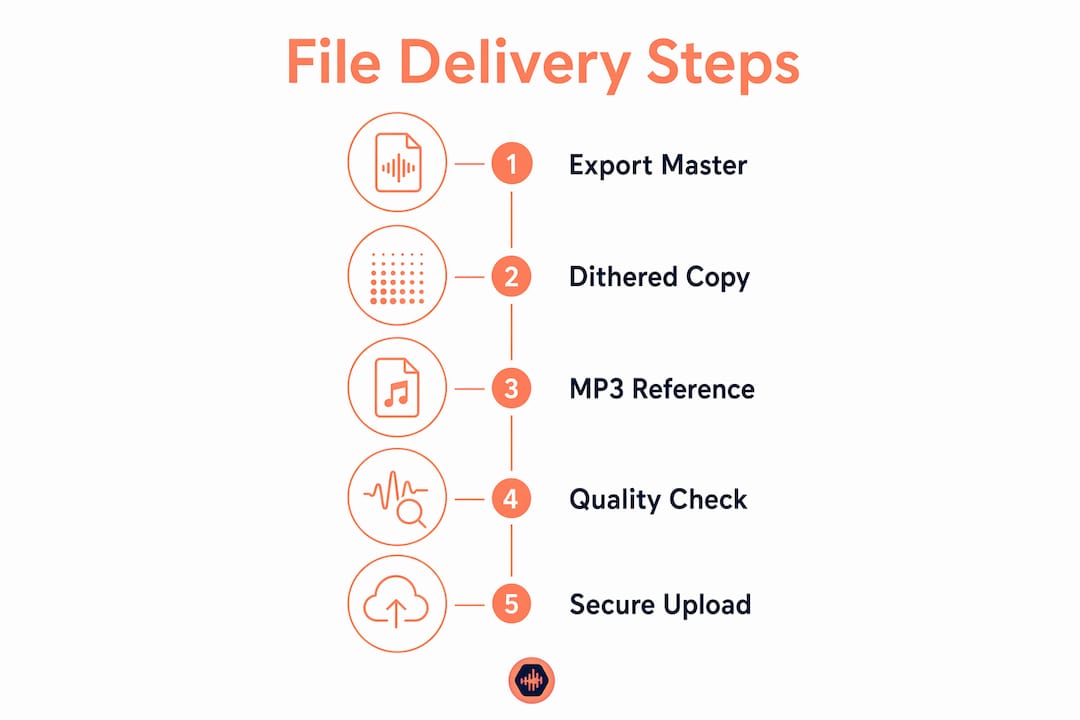
The professional method for audio file delivery covers three formats, one QC pass, and one secure portal. Here is the short version:
TL;DR checklist:
- Export a 24-bit WAV at your session sample rate for mastering and archive
- Include a dithered 16-bit/44.1kHz WAV for distribution and legacy services
- Add a 320kbps MP3 reference for client previews and sharing
- Run a QC pass: clip check, true-peak scan, loudness, metadata, stem alignment
- Name files with a predictable convention (Artist_Song_Version_MixType_Date)
- Deliver through a portal with timestamped comments, password protection, download tracking, and payment-gated WAV downloads
- Require written approval before archiving; hold lossless files until payment clears
Table of Contents
- Which files should you actually include in a delivery?
- What to check before any file leaves your session
- How do you collect feedback without endless revision cycles?
- How do you protect unreleased work during delivery?
- Simple file naming and versioning rules that stick
- What turnaround times and revision pricing actually look like
- A complete delivery walkthrough using Audome
- Key Takeaways
- Delivery is part of the craft, not a chore after it
- Audome handles the delivery workflow so you can focus on the mix
- Useful sources
- FAQ
Which files should you actually include in a delivery?
The three-format rule covers every downstream use without overcomplicating the handoff.
| Format | Specs | Purpose |
|---|---|---|
| Primary WAV | 24-bit, native session rate | Mastering, archive |
| Distribution WAV | 16-bit, 44.1kHz, dithered | CD, streaming distributors |
| MP3 reference | 320kbps, 44.1kHz | Client preview, social sharing |
Primary deliverable: Export at your session’s native sample rate (48kHz, 88.2kHz, 96kHz) at 24-bit. No master-bus limiter. Leave roughly -3 to -6 dBFS of headroom so the mastering engineer has room to work.
Distribution copy: Dither down to 16-bit/44.1kHz for services that still require CD-spec files. Do not skip dithering; truncating without it adds quantization noise.
Reference MP3: Clients will share this with managers, labels, and collaborators. A 320kbps encode at 44.1kHz survives one generation of re-encoding without audible damage. Anything lower and you risk artifacts appearing in a re-share.
Optional deliverables to include by default:
- Instrumental and vocal-up/down passes (even when not explicitly requested, they prevent a costly session recall)
- Stems: drums, bass, keys, guitars, lead vocals, backing vocals, FX, each time-aligned from session start with identical file lengths
- TV/clean mixes when the contract covers sync or broadcast
Pro Tip: Remove the master-bus limiter before bouncing your pre-master WAV. Leaving it on hands the mastering engineer a ceiling they cannot undo.
What to check before any file leaves your session
A five-minute QC pass prevents the kind of mistake that costs you a client.
Listen-through checks:
- Play the first and last 10 seconds on studio monitors, headphones, and a consumer speaker
- Confirm no clicks, pops, or dropout artifacts crept in during export
- Check mono compatibility: sum to mono and listen for phase cancellation on low-end elements
Technical checks:
- Run a true-peak scan; confirm no overs above your agreed ceiling
- Verify sample rate and bit depth match the export spec
- Confirm no extraneous silence at the head or tail beyond the agreed pre-roll
- For stems: verify all files are identical length and align from session start
Loudness: If the client or platform specified a LUFS target, confirm the integrated loudness measurement hits it. For pre-masters, leave headroom and skip normalization.
File integrity: Compare exported file sizes against expected sizes. A WAV that is suspiciously small was probably exported at the wrong bit depth.
Pro Tip: Include a README.txt in the delivery folder listing session specs (sample rate, bit depth, BPM, key), what each file is, and any bus-chain notes for the mastering engineer. A concise README cuts follow-up emails almost entirely.
How do you collect feedback without endless revision cycles?
The answer is structure, not patience.
- Batch your deliveries. Send 3–5 files per review batch rather than dumping an entire album at once. Smaller batches keep client focus sharp and make feedback specific.
- Use timestamped, on-waveform comments. A portal that lets clients click a point on the waveform and leave a note eliminates “around the second chorus” ambiguity. The comment maps to an exact moment, which means faster revisions and fewer interpretation errors.
- Require a formal decision. Clients should mark each file as Approved or Request Changes inside the project page. That decision becomes the single source of truth, not a buried email thread.
- Set expectations in the delivery note. State what is included, how many revision rounds are covered, the hourly recall rate for post-signoff changes, and the approval step required before archiving.
- Version every revision. Each new upload gets a new version number (v1, v2, v3). Keep older versions in the project history for auditability.
Pro Tip: State the revision allowance in the delivery note, not just the contract. Clients who see “2 rounds included” in the email they open with the files are far less likely to treat revisions as unlimited.
What a good feedback workflow prevents:
- Vague verbal approvals that get disputed later
- Revision requests arriving through three different channels
- Lost decisions when a client changes their mind after signoff
How do you protect unreleased work during delivery?
Generic tools create real risk. Email attachments expire, cloud links get forwarded, and scattered confirmations make it impossible to prove delivery.
What to demand from your delivery platform:
- No-login review links so clients can listen without creating an account
- Password-protected project pages for unreleased material
- Download tracking that confirms when and by whom files were accessed
- Access expiry controls for time-sensitive deliveries
- Payment-gated downloads via Stripe Connect so WAVs and stems stay locked until the invoice clears
| Delivery method | Password protection | Download tracking | Payment gating | Timestamped comments |
|---|---|---|---|---|
| Email attachment | No | No | No | No |
| Generic cloud storage | Limited | No | No | No |
| Audio-specific portal | Yes | Yes | Yes | Yes |
Centralizing everything in one delivery channel means approvals and feedback are auditable. Scattered file syndrome (email here, Dropbox link there, Discord message somewhere else) is how decisions get lost and disputes start. Pick one channel per project and keep it there.
Access structure that works: Make the MP3 reference available immediately for review. Hold the WAVs and stems behind a payment gate. Once the invoice clears, enable full downloads. That sequence protects revenue without slowing the client’s review process.
Simple file naming and versioning rules that stick
A naming convention you can apply in under 10 seconds per file is one you will actually use.
Recommended format: Artist_Song_Version_MixType_Date.wav
Example: Lyra_EasyMoney_v2_MainMix_20260512.wav
Versioning rules:
- Use v1, v2, v3 sequentially; never “final,” “final2,” or “final_FINAL”
- Archive old versions rather than deleting them; they are your audit trail
- For stems: include song name, stem group, and session start alignment in the filename
Folder structure:
/Lyra_EasyMoney_20260512/containing the main mix, distribution WAV, MP3, stems subfolder, and README.txt- README.txt lists: sample rate, bit depth, BPM, key, which version the client approved, and any bus-chain notes
What turnaround times and revision pricing actually look like
Typical turnaround for a single-song mix revision varies from about one to several days. A full project batch (album or EP) usually takes multiple days depending on scope and current workload.
Revision policy that protects your time:
- Include a small number of revision rounds in the base price
- Charge a preset recall fee or hourly rate for changes requested after signoff
- State explicit fees for files recalled after a long archive period (a typical length of time before additional recall fees may apply)
Payment gating in practice: Deliver the MP3 reference immediately. Hold WAVs and stems until the final invoice clears. Embed payment terms in the contract and restate them in the delivery note so there is no ambiguity.
For longer projects, use milestones: a payment checkpoint at rough mix approval and another at final delivery. This keeps cash flow steady and prevents a client from disappearing after receiving all the files.
A complete delivery walkthrough using Audome
Here is how a single-song delivery looks from export to closed project.
- Export: Bounce the 24-bit native WAV (no limiter), the 16-bit/44.1kHz distribution WAV (dithered), and the 320kbps MP3 reference. Add instrumental and vocal-up/down passes if the contract includes them.
- QC pass: Clip check, true-peak scan, headroom confirmation, sample rate verification, stem alignment check, metadata review, README.txt written and saved to the folder.
- Upload to Audome: Create a project page, upload the batch (3–5 mixes maximum per review round), enable timestamped commenting, set password protection, and gate the WAV/stem downloads behind payment. Send the client a single no-login review link.
- Client review: The client listens, leaves timestamped comments on the waveform, and marks the file Approved or Requests Changes. If changes are needed, address them, upload v2, and repeat. Every version stays in the project history.
- Close the project: Once the client approves and payment clears, enable full WAV and stem downloads, attach the final README to the archive, and mark the project complete.
Pro Tip: Send the no-login link with a short delivery note in the same message: what is included, the revision allowance, and the approval step required. Clients who understand the process upfront move faster.
What this workflow eliminates:
- Chasing clients for confirmation that files arrived
- Disputed approvals with no written record
- Unpaid downloads of final WAVs
Key Takeaways
Professional audio file delivery requires three formats, one QC pass, and a single secure portal with payment gating, timestamped feedback, and version history.
| Point | Details |
|---|---|
| Three-format delivery | Always include a 24-bit native WAV, a dithered 16-bit/44.1kHz WAV, and a 320kbps MP3 reference. |
| QC before every send | Run a clip check, true-peak scan, loudness verification, and stem alignment check before uploading. |
| Consistent file naming | Use Artist_Song_Version_MixType_Date and never name anything “final_final.” |
| Batch and gate | Send 3–5 files per review batch; hold WAVs and stems until payment clears. |
| Audome for the full workflow | Audome handles timestamped feedback, version history, no-login review links, password protection, and Stripe Connect payment gating in one place. |
Delivery is part of the craft, not a chore after it
Here is the thing most engineers underestimate: a client’s perception of your work does not end when the session closes. It ends when they open the folder. Neat files, a clear README, and a structured approval process signal that you run a professional operation, not just that you can mix. That signal drives referrals.
There is also a practical protection argument. A single, auditable project record (timestamped comments, version history, written approvals) is your defense if a client later claims they never approved a mix or disputes scope. Without it, you are arguing from memory against someone who may be arguing in bad faith. With it, the record speaks for itself.
The approval checkpoint is also a capacity tool. Treating signoff as a real gate, not a formality, is what prevents a project from reopening six months later because a client “just wants one more small change.” Revision abuse is not a client problem; it is a workflow problem. Build the gate, and the problem mostly disappears.
Audome handles the delivery workflow so you can focus on the mix
If the workflow above sounds like a lot to manage manually, that is because it is. Stitching together Dropbox, WeTransfer, email, and a separate invoicing tool means four places where something can go wrong, a file can get lost, or an approval can go unrecorded.

Audome is built specifically for this. Upload lossless files up to 96kHz/24-bit, collect timestamped on-waveform feedback, track every version, and send clients a no-login review link to a password-protected project page. WAV and stem downloads stay locked until payment clears through Stripe Connect, so you never hand over final files before the invoice is settled. Unlimited projects, unlimited collaborators, and a built-in notes area for README content keep everything in one place.
Start your project on Audome and run your next delivery the way this article describes, without the manual stitching.
Useful sources
- Final Mix Delivery: What to Send Clients (And How) — TrackBloom’s guide on format selection, stem rules, and README best practices
- Mix Engineer File Delivery Checklist — Compact pre-delivery checklist covering format specs, headroom, and file naming
- Sending Mixes to Clients: A Step-by-Step Guide — Audome’s workflow guide on batching, timestamped comments, and closing projects
- How to Share WAV Files Online Without Losing Quality — Audome on transfer integrity and avoiding compression artifacts
- Exporting Audio Deliverables: Best Practices for Clients — Detailed export settings for different downstream uses
- File Sharing Methods for Studios: 2026 Guide — Overview of transfer methods and their tradeoffs for studios and freelancers
FAQ
What file formats should a freelance audio engineer deliver?
Deliver a 24-bit WAV at the session sample rate for mastering, a dithered 16-bit/44.1kHz WAV for distribution, and a 320kbps MP3 for client previews and sharing.
How do you prevent clients from downloading files before paying?
Use a platform with payment-gated downloads, such as Audome with Stripe Connect integration, which holds WAV and stem files locked until the invoice clears.
How many revision rounds should a mix engineer include?
Most engineers include 1–2 revision rounds in the base price and charge a preset recall fee for changes requested after signoff or after a long archive period.
What is the best way to collect client feedback on audio files?
Use a portal that supports timestamped, on-waveform comments so feedback maps to exact moments in the file, reducing interpretation errors and speeding up revisions.
How should audio files be named for client delivery?
Use the format Artist_Song_Version_MixType_Date (example: Lyra_EasyMoney_v2_MainMix_20260512.wav) and version sequentially with v1, v2, v3, never “final” or “final_final.”