
TL;DR:
- File sharing methods for studios vary by task, including raw delivery with MASV, review with Frame.io, and team sync with Dropbox or Google Drive. Selecting the appropriate tool based on specific project needs minimizes wasted time, bandwidth, and confusion while ensuring security and file integrity. Combining multiple specialized tools and adopting best practices like proxy workflows enhances efficiency and maintains high-quality audio and video collaborations.
The best examples of file sharing methods for studios are not one-size-fits-all. They split into three categories: raw file delivery tools like MASV, review and approval platforms like Frame.io, and team sync services like Dropbox and Google Drive. Knowing which category your project needs right now saves you hours of wasted uploads, client confusion, and bandwidth you’ll never get back. This guide breaks down each method with blunt, real-world context so you can stop guessing and start moving files the right way.
1. Examples of file sharing methods for studios: the full breakdown

Before you pick a tool, you need to know what problem you’re actually solving. Are you moving 200GB of ProRes dailies across the country? Getting client sign-off on a mix? Syncing stems with a co-producer in another city? Each of those is a different problem, and the right studio transfer solution is different every time. The biggest mistake studios make is using one tool for everything and wondering why it keeps breaking down.
2. MASV: the go-to for massive raw file delivery
MASV is the tool you reach for when the file is so big that everything else either chokes or charges you a fortune. MASV uses a UDP/TCP hybrid optimized for real-world network routes with TLS encryption, password protection, and expiring links baked in. It is built specifically for camera-original formats: ProRes, ARRIRAW, R3D. The kind of files that make a regular cloud upload sit at 3% for two hours and then fail.
Pricing runs at approximately $0.25/GB on a usage basis, which means you only pay when you actually send something. No monthly seat fees eating into your budget when you’re between projects. Uploads are resumable, and SHA checksum verification confirms the file that left your drive is the same file that arrived on the other end. That last part matters more than people realize. A corrupted ARRIRAW file discovered on day one of the color grade is a very bad day.
- Speed: UDP acceleration cuts transfer time significantly over long distances
- Security: TLS encryption plus password and expiry controls on every link
- Flexibility: Upload portals let clients or crew send files without needing an account
- Integrity: Checksum verification catches corruption before it becomes a problem
- Format support: Built for ProRes, ARRIRAW, R3D, and other camera originals
Pro Tip: Set your MASV links to expire 48 hours after delivery. It keeps your assets from floating around the internet indefinitely on a link someone forwarded three times.
3. Frame.io: where video review actually works
Frame.io is the gold standard for video review and approval workflows, and it earns that title. Subscription pricing sits around $15 per editor per month, which is cheap when you consider how much time you waste emailing timestamped notes back and forth in a spreadsheet. The integration with Premiere Pro and DaVinci Resolve is real and it works. You can send a sequence directly from the timeline, get timecoded comments back from the client, and address them without ever leaving your edit.
Where Frame.io falls short is raw file transfer speed. It is not built to move 200GB overnight. It is built to move a 2GB proxy so your client can watch it, click on a frame, and type “the logo is wrong here.” That is its job and it does that job well. Watermarking and access controls add a layer of IP protection for client-facing deliveries.
- Timecoded comments eliminate the “around 2 minutes in” feedback problem
- Version control keeps revision history clean and prevents the “final_v7_REAL_FINAL” chaos
- Watermarking protects cuts before formal delivery
- Access controls let you restrict who sees what and for how long
Pro Tip: Use Frame.io for proxy-based approvals while your originals transfer overnight via MASV. Sending proxies first lets your team start editing immediately instead of waiting on a 300GB download to finish.
4. Dropbox and Google Drive: the daily workhorses
Dropbox Business and Google Drive are not glamorous, but they are everywhere. Dropbox Business runs approximately $20 per user per month and its Smart Sync feature makes files appear local on your machine without actually downloading them, which saves storage on laptops that are already full of plugins and sample libraries. Google Drive offers 15GB free and business plans starting around $7 per user per month, making it the default for budget-conscious teams.
The problems show up fast in a real studio context. Both platforms have file size upload limits when you’re working through a browser. Share links are generic with zero branding and no engagement analytics. You have no idea if your client actually opened the folder or just said they did. For internal team sync on smaller files, stems, session backups, and reference tracks, they work fine. For anything client-facing or over 20GB, you will hit a wall.
- Google Drive requires the desktop app for large uploads, which is an extra step that trips people up
- Neither platform tells you when or how long a client engaged with your files
- Generic share links look unprofessional in a client-facing context
- Major studios use these tools internally and supplement them with specialized delivery tools for everything else
5. Peony and LucidLink: the newer options worth knowing
Peony and LucidLink represent a different philosophy about how studios share files, and both are worth understanding before you dismiss them as niche.
Peony is built for client-facing delivery. It gives you branded portals with page-level engagement analytics, dynamic watermarks, and screenshot protection. The Business plan runs $40 per admin per month, and a free tier exists with analytics and link controls included. For a post-production house or a music producer sending stems to a label, knowing that the A&R rep spent 14 minutes on page three of your delivery is genuinely useful information. That is not something Dropbox will ever tell you.
LucidLink takes a completely different approach. It eliminates manual file transfers entirely by treating your storage as a streaming file system. Your editor in Berlin opens a file that lives on a server in Los Angeles and works on it in real time, the same way you’d open something off a local drive. No download. No wait. Just work. For studios with distributed teams doing live collaboration, this changes the math on remote production entirely.
| Tool | Best for | Pricing | Key differentiator |
|---|---|---|---|
| Peony | Client deliveries and presentations | Free to $40/admin/mo | Branded portals and engagement analytics |
| LucidLink | Real-time remote team collaboration | Subscription based | Streaming file system, no manual transfers |
| MASV | Large raw file delivery | $0.25/GB usage-based | Speed and checksum verification |
| Frame.io | Review and approval workflows | ~$15/editor/mo | Timecoded comments and DAW integration |
| Dropbox Business | Internal team sync | ~$20/user/mo | Smart Sync and broad compatibility |
Pro Tip: If you’re presenting work to a label, a network, or a brand, Peony’s engagement analytics tell you exactly what they looked at and for how long. That intel is worth more than you’d think going into a follow-up call.
6. How to choose the right method for your studio workflow
The honest answer is that most working studios use at least two or three of these tools at the same time, and that is not a problem. It is just reality. The proxy-first workflow is the clearest example: send a compressed proxy via Frame.io so the client can review and approve, then deliver the full-resolution original via MASV once the cut is locked. You save bandwidth, you save time, and your client is not waiting three days to give you notes.
Studio pipelines are moving away from transit-heavy file logistics toward unified platforms where teams work directly in shared project environments. Unified systems like DaVinci Resolve Studio’s cloud project servers have helped studios reduce storage needs from 40TB to 15TB by centralizing color, VFX, and audio cleanup in one environment. That is a real operational shift, not just a trend.
| Scenario | Recommended tool | Why |
|---|---|---|
| Delivering camera originals to post | MASV | Speed, checksums, no account needed |
| Client review and approval | Frame.io | Timecoded comments, version control |
| Internal team file sync | Dropbox or Google Drive | Familiar, affordable, widely compatible |
| Client-facing branded delivery | Peony | Analytics, watermarks, professional presentation |
| Distributed team real-time editing | LucidLink | Streaming access, no manual transfer |
| Audio project collaboration | Audome | Lossless audio, timestamped feedback, version control |
Security is not optional regardless of which tool you pick. Password-protected links, expiring access, and SHA checksums are the baseline every studio should be running. A shared link with no expiration is a liability. You also want to standardize your file naming before delivery. Ambiguous file names cause revision confusion that costs real money. Check out secure file sharing practices that actually hold up in a professional context.
Key takeaways
The right file sharing method for a studio is determined by the specific task: raw delivery, client review, team sync, or live collaboration. No single tool covers all four equally well.
| Point | Details |
|---|---|
| Match tool to task | MASV for raw delivery, Frame.io for approvals, Dropbox for internal sync. |
| Use the proxy-first workflow | Send proxies for review while originals transfer overnight to save time and bandwidth. |
| Security is non-negotiable | Password protection, expiring links, and SHA checksums protect every delivery. |
| Newer tools offer real advantages | Peony and LucidLink solve problems that traditional cloud storage cannot. |
| Unified platforms reduce overhead | Centralizing workflows can cut storage needs and eliminate redundant logistics. |
What I’ve actually learned from years of bad file transfers
I’ve been in sessions where a 120GB session file showed up corrupted because someone used a free WeTransfer link with no checksum and no verification. I’ve watched a mix get rejected because the client downloaded the wrong version from a Dropbox folder with five files named “final.” I’ve had a label ask for a file and the engineer spent 45 minutes trying to figure out which hard drive it was on.
Cloud is not magic. It is just someone else’s hard drive, and if you treat it like a dumping ground with no organization, no security, and no verification, it will fail you at the worst possible moment. The studios that run clean pipelines are not using more tools. They are using fewer tools, chosen deliberately, with clear rules about what goes where.
For audio specifically… the problem gets worse because lossless files are huge and most general-purpose file sharing tools were not built with 96kHz/24-bit sessions in mind. You need something that understands what you’re sending, not just that you’re sending something large. The remote collaboration tips that actually work in audio are built around that reality.
My honest take: stop trying to make one tool do everything. Pick a delivery tool, pick a review tool, and pick a sync tool. Know which one you’re using and why. That’s it.
— Kreg
How Audome fits into your studio file sharing setup
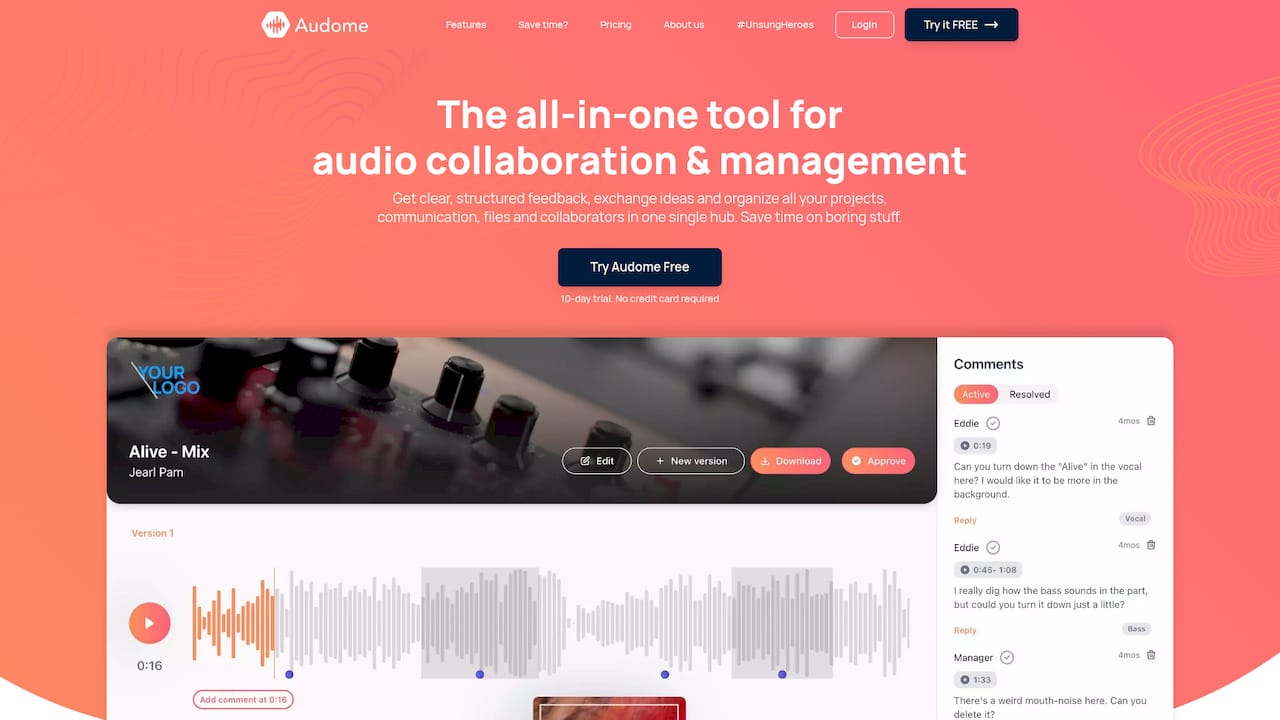
Audome is built specifically for audio professionals who are tired of stitching together five different tools to manage one project. It handles audio collaboration and file sharing in one place: lossless audio up to 96kHz/24-bit, unlimited file uploads, timestamped comments, version control, and private collaborator spaces. No client login required. No compression killing your files before they arrive. Password protection and download toggling give you full control over who accesses what and when. If you’re managing sessions, stems, mixes, or sound design deliveries across multiple stakeholders, Audome cuts the chaos without cutting corners on audio quality. Visit Audome.com to see how it fits your workflow.
FAQ
What is the best tool for sending large raw files from a studio?
MASV is the preferred choice for large raw file delivery in studios, using UDP-accelerated transfers and checksum verification at approximately $0.25/GB with no account required for recipients.
How do studios share files for client review and approval?
Frame.io is the standard for client review, offering timecoded comments, version control, and integration with Premiere Pro and DaVinci Resolve at around $15 per editor per month.
What security measures should studios use when sharing files?
Password-protected links, expiring access windows, and SHA checksums are the baseline security controls studios should apply to every external file delivery.
Is Google Drive good enough for studio file sharing?
Google Drive works for internal sync on smaller files but lacks branded delivery, engagement analytics, and struggles with large uploads through the browser, making it a poor fit for professional client-facing delivery.
What file sharing tools work best for audio professionals specifically?
Audome is purpose-built for audio workflows, supporting lossless files up to 96kHz/24-bit with timestamped feedback and version control. For general audio collaboration tools, the right choice depends on whether you need delivery speed, client review, or team sync.