
TL;DR:
- A professional podcast workflow involves organizing files and feedback through central platforms with strict version control. Clients submit consolidated timestamped comments within a defined feedback window, and final delivery is locked behind payment or approval. Audome automates this process, replacing multiple tools with one secure, integrated workspace.
An effective podcast delivery and revision workflow moves in one direction: from finalized audio to client approval without backtracking, scattered feedback, or version confusion. Here is what that looks like in practice:
- Deliver lossless files (WAV or AIFF, 48kHz/24-bit minimum) in a zipped archive with a manifest listing every file, its format, and its role
- Use strict naming conventions that embed project name, version number, role, and date (e.g.,
ShowName_EP012_MasterMix_v2_20260315.wav) - Centralize all feedback on one platform with timestamped waveform comments tied to a specific file version, not scattered across email threads or Slack
- Limit revision rounds in the contract, pre-price extras, and require payment or signed approval before releasing final deliverables
- Set a maximum feedback window per revision round (48 hours is the professional standard) to prevent indefinite project drift
- Control access with password-protected portals that require no client login, keeping delivery frictionless and assets secure
- Track versions automatically with an immutable changelog so every change, editor, and timestamp is on record
Audome is built to enforce all of this in one workspace, replacing the Dropbox, Google Drive, email, and Discord patchwork most studios still rely on.
Table of Contents
- What Does a Professional Podcast Delivery and Revision Workflow Look Like?
- How Should You Organize Files, Versions, and Naming Conventions?
- How Do You Set Revision Limits and Payment Terms That Clients Actually Respect?
- How Does Audome Solve the Hardest Parts of Podcast Delivery and Revision?
- Audome Handles the Workflow You Just Read About
- FAQ
- Key Takeaways
What Does a Professional Podcast Delivery and Revision Workflow Look Like?
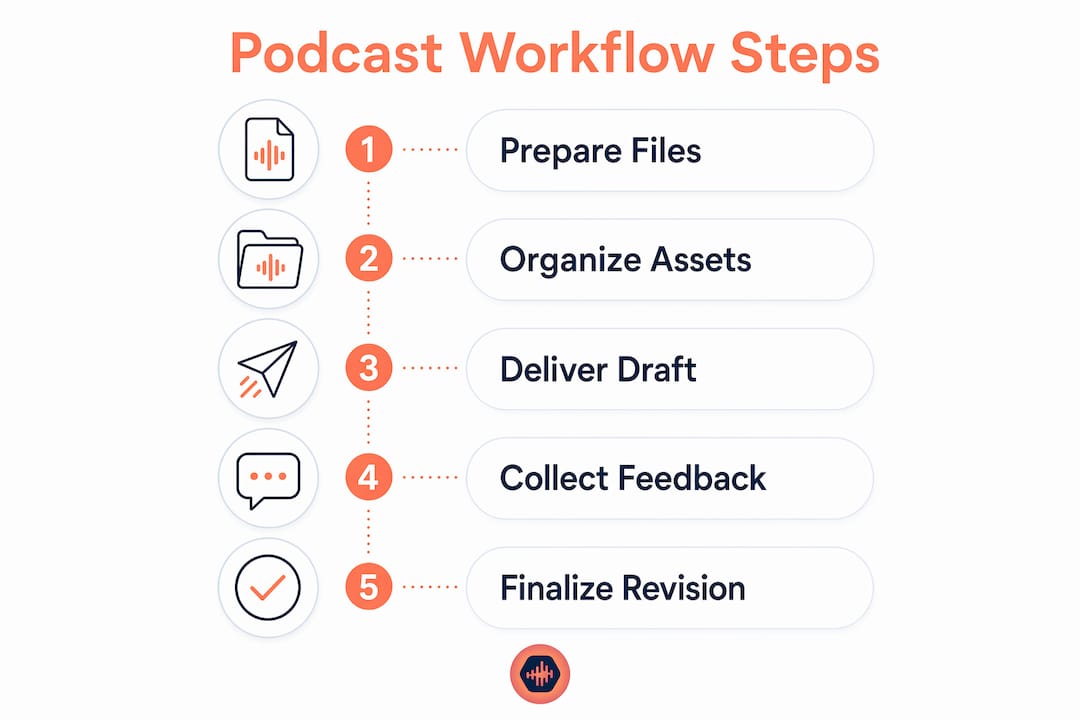
A professional revision workflow moves through seven defined stages. Each stage has a clear input, a decision set, and a measurable output. Skip one and you will feel it downstream.
- Stage 1: Prepare the delivery package. Export the master mix, stems (voice-only, music-only), and any alternate versions. Bundle everything into a single zipped archive with a manifest file. Verify file integrity before sending anything.
- Stage 2: Upload to a centralized platform. Organize files into project folders with clear subfolders (Raw, Stems, Mixes, Finals). Use a platform that enforces version control automatically, not a generic cloud sync tool.
- Stage 3: Share client access via a no-login portal. Send a password-protected link. The client clicks, enters the password, and hears the file. No account creation, no friction, no excuse for delayed feedback.
- Stage 4: Collect consolidated, timestamped feedback. All stakeholders submit comments in one revision round, pinned to exact waveform moments. One pass, not a rolling conversation.
- Stage 5: Enforce a 48-hour feedback window. Communicate this in the project brief and again when you send the review link. A defined window prevents the “I’ll listen this weekend” delay that stalls projects for weeks.
- Stage 6: Implement revisions and log changes. Work from the consolidated notes, update the version number, and record every change in the changelog. Trigger the extra-round charge if the client has exceeded included rounds.
- Stage 7: Release finals only after payment or approval. Lock the download until payment clears or a signed approval is on file. No exceptions.
Pro Tip: Build a handoff checklist for each stage, covering files present, naming verified, portal link tested, and feedback window communicated. A two-minute check prevents a two-hour fix.
How Should You Organize Files, Versions, and Naming Conventions?
Version confusion is the most common source of rework in podcast post-production. Manual renaming and loose cloud storage cause most of it. A rigid system eliminates the problem before it starts.
- Adopt a single naming convention and never deviate. The format
[ShowName]_[EP###]_[Role]_[Version]_[YYYYMMDD]gives any team member enough context to identify a file without opening it. - Use four standard subfolders for every project: Raw, Stems, Mixes, Finals. Nothing lives outside these folders.
- Archive milestone versions before major revisions. Before implementing a second round of client notes, copy the current mix to an
_Archivefolder. Rollback takes seconds; rebuilding from memory takes hours. - Maintain an immutable changelog. Every version entry should record what changed, who made the change, and when. This is not optional for studios handling multiple clients simultaneously.
- Never share raw DAW session files across different systems unless plugin versions and DAW builds match exactly. Mismatched sessions corrupt on open.
- Use version-controlled platforms instead of simple cloud sync. Dropbox and Google Drive sync the latest file over the previous one. A version-controlled platform keeps every iteration accessible.
- Store final deliverables in a separate folder from session files. Accidental overwrite of a final master is a recoverable problem only if the file was isolated to begin with.
The principle behind digital asset delivery in any professional media context is the same: structure protects the asset, and the structure has to be defined before the project starts, not after the first version goes missing.
How Do You Set Revision Limits and Payment Terms That Clients Actually Respect?
Revision chaos usually comes from a poorly defined scope, not a difficult client. When the contract is vague, clients treat feedback as an ongoing conversation. When it is specific, they consolidate and prioritize.
- Define revision rounds in the initial contract. Specify exactly how many rounds are included, what constitutes a round (all consolidated notes submitted in one pass), and what the feedback window is per round.
- Pre-price additional rounds. State the per-round fee in the contract so there is no negotiation when the client exceeds the limit. The conversation has already happened.
- Gate final delivery behind payment or signed approval. Requiring payment before the download unlocks protects against revision abuse and unpaid work. Platforms that enforce this automatically remove the awkward manual follow-up.
- Aggregate all stakeholder feedback into one pass. If a client has three internal reviewers, their notes must arrive as one consolidated document, not three separate emails over four days. Make this a contractual requirement, not a request.
- Set realistic turnaround expectations. A 48-hour feedback window per round is standard. Communicate it at project kickoff and again when each review link goes out.
- Explain the structure to clients as a benefit. Defined rounds mean faster delivery, cleaner results, and fewer misunderstandings. Clients who understand the logic cooperate with it.
- Use password-protected portals with controlled download permissions. Clients access only what they need to review, and the final download stays locked until the approval condition is met.
For a deeper look at how many rounds to include by project type, the revision round guide covers the tradeoffs in detail. The podcast approval workflow guide covers payment gating and approval step design.
How Does Audome Solve the Hardest Parts of Podcast Delivery and Revision?
Most studios piece together five or six tools to manage what Audome handles in one place. The difference is not convenience; it is control.
- Unlimited high-resolution audio uploads up to 96kHz/24-bit, including stems and master files, all in one secure workspace.
- Automatic version management with immutable logs recording every change, every editor, and every timestamp. No manual renaming required.
- Timestamped waveform comments without client accounts. Clients click a password-protected link, listen, and drop a comment at the exact second they mean. No login, no friction, no “I’ll get to it later.”
- Password-protected project pages with controlled download permissions. You decide what the client can access and when the final file unlocks.
- Stripe Connect integration for automated revision billing. When a client exceeds included rounds, the charge triggers automatically. No invoice, no awkward email, no delay.
- Centralized project communication that replaces email threads, DMs, and voice notes with organized, version-linked commentary.
- Consolidated feedback collection that reduces the total number of revision rounds by giving clients one structured place to submit all notes at once.
Pro Tip: Studios using timestamped feedback on waveforms report fewer total revision rounds because clients give more specific, actionable notes the first time. Precision in, precision out.
Audome Handles the Workflow You Just Read About

Every stage in this guide, from zipped delivery packages to payment-gated final downloads, maps directly to what Audome does out of the box. You get unlimited high-res file uploads, automatic version tracking, client portals with no login requirement, timestamped waveform feedback, and Stripe-powered revision billing, all without stitching together Dropbox, WeTransfer, and a spreadsheet.

Podcast production companies and freelance producers use Audome to cut the back-and-forth, protect their files, and get paid before the final download goes out. If your current workflow still involves chasing feedback over email or manually tracking which version the client actually approved, try Audome and run your next project the way this guide describes.
FAQ
What file format should I use for podcast deliverables?
Deliver masters as WAV or AIFF at 48kHz/24-bit minimum, bundled in a zipped archive with a manifest file. Export MP3 at typical bitrates for mono or stereo for distribution-ready copies.
How many revision rounds should a podcast production contract include?
Most professional contracts include one to two revision rounds in the base fee, with additional rounds pre-priced and billed automatically. Clearly defining what counts as a round prevents scope creep.
How do clients leave feedback without creating an account?
Platforms like Audome let clients access a password-protected project page via a shared link, leave timestamped comments directly on the waveform, and download approved files, all without registering an account.
What is a 48-hour feedback window and why does it matter?
A 48-hour feedback window is a contractual limit on how long a client has to submit notes per revision round. It prevents indefinite project delays and keeps delivery schedules on track.
How do you prevent clients from downloading files before paying?
Use a platform with payment gating, such as Audome’s Stripe Connect integration, which locks the final download until payment clears or a signed approval is on file.
Key Takeaways
A structured podcast delivery and revision workflow, with defined rounds, payment gating, and centralized timestamped feedback, is the single most effective way to protect studio profitability and keep projects on schedule.
| Point | Details |
|---|---|
| Define revision rounds upfront | Specify included rounds, a 48-hour feedback window, and per-round pricing in the contract before work begins. |
| Use strict file naming and folders | Name files with project, episode, role, version, and date; organize into Raw, Stems, Mixes, and Finals subfolders. |
| Gate final delivery behind payment | Lock final downloads until payment clears or a signed approval is received to prevent revision abuse. |
| Collect timestamped, consolidated feedback | Require all stakeholders to submit notes in one pass, pinned to exact waveform moments, to reduce total revision rounds. |
| Audome centralizes the full workflow | Audome handles file delivery, version tracking, no-login client portals, and automated revision billing in one platform. |