
TL;DR:
- High resolution audio streaming means delivering and verifying studio-quality files at 24-bit and sample rates of 48 to 192 kHz. Using a permissioned host that supports verified downloads and access controls is essential for maintaining original bit depth and sample rate. Audome is designed for this workflow, offering file hosting, timestamped feedback, and revision billing.
High resolution audio streaming means delivering and verifying studio-quality files at 24-bit/48–192 kHz end to end. The single most important action: use a permissioned host that preserves original bit depth and sample rate, supports verified downloads, and gives you access controls that generic cloud storage never will. Audome is built exactly for that workflow, hosting files up to 96kHz/24-bit with timestamped waveform feedback and revision billing built in.
Before you go further, confirm these three things:
- Your delivery host stores and serves the original file without transcoding
- Your playback chain includes a DAC capable of 24-bit/96–192 kHz
- You verify every delivery with a checksum and a sample-rate readout
Table of Contents
- What does “hi-res” actually mean for studio work?
- When does hi-res delivery actually matter in your workflow?
- Which file formats preserve your studio masters?
- What are your practical options for delivering hi-res audio to clients?
- How should a studio host and stream hi-res files to clients?
- What hardware and network do you need to actually hear hi-res?
- How do you verify the client received the studio master intact?
- What studio workflow rules protect your hi-res masters?
- What listening tests should you run before declaring a delivery final?
- What is the minimum setup a studio needs for pro hi-res delivery?
- Key Takeaways
- Why controlled hi-res delivery is a business decision, not just a technical one
- Audome gives studios a complete hi-res delivery workflow
- Useful sources
- FAQ
What does “hi-res” actually mean for studio work?
The industry draws the line at 16-bit/44.1 kHz (CD quality). Anything above that threshold qualifies as hi-res, though the practical studio standard sits at 24-bit with sample rates of 48, 88.2, 96, 176.4, or 192 kHz. HiRes FLAC is defined as any FLAC file above 16-bit/44.1 kHz, with services delivering up to 24-bit/192 kHz.
The confusion between “lossless” and “hi-res” in music discovery tools trips up even experienced engineers. Lossless means no data was removed relative to the source file. Hi-res means the source itself carries more data than a CD. A 16-bit/44.1 kHz FLAC is lossless but not hi-res. A 24-bit/96 kHz WAV is both. That distinction matters when a client asks for “lossless” and you need to know whether they actually want the full master.
File headers tell the truth. In macOS, Get Info on any audio file shows sample rate and bit depth. In Windows, right-click → Properties → Details. Tools like MediaInfo or Adobe Audition’s file properties panel give you the same readout in seconds. Always check before delivery.
Key thresholds at a glance:
- CD/lossless baseline: 16-bit/44.1 kHz
- Hi-res minimum: 24-bit/48 kHz
- Common studio masters: 24-bit/88.2, 96, or 192 kHz
- DSD (Direct Stream Digital): a separate encoding scheme used in some archival and audiophile contexts, not a standard studio delivery format
Pro Tip: Run MediaInfo on every file before upload. If the bit depth reads 16-bit on a file you recorded at 24-bit, something in your export chain silently down-converted it.
When does hi-res delivery actually matter in your workflow?
Not every session warrants a full hi-res transfer. Sending a 24-bit/192 kHz file for a rough mix note is overkill and wastes everyone’s time. Knowing when it matters keeps your workflow lean.
Deliver hi-res for:
- Final mastering checks and master approvals
- Archival copies of session stems and full mixes
- Film, TV, and sync deliverables (many require 24-bit/48 kHz minimum)
- High-end client approvals where the client has a calibrated listening environment
CD quality or lossless is fine for:
- Rough mix feedback from clients on laptop speakers or earbuds
- Reference tracks shared for arrangement or tonal direction
- Most podcast and voice-over deliverables
The hardware chain matters as much as the file itself. Hi-res streaming is only worthwhile when the listener has equipment that can resolve the extra detail. Sending a 192 kHz file to a client who plays it through a Bluetooth speaker produces zero audible benefit. Ask about their playback setup before you decide which format to send.
Which file formats preserve your studio masters?
WAV and AIFF are the uncompressed workhorses. Both preserve full bit depth and sample rate with no encoding overhead, which makes them the safest archival choice. The catch: neither format handles metadata particularly well, and large WAV files over 4 GB can hit container limits.
FLAC and ALAC solve the metadata problem. FLAC is open-source and widely supported; ALAC is also open-source and preferred in Apple-centric workflows. Both compress losslessly, meaning the decoded audio is bit-for-bit identical to the source. For client transfers, FLAC at 24-bit/96 kHz is the most practical choice: smaller than WAV, universally readable, and metadata-rich.
Common traps that destroy fidelity silently:
- Exporting from a 48 kHz session to a 44.1 kHz file without a proper SRC (sample rate conversion) pass
- Bouncing through a codec chain that adds dithering at the wrong stage
- Uploading to a platform that re-encodes on ingest (most consumer services do this)
DSD is worth a mention for archival work, particularly for classical and acoustic recordings, but it is not a standard delivery format for most studio contexts. Stick to WAV or FLAC for client delivery unless a specific deliverable spec calls for something else. For a deeper look at audio file format choices, the Audome blog covers the trade-offs in detail.
Pro Tip: Always export stems and full mixes at the session’s native sample rate. Never upsample a 44.1 kHz session to 96 kHz — it adds no information and can confuse downstream processing.
What are your practical options for delivering hi-res audio to clients?
| Category | Purpose | Access Control | Revision Workflow | File Limits | Cost Model |
|---|---|---|---|---|---|
| Pro collaboration platforms (e.g., Audome) | Pro delivery and client approval | Permissioned, password-protected portals | Timestamped waveform feedback, version tracking, paid revision limits | Unlimited (up to 96kHz/24-bit on Audome) | SaaS subscription |
| Consumer hi-res streaming (Tidal, Qobuz) | Public release and consumer listening | Public or subscriber-only | None | Per-track, label-controlled | Per-stream or subscription |
| Generic cloud transfer (Dropbox, Google Drive) | File transfer only | Link-based, minimal control | None built in | Varies by plan | Subscription or per-transfer |
| Managed file transfer (SFTP, Aspera) | Large-batch delivery to post facilities | Strong, IT-managed | None | Very large | Enterprise licensing |
For client approvals and revision cycles, a pro collaboration platform is the only category that actually closes the loop. Generic cloud storage gets the file there, but it gives you no way to know whether the client played it, what they thought, or whether they downloaded the right version. Consumer streaming services like Tidal (up to 24-bit/192 kHz) and Qobuz (FLAC 24-bit up to 192 kHz) are built for public releases, not private studio approvals. They are excellent for consumer distribution but wrong for the approval workflow.
For a practical breakdown of cloud storage options sized for large hi-res files, Audome’s guide covers the trade-offs by file size and use case.
How should a studio host and stream hi-res files to clients?
The recommended stack is straightforward: a permissioned hi-res file host, verified download links, timestamped feedback on waveforms, revision controls, and payment integration for paid revisions.
Audome covers all of it. The platform hosts unlimited hi-res files up to 96kHz/24-bit, serves the original file without transcoding, and lets clients leave timestamped comments directly on the waveform without creating an account. Revision limits and Stripe-based billing mean you can cap free rounds and charge automatically when clients exceed them.
What to expect from a pro delivery platform:
- Exact sample-rate and bit-depth preservation on ingest and download
- Password-protected project pages with expiry controls
- No-client-login access so approvals don’t stall on account creation
- Version history so every revision is traceable
- Download controls that lock final files behind payment
Permissioned hosting beats consumer streaming for client approvals because you control who downloads what and when. The client gets a clean, professional experience; you get a complete audit trail.
What hardware and network do you need to actually hear hi-res?
The playback chain is: file → host → transport → DAC/audio interface → monitors or headphones. Every link matters. A dedicated DAC and wired connection are the two most critical variables for resolving 24-bit detail. Bluetooth codecs introduce bandwidth limits that negate hi-res advantages entirely, regardless of file quality.
- File source: original 24-bit/96–192 kHz file, no transcoding
- Transport: wired USB or Thunderbolt to DAC; Wi-Fi acceptable at 5 GHz for streaming; Bluetooth is not suitable for verification
- DAC/interface: must support 24-bit/96–192 kHz natively (most modern audio interfaces do; consumer dongles often cap at 24-bit/48 kHz)
- Monitors/headphones: calibrated studio monitors or reference headphones with a flat response
Storage and bandwidth planning: HiRes FLAC at high quality runs approximately 10 MB per minute; max quality (24-bit/192 kHz) reaches up to 40 MB per minute. A 5-minute master at max quality is roughly 200 MB. Plan client portal storage and transfer speeds accordingly, especially for album-length deliveries.
Some devices fall back silently. A Chromecast, for example, defaults to 16-bit/44.1 kHz if it lacks hi-res support. Always confirm the playback device reports the correct sample rate before signing off on a delivery.
Pro Tip: Use your audio interface’s sample-rate indicator LED or your DAW’s device settings panel to confirm the DAC locked onto the correct rate. If it reads 44.1 kHz when you expected 96 kHz, the OS or player is resampling.
How do you verify the client received the studio master intact?
- Check file headers: open the delivered file in MediaInfo, Adobe Audition, or a similar tool and confirm bit depth and sample rate match the source
- Compare file sizes: a re-encoded or resampled file will be noticeably smaller than the original; a rough size match is a fast sanity check
- Run a checksum: generate an MD5 or CRC32 hash of the source file before upload and share it with the client; they run the same hash on the downloaded file and compare
- Confirm playback device sample rate: the DAC or interface should lock to the file’s native rate, not resample to the system default
- Spectral inspection: open both files in a spectral analyzer (iZotope RX, Adobe Audition’s spectral display) and confirm high-frequency content extends to the expected ceiling
Quick tools for verification:
- MediaInfo (free, cross-platform): reads bit depth, sample rate, codec, and container
- md5sum / CertUtil: command-line checksum generation on macOS/Linux and Windows respectively
- iZotope RX: spectral display and file comparison for detecting resampling artifacts
- Your DAW’s file import dialog: most DAWs report sample rate on import
What studio workflow rules protect your hi-res masters?
File naming is the first line of defense against version confusion. A consistent convention like ProjectName_StemType_SampleRate_BitDepth_vX_YYYYMMDD.wav takes ten seconds to set up and saves hours of “which file is final?” emails.
Naming and metadata conventions:
- Include sample rate and bit depth in the filename (e.g.,
Mix_96k24b_v3_20260315.wav) - Tag FLAC files with ISRC, project name, and engineer name using a tool like Mp3tag or Kid3
- Keep stems and full mixes in separate folders with matching version numbers
Revision and security practices:
- Set a fixed number of free revision rounds in your contract and mirror that limit in your delivery platform
- Use timestamped waveform feedback so clients mark exactly where changes are needed, cutting ambiguous email threads
- Password-protect every client portal and set download expiry links for final deliveries
- Never send final masters over unencrypted email or generic public links
For a complete breakdown of sharing audio files with clients securely, Audome’s guide covers the full delivery workflow.
Pro Tip: Treat every hi-res master as a billable asset. If a client requests a re-export in a different format after final delivery, that is a new deliverable. Price it accordingly and document it in your revision policy.
What listening tests should you run before declaring a delivery final?
Technical checks catch most problems, but a focused listening pass catches what meters miss.
- Calibrated monitor check: play the delivery at reference level on your studio monitors and confirm the noise floor, transient detail, and stereo image match the source session
- Headphone cross-check: switch to reference headphones to catch any phase or imaging issues that monitors can mask
- Mono sum: collapse to mono and listen for comb filtering or phase cancellation that indicates a problem in the mix or a codec artifact
- High-frequency detail check: listen specifically to cymbals, room ambience, and breath sounds; resampling artifacts and lossy transcodes show up first in the top octave
- Low-level detail check: turn the level down 20 dB and listen for noise floor artifacts, quantization noise, or compression pumping
When to stop and run a technical check:
- Any harshness or “gritty” quality in the high frequencies that was not in the session
- A noise floor that sounds different from the source
- Any clipping indicator in the playback software
A/B against the original session bounce if anything sounds off. If the waveforms look identical but something sounds different, run a null test: invert one file, sum both, and listen for residual signal. A true bit-for-bit match produces silence.
What is the minimum setup a studio needs for pro hi-res delivery?
The floor is lower than most engineers assume. You do not need a $5,000 DAC or a dedicated fiber line. You need three things: a permissioned host that serves original files, a DAC capable of 24-bit/96 kHz, and a wired connection for verification sessions.
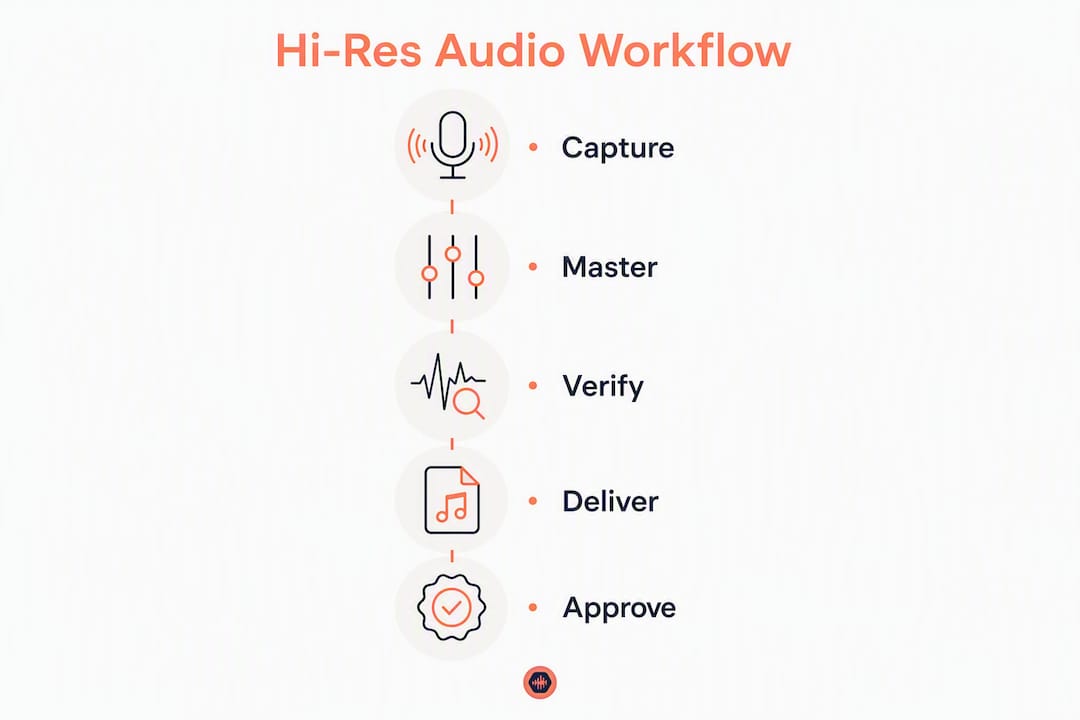
Immediate 3-step roadmap:
- Step 1 — Choose a host: use a platform that preserves original bit depth and sample rate on ingest, offers access controls, and supports verified downloads (Audome covers all three)
- Step 2 — Prepare files and metadata: name files with sample rate, bit depth, and version; tag FLAC files; generate MD5 checksums before upload
- Step 3 — Verify with checksums and listening tests: confirm the downloaded file matches the source hash, check sample-rate lock on your DAC, and run the 5-point listening battery above
Present clients with a written delivery policy that defines what “final hi-res delivery” means, how many free revisions are included, and what triggers a paid revision. That single document eliminates most revision disputes before they start.
Key Takeaways
True hi-res delivery requires exact-file hosting, a capable playback chain, and checksum verification at every handoff.
| Point | Details |
|---|---|
| Hi-res threshold | 24-bit at 48–192 kHz; anything at or below 16-bit/44.1 kHz is CD quality, not hi-res |
| Format choice | Use WAV or FLAC for delivery; FLAC preserves metadata and compresses losslessly without quality loss |
| Bandwidth planning | At 24-bit/192 kHz, hi-res audio files use up to 40 MB per minute; plan storage and transfer speeds for large files |
| Verification steps | Confirm bit depth and sample rate with MediaInfo, match MD5 checksums, and verify DAC sample-rate lock before sign-off |
| Audome for studios | Audome hosts files up to 96kHz/24-bit with permissioned portals, timestamped waveform feedback, and paid revision controls |
Why controlled hi-res delivery is a business decision, not just a technical one
Studios that treat hi-res delivery as a technical checkbox miss the bigger point. The real value is not the extra bits. It is the control you have over what leaves your studio, who can access it, and what happens when a client asks for “just one more change.”
Every time a final master goes out over a generic file-sharing link with no expiry, no checksum, and no revision limit, you have handed the client leverage you cannot get back. They can download it, sit on it for three weeks, and come back with a list of changes after you have already moved on to the next project. A permissioned delivery workflow with paid revision limits changes that dynamic entirely.
The studios that have adopted this approach report fewer revision cycles, faster approvals, and clients who give more decisive feedback the first time because they know additional rounds cost money. That is not a coincidence. When clients understand that the delivery is final and that changes have a price, they listen more carefully before responding.
Hi-res delivery done right also protects the master itself. A file served from a permissioned portal with download controls and expiry links is not floating around in someone’s Downloads folder indefinitely. You know who has it, when they got it, and whether they downloaded the correct version.
Audome gives studios a complete hi-res delivery workflow
Scattered files, vague feedback, and unpaid revision rounds are the three things that eat studio profitability. Audome solves all three in one place: upload unlimited files up to 96kHz/24-bit, share password-protected client portals with no client login required, collect timestamped feedback directly on the waveform, and lock final downloads behind Stripe payment until the invoice clears.

A typical delivery loop with Audome looks like this: upload the 24-bit master, share a permissioned link, the client leaves timestamped notes at the exact moment they want a change, you revise and upload the new version, and the platform tracks every iteration automatically. When the client hits their free revision limit, the next round triggers a charge. No chasing invoices, no ambiguous email threads.
Start a free trial at Audome and see how much time you recover in the first week.
Useful sources
- TIDAL HiRes FLAC support page — bandwidth estimates, device compatibility, and HiRes FLAC definition
- Qobuz streaming offers (US) — current hi-res streaming tiers and FLAC 24-bit/192 kHz specs
- TIDAL sound quality overview — HiRes FLAC vs FLAC vs Immersive format comparison
- World Wide Stereo hi-fi streaming guide — DAC and playback chain recommendations
- Pocket-lint lossless codec comparison — FLAC vs ALAC codec analysis
- Audome: sharing audio files with clients — secure delivery workflow guide
- Audome: exporting audio deliverables — file export and metadata best practices
FAQ
What sample rate and bit depth count as hi-res audio?
Any file above 16-bit/44.1 kHz qualifies as hi-res. The practical studio standard is 24-bit at 48, 96, or 192 kHz.
Does hi-res streaming matter if the client uses Bluetooth headphones?
No. Bluetooth codecs cap bandwidth well below what hi-res requires, so the extra bit depth and sample rate are lost in transport. Verify on a wired DAC before delivery.
How much storage does a hi-res audio file use?
At 24-bit/192 kHz, hi-res audio files use up to 40 MB per minute of audio. A typical 5-minute master is about 200 MB.
How do I confirm a delivered file was not resampled or transcoded?
Run MediaInfo on the downloaded file to check bit depth and sample rate, then compare the MD5 checksum against the source file. A matching hash confirms the file is bit-for-bit identical.
Which platform is built for hi-res client delivery in a studio workflow?
Audome hosts files up to 96kHz/24-bit with permissioned portals, timestamped waveform feedback, automated version tracking, and paid revision billing, making it purpose-built for studio client delivery.