
TL;DR:
- A recording studio workflow is a repeatable sequence of tasks that moves a project from idea to release-ready audio efficiently. It includes templates, organization, gain staging, and quality control to prevent delays and mistakes. Collaboration platforms like Audome centralize files, feedback, and version control to keep teams aligned and workflows smooth.
A recording studio workflow is the repeatable sequence of tasks that moves a project from raw idea to finished, release-ready audio without burning time, money, or your sanity. Most session disasters trace back to one thing: no real system. Engineers show up, wing it, and then wonder why the mix took three weeks and the client is pissed. The core tools that fix this are DAW templates, consistent session organization, solid gain staging, and a collaboration platform like Audome that keeps everyone on the same page. Get those four things right and your sessions run tighter, your handoffs stop being a nightmare, and you actually finish projects.
What does a recording studio workflow actually look like?
A recording studio workflow is not one thing. It is a chain of stages, and each stage has a job. Think of it like a relay race. If the first runner drops the baton, the whole team loses, no matter how fast the anchor leg is.
The 10-stage music production workflow covers everything from initial concept through release-ready delivery, including two quality control phases most engineers skip entirely. Skipping those QC stages is like sending a car off the assembly line without checking the brakes. The stages run roughly like this: concept, pre-production, tracking, editing, mixing, pre-master QC, mastering, post-master QC, distribution prep, and release. Most producers handle the middle stages fine. The QC stages are where things fall apart.
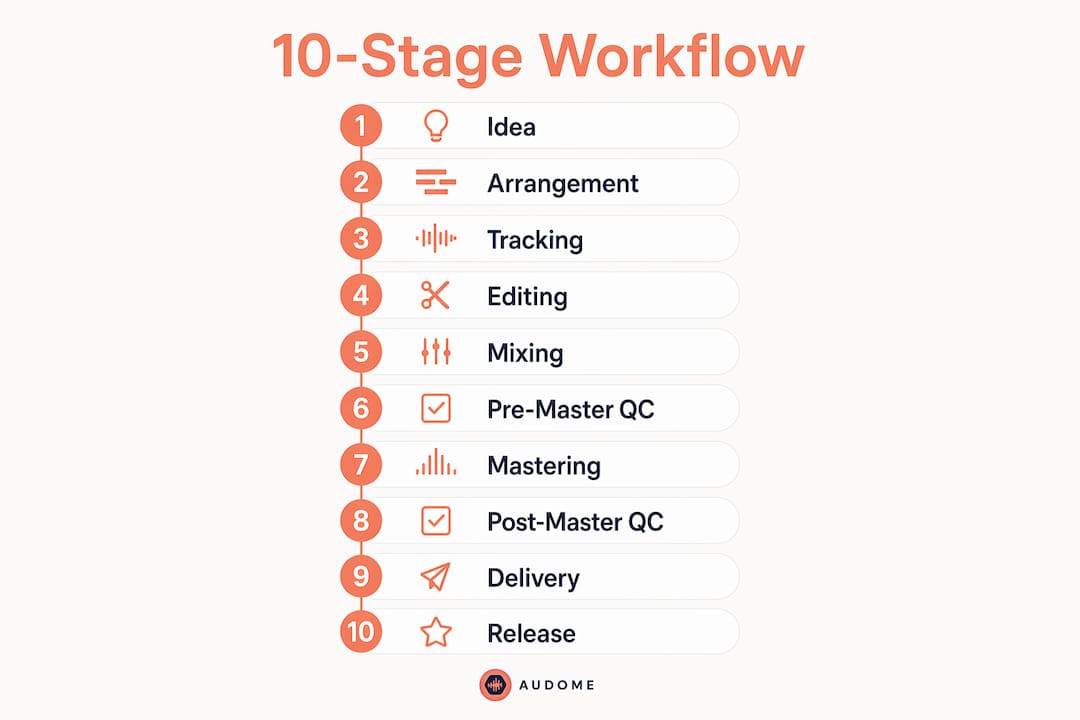
The goal of any audio recording process is continuous forward movement. You are not chasing perfection at each stage. You are chasing “good enough to move on.”
How do session templates save you serious time?
Session templates are the single fastest way to cut wasted setup time in the studio. Building a solid template reduces individual setup tasks from 47 seconds down to 9 seconds and saves over 20 minutes across a 6-hour session. That is not a small number. That is the difference between finishing a rough mix and going home with nothing.
A useful template includes these components:
- Track groups for drums, bass, guitars, vocals, and FX returns
- Bus routing already wired to your mix bus and stem buses
- Plugin chains on each bus with your go-to compressor and EQ loaded
- Color coding so any engineer can open the session and know exactly what they are looking at
- Gain staging markers set to your standard reference levels
The mix bus chain matters most. Loading a blank session and rebuilding your bus chain from scratch every time is like cooking the same meal every night but throwing away your recipe card after dinner. Save the chain. Reload it. Move on.
Pro Tip: Save separate templates for different session types. A vocal production template, a full band tracking template, and a podcast session template should each live in their own folder. Switching between them takes seconds and keeps your headspace clean.
Here is a quick comparison of templated versus non-templated session startup:
| Task | Without Template | With Template |
|---|---|---|
| Bus routing setup | 8–12 minutes | 0 minutes |
| Plugin chain loading | 5–10 minutes | 0 minutes |
| Track labeling and color | 10–15 minutes | 0 minutes |
| Total saved per session | 0 minutes | 20+ minutes |
How should you organize a DAW session for collaboration?
Poor session organization is a systems problem, not just a personal preference issue. DAW session organization requires addressing both human factors and technical infrastructure. When a collaborator opens your session and has no idea what they are looking at, that is your fault, not theirs.

Consistent track labeling is non-negotiable. Every track needs a name, a color, and a group. “Audio 1” tells nobody anything. “Kick In” tells everyone everything. Group your tracks by instrument family, then by function. Drums together. Vocals together. FX returns at the bottom.
Gain staging is where most engineers quietly screw up. Industry standard gain staging sets tracks at approximately -18dBFS RMS on input. That gives you headroom to work with and keeps your plugin chain out of distortion territory. Think of -18dBFS as the sweet spot on a highway. You are not crawling and you are not redlining. You are just driving.
Pro Tip: Define a “done” condition for each stage before you start. “Tracking is done when every take is comped and gain staged.” Write it down. When you hit that condition, you move on. No more endless tweaking.
A clean session structure also looks like this in practice:
- Label every track before recording a single note
- Assign colors by instrument family, not randomly
- Group all drum tracks under one folder track
- Route all vocals to a dedicated vocal bus
- Archive unused takes in a dedicated “Unused” folder, not the trash
What are the critical QC stages most engineers skip?
Pre-master quality control is the main silent killer of professional-sounding tracks. Mixes that skip pre-master QC go straight to mastering with problems the mastering engineer cannot fix without charging extra or sending the mix back. That costs time and money.
The pre-master QC stage is an iterative loop. You analyze the mix, fix what you find, then analyze again. Common catches include low-frequency buildup below 40Hz, harsh resonances in the 2–5kHz range, and stereo width issues that collapse to mono. None of these are obvious on studio monitors after six hours of listening fatigue.
“Quality control at the pre-master stage is not optional. It is the last line of defense before your mix becomes someone else’s problem.”
Post-master QC is equally important and equally ignored. Play the mastered file back on at least three different playback systems: studio monitors, consumer earbuds, and a phone speaker. If it sounds bad on the phone speaker, it sounds bad to most of your listeners. That is just reality.
The iterative analyze-fix-reanalyze loop in pre-master QC catches issues early. Catching a problem at the mix stage costs you 20 minutes. Catching it after mastering costs you a full revision cycle and possibly the client relationship.
How do collaboration tools change the studio workflow for teams?
Remote and multi-stakeholder projects break down fast without the right infrastructure. DAW session organization for teams requires both human-friendly systems and reliable cloud infrastructure. Email chains, Dropbox folders, and Google Drive comments are not built for audio. They lose versions, compress files, and create confusion about which mix is current.
Audome solves this directly. It consolidates file sharing, project management, and feedback into one place. Engineers can share lossless audio up to 96kHz/24-bit without compression, so the file your client hears is the actual file, not a degraded proxy. Timestamped comments let collaborators mark exactly where in the track they have a note. No more “around the 2-minute mark” emails.
The features that matter most for audio collaboration workflow are:
- Version control so you always know which mix is current
- Private collaborator spaces that keep client feedback separate from internal notes
- Password protection and download toggling for asset security
- No login required for clients, which removes the friction that kills feedback turnaround
Automation tools also play a role in workflow efficiency for producers. Automating file delivery notifications, revision reminders, and approval requests cuts the back-and-forth that eats studio hours. The goal is to make the administrative side of a session invisible so you can stay focused on the audio.
What are the biggest workflow mistakes pros make?
Hardware power-up and shutdown sequences are not optional. Standard power-up sequences protect monitors and interfaces from the “pop” that blows tweeters and fries inputs. Pros make this muscle memory. You turn on the interface first, then the monitors. You reverse it on shutdown. Every time. No exceptions.
Overusing templates kills creativity just as fast as having no templates at all. A template is a starting point, not a straitjacket. If you are forcing every session into the same structure because it is “the template,” you are letting the system work against you.
Scheduling errors cascade into equipment bottlenecks that blow session budgets. A double-booked room or a missing outboard piece does not just cost an hour. It costs the whole session vibe, and sometimes the client. Build buffer time into every booking.
The onramp and offramp model from producer pipeline thinking is the clearest fix for perfectionism paralysis. Every stage has an entry condition and an exit condition. When you hit the exit condition, you leave. You do not keep polishing. You move to the next stage. That is how working producers actually finish music.
Pro Tip: Write your offramp condition at the top of your session notes before you open the DAW. “Mixing is done when the client approves revision 2.” That sentence will save you from three extra unpaid revision rounds.
Key Takeaways
A tight recording studio workflow requires templates, clean organization, consistent gain staging, and real QC stages at both the pre-master and post-master points.
| Point | Details |
|---|---|
| Use session templates | Templates cut setup time from 47 seconds to 9 seconds per task, saving 20+ minutes per session. |
| Gain stage at -18dBFS RMS | Hitting -18dBFS RMS on input gives headroom and keeps plugin chains clean. |
| Run pre-master QC every time | Catching mix problems before mastering saves a full revision cycle and protects client relationships. |
| Define done conditions | Writing exit conditions for each stage stops perfectionism from killing your session momentum. |
| Use a real collaboration platform | Audome keeps versions, feedback, and files in one place so nothing gets lost between collaborators. |
What I’ve learned from sessions that went sideways
I have been in rooms where the whole session fell apart because nobody labeled a single track. Six hours of recording, and the session file looked like a ransom note. “Audio 47.” “Audio 48.” “New track.” Nobody knew what was what, including the engineer who recorded it. That is not a talent problem. That is a workflow problem.
The thing most engineers get wrong is thinking a workflow has to be rigid to work. It does not. The best systems I have seen are loose enough to let creativity breathe but tight enough that you never lose a take, miss a QC step, or send the wrong mix to a client. That balance is the whole game.
I also think people copy other engineers’ workflows without understanding why those workflows exist. You see a YouTube video of some producer’s session setup and you rebuild it exactly. But that setup was built for their specific clients, their specific gear, and their specific way of working. Yours needs to be built for yours.
Start simple. One template. One gain staging rule. One QC checklist. Run it for a month. Fix what breaks. Add what is missing. A workflow is not something you build once. It is something you tune over time, like a mix.
— Kreg
Audome keeps your studio sessions from falling apart
If you are managing projects across multiple collaborators, clients, or remote engineers, fragmented tools will eventually cost you a session.
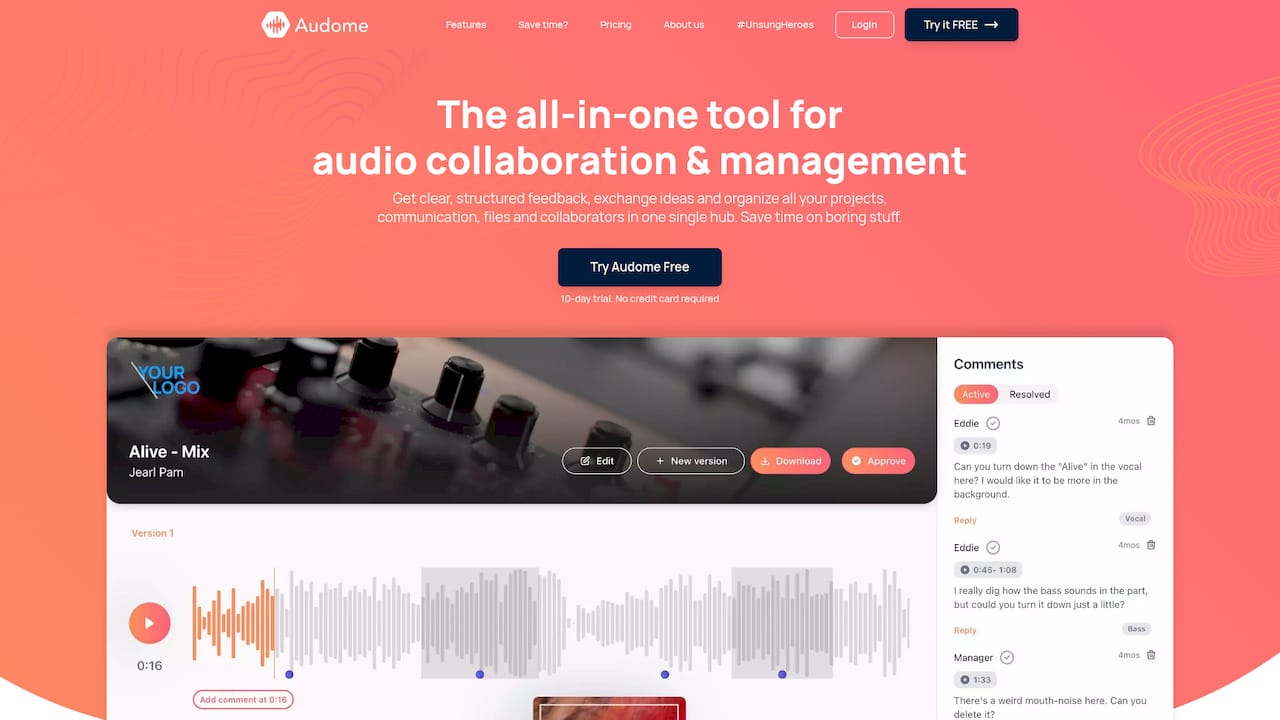
Audome brings file sharing, version control, timestamped feedback, and private collaborator spaces into one platform built specifically for audio professionals. No compressed files. No login friction for clients. No confusion about which mix is current. It handles the audio collaboration tools side of your workflow so you can stay focused on the work that actually matters. Whether you are running a full production house or a solo home studio with outside clients, Audome removes the administrative noise that kills momentum.
FAQ
What is a recording studio workflow?
A recording studio workflow is the structured sequence of tasks that moves a project from initial concept through tracking, mixing, QC, and mastering to a finished, release-ready file.
How do session templates improve studio efficiency?
Session templates reduce individual setup tasks from 47 seconds to 9 seconds and save over 20 minutes per 6-hour session by pre-loading track groups, bus routing, and plugin chains.
What is the correct gain staging level for recording?
The industry standard sets tracks at approximately -18dBFS RMS on input, which provides sufficient headroom and keeps plugin chains operating cleanly without distortion.
Why is pre-master QC so important?
Pre-master QC catches mix problems like low-frequency buildup and stereo issues before mastering, saving a full revision cycle and preventing costly rework after the mastering stage.
What collaboration tools work best for remote studio projects?
Platforms like Audome that support lossless audio sharing, timestamped comments, version control, and private collaborator spaces are built for the specific demands of audio production teams.