
TL;DR:
- Mastering client workflow involves creating a clear, repeatable system that smoothly guides clients from initial contact to offboarding. Effective workflows require defined phases, role ownership, structured communication, and thorough documentation before automation. Using tailored tools like Audome streamlines file sharing and feedback, helping audio pros maintain professionalism while scaling relationships.
Mastering client workflow is the process of designing a clear, repeatable system that moves a client from first contact through delivery and offboarding without things falling apart in the middle. Most audio pros are incredible at their craft and terrible at this part. Files get sent over email, feedback comes in through three different apps, and nobody knows which version is the final one. AI-powered workflows cut onboarding time by 30 to 40%, which means the chaos you’re living with right now is a choice, not a requirement. Tools like Audome, Sagely, and Noloco exist specifically to fix this. The question is whether you’re ready to build the system.
What are the essential stages of a client workflow?
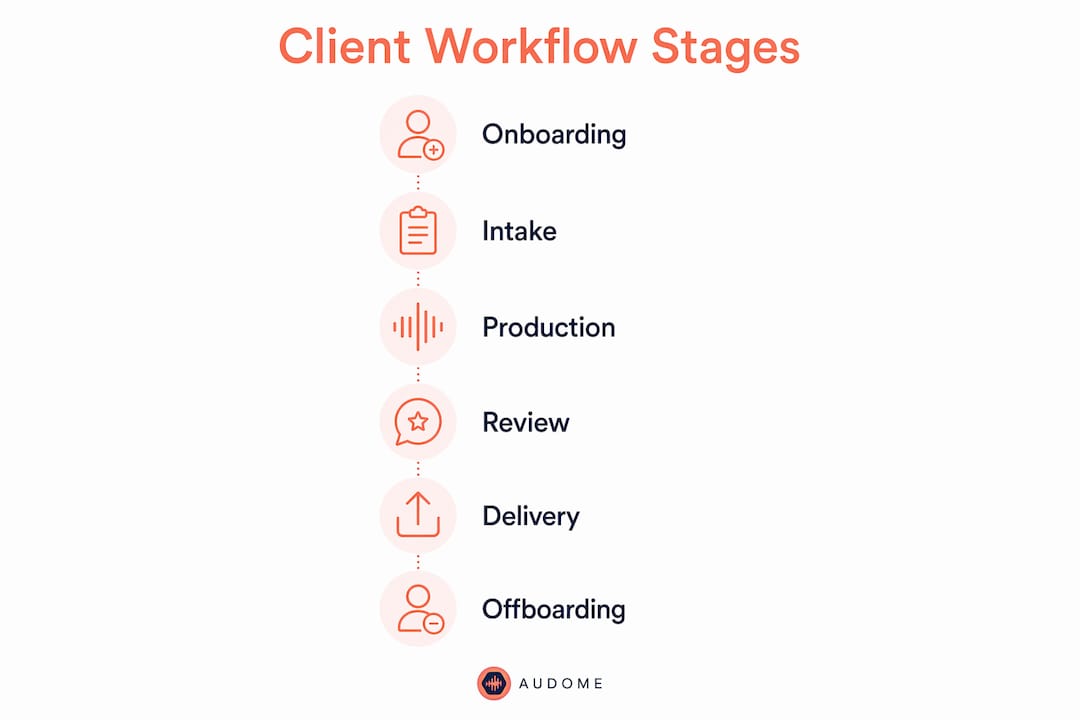
A client workflow in audio production is not just a project tracker. It’s a full lifecycle system with six distinct phases, and skipping any one of them is where things go sideways.
- Onboarding sets the tone for everything. This is where you define scope, collect assets, sign agreements, and make sure the client knows exactly how you work. A weak onboarding creates a client who emails you at midnight asking where their stems are.
- Request intake is how new work enters your pipeline. Without a structured intake form or portal, you’re triaging requests from Slack DMs, Instagram messages, and a voicemail from 2023. Use a single intake channel. Period.
- Project delivery covers status tracking, file handoffs, and approvals. This is where client portals with approval workflows earn their keep. Clients see progress, approve deliverables, and leave feedback in one place instead of scattering it across platforms.
- Reporting keeps trust alive between sessions. A quick async update on where things stand prevents the “just checking in” emails that eat your day.
- Issue escalation is the phase nobody plans for. Who handles it when a client hates the mix? Who has authority to offer a revision or a refund? Define this before you need it.
- Offboarding is the most neglected phase in audio. Sending a final invoice and going quiet is not a process. A proper offboarding includes a final file delivery checklist, a feedback request, and a clear path to re-engagement.
Pro Tip: Build your onboarding checklist before you take on your next client. Even a Google Form beats nothing. Nail this phase and the rest of the workflow gets easier by default.
Common workflow breakdowns happen at the handoff points between phases. The project moves from intake to delivery and nobody told the client what to expect next. That silence is where confusion and frustration breed.

How to structure communication and define roles clearly
Structured ownership and timing clarity in workflows eliminate guesswork and speed up handoffs. That sentence sounds obvious until you’re on a call with a client who got three different answers from three different people on your team.
The first rule is separating client-facing communication from internal communication. Your client does not need to see the thread where you and your engineer argued about the low end for 45 minutes. Keep that internal. What the client sees should be clean, intentional, and on-brand.
Here’s what a structured communication setup looks like in practice:
- One intake channel for all new requests, no exceptions
- Role-based access so clients only see what’s relevant to their project
- Named task owners with due dates attached to every deliverable
- Timezone-aware scheduling for live calls and approval deadlines
- A single feedback channel per project, not a mix of email, voice notes, and text
“Consolidated written feedback with deadlines and portal approvals provide an auditable reference versus scattered informal comments.” — Sagely Client Relationship Management
The Senior Client Manager model, where one person owns the client relationship end to end, works well for audio agencies handling multiple projects simultaneously. That person is the single point of contact for the client and the internal traffic cop for the team. Without that role defined, every team member becomes a de facto account manager and nothing gets done efficiently.
The biggest mistake most audio pros make is letting every client relationship develop its own informal structure. One client gets updates via WhatsApp. Another expects a weekly call. A third just shows up at the studio. That’s not a workflow. That’s chaos with a studio tan.
Which tools actually help with audio client workflows?
Avoid buying software before documenting your manual workflow. The workflow shapes the tool, not the other way around. If you don’t know your own process yet, no app is going to save you.
Start by writing down every step you currently take with a client, from the first email to the final file delivery. Then identify where things break, slow down, or require you to chase someone. Those are your automation targets.
By 2026, 40% of enterprise apps will embed task-specific AI agents for workflow orchestration. That’s not a distant trend. It’s already showing up in onboarding tools that auto-send welcome sequences, collect intake data, and trigger project creation without you touching a keyboard.
Here’s how three tools compare for audio workflow management:
| Tool | Best for | Key limitation |
|---|---|---|
| Sagely | Client management and CRM-style workflows | Not built specifically for audio file handling |
| Noloco | Custom client portals with approval logic | Requires setup time and some technical knowledge |
| Audome | Audio-specific file sharing, feedback, and approvals | Purpose-built for audio pros, not general project management |
Moving from scattered email threads to a centralized client portal cuts administrative overhead and errors sharply. Audome handles this specifically for audio, with timestamped comments on waveforms, version control, and no-login access for clients. That last part matters more than people realize. Clients who have to create an account to hear your mix will not create an account. They’ll just text you instead.
Pro Tip: Before evaluating any tool, write out your current workflow on paper. If you can’t explain it in ten steps or fewer, the problem isn’t the software. The process needs fixing first.
For a deeper look at how to handle the delivery side specifically, the guide to sending mixes to clients covers approval workflows step by step.
How to scale without losing the personal connection
Discipline in scope management, communication cadence, and feedback loops matters more than any software feature for sustaining client relationships. You can have the best tools in the world and still lose clients because you went quiet for two weeks.
Scaling a client workflow means systematizing the repeatable parts while protecting the human moments. Here’s what that looks like in practice:
- Weekly async updates sent every Monday covering project status, next steps, and any decisions needed from the client
- Monthly live strategy calls for relationship check-ins, not just project status
- Quarterly reviews focused on whether the working relationship is healthy, not just whether deliverables are on time
- Change order documentation for any scope additions, referenced calmly and consistently to protect your margins
The hybrid communication cadence of async updates plus live calls keeps clients informed without burning out your team. It also creates a paper trail that protects you when a client suddenly “doesn’t remember” agreeing to something.
Scoping changes require documented change orders from the start. Scope creep is the silent profit killer in audio production. A client asks for “just one more revision” and suddenly you’ve done four extra sessions for free. Reference the original scope document every time. Not as a confrontation. Just as a habit.
Different clients have different involvement preferences. Some want to be in the loop on every decision. Others want to hand it off and get a finished product. Your workflow needs to accommodate both without requiring you to build a custom process from scratch each time. Build two or three communication templates and let the client choose their preference during onboarding.
For a practical breakdown of how this applies specifically to producers, the producer client workflow guide is worth reading alongside this one.
Key takeaways
Effective client workflow management in audio production requires defined phases, clear role ownership, and discipline in communication before any tool can make a meaningful difference.
| Point | Details |
|---|---|
| Define all six workflow phases | Onboarding through offboarding must each have a clear owner and expected output. |
| Separate internal and client communication | Role-based access and single feedback channels prevent confusion and protect your process. |
| Document before you automate | Write your manual workflow first; then choose tools that fit it, not the other way around. |
| Use a hybrid communication cadence | Weekly async updates plus monthly live calls keep clients engaged without burning out your team. |
| Protect scope with change orders | Document every scope addition early and reference it consistently to prevent silent profit loss. |
Why most audio pros get this wrong (and what I’ve actually seen)
Here’s the honest version of this conversation. Most audio engineers I know are running their client relationships out of their head and their inbox. No system. No documentation. Just vibes and muscle memory. And it works… until it doesn’t.
I’ve seen sessions fall apart because nobody knew which mix version the client approved. I’ve seen engineers lose clients not because the work was bad, but because the client felt ignored between sessions. I’ve seen scope creep eat an entire project’s margin because nobody wanted to have the “that’s outside the original agreement” conversation.
The thing most people miss is that a workflow is not a tool. It’s a discipline. You can buy Audome, Sagely, Noloco, and ClickUp on the same day and still have a broken client process if you haven’t decided who owns what and when.
My actual advice: pilot your new workflow with one client before you roll it out to everyone. One client. Get the kinks out. See where it breaks. Fix it. Then scale it. Trying to overhaul your entire operation at once is how you end up with a half-built system that nobody uses.
Ditch the complex tools if they’re slowing you down. A shared folder with a clear naming convention beats a fancy portal that nobody logs into. Clarity beats features every time.
— Kreg
How Audome makes client workflow management easier for audio pros
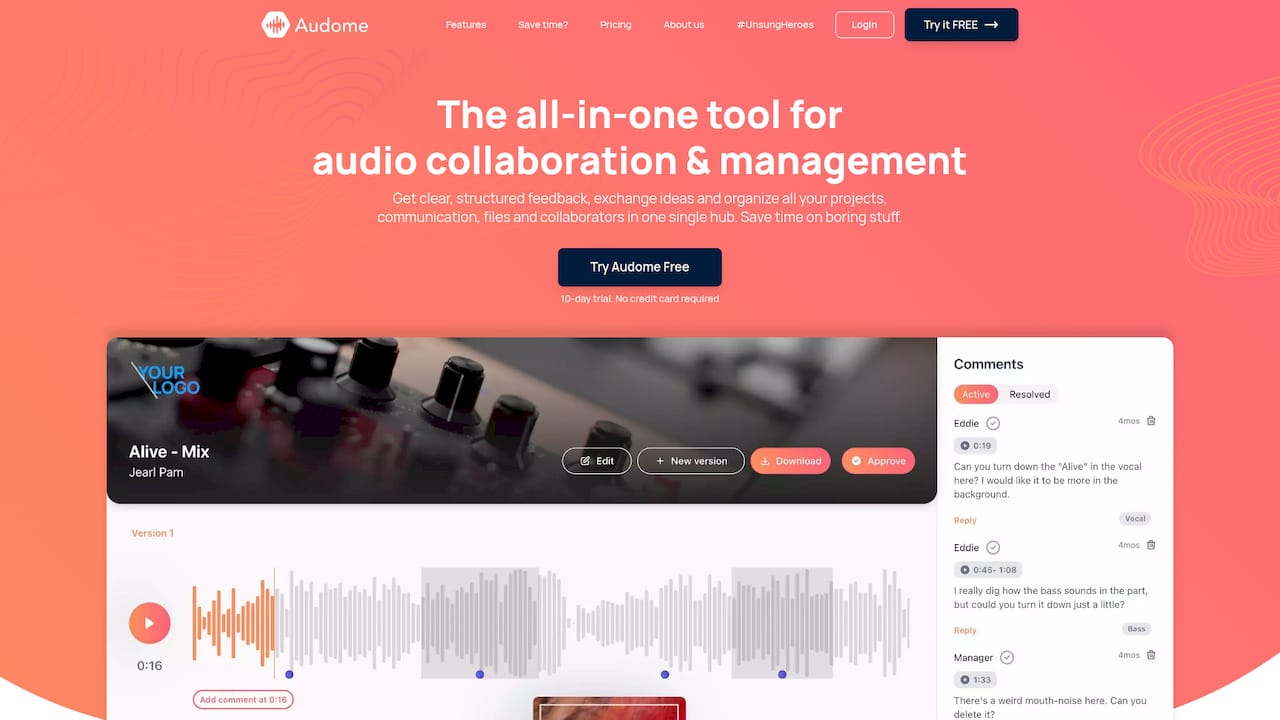
Audome is built specifically for audio professionals who need to manage client feedback, file delivery, and project approvals without duct-taping five different apps together. The platform handles lossless audio up to 96kHz/24-bit, timestamped comments directly on waveforms, version control, and client access with no login required. That means your clients actually use it.
If you’re serious about optimizing your audio workflow, Audome replaces the scattered email threads, Dropbox folders, and Google Docs approval chains with one place that was designed for exactly what you do. No compromises on audio quality. No chasing clients to create accounts. Just a clean, professional process from first share to final approval.
Visit Audome.com and see how it fits your current workflow.
FAQ
What is a client workflow in audio production?
A client workflow in audio production is a defined system that manages every stage of a client engagement, from onboarding and intake through project delivery and offboarding. It specifies who owns each step, what tools are used, and how communication is handled at every phase.
How do I improve client workflow without buying new software?
Document your current manual process first, identify where handoffs break down, and assign clear ownership to each step. Structured ownership and timing clarity eliminate most workflow problems before any software is needed.
What is the best way to handle client feedback in audio projects?
Use a single, dedicated feedback channel per project with written comments and deadlines attached. Consolidated written feedback with portal approvals creates an auditable record and prevents the revision spiral that comes from scattered informal comments.
How do I prevent scope creep in audio client projects?
Document every scope addition as a formal change order and reference the original agreement consistently. Referencing scope calmly and early protects your margins without turning every conversation into a confrontation.
When should I automate parts of my client workflow?
Automate only after you have a documented, working manual process. AI-powered onboarding tools can cut intake time significantly, but automation built on a broken process just breaks faster.