
TL;DR:
- Effective management of mix revisions involves establishing clear workflows, including consistent file naming, detailed change logs, and batching client feedback. Structuring revision rounds with defined limits and channels helps prevent scope creep, while proactive communication before reaching revision caps ensures smoother collaboration. Implementing a robust system for tracking, archiving, and delivering versions saves time and reduces confusion throughout the mixing process.
Managing mix revisions is the process of organizing, tracking, and implementing client feedback in audio projects to prevent endless revision spirals and wasted studio time. Most engineers don’t fail because they can’t mix. They fail because they never set up a system. A client sends notes at midnight, you tweak three things, they send four more notes the next morning, and suddenly you’re on version 23 of a song that should have been done two weeks ago. That’s not a mixing problem. That’s a workflow problem. And it’s completely fixable.
What do you need before starting mix revisions?
Before you touch a fader on round two, get your foundation right. The biggest source of chaos in mix revision workflows isn’t a difficult client. It’s a folder full of files named “final_FINAL_v3_USE THIS ONE.wav.” That’s a disaster waiting to happen.

Start with a naming convention and stick to it every single time. A format like ProjectName_Type_Version_Date works well. Something like SmithAlbum_Mix_v03_20260415 tells you exactly what you’re looking at without opening the file. Simple consistent naming is more important than any complex version control tool you could buy.
Beyond naming, you need a dedicated change log. This is just a text file or spreadsheet that lives in your project folder. Every time you update a mix, you write down what changed, who requested it, and what plugin versions you’re running. Timestamped comments and reference audio exports alongside major session milestones make collaboration and traceability dramatically cleaner. It takes two minutes and saves hours of “wait, which version has the vocal up?” conversations.
Here’s the third piece most engineers skip: export a reference MP3 or AAC with every major version. Not everyone you work with has Pro Tools or Logic. Your client, their manager, the label A&R… they’re listening on their phone. Give them a compressed reference file they can actually play.
- Naming convention: Use
ProjectName_Type_Version_Datefor every file, every time - Change log: Document what changed, who asked for it, and plugin versions used
- Reference exports: Export an MP3 or AAC alongside every major session milestone
- Single source of truth: One folder, one platform, one place where the approved version lives
- Feedback portal: Pick one channel for client feedback and tell them upfront that’s the only channel you check
Pro Tip: Export reference stems starting at timecode 00:00 every time. It sounds obvious, but consistent export start points prevent the “I’m hearing something different than you” confusion that kills sessions.
How do you structure a mix revision workflow?
The most effective mix revision workflow is built before the project starts, not during it. Defining revision rounds upfront with clear limits and delivery rules is the single biggest lever you have to avoid endless back-and-forth. This is where most engineers leave money and sanity on the table.
Here’s how to build a revision workflow that actually holds up:
-
Define what a revision round means. A revision round is triggered only when a client submits one consolidated batch of notes. Not a text at 11pm. Not a voice memo the next morning. One batch, submitted through the agreed channel. Operationally defining a revision round this way prevents stealth scope creep before it starts.
-
Set a limit and put it in writing. Two or three rounds included in your rate is standard. Anything beyond that costs extra. Write it in your contract or project agreement. No exceptions.
-
Batch the feedback. Tell your client upfront: sit with the mix for 24 hours, collect all your notes, then send them together. Bundling feedback into one consolidated set reduces confusion and speeds up your turnaround. It also stops the drip-feed of “oh one more thing” messages that turn a two-round project into a ten-round nightmare.
-
Pick one feedback channel. Email, a platform like Audome, a shared doc… pick one and tell your client that’s where feedback lives. If they text you a note, you don’t see it until they put it in the right place.
-
Set a soft checkpoint before the revision cap. When you’re one round away from the included limit, reach out. Don’t wait for them to hit the wall and get surprised by an invoice.
Pro Tip: Delivering mixes in batches of 3–5 files treats each delivery as a natural checkpoint. It gets clients focused on a smaller set and makes their feedback more specific and useful.
How to handle, track, and implement mix revisions
This is the daily execution part. You’ve got your system set up. Now a batch of notes lands in your inbox. Here’s how to work through it without losing your place or your mind.
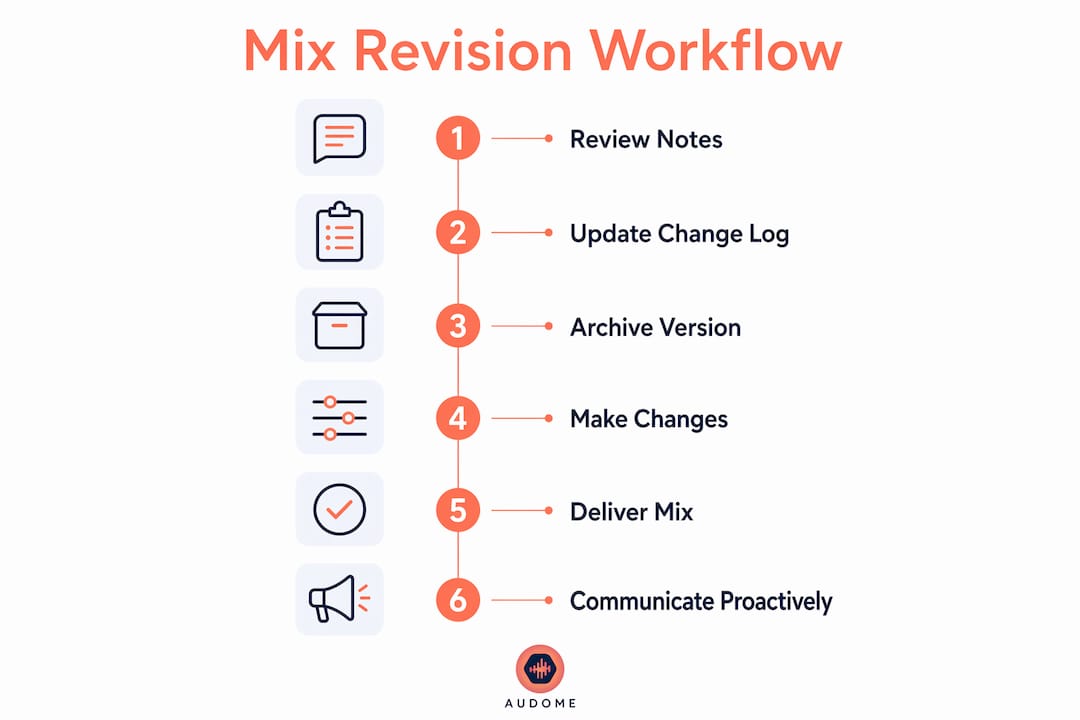
Review everything before you change anything. Read the full batch of notes first. Identify conflicts. If the vocalist wants more presence and the producer wants less brightness, those notes are fighting each other. Flag it before you start working, not after you’ve already printed a new version.
Once you’ve reviewed the batch, update your change log before you open the session. Write down the date, the version number you’re moving to, and a summary of the requested changes. This takes three minutes and means you’ll never have to dig through email threads to remember what changed between v04 and v05.
| Step | Action | Why It Matters |
|---|---|---|
| 1. Review batch | Read all notes before touching anything | Catches conflicts early |
| 2. Log the version | Update change log with date and requests | Creates a clear paper trail |
| 3. Archive the current version | Save approved version before making changes | Protects your last good mix |
| 4. Implement changes | Work through notes systematically | Keeps sessions organized |
| 5. Export and deliver | Send reference file through agreed channel | Closes the loop cleanly |
Archive the current approved version before you start making changes. This is your safety net. If the client hears the new version and says “actually the old one was better,” you can go back without rebuilding from memory. Tools like Audome make this straightforward with built-in version control for audio projects, but even a simple folder structure works if you’re consistent.
When you deliver the updated mix, communicate proactively. Don’t just drop a file and disappear. Tell them what you changed, reference the notes they sent, and remind them how many revision rounds remain. That last part matters more than most engineers realize.
What are the most common mix revision problems?
Even with a solid system, things go sideways. Here’s what actually happens in the real world and how to handle it.
The drip-feeder. This client sends one note, you fix it, they send another, you fix that, and suddenly you’ve done eight rounds of changes that should have been two. The fix is going back to your definition of a revision round. Remind them politely but firmly: notes need to come in one batch. If they’ve already burned through their included rounds this way, that’s a billing conversation you need to have.
Conflicting feedback within a batch. The artist wants the snare louder. The producer wants it buried. You’re stuck in the middle. Don’t guess. Send a quick message asking them to align on the note before you proceed. You’re not a referee, and making the wrong call costs you another round.
File and version confusion. This one is almost always self-inflicted. If you’ve got five files named some variation of “final” in a shared Dropbox folder, you created this problem. A single source of truth, whether that’s a platform like Audome or a strictly organized folder, is the only cure.
“Avoiding revision spirals requires structure and clear upfront communication more than mid-project strictness.” TrackBloom
The creative pivot. You’re on round two of mix revisions and the client suddenly wants to change the arrangement. That’s not a mix revision. That’s a new project. Name it clearly, price it accordingly, and don’t let it get absorbed into your existing agreement.
Approaching the revision cap. When you’re one round away from the limit, schedule an alignment call before additional charges apply. Proactive communication at this boundary prevents conflict and keeps the relationship intact.
Key takeaways
Effective mix revision management comes down to three things: clear upfront rules, batched feedback, and a single source of truth for every version.
| Point | Details |
|---|---|
| Set rules before you start | Define revision rounds, limits, and feedback channels in writing before the project begins. |
| Batch all client feedback | Require one consolidated set of notes per round to prevent drip-feed chaos and scope creep. |
| Maintain a change log | Document every version update with what changed, who requested it, and the date. |
| Archive before you revise | Save the approved version before making changes so you always have a clean fallback. |
| Communicate near the cap | Reach out proactively when one revision round remains to avoid billing surprises. |
The revision system that actually saved my sessions
Here’s the honest truth… I learned most of this the hard way. I had a project years ago where I ended up on version 31 of a mix. Thirty-one. The client was a good person, not a nightmare, just someone who had never worked with an engineer before and didn’t know how the process was supposed to work. That was on me. I never told them.
After that, I started having the revision conversation before I ever opened a session. Not in a rigid, contract-lawyer way. Just a five-minute talk at the start: here’s how we work, here’s what a round means, here’s where you send notes. That one conversation cut my average revision count in half.
The other thing I’ll say is this: simple beats complex every time. I’ve seen engineers build elaborate folder structures with color-coded labels and sub-folders for sub-folders. They spend more time managing the system than mixing. A consistent naming convention and a plain text change log will serve you better than any elaborate setup you’ll eventually abandon.
The collaboration workflow guides and version control resources from Audome are worth reading if you want to go deeper. But the mindset shift is the real work. You’re not just a mixer. You’re managing a project. Own that part of the job and the revisions stop feeling like punishment.
— Kreg
Stop letting revisions run your sessions
If you’re tired of chasing down feedback across texts, emails, and voice memos while trying to remember which “final” file is actually final… Audome was built for exactly this.

Audome consolidates file sharing, timestamped feedback, and version control into one place. Clients leave notes directly on the audio at the exact timestamp, no login required on their end. You get organized feedback, clean version history, and full control over what gets downloaded. It’s the kind of audio collaboration tool that makes the revision process feel like a workflow instead of a fire drill. Try Audome and run your next project the way it should be run.
FAQ
What is a mix revision round?
A mix revision round is one consolidated batch of client notes submitted through an agreed channel. Defining it this way prevents scope creep and keeps revision counts accurate.
How many revision rounds should i include in my rate?
Two to three rounds is standard for most audio engineers. Anything beyond the included rounds should be priced as an additional fee, stated clearly in your project agreement.
How do i stop clients from sending notes one at a time?
Tell them upfront that feedback must come in one batch per round. Batching feedback reduces confusion, speeds up approvals, and prevents the drip-feed pattern that inflates revision counts.
What is the best file naming convention for mix versions?
Use a format like ProjectName_Type_Version_Date for every file. Consistent naming is the simplest and most effective way to prevent version confusion across a project.
What should i do when a client requests a creative change mid-revision?
Treat it as a new scope item, not a revision. Name it clearly, price it separately, and document the change in writing before proceeding.