
TL;DR:
- Effective revision tracking consolidates feedback within a single, version-controlled platform, eliminating chaos. Structured workflows with automatic versioning, version-specific comments, and signed approvals ensure clarity and prevent scope creep. Enforcing the use of one dedicated platform for all revisions streamlines collaboration and reduces miscommunication.
Revision tracking for creatives is the practice of anchoring feedback and file changes to specific asset versions inside a centralized system, so nothing gets lost, overwritten, or argued about. The industry term for this is version control, and if you’re still managing it through email threads and files named “final_v3_ACTUALLY_FINAL.mp3,” you’re burning hours you don’t have. Tools like Approval Studio, Wonderful, and Anchorpoint exist specifically to kill that chaos. This article walks you through how to set up a system that actually holds, what features matter, and where most creative teams fall apart.
How to set up revision tracking that doesn’t fall apart
The foundation of any working revision tracking workflow is a single source of truth. One place where files live, versions stack, and comments attach to the right asset at the right moment. Not three Slack threads and a Google Drive folder nobody can find.
Here’s how a clean revision cycle actually runs:
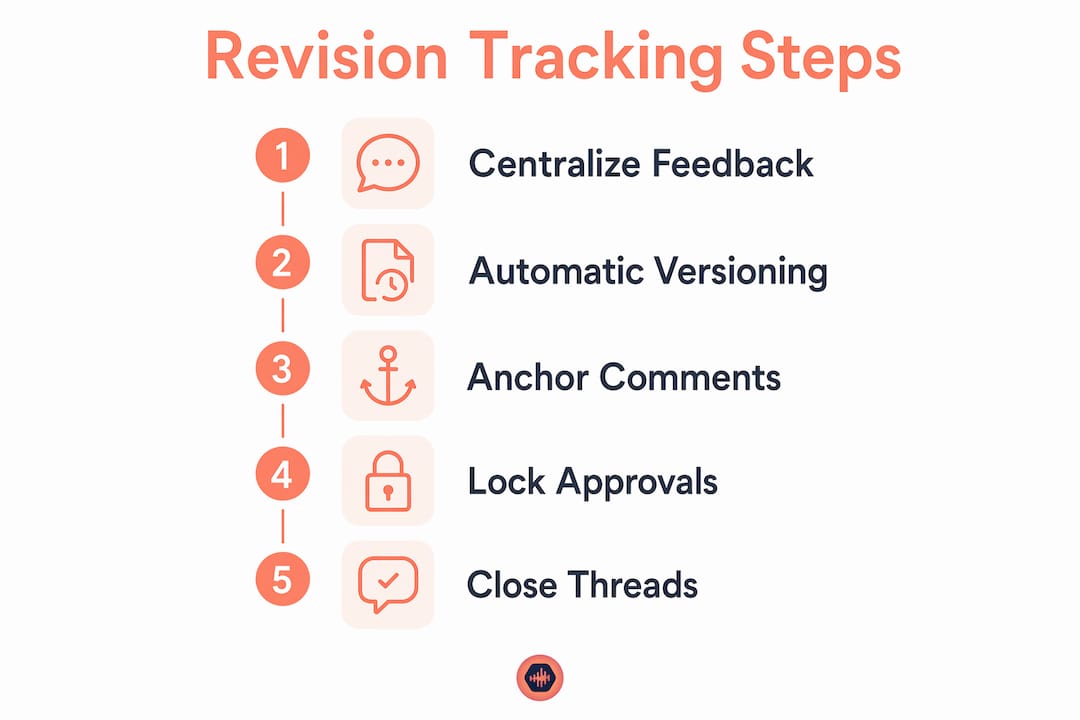
- Upload the asset to your platform. The system creates version 1 automatically. No manual naming. No “v2_revised_FINAL” nonsense.
- Stakeholders leave comments directly on the asset. Not in email. Not in chat. On the file, tied to that version.
- You revise and upload again. The system increments to version 2. Old comments stay attached to version 1 where they belong.
- Use version filters to see what’s new. Wonderful’s system preserves comment history across versions and lets you filter by current or all versions, so you’re never guessing what feedback applies to what.
- Lock the version once approved. Approval Studio lets reviewers approve or reject in one click, recording who signed off and when. That timestamp is your paper trail.
- Close the loop. Mark the task complete. Archive the version. Move on.
The key habit is enforcing where feedback lives. If a client emails you a revision note, you copy it into the platform and reply asking them to use the link next time. You do that twice and they learn. You let it slide and you’re back to chaos by week three.
Pro Tip: Ban email and chat as feedback channels for revisions. Put it in your contract if you have to. One platform, one thread, one version history. That’s the rule.

What features actually matter in revision management software
Not all creative collaboration tools are built the same. Some are glorified comment boxes. Others give you real version control for designers and a full audit trail. Here’s how to tell the difference.
Email and file naming as a versioning system is a disaster waiting to happen. Current version holders become unclear fast, and there’s no audit trail when a client claims they never approved something. Structured systems fix this at the root.
The features that actually matter:
| Feature | Why It Matters |
|---|---|
| Automatic versioning on upload | Removes human error from naming and creates a clean rollback path |
| Comment anchoring to versions | Feedback stays tied to the right file, not floating in a thread |
| Approval locking | Prevents changes after sign-off and creates a legal paper trail |
| Audit logs with timestamps | Proves who approved what and when, no arguments |
| Browser-based proofing | Clients review without downloading anything or creating an account |
| Notification and gating | Keeps the workflow moving without manual follow-up |
Advox automatically versions assets and locks approvals to version numbers, so nothing enters production without a documented sign-off. That’s the standard you should expect from any revision management software you pay for.
Anchorpoint takes a different angle. It adds metadata layers for state management on top of Photoshop files, giving designers Git-style version control without forcing them to learn Git. File locking, notifications, rollback. All without touching a terminal.
For music video and social media content teams, platforms built around structured approval records in creative workflows handle the visual asset side in a similar way.
Pro Tip: Pick a tool that gives clients a simple review link with no login required. If they have to create an account, half of them won’t bother and you’ll get the feedback in a text message instead.
What breaks creative collaboration and how to fix it
The most common revision tracking failures aren’t technical. They’re behavioral. Here’s what actually kills projects:
- Stale comments after deployment. You finalize a design in Figma, the dev ships it, and then the live product drifts from the file. Now your Figma comments don’t map to what’s actually in production. You’re reviewing a ghost.
- Feedback in the wrong channel. One stakeholder emails you. Another texts. A third drops it in Slack. None of it is attached to a version. You’re now playing detective instead of making work.
- Unlimited revision rounds. No cap, no governance, no end. The client keeps finding “one more thing” and you keep saying yes because you didn’t set expectations upfront.
- Unresolved comments at handoff. In Figma, unresolved feedback before handoff creates confusion about what’s been addressed and what’s still open. Close threads before you hand anything off.
- Scope creep disguised as revisions. A “small tweak” that’s actually a new feature. Without clear approval state documentation, you can’t prove the scope changed.
“Batching feedback, monitoring approval state, and using timers for revision rounds” is how HireSava’s 2026 playbook describes governed revision workflows. That’s not bureaucracy. That’s how you stop working for free.
The fix for stale comments is running parallel feedback loops. One loop on the design file, one on the live product. They serve different purposes and should never be confused for each other.
Pro Tip: Close feedback threads the moment they’re resolved. An open thread from three versions ago is a landmine. Someone will step on it.
How to plug revision tracking into your current workflow
You don’t need to blow up your existing process to add real version control. You need to add structure at the right pressure points.
Here’s a phased approach that works without disrupting your team:
- Pick one platform and make it mandatory for all reviews. Not “preferred.” Mandatory. This is the hardest step because people resist change. Do it anyway.
- Add metadata to your asset uploads. Project name, version number, approval state. Tools like Anchorpoint handle this automatically for design files. For audio, Audome does the same with audio version control built into the upload flow.
- Set up phased approvals. Internal creative review first. Then legal if needed. Then client. Each phase gates the next. Nobody sees the client version until internal is locked.
- Use notifications to replace manual follow-up. The platform pings the right person when it’s their turn. You stop chasing people over email.
- Give clients a preview link. No account, no download, no friction. They click, they comment, you get structured feedback tied to the right version.
For teams working across design and engineering, parallel feedback loops on the design file and the shipped product keep both tracks honest. You track whether the feedback actually made it into the build, not just whether someone said “approved” on a Figma frame.
Pro Tip: Automate your deadline reminders inside the platform. If a reviewer hasn’t responded in 48 hours, the system nudges them. You don’t have to be the bad guy.
Key takeaways
Revision tracking for creatives works when feedback is anchored to specific versions inside a single platform, approvals are locked with timestamps, and revision rounds are governed with clear limits.
| Point | Details |
|---|---|
| Centralize all feedback | Use one platform for comments and approvals; ban email and chat as revision channels. |
| Anchor comments to versions | Feedback tied to the wrong version causes rework; tools like Wonderful and Approval Studio prevent this. |
| Lock approvals with timestamps | Timestamped sign-offs create an audit trail and stop scope creep before it starts. |
| Govern revision rounds | Set a round limit and SLA upfront; HireSava’s playbook shows this cuts unbounded revision cycles. |
| Automate version increments | Manual file naming creates errors; automatic versioning on upload removes that risk entirely. |
The honest truth about why creatives keep suffering through this
I’ve been in sessions where we spent two hours trying to figure out which mix the client actually approved. Not mixing. Not creating. Arguing about a file named “mixdown_v7_clientapproved_FINAL2.” That’s not a workflow problem. That’s a self-inflicted wound.
The thing nobody tells you is that the chaos isn’t random. It’s a choice. Every time you let a client send revision notes in a text message, you chose that. Every time you named a file “final” and then made another one, you chose that. The tools to fix it have existed for years. Approval Studio, Wonderful, Anchorpoint, Audome… they’re not new ideas. Most creatives just haven’t made the switch because “it’s always worked this way.”
It hasn’t worked. You’ve just been absorbing the cost.
I switched to a centralized feedback system on a post-production project about three years ago and the first thing I noticed wasn’t speed. It was that I stopped dreading client feedback. Because when it comes in attached to a version with a timestamp, it’s just information. Not a mystery. Not a fight. Just a task.
Half-measures don’t cut it. If you’re using a structured platform for internal review but still letting clients email notes, you’ve got one foot in and one foot in the fire. Commit to the system or don’t bother.
— Kreg
Audome keeps your revisions from becoming a dumpster fire
If you’re an audio professional dealing with revision chaos, Audome was built for exactly this situation. It consolidates file sharing, feedback, and version control into one place, so you’re not stitching together three apps and a prayer.

Audome supports timestamped comments, version history, and private collaborator spaces. Clients get a secure review link with no account required. You get structured feedback tied to the right file, every time. No more “which version did they mean?” conversations. Check out how Audome handles client approval workflows and see what a clean revision process actually looks like. Ready to stop the madness? Start with Audome and get your revisions under control.
FAQ
What is revision tracking for creatives?
Revision tracking for creatives is the process of managing feedback and file changes using a centralized system that anchors comments to specific asset versions. The industry term is version control, and it replaces manual file naming and email threads with structured, auditable workflows.
What are the best tools for creative feedback and version control?
Approval Studio, Wonderful, Anchorpoint, and Audome are among the strongest options for managing creative revisions. Each offers automatic versioning, comment anchoring, and approval locking, though their focus areas differ across visual design, audio, and general creative assets.
How do i stop clients from sending revision notes over email?
Set the expectation in your contract and onboarding process that all feedback must go through your review platform. Provide a direct link and make it as easy as possible. Most clients comply once they see how simple browser-based proofing actually is.
Why do figma comments stop working after a product ships?
Static design comments become stale when the live product diverges from the design file. Running a parallel feedback loop anchored to the live product, separate from the design file, keeps post-deployment feedback valid and actionable.
How many revision rounds should i allow per project?
Set a specific round limit upfront, typically two to three rounds, with a clear definition of what counts as a revision versus a new request. HireSava’s 2026 playbook recommends tracking rounds with SLAs and escalation policies to prevent scope creep from eating your margin.