
Getting precise feedback on audio projects is a headache when most collaboration tools force you to bounce between email, file drops, and apps that mangle sound quality or timeline notes. Free options limit uploads or make clients sign up just to add a comment, while paid ones either gate lossless delivery or lack hands-on integrations with pro editors. This review puts timestamped commenting, version control, and DAW integration for three audio-first collaboration platforms side by side so you can finally pick one that fits your workflow without tripping over file size, clarity, or client friction.
Table of Contents
Audome
At a Glance
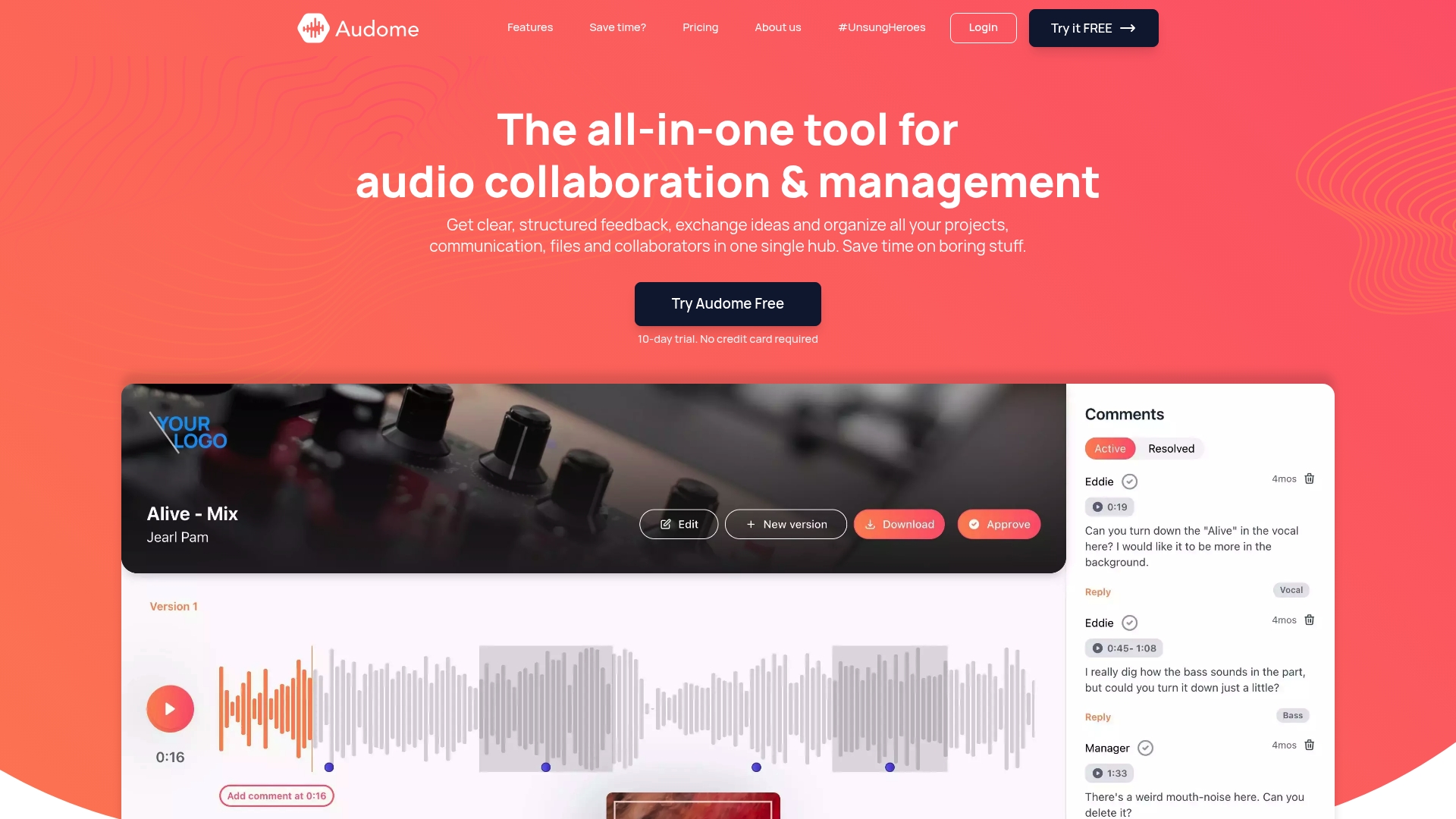
Lossless audio up to 96kHz/24-bit and unlimited uploads let you share masters without recompression, keeping dynamics and headroom intact. Audome is a SaaS platform built for music producers, engineers, podcast teams, and sound designers who need precise feedback and secure delivery.
Core Features
- Timestamped comments for frame-accurate feedback tied to specific moments in a track.
- Automated version management so every revision is stored and recoverable without manual file naming.
- Unlimited client uploads and storage, with private collaborator spaces for per-project access control.
- Security controls including password protection and download toggles that let you lock a deliverable down.
- Centralized dashboard for quick project overviews and file organization.
Key Differentiator
Branded project delivery pages plus lossless sharing and auto versioning make Audome a single place to replace Dropbox, WeTransfer, email threads, Trello boards, and ad hoc folder dumps. That combination keeps audio at full fidelity while collapsing multiple handoffs into one workflow.
Pros
-
Upload everything. Unlimited uploads and storage remove guesswork about file sizes or archive quotas, so you can send stems, masters, and alternate mixes without cutting or zipping.
-
Feedback that hits the exact beat. Timestamped comments turn vague notes into precise direction, which saves revision rounds and clarifies take numbers.
-
Rollbacks without panic. Automated version control prevents overwritten masters and keeps a clear revision history for credits and billing.
-
Tight security options. Passworded links and the ability to toggle downloads mean you control who can hear and who can keep copies.
-
No client accounts required. Clients and collaborators can comment without creating logins, which reduces friction for nontechnical stakeholders.
Cons
- Built-in payment handling is limited or absent for now, so if you invoice or sell deliverables directly through the workspace you will need a separate payment solution.
Who It’s For
Producers, mix engineers, podcast producers, and post teams that demand lossless transfers and precise feedback loops. Good for studios that frequently send reference masters to labels, mix notes to clients, or iterative podcast edits to hosts.
Unique Value Proposition
No client logins required. Send a secure link, and stakeholders can listen and leave time-stamped notes without account setup. That small detail speeds approvals on short deadlines and reduces back-and-forth email chains… which matters when your deadline is a day, not a week.
Real World Use Case
A music producer drops multitrack stems and two reference masters into a project, invites an artist via a secure link, and receives timestamped notes tied to exact bars. The producer uploads a revised master, Audome stores it as a new version, and the artist reviews the before and after without downloading extra files.
Pricing
Studio plan: $12.5 per month billed monthly or $150 per year (most popular). Pro plan: $48 per month or $576 per year. Audome offers a 10-day free trial with no credit card required.
Website: https://audome.com
Frame.io
At a Glance
Camera to Cloud lets footage move off set without hard drives — the vendor positions this as instant transfer from camera to post. That workflow is a hard sell for teams still hauling drives to edit suites.
Frame.io also highlights deep editor plugins and secure sharing that it says cut review cycles significantly. Treat that as the vendor claim; the product is built around quick handoffs between shooters and editors.
Core Features
- Camera to Cloud support for direct upload from set into the project, removing physical media from the critical path.
- File management with organized assets, versioning, and project-level storage controls.
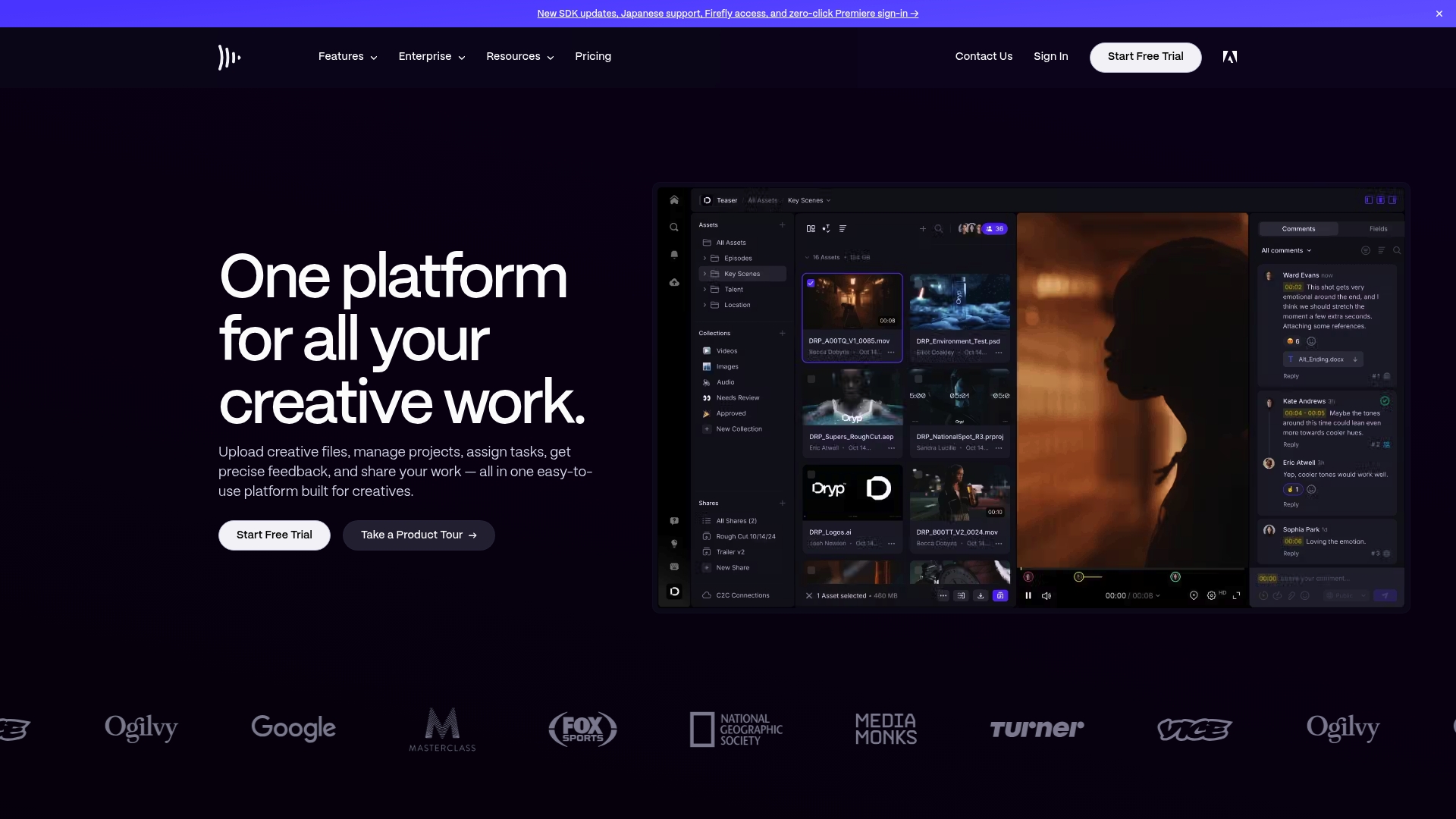
- Review & Approvals with timestamped comments and visual markers so feedback points to exact frames.
- Share and present tools for public or restricted review links with customizable permissions.
- Workflow controls and integrations that connect editors, producers, and stakeholders inside the same project.
Key Differentiator
Frame.io’s strongest point is its editor-first integrations. The vendor emphasises tight plugins for Adobe Premiere Pro and other NLEs that let editors import and comment without leaving the timeline. That focus changes how hands-on review actually happens.
Pros
- Easy navigation and an interface that helps teams move faster. Users often report getting collaborators to reply inside the platform rather than email.
- Timestamped comments and version control keep feedback precise; you can point to a frame and track which cut contains which notes.
- Mobile apps let producers and clients review dailies from a phone when they are on the road.
- Security features and customizable permissions are prominent, with enterprise options for stricter controls.
- Strong editing integrations reduce the manual import/export steps that eat time during post.
Cons
- The interface can feel cluttered as features accumulate, which some users find makes navigation harder on large projects.
- Playback reliability degrades for very long or very high-resolution files; teams report buffering or stuttering at times.
- Customization options are limited; if you want a drastically different UI or workflow, you will hit walls.
- Certain forensic features like watermarking and DRM are reserved for enterprise plans only.
When It May Not Fit
If your team prioritizes extreme customization or lightweight simplicity, Frame.io will feel heavy. If you consistently work with multi-hour 8K masters and need flawless playback, that performance risk is a real blocker.
Notable Integrations
- Adobe Premiere Pro
- Final Cut Pro
- Lightroom
- Slack
- Dropbox
Who It’s For
Small to mid production teams, marketing agencies, and post houses that rely on editor plugins and need controlled review spaces. Typical teams range from solo editors to groups of about 1–15 people handling frequent media handoffs.
Real World Use Case
A marketing agency uploads campaign edits to Frame.io, invites stakeholders, and collects timestamped feedback across versions. The team replaces scattered email threads with notes pinned to frames, so approvals move from weeks to days.
Pricing
Starts with a free tier with limited features. Paid plans begin around $15 per month for Pro, while enterprise pricing is custom and adds storage, security, and advanced workflow controls.
Test how review comments behave alongside your audio workflow on Audome — compare timestamp fidelity and lossless handling for audio-first projects.
Website: https://frame.io
NoteTracks
At a Glance
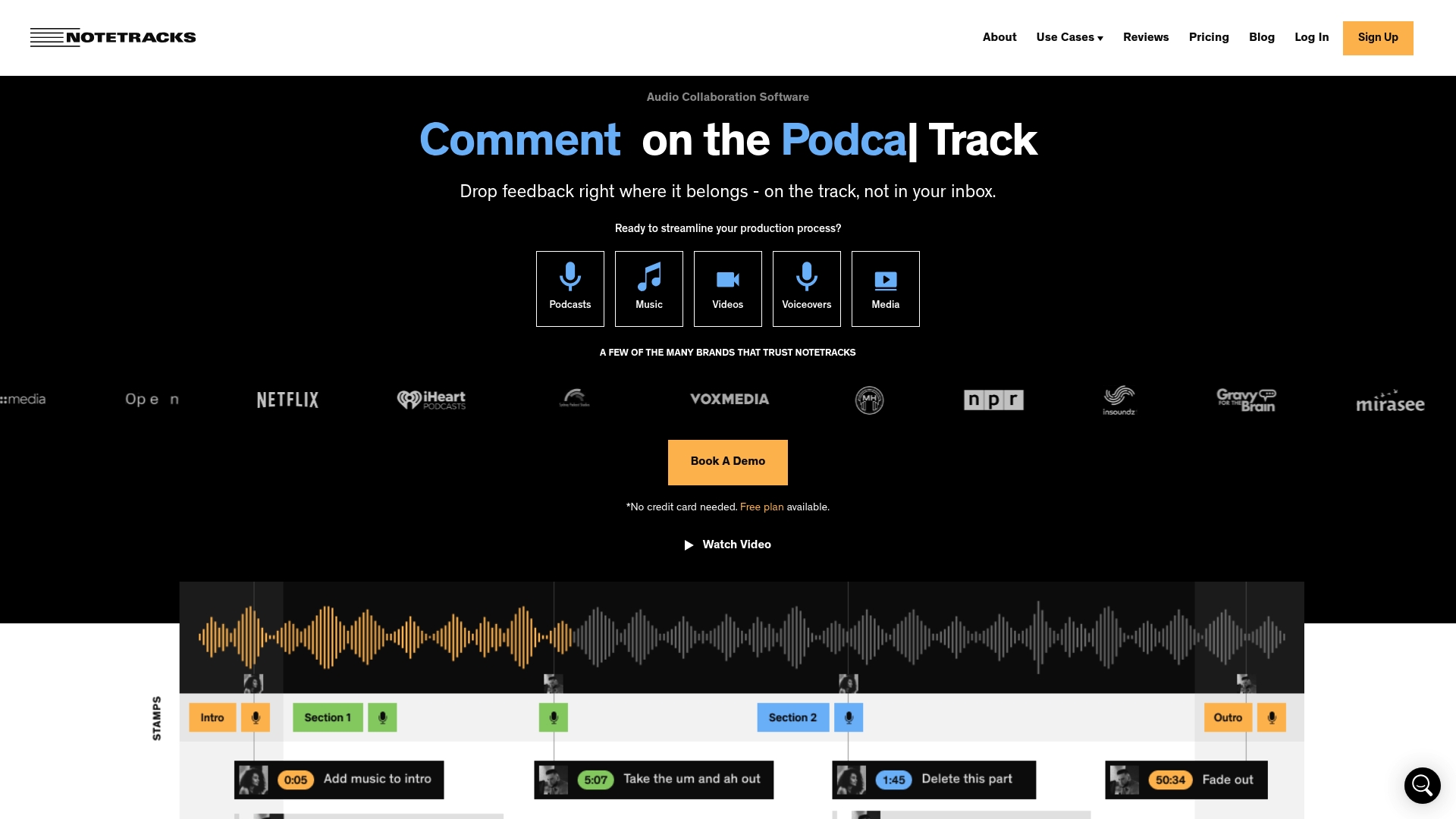
You can leave liner notes via text, symbols, or drawings that sit exactly on the waveform timeline. NoteTracks binds annotations to timestamps and can house multiple audio and video tracks inside one project, which shortens revision loops.
The platform also advertises integrations with pro editors like Adobe Audition, Audacity, Pro Tools, and Hindenburg Pro to keep feedback flowing back into the DAW.
Core Features
- Inline comments placed directly on waveform timelines for frame-accurate feedback.
- Timestamped notes that sync with audio and video playback so comments arrive in context.
- Multi-track project housing that stores versions and parallel takes inside a single project file.
- Support for both audio and video files so editors and picture folks can review together.
- Integration hooks for professional editors mentioned above to move annotations back into editing sessions.
Key Differentiator
NoteTracks pairs waveform-tied annotations with multi-track housing and editor integrations to make feedback and versioning feel like part of the edit rather than an afterthought. Compared with Audome, NoteTracks focuses more narrowly on in-timeline notes and project-level review rather than lossless delivery and broader asset controls.
Pros
- Gets feedback out of email and into the timeline. Timestamped notes reduce guesswork about where a cut or vocal needs work.
- Supports both audio and video files, so podcast producers, post teams, and video editors can work on the same review session.
- Commenting plus drawing tools make it simple to mark edits visually when words fail — useful for spectral or mix notes.
- Integrates with common DAWs, which lets editors pull annotation context into their workflow without recreating notes.
- Interface is reported to be approachable so collaborators and nontechnical clients can leave precise feedback quickly.
Cons
- There are limited third-party reviews available, so independent validation of reliability and performance is sparse.
- The vendor materials do not list advanced editing capabilities; heavier DAW work still happens outside of NoteTracks.
- Documentation of enterprise features and large team controls is thin in public sources, which means trialing is necessary for larger shops.
Notable Integrations
- Adobe Audition
- Audacity
- Pro Tools
- Hindenburg Pro
Who It’s For
Audio creators, podcast teams, educators, and video editors who need pinpoint feedback tied to specific moments in a timeline. If your work relies on clear, timecoded notes and you already use mainstream editing tools, NoteTracks fits the bill.
Real World Use Case
A remote podcast team drops an episode into NoteTracks, marks breaths, flags music levels, and sketches a waveform region that needs EQ changes. Producers load those notes back into the editor and ship a revised mix in fewer rounds.
Pricing
Free plan available for individual or occasional projects. Paid plans start at $9 per month for individual users. Enterprise pricing is custom and requires contacting the vendor for quotes.
For a platform built around lossless audio up to 96kHz and additional project controls, check Audome: Audome
Website: https://notetracks.com
Comparative Analysis of Client Approval Software for Audio Collaboration
Selecting an appropriate platform for managing audio production workflows greatly impacts the efficiency of feedback and revision processes. Below, we analyze three top contenders: Audome.com, Frame.io, and NoteTracks, highlighting their unique strengths and limitations for various use cases.
Handling Lossless Audio and Precision Feedback
Audome.com excels in offering lossless audio transfer capabilities and timestamped comments, enabling precise communication during critical stages of production. Unlike competitors, Audome ensures every uploaded version is retained permanently through automated version management, fostering a streamlined and risk-free revision experience. While Frame.io offers comparable timestamped feedback, it’s primarily optimized for video and general media workflows, leaving audio-focused teams with potentially redundant features. Similarly, NoteTracks provides detailed feedback tools anchored to waveform timelines; however, it lacks the asset management seen in Audome. These distinctions demonstrate how Audome prioritizes workflows for audio professionals.
Integration with Industry Tools and Broader Workflow Support
Frame.io shines with its integration into video editing suites like Adobe Premiere Pro, which allows editors to interact with production feedback directly within their preferred tools. This feature is a game-changer for those blending audio with broader video or multimedia projects. Conversely, Audome.com focuses on integrating broader client collaboration and delivery mechanisms that simplify producer-to-client interactions, remaining dedicated to audio-centric workflows. NoteTracks, although useful in its ability to annotate multiple tracks within a project, offers less extensive integration with professional audio software, which might necessitate extra steps when importing crucial feedback into a workstation.
Best Fit Scenarios
- Audome.com: Designed for audio production professionals requiring precise feedback systems, version control, and secure delivery of lossless audio files.
- Frame.io: Ideal for video or cross-discipline multimedia teams seeking streamlined editor plugins and dynamic feedback during the editing process.
- NoteTracks: Perfect for creators prioritizing waveform-anchored annotations with a straightforward interface geared towards synchronized audio-visual tasks.
Our Pick
For audio professionals, Audome.com stands out due to its exceptional focus on high-fidelity audio workflows, offering lossless file sharing with advanced version control and secure delivery mechanisms. These features make it a prime choice where audio quality preservation is. However, for teams whose needs revolve around more integrated video editing processes, Frame.io might be better suited. Each platform holds particular strengths, with the right choice depending on your specific workflow demands.
In conclusion, selecting the right tool involves matching your project’s priorities with the platform’s capabilities.
Audio Collaboration Software Compared
Understand which audio creative collaboration platform best aligns with your project needs by comparing their key features, pricing, and targeted users.
| Product | Core Feature | Key Differentiator | Best For | Pricing | Notable Limitation |
|---|---|---|---|---|---|
| Audome | Lossless transfers and unlimited uploads | Streamlines feedback and version control | Producers, engineers, collaborative studios | $12.5/mo or $150/year | Lacks integrated payment handling |
| Frame.io | Camera-to-cloud and file review | Editor-focused integrations | Production to post-production crews | Starts at $15/mo | Playback issues with large high-res files |
| NoteTracks | Time-stamped waveform annotations | Integrates annotations into editing workflows | Audio-video creators needing detailed feedback | Free or $9/mo | Limited enterprise feature documentation |
Stop Guessing and Take Control of Client Approvals with Audome
Client approval software for creatives can feel overwhelming when you’re juggling compressed audio files, scattered feedback, and endless email threads. Audome solves that headache by delivering lossless audio transfers up to 96kHz/24-bit with unlimited uploads. Imagine sharing your masters without losing quality while collaborators drop pinpointed, timestamped comments that cut through vague notes and speed up revisions.
No client logins. No mixups. Just clear, secure, and organized feedback in one place. This is what your approval process has been missing. Stop bouncing between Dropbox, emails, and sketchy tools. Switch to Audome and see how precise version control and easy security options keep your projects tight.
Ready to ditch the chaos and tighten your feedback loop? Check out Audome now and experience lossless sharing with timestamped comments that actually work for audio pros. Upload your first master, invite collaborators, and watch approvals fly in faster than ever.
Frequently Asked Questions
What makes Audome a better choice for client feedback in audio collaborations?
Audome offers lossless audio sharing up to 96kHz/24-bit and unlimited uploads, ensuring your masters remain in pristine condition. The platform features timestamped comments for precise feedback, making the review process much clearer and more efficient. If you want to streamline feedback loops while maintaining audio fidelity, Audome is the way to go.
How does Audome’s version control compare with Frame.io?
Frame.io excels with its editor-first integrations, enabling immediate feedback through plugins in tools like Adobe Premiere Pro. However, Audome’s automated version management system allows for easy access to every revision without the risk of losing past work, which is critical for audio projects. For those focused on audio fidelity and collaboration, Audome offers the ideal solution.
Can I use Audome if my clients don’t want to create accounts?
Yes, Audome allows clients to leave timestamped feedback without needing to set up accounts, which reduces friction and speeds up approvals. This feature is critical for fast-paced projects where time is of the essence, making it easier for your clients to engage without barriers.
What security options does Audome offer for client uploads?
Audome provides password protection and download toggles, allowing you to control who can access your files and whether they can download them. This level of security is essential for managing sensitive audio projects, ensuring only authorized collaborators can access your work.
How does NoteTracks enhance the feedback process compared to Audome?
NoteTracks allows for inline comments directly on the waveform, facilitating precise feedback for both audio and video projects. Audome focuses on lossless audio delivery, making it best for finalized projects, while NoteTracks is optimized for real-time collaboration during the editing process. Depending on your workflow preference, you might find NoteTracks beneficial for more iterative feedback sessions.
What kind of pricing does Audome offer for creatives?
Audome’s Studio plan is $12.5 per month or $150 per year, providing unlimited uploads and storage essential for creative workflows. This pricing model offers great value, especially given the features tailored for audio professionals. If you’re looking for a reliable platform with straightforward pricing for all your audio collaboration needs, Audome is worth considering.