
The fastest way to cut revision rounds is to centralize client feedback: put timestamped waveform comments, versioned lossless files, and one shared review link in a single workspace instead of scattered emails and texts. That single move removes the guesswork that drives extra revisions. Platforms like Audome are built around exactly this workflow.
TL;DR:
- Centralizing client feedback with timestamped waveform comments and version control reduces unnecessary revisions and clarifies specific requests.
- Sending lossless files at the session’s native sample rate and up to 96kHz/24-bit prevents artifacts that could mislead clients or require extra rounds.
- Limiting revisions to two or three rounds with clear feedback windows and attaching change logs helps manage scope and avoid scope creep.
- Using a private, no-account portal streamlines feedback collection from non-technical clients and ensures all comments live in one organized space.
- Setting and enforcing revision limits through contracts and automated billing prevents unlimited revision requests and protects the studio’s time.
Table of Contents
- What Does It Mean to Centralize Client Feedback on Audio Projects?
- How Do You Set Up a Centralized Feedback Workflow for Mixes?
- What File Formats and Specs Should You Use for Client Review?
- How Do You Set Revision Limits Without Losing Clients?
- How Do You Get Clients to Give Useful Feedback the First Time?
- Why a Purpose-Built Platform Matters for Centralizing Feedback
- Why This Workflow Change Is Worth Making Now
- Get Your Studio Off Email and Onto One Review Link
- Sources
- FAQ
What Does It Mean to Centralize Client Feedback on Audio Projects?
Centralizing client feedback means every comment, file version, and approval lives in one place tied directly to the audio itself, not spread across a Gmail thread, three text messages, and a Dropbox folder nobody can find. For audio work specifically, that “one place” has to do more than hold files. It has to understand waveforms.
A workspace that actually solves the problem needs to check every box below. Skip one, and you’re back to guessing what “the drums sound weird around the bridge” actually means.
- Timestamped comments pinned to the waveform so “fix the vocal” becomes a note attached to 2:14, not a vague paragraph you have to interpret.
- Lossless playback, with no browser-side downsampling, and support for common high-resolution formats so clients hear what you actually mixed.
- Version history that’s immutable, meaning old versions stay intact and comparable even after you’ve pushed v4.
- One sharable review link or private client portal, with no account creation required on the client’s end.
- A change log per version noting what moved and why, so nobody has to reconstruct history from memory.
- Access controls, including password protection, download gating, and the option to lock revisions behind payment.
Timestamped waveform annotations replace vague notes and sharply cut the guesswork that turns a two-round revision into a six-round slog.
How Do You Set Up a Centralized Feedback Workflow for Mixes?
Building this workflow takes an afternoon, not a quarter. Here’s the sequence that works for most mixing and mastering engineers moving off email and drive links.
- Create a named project with a consistent file-naming convention. Something like
project_shortname_trackname_v1_20260214keeps versions sortable across any platform, even if a client downloads five versions and renames half of them. - Export lossless deliverables and check headroom before upload. Don’t ship a version with clipped peaks because you were rushing to hit a deadline.
- Upload a focused batch of three to five files. Dropping an entire 14-track album on a client at once guarantees scattered, low-quality feedback. Batching improves focus and produces more actionable notes.
- Set a feedback window and ask for batched notes plus any reference tracks. A defined feedback window of several days is typical to keep projects moving.
- Acknowledge receipt and reply before touching the session. A quick “got it, starting revisions Thursday” prevents the anxious follow-up email 40 minutes later.
- Push the new version with short change notes and mark resolved comments closed. This is what keeps the whole thread from turning into archaeology six weeks from now.
Pro Tip: Model the behavior once. Leave a sample timestamped comment on the first project you send a new client, showing exactly how to click the waveform and type a note. Clients who aren’t tech-savvy copy what they see, and it eliminates the “how do I even leave feedback” email entirely.
What File Formats and Specs Should You Use for Client Review?
Send stereo WAV or AIFF files at your session’s native sample rate and bit depth. Never send MP3s for review. Compression artifacts get mistaken for mix problems, and you’ll waste a whole round chasing a phantom issue that was never in your session.
Most professional workflows top out around 96kHz/24-bit, and delivering at that fidelity avoids the review artifacts that come from client-side transcoding or browser downsampling. Add a light dither if you’re bouncing down from a higher internal bit depth, and leave at least a few dB of headroom on the master bus so the file doesn’t clip when a client plays it through a laptop speaker with its own gain staging quirks.
Stems make sense for feedback rounds involving another mixer, a label A&R person, or anyone who might want to hear isolated elements. For most single-client approval rounds, a stereo bounce is plenty.
| Delivery scenario | Recommended format | Typical spec |
|---|---|---|
| Client review round | WAV or AIFF | Session sample rate, 24-bit |
| Final client download | WAV or AIFF | Up to 96kHz/24-bit |
| Reference for another engineer | Stems (WAV) | Session sample rate, 24-bit |
| Quick mobile preview only | Compressed (MP3) | Not for formal approval rounds |
Batch size matters here too. Five high-resolution WAVs already push file sizes into the hundreds of megabytes, so a platform with unlimited storage and no forced compression saves you from the “the link expired” conversation weeks into a project.
How Do You Set Revision Limits Without Losing Clients?
Unlimited revisions is not a service tier. It’s a scope-creep invitation, and every mixing engineer who’s ever quoted a flat rate has learned that lesson the hard way. The fix is a written policy stated before the first invoice, not after round seven.
- State the included revision count in the quote itself, typically two to three rounds, so there’s no ambiguity later.
- Require feedback to arrive in one batch per round rather than a trickle of “oh, one more thing” messages spread across a week.
- Set a defined feedback window, often three to seven days, so the project doesn’t stall indefinitely.
- Name each version clearly and attach a short change log, so a dispute about what was asked for six weeks ago has an actual paper trail.
- Gate additional rounds behind payment. Stripe Connect integration on platforms like Audome can automate this billing so a fourth round simply requires a card charge before the new version unlocks.
Agreeing revision limits up front and keeping a short change log protects your time without making you the bad guy. When a client asks for something outside the original scope, the easiest move is naming it plainly: “that’s outside the current mix scope, happy to add it as a billed extra.”
Pro Tip: Put the revision count in writing even for repeat clients. The moment a policy becomes “well, we usually just wing it,” you’ve lost your ability to enforce it later without an awkward conversation.
How Do You Get Clients to Give Useful Feedback the First Time?
Most bad feedback isn’t a client problem. It’s an onboarding gap. “Make it punchier” is what happens when nobody showed the client how to leave a real note.
Give new clients a short template for every comment: timestamp, track name, what to change, and a reference example if they have one. That last part matters more than people think. “Punchier” means something different to every client, but “punchier, like the kick in this reference track at 0:34” is something you can actually mix toward.
- Ask what they listened on. Feedback from AirPods reads differently than feedback from studio monitors, and knowing the playback device helps you weigh tonal notes correctly.
- Request batched notes rather than a running commentary sent one thought at a time.
- Acknowledge each thread quickly and mark it resolved once addressed, so the timeline stays readable instead of turning into forty scattered comments.
- Separate subjective, project-level notes (“I want this to feel more energetic overall”) from timestamped fixes. Both are valid, but they need different responses.
Filtering and resolving threads keeps a multi-stakeholder project usable when a label, an artist, and a manager are all commenting on the same file.
Why a Purpose-Built Platform Matters for Centralizing Feedback
General file-sharing tools weren’t built for waveforms. That’s the gap Audome closes, and it’s worth understanding what that actually looks like in practice rather than in the abstract.
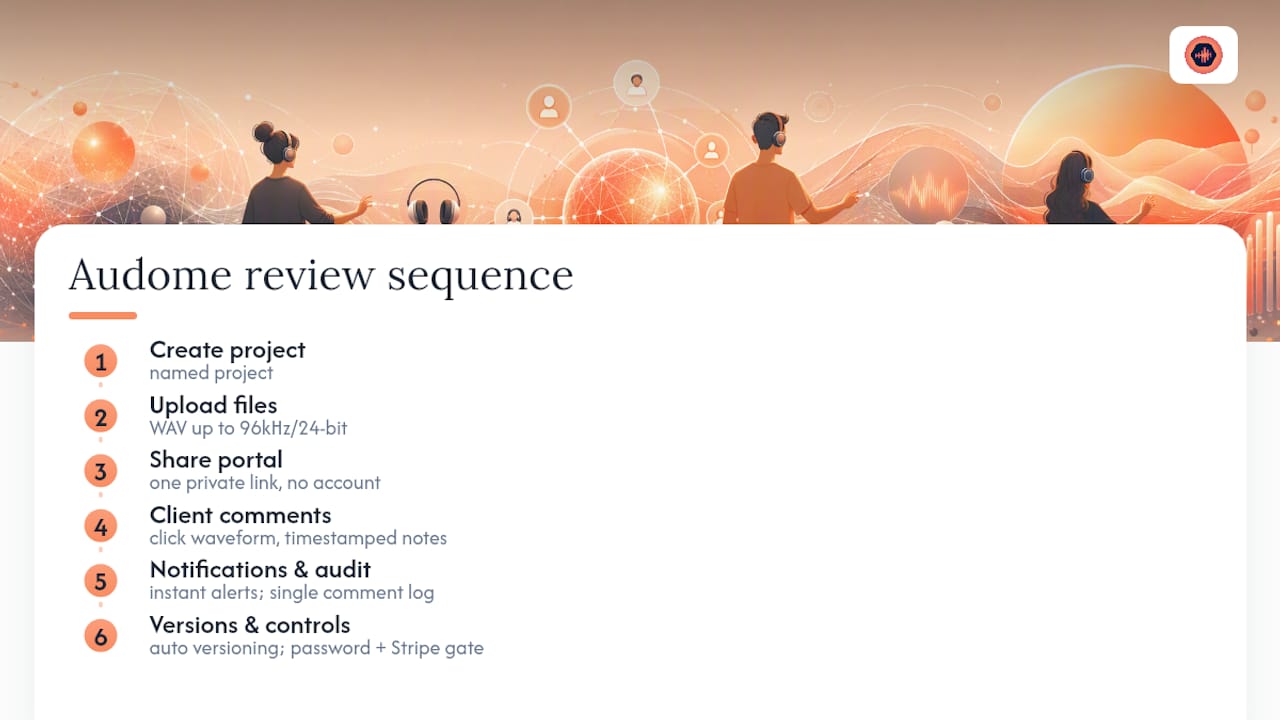
A typical Audome project runs the exact sequence described above: create a named project, upload a batch of high-resolution WAV files up to 96kHz/24-bit, and share one private portal link that requires no client account. The client clicks the waveform, drops a timestamped comment at the exact second something needs to change, and you get a notification instead of a text message three days later asking if you saw their email. A single, auditable place for comments and versions means nobody argues months later about who asked for what.
Version control tracks each upload automatically, so v2 sits next to v1 with a short change log instead of a filename that just says “final_FINAL_v3.wav.” Password protection and download controls stay on by default, and Stripe Connect lets you gate a fourth revision round behind payment without sending a separate invoice. For a deeper walkthrough of the exact review sequence, Audome’s guide on running structured client reviews covers the onboarding side in more detail.
Why This Workflow Change Is Worth Making Now
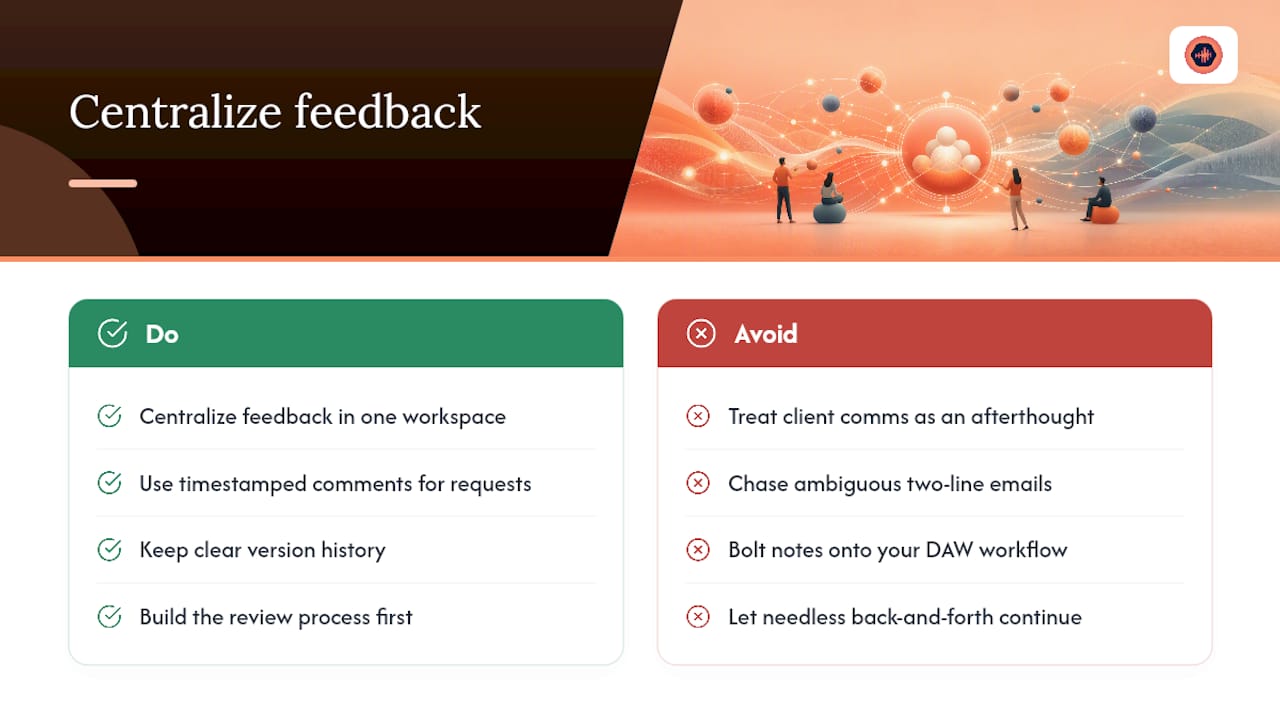
The biggest time sink in most studios isn’t mixing. It’s chasing down what a client actually meant in a two-line email sent at 11 p.m. Centralizing feedback into one workspace with timestamped comments and clear version history doesn’t just organize your files. It removes entire rounds of back-and-forth that never needed to happen in the first place.
If you take one thing from this: stop treating client communication as an afterthought bolted onto your DAW workflow. Build the review process first, then let the mixing happen inside a structure that already knows what a change log is for.
— Kreg
Get Your Studio Off Email and Onto One Review Link
Audome replaces the Dropbox link, the text thread, and the “did you see my email” follow-up with a single portal built specifically for audio review. Clients leave timestamped comments right on the waveform, you push versioned lossless files instead of guessing which “final” file is actually final, and revision limits enforce themselves through built-in Stripe Connect billing instead of an awkward invoice conversation.

It suits freelance mixers, mastering engineers, podcast studios, and post-production teams who are tired of losing time to scattered feedback and unpaid revision creep. If the workflow described in this article sounds like what your studio needs, start with Audome and set up your first project today. No client account required, no more chasing files across five apps.
FAQ
What Does It Mean to Centralize Client Feedback?
It means collecting all client comments, approvals, and file versions in one workspace tied directly to the audio, rather than spread across email, text, and file-sharing links.
What File Format Should I Send Clients for Mix Approval?
Send lossless WAV or AIFF files at your session’s sample rate and bit depth, up to 96kHz/24-bit, never MP3, since compression artifacts get mistaken for mix issues.
How Many Revision Rounds Should I Include in a Mix Quote?
Two to three included rounds is standard practice, stated clearly in the quote with batched feedback windows of three to seven days, according to established revision-management guidance.
Do Clients Need to Create an Account to Leave Feedback?
No. Platforms like Audome let clients comment directly on a private portal link without creating an account, which increases response rates from non-technical clients.
How Do I Stop Clients From Requesting Unlimited Free Revisions?
Set a written revision limit in your contract and gate extra rounds behind payment. Integrated tools like Stripe Connect within Audome can automate billing for additional revisions before the new version unlocks.