
The fastest way to collect mix notes is to gather one consolidated, timestamped batch tied to a single named mix version, submitted through one agreed channel. Mark priorities on each note, then log the change once you act on it. Batching and timestamping are what actually save time. Everything else in this workflow just supports those two habits.
TL;DR:
- Collect timestamped notes in a single batch tied to one mix version, including author, filename, date, timestamp, symptom, and desired result for clarity.
- Require reviewers to listen on multiple systems within a set window and consolidate their notes offline to prevent noisy, inconsistent feedback.
- Use a clear naming convention and maintain a change log that records all revisions, including who requested changes and plugin versions, to prevent file confusion.
- Employ tools like timestamped annotation apps or versioned collaboration platforms to ensure feedback links directly to specific versions and track history automatically.
- Enforce a single designated decision-maker to reconcile conflicting notes and streamline revisions, reducing the mix cycle and avoiding unnecessary back-and-forth.
Table of Contents
- What Should Go in a Mix Note?
- How Do You Structure the Feedback Workflow?
- How Do You Keep Version Control Clean?
- What Tools Actually Support This Workflow?
- Why This System Actually Works
- How Audome Puts This Workflow Into Practice
- Sources
- FAQ
What Should Go in a Mix Note?
A mix note is useless if it doesn’t tell you where the problem lives and what result someone wants. Vague comments like “make it punchier” or “more exciting” force you to guess, and guessing burns revision rounds. Guidance from Sound On Sound is blunt about this: fuzzy descriptors need clarifying before they’re actionable, and the fix is structure, not more adjectives.
Every note you collect should carry six pieces of information at minimum:
- Author and decision-maker — who wrote it, and who has final say if opinions conflict
- Mix filename and version — the exact file the note applies to, not “the new one”
- Date — when the note was written
- Timestamp or timecode — the precise moment in the track
- Symptom — what the listener actually hears
- Desired result — the musical outcome they want, not a technical instruction
The best phrasing formula is simple: symptom (where/when) → desired result. For example, “vocal buries under the guitar at 1:42, want it to sit forward without losing the room tone.” That tells you the problem and the goal, but leaves the method up to you. Describing the symptom and the desired outcome separately from any prescribed fix keeps the engineer in control of how to solve it, which usually produces a better mix than a client dictating plugin settings.
Add priority tags to every note: must-fix, optional, or subjective. And if a note references another track or version, name it explicitly rather than trusting memory.
How Do You Structure the Feedback Workflow?
Confusion during revisions almost always comes from process gaps, not bad ears. Here’s the sequence that closes those gaps:
- Deliver one clearly named version. No “final_v2_reallyfinal” files. Use a consistent naming pattern so nobody argues about which mix they’re commenting on.
- Set a listening window. Give stakeholders 24 to 48 hours to live with the mix before responding. Rushed first impressions produce noisy notes.
- Require multi-system listening. Ask reviewers to check the mix on at least two playback systems (phone speaker, car, studio monitors) before submitting anything.
- Collect notes offline first. Have each person jot timestamped comments on their own, away from group chat noise, then combine them.
- Designate one decision-maker. If three people send conflicting notes, someone has to reconcile them before the engineer sees a single word. Sound On Sound’s guidance on mix management is direct on this point: don’t let the engineer become the referee for a band’s internal disagreements.
- Submit one consolidated batch. All notes, references, and priorities in a single message through the one agreed channel, tied to the exact version reviewed.
A useful listening pattern within that window: do a full pass for overall reaction first, then a second pass targeting known problem areas, then a third pass against reference tracks. That sequence preserves musical context and cuts down on false positives, because a note written mid song, out of context, often reads differently once the whole track has played through.
Pro Tip: Ask reviewers to compare against a specific reference for one target only, like low-end weight or vocal presence, instead of “make it sound like [famous record].” A narrow reference request gets you usable notes; a broad one gets you a copy job nobody can actually deliver.
How Do You Keep Version Control Clean?
Nothing wastes more studio time than three people arguing over which file is actually current. A file naming convention fixes most of it on its own. Something like SongTitle_MixV3_2026-03-14.wav tells you the track, the version number, and the date without opening a single file.
Beyond naming, keep a running change log. It doesn’t need to be fancy; a shared spreadsheet or a text file works fine. Each entry should record:
- The date of the change
- Which version it moved from and to (V2 → V3)
- Who requested the change
- A one-line summary of what changed
- Plugin versions, if a plugin update might affect recall
A simple change log like this saves hours of confusion down the line, especially when a client asks for something reverted three weeks after approving it.
Archive every approved version, and export a reference bounce (MP3 or WAV) at each milestone so you have a listening copy outside your session file. When you deliver a new revision, always summarize what changed and state how many revision rounds remain. That single sentence prevents the “wait, I thought this was the last one” conversation.
What Tools Actually Support This Workflow?
You don’t need exotic software to collect mix notes well. You need a format that ties every comment to an exact timestamp and an exact version, and a way to get that data into your session without retyping it.
Four categories cover almost every studio’s needs:
- Timestamped audio-annotation apps. Tools like the Mix Notes iOS app let a client drop preset or custom notes directly on a waveform and export a timestamped list. It’s iOS only, with no DAW plugin, so treat it as a client-side collection tool rather than an engineer’s workstation app.
- DAW markers. Fast for the engineer, but they require the client to already be inside your session, which rarely happens.
- Shared documents with timecodes. Low friction, zero learning curve, but prone to formatting drift and copy-paste errors across multiple contributors.
- Collaboration platforms with built-in versioning. These attach comments directly to the waveform of a specific uploaded version, so a note can never accidentally apply to the wrong mix. ABmyMix is a good example on the comparison side, offering level-matched A/B listening, blind-test modes, and timestamped notes without uploading files to a third party.
Standardize your exports around CSV or plain timestamped text lists. Most DAWs can import marker lists from CSV or plain text, which turns a client’s scattered comments into clickable markers inside your session in seconds instead of minutes spent retyping timecodes by hand.
Why This System Actually Works
Most engineers assume better revisions come from better communication, meaning more back and forth, more clarifying questions, more messages. It’s usually the opposite. Revision quality tracks with how visible the decisions are, not how many comments pile up. A single timestamped batch, tied to one version, tells you exactly what changed and why, which cuts interpretation errors that eat entire revision rounds.
The operational rules matter more than they get credit for. One channel stops notes from splitting across five apps. Batched submissions stop drip-fed feedback from turning a two-round revision into six. A change log protects your time and your studio’s margins, because “I never asked for that” stops being a conversation you have to have twice.
— Kreg
How Audome Puts This Workflow Into Practice
Audome is the alternative to juggling five apps just to collect one round of mix feedback. Every checklist item above maps to a feature: clients drop timestamped comments directly on the waveform, so symptom, timestamp, and desired result live in one place automatically. Version history tracks every upload without a manual naming system, and password-protected project pages keep your single feedback channel locked to the people who should actually be commenting.

Studios also get tools that go beyond note-taking. You can cap the number of free revisions a project includes, then automatically bill clients for extra rounds through built-in Stripe Connect payments, and require payment before final downloads unlock. That turns “just one more round” from a margin problem into a billed line item. Fewer ambiguous notes, a cleaner version history, and faster approvals follow naturally once feedback has a single, timestamped home.
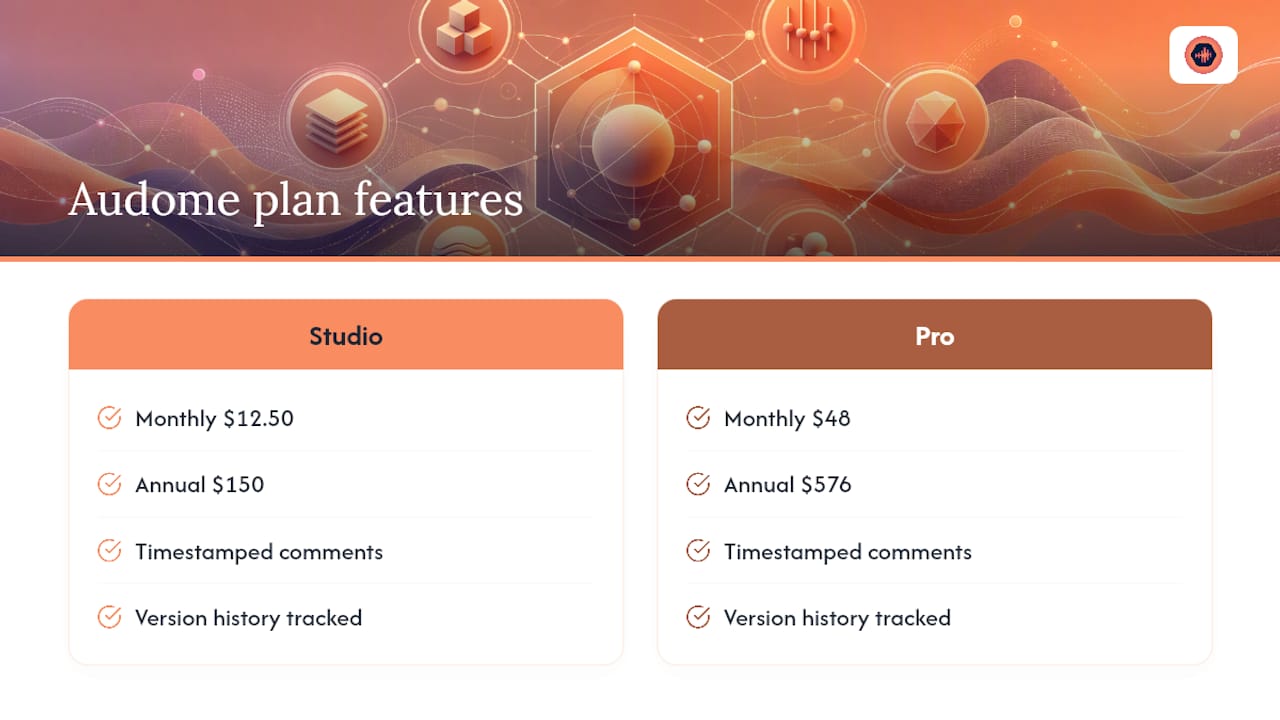
Audome’s Studio plan starts at $12.50 per month ($150 billed annually), and the Pro plan runs $48 per month ($576 billed annually). Check current features and sign up on the Audome pricing page to see which tier fits your revision volume.
Sources
For deeper reading on the practices covered here, Sound On Sound’s guidance on understanding client feedback covers symptom-based note writing and reference-track comparisons in more detail. Their coverage of the Mix Notes iOS app and ABmyMix walks through timestamped annotation and blind-test comparison tools. Audome’s own guide to mix revision management expands on defining revision rounds and building a change log.
- Understanding client feedback — Sound On Sound
- Mix Notes iOS app by David Thomas — Sound On Sound
- ABmyMix: Online mix-comparison tool — Sound On Sound
FAQ
What’s the Best Way to Collect Mix Notes From Multiple People?
Have each person listen independently and write timestamped notes on their own, then have one designated decision-maker combine and reconcile them into a single batch. That prevents conflicting opinions from landing on the engineer’s desk separately, which Sound On Sound’s mix management guidance warns turns the engineer into an unwanted referee.
How Do I Write a Mix Note That Actually Gets Acted On?
State the symptom, where it happens, and the result you want, in that order. A note like “chorus vocal feels thin at 2:15, want more warmth without added reverb” gives the engineer a clear target and lets them choose the right technical approach.
Should I Use a Listening Window Before Submitting Notes?
Yes. Giving reviewers 24 to 48 hours to listen on multiple systems, phone, car, and monitors, before writing notes produces more consistent, less reactive feedback than requesting comments immediately after a first listen.
Does Audome Support Timestamped Feedback and Version Tracking?
Audome lets clients leave timestamped comments directly on the mix waveform and automatically tracks version history as new files are uploaded. That keeps every note tied to the exact version it was written against, without extra spreadsheets or naming systems.
What Belongs in a Mix Revision Change Log?
A working change log needs the date, the version change (such as V2 to V3), who requested it, a short summary of what changed, and plugin versions if relevant. This simple log format prevents disputes over what was approved and when.