
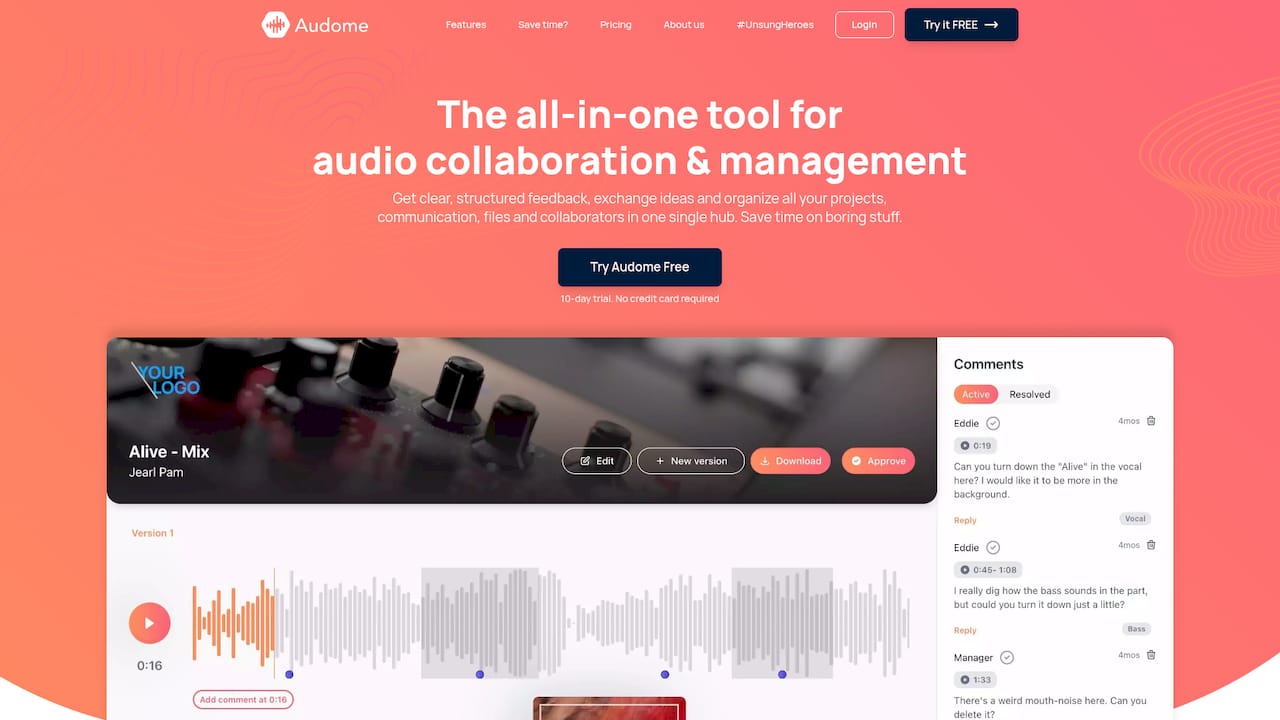
A sound design feedback portal is one private page where a client or collaborator plays your audio, leaves comments pinned to exact moments, and sees which version they are hearing. It replaces the email chain of “the explosion at around 1:12 feels thin” and the three different bounces nobody can tell apart. If you deliver sound design, mixes, podcast edits or post-production stems, a portal like Audome gives every note a timecode, every file a version number and every client a single link that needs no account.
TL;DR
- A feedback portal is a shared review page for audio: playback, time-stamped comments and version history in one place.
- It is not a music submission site. Those collect opinions from strangers; a portal collects approvals from your own client or team.
- Check four things: lossless playback, comments tied to the waveform, automatic version tracking, and a client experience with no login.
- Set a revision limit and a clear approval step before the first review round, not after the fourth.
- Audome covers all of this, with unlimited high-resolution uploads up to 96kHz/24-bit, starting at $12.50 per month on the Studio plan.
Table of Contents
- What a sound design feedback portal actually is
- Why email and cloud folders fall short for audio feedback
- How an audio professional uses a portal, step by step
- What to check in a portal before you commit
- Managing approvals, revisions and scope
- Fitting a portal into podcast and post-production workflows
- Writing a feedback request clients can answer
- Why a purpose-built portal beats stitching tools together
- Try it on your next project
- FAQ
- Sources
What a sound design feedback portal actually is
Search this phrase and you mostly find music feedback sites, forum threads and general client-review tools for websites and video. None of them is quite what a sound designer, mixer or podcast producer needs.
A music feedback platform exists so an artist can get opinions on a finished track from curators or other listeners. The audience is strangers and the goal is exposure or critique.
A general client-feedback tool is built around screenshots, PDFs and video frames. Audio is an afterthought, usually played back as a compressed preview.
A sound design feedback portal is the working room between you and the person who has to sign off. The audience is known: a game studio’s audio lead, a film director, a podcast host, a label’s A&R. The goal is a decision on this exact file, and then the next one.
That difference sets the requirements. You need playback that matches what you exported, comments that point to a moment rather than a paragraph, and a record of which version each comment belongs to.

Why email and cloud folders fall short for audio feedback
Most of us started the same way: bounce a WAV, drop it in a shared folder, email the link. It works for one file and one round. It breaks down when:
- Notes arrive in different formats. One person emails, another texts, a third leaves voice memos. You end up transcribing them into a list.
- Timecodes drift. “Around the second hit” means different things on v2 and v4 if the edit changed.
- Versions blur. A client comments on a file you replaced yesterday, and you only find out after you’ve reworked the wrong thing.
- Preview quality is unreliable. Many general file tools stream a compressed version, so a client judges your high-frequency detail through a lossy codec.
- Approval is vague. “Sounds good” in a chat is not a sign-off, and it gets reopened later.
A portal fixes these by design: one page, one timeline, one history.
How an audio professional uses a portal, step by step
Here is the routine, from first upload to approved file. Each step shows where it commonly goes wrong and what a purpose-built tool takes off your plate.
1. Create a project and name it for the client’s world
Group everything for a job in one project: the sound design pass, alternates, stems, the revision rounds. Use the client’s vocabulary in names (“Trailer v1, impact layer”) so they recognize what they are opening.
Where it goes wrong: files scattered across drives and chat threads, so you cannot say later what was delivered when. In Audome the project is the hub for uploads, revisions and communication, so the history lives with the work.
2. Upload at the quality you mixed at
Export the version you want judged. For sound design, that often means a 24-bit file, because transients and tails are what clients react to. Audome supports unlimited uploads of high-resolution audio up to 96kHz/24-bit, so you are not choosing between quality and storage limits, and your audio is shared exactly as you intended.
Where it goes wrong: exporting a low-bitrate MP3 “just for review” and then hearing complaints that the sound is harsh or dull. That is a codec problem, not a design problem.
3. Send one link, with no account hurdle
The client should be able to click and listen. Every extra step (create an account, verify an email, remember a password) delays feedback by a day. With Audome, collaboration needs no client login, and if the material is sensitive you can use a password-protected, branded client portal that carries your studio’s identity rather than a generic file-host page.
Where it goes wrong: you send a folder link, the client cannot open it on their phone, and the review slips a week.
4. Ask for time-stamped comments on the waveform
Tell reviewers to click the moment they want to discuss and type there. A note like “tail rings too long” pinned to 0:42 is something you can act on in seconds. This is the core of any audio review tool: Sound on Sound’s review of a subscription collaboration platform describes projects where collaborators upload, audition and add time-stamped comments to audio files and their revisions, keeping the full conversation across versions so remote work does not fragment into separate threads.
Audome works on the same principle: structured, time-stamped feedback on the waveform, so you stop decoding vague descriptions.
Where it goes wrong: reviewers who leave one long paragraph at the top. Ask them up front to comment at the moment, one issue per note.
5. Let versions track themselves
When you upload the next revision, it should land in the same lineage as the last one, with the earlier comments still attached to the version they were written on. Audome handles version tracking automatically, so you are not renaming files “final_v3_REALfinal” and then arguing about which one the client heard.
Where it goes wrong: manual naming. One slip and a client approves a file you never meant to ship.
6. Close each round with an explicit approval
Finish every round by asking for a yes or a list. Once the client approves, lock that version as the deliverable. If you want a deeper treatment of the revision cycle itself, our guide to revisions in music production walks through how to structure rounds.
Where it goes wrong: open-ended “let me know what you think” with no end point.
What to check in a portal before you commit
Not every tool that lets you share audio is a good fit for sound design. Use this checklist.
| What to check | Why it matters for sound design | What Audome offers |
|---|---|---|
| Lossless playback | Clients judge transients, noise floors and tails | Lossless audio, up to 96kHz/24-bit |
| Upload limits | Stems, alternates and long sessions add up | Unlimited uploads |
| Comment placement | Notes must point to a moment | Time-stamped feedback on waveforms |
| Version handling | Comments must stay with the right file | Automated version tracking |
| Client access | Friction delays sign-off | No client login needed |
| Privacy and look | Unreleased work and your brand | Password-protected, branded client portals |
| Download control | You decide who keeps which files | Download controls |
| Revision limits and billing | Scope creep eats margin | Revision limits and billing for paid revisions via Stripe |
If a tool fails on the first two rows, it is a general file host with comments added on, and you will feel it in the first stems delivery.
Managing approvals, revisions and scope
Feedback is where many freelance jobs lose money. The first round is in the quote. The sixth round is a gift.
A portal helps because it makes scope visible. Decide before kickoff how many revision rounds the fee covers, and tell the client in the first message. With Audome you can set revision limits, and when a client wants more, you can bill for paid revisions through the Stripe integration. The conversation changes from an awkward negotiation to a stated rule the client already knew.
A few habits make this smoother:
- State the rounds in writing. “Two rounds included, additional rounds billed” in your first message, and again on the project page.
- Batch the feedback. Ask the client to collect notes from everyone on their side before sending, so you do not receive five conflicting lists. The portal link lets a director, a producer and a client rep all comment on the same version.
- Reply inside the thread. Answer a note at its timestamp (“softened by 2 dB, see v3”) so the history documents the decision.
- Keep a reference in the room. For mastering feedback in particular, agreeing on comparison material early saves rounds. This piece on reference tracks in mastering explains how a small set of references anchors the conversation.
One limit to plan for in any portal: it records opinions, it does not resolve them. When two stakeholders disagree, you still need one named decision-maker on the client side. Name that person at kickoff.
Fitting a portal into podcast and post-production workflows
The same page serves different jobs.
Sound design for games, film and trailers. Upload alternates of the same effect as separate versions, and let the director comment on the exact frame-adjacent moment. Use the project to hold stems so nothing is emailed in a zip.
Podcast editing. Hosts and producers can drop notes on a rough cut at the exact spot: a cough to remove, a pause to tighten, a music bed to lower. Ask the host to review once, in one sitting, with headphones.
Mixing and mastering. Mix engineers and mastering engineers pass files between each other and to artists. Keeping both stages inside one project means the mastering notes sit next to the mix notes. For ideas on organizing that, see our overview of project management platforms for mixing engineers.
Studio-wide. If you run a studio with several engineers, a shared structure means any engineer can open a project and see where it stands. Our project collaboration workflow guide lays out a repeatable pipeline, and the sound design collaboration best practices piece covers how pro teams divide the work.
Live sessions versus asynchronous review
Some platforms add video chat, screen sharing and live DAW audio for real-time sessions. Those are useful when everyone can be online together. For most client approvals, though, asynchronous review is better: the client listens when they have quiet time and good speakers, and you get considered notes rather than reactions in the moment. A portal with time-stamped comments is built for exactly that rhythm.
Writing a feedback request clients can answer
The portal gives structure, but the request still matters. A short message at the top of each round raises the quality of notes a lot. Include:
- What you changed since the last version, in one or two lines.
- What you want judged this round (“focus on the impact weight, not the ambience yet”).
- How to listen (“headphones if you can, and at normal playback level”).
- The deadline for notes.
- How many rounds remain.
Clients who are not audio people tend to describe sound with words like “bigger,” “warmer” or “cleaner.” Invite them to comment at the moment and add a reference if they have one. You translate; they just point. That is the practical value of putting the waveform in front of them.
Why a purpose-built portal beats stitching tools together

It is possible to run a review with a cloud folder, a chat app and a spreadsheet of notes. The cost shows up in time: you copy comments between tools, double-check versions and chase approvals across channels. Each of those is a small task, and a busy week multiplies them.
If you want a map of the types of tools out there before choosing, our guide to types of audio collaboration tools breaks them down by job, and the producer collaboration tools roundup shows how they combine in practice. The aim is fewer places for work to hide.
Our view from the studio side
We built Audome because audio feedback should be as precise as the work it describes. A comment that says “it feels off” costs an hour. A comment pinned to a moment on a waveform costs a minute.
We think three things belong together: lossless playback so the client hears what you made, structured time-stamped notes so you know exactly where they mean, and automatic version tracking so every comment stays attached to the right file. Add a client link that needs no login, and the biggest reason feedback stalls disappears.
The commercial side matters as much. Revision limits and billing for paid revisions mean scope is part of the workflow, not a difficult email you dread writing. Your client sees your branding, not a stranger’s file host, and you keep the project, the files and the conversation in one hub instead of five apps.
That is the whole idea: fewer tools, fewer misunderstandings, and a clear line from first upload to approval.
Kreg
Try it on your next project
Audome is a collaboration and project management tool for audio professionals: unlimited high-resolution uploads, time-stamped waveform feedback, automated version tracking, branded and password-protected client portals, and revision billing through Stripe. It runs on a subscription after a free trial.
The Studio plan is $12.50 per month or $150 per year. The Pro plan is $48 per month or $576 per year. Compare them on the Audome pricing page, or look at the whole platform on the Audome homepage.
FAQ
What is a sound design feedback portal?
It is a private web page where a client or collaborator can play your audio, leave comments at exact moments and see which version they are reviewing. It is built for approvals on your own projects, unlike music feedback sites that gather opinions from strangers. Audome is one such portal for audio professionals.
Do my clients need to create an account to leave feedback?
Not with Audome. Collaboration works without a client login, so a client can open the link and comment right away. If the material is confidential, you can protect the portal with a password.
What audio quality can I share for review?
Audome shares lossless audio and supports unlimited uploads of high-resolution files up to 96kHz/24-bit. That means your client hears the file you exported, not a compressed stand-in.
How do I stop endless revision rounds?
Set the number of included rounds before work starts and tell the client in your first message. Audome lets you set revision limits and bill for paid revisions through Stripe, so extra rounds follow a rule the client already knows.
Sources
- Sound on Sound: Acustica Audio Sienna Sphere Live review
- UpNComer: Measurement First Mastering, reference tracks