
An audio client communication hub centralizes lossless file delivery, timestamped waveform feedback, and version history, and it should be your studio’s single review channel. Most studios still lean on Dropbox links, email threads, and text messages, which scatters feedback and buries revision history. Fewer lost files, faster approvals, and cleaner revision control come from consolidating everything in one place. If you want to see what that looks like in practice, Audome is worth testing this week.
TL;DR:
- Using an audio-specific client hub ensures lossless file transfer at native resolution and provides timestamped, waveform-linked feedback for precise revisions.
- Enforcing a single review channel with no-login review links and branded portals improves client engagement and maintains organized, secure file sharing.
- Implementing payment gating for revisions and final downloads encourages deliberate feedback and protects studio margins.
- Delivering files at the session’s native sample rate and using consistent labeling helps prevent confusion and technical issues during delivery.
- Tracking client interactions and feedback patterns through analytics can guide better scheduling, follow-ups, and revision policies.
Table of Contents
- What a Client Communication Hub Means for Audio Professionals
- Checklist: Must-Have Features for an Audio-Specific Hub
- How to Set Up a Hub and Onboard Clients in Six Steps
- Payments and Revision Controls: How to Protect Billable Time
- Security and Delivery Best Practices: Formats, Labeling, and Access Controls
- How a Hub Fits With Your Email, Chat, and Video Calls
- Real-Time Collaboration and Notifications That Actually Help
- Mobile Access and App Support for On-the-Go Approvals
- Analytics and Reporting on Client Interactions
- Handling Multiple Clients and Projects Without Losing Track
- Publisher Perspective: The Hub Is a Studio Discipline, Not an App
- Try Audome: What to Test in a Free Trial
- Quick Links: Guides to Implement This Workflow
- FAQ
What a Client Communication Hub Means for Audio Professionals
Generic client portals built for agencies or consultants don’t understand audio. They compress files for preview, strip metadata, and treat feedback as generic comments instead of moments pinned to a waveform. An audio-specific hub supports lossless uploads at native session resolution, lets clients drop timestamped notes directly on the audio, tracks named versions instead of a folder full of “final_v3_ACTUALFINAL.wav,” and never forces a client to create an account just to listen.
That last point matters more than it sounds. Session recall, file naming that survives multiple revision rounds, and awareness of details like ISRC codes are things a general-purpose file-sharing tool has no reason to build. Platforms designed specifically for audio collaboration centralize high-resolution sharing and automated version tracking so nothing gets buried under a generic “Comment” box.
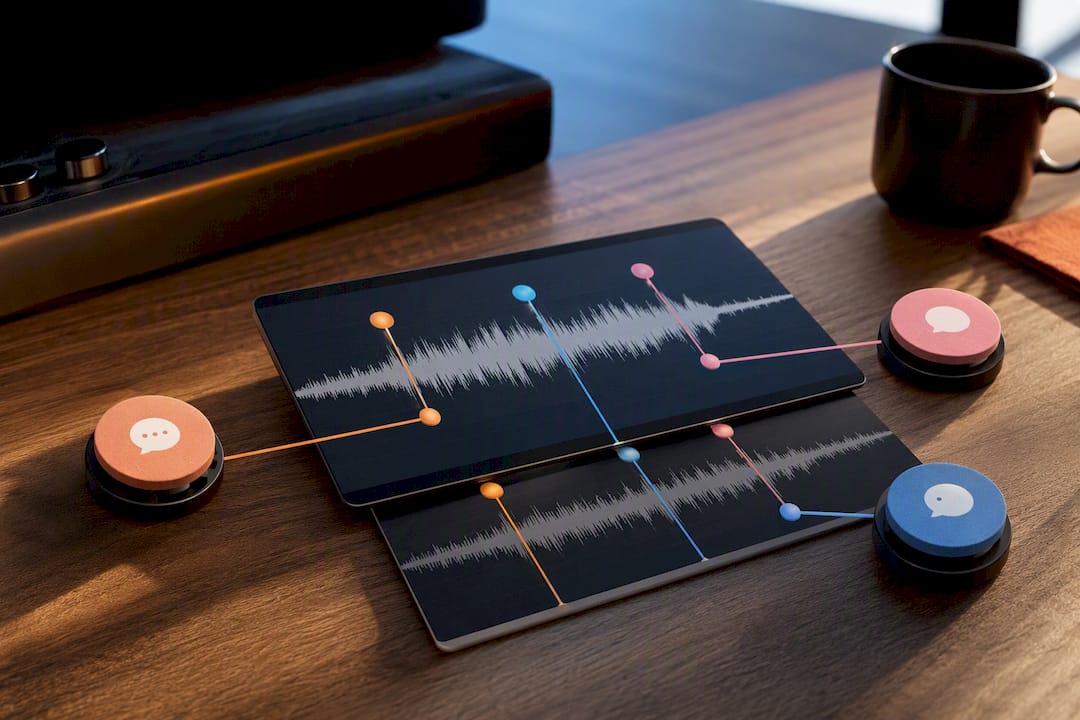
The payoff is operational, not cosmetic. When feedback lives on the waveform instead of scattered across text messages, you stop chasing “the loud part around 2 minutes in, I think” and start seeing exact timestamps. Approvals move faster because there’s no back-and-forth asking which file someone is even referencing.
Checklist: Must-Have Features for an Audio-Specific Hub
Before you commit to any workflow, run it against this list. If a tool fails more than one of these, it’s going to cost you time somewhere down the line.
- Lossless uploads at 96kHz/24-bit with no forced compression on preview or download.
- Timestamped waveform feedback that pins comments to an exact second, not a vague description.
- Named version history so “Mix v3” and “Mix v3 (client notes addressed)” are distinct, searchable entries.
- No-login review links for clients, since forcing account creation is one of the biggest adoption killers in studio workflows.
- Branded, password-protected client portals with download controls you set per project.
- Payment gating for revisions, including Stripe Connect style unlocks before final files release.
- Project organization with milestones, a unified inbox, and permission settings for each collaborator.
Pro Tip: Test the no-login flow yourself before you send it to a client. Open the review link in an incognito browser tab and time how long it takes to hear the mix. If it’s more than 15 seconds, your client will feel that friction too.
How to Set Up a Hub and Onboard Clients in Six Steps
Getting a client communication hub in place is the easy part. Getting clients to actually use it as their only channel takes a deliberate onboarding sequence.
- Declare one review channel at kickoff. Tell the client explicitly: all feedback goes through the portal, not text or email, and state your included revision count up front.
- Build a project template with milestones. Demo, mixing rounds, mastering, and final delivery each get their own stage, so nothing gets skipped when you’re juggling five projects at once.
- Batch mixes instead of trickling files. Send a complete set for one listening pass rather than one track at a time, which keeps feedback focused and avoids fatigue.
- Turn on timestamped comments and ask for short listening instructions, like requesting headphones first and car speakers second, since that sequencing noticeably improves feedback quality.
- Set a deadline and an approval window. Give clients a specific number of days to respond before a round is considered approved by default.
- Log every approval and export the revision history. That log becomes your invoice backup if a client claims they never signed off.
A practical producer workflow guide frames this milestone structure as the difference between a repeatable business and constant improvisation.
Payments and Revision Controls: How to Protect Billable Time
Unlimited revisions kill margins quietly. A client who knows there’s no cost to asking for “one more small tweak” will ask for it six more times. Gating final downloads behind payment, and gating extra revisions behind a paid unlock, changes that behavior almost immediately because feedback becomes deliberate instead of casual.
Present your revision policy at kickoff, not after round three gets contentious. State it in writing and mirror it in the client portal so there’s no ambiguity later.
- Include a fixed number of revision rounds in your base rate, typically two to three.
- Charge a flat fee for revisions beyond that limit, and require payment before the new files unlock.
- Add a rush fee for turnaround under 48 hours.
- Log every requested change with its timestamp and file version, since that record protects both sides if there’s ever a dispute.
- Require an explicit “approved, final” statement before closing a project, not silence interpreted as approval.
Studios using Stripe Connect style payment gating before unlocking final downloads report clients making decisions faster, simply because vague feedback no longer has a free pass.
Security and Delivery Best Practices: Formats, Labeling, and Access Controls
Sloppy delivery habits create client confusion even when the mix itself is great. Fix the technical side first.
- Deliver WAV files at the session’s native sample rate and bit depth. Don’t downsample “for convenience.”
- Use consistent stem naming across a project, including version number and date, so nobody guesses which file is current.
- Check headroom before upload. A client hearing clipping on their laptop speakers will blame the mix, not their playback chain.
- Batch deliverables into a single review pass rather than sending files piecemeal, which keeps feedback organized around one version.
- Set password protection, download expiration windows, and per-project access controls so files don’t circulate beyond the intended listener.
- Keep your session masters under your own control and share client-facing bounces only, never the working files.
Structured delivery built around these habits cuts down the “wait, which file is this?” messages almost entirely.
How a Hub Fits With Your Email, Chat, and Video Calls
A client communication hub isn’t meant to replace every tool you own. It’s meant to be the place where decisions and files live, while email, chat apps, and video calls stay in their supporting roles.
Use email for scheduling and initial contact, since that’s where most clients already expect a first touch. Once a project starts, redirect all feedback and file exchange into the hub, and send an email notification when there’s something new to review rather than pasting waveform notes into the email body itself. That keeps a single source of truth instead of splitting the conversation across two systems.
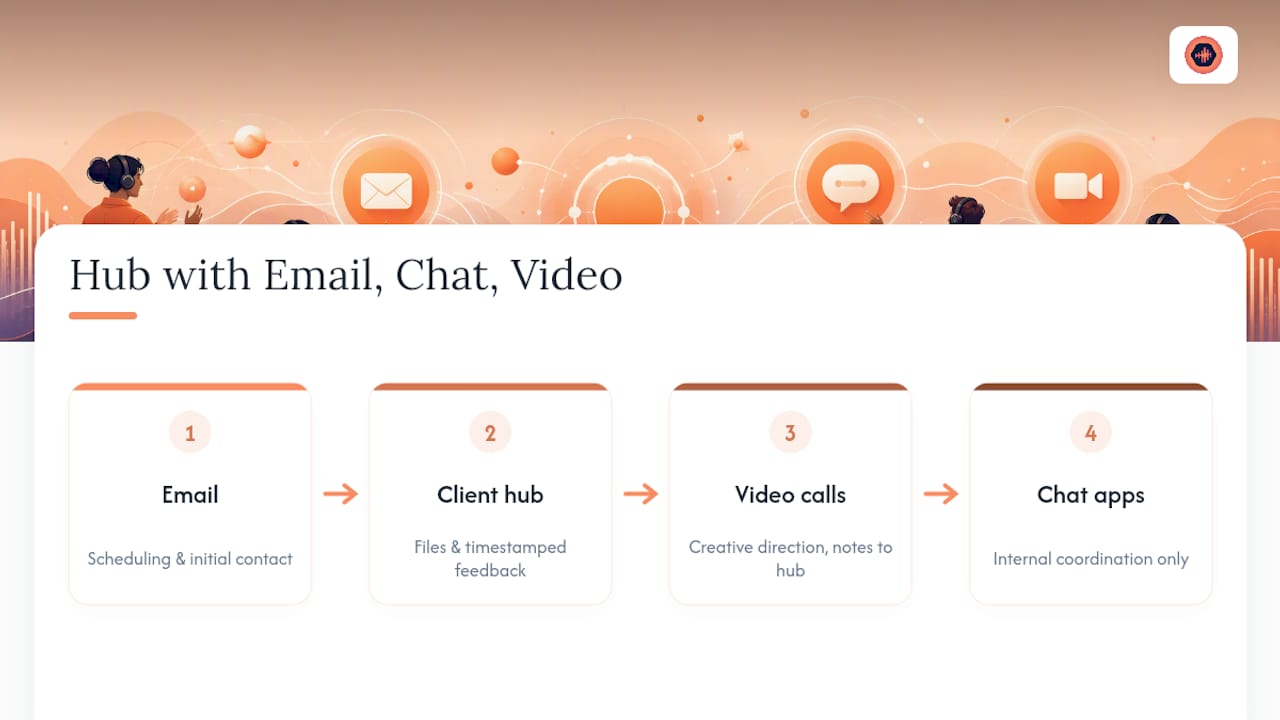
Video calls still matter for creative direction, especially early in a project when tone and reference tracks need discussion that text can’t capture efficiently. But even after a call, the follow-up notes belong in the hub as a written, timestamped record. Otherwise you’re relying on memory for what was agreed to, which is exactly how scope disputes start.
Chat apps like Discord or Slack tend to work fine for quick internal coordination with an assistant engineer or a co-producer. They work poorly as the client-facing feedback channel because messages scroll away and timestamps on audio comments get lost in a wall of unrelated chatter. Keep internal chatter separate from client-facing feedback, and the hub stays clean enough that a client can scan a project’s history in under a minute.
Real-Time Collaboration and Notifications That Actually Help
Real-time features matter less for audio work than they do for document editing, since two people rarely need to hear the same waveform at the exact same millisecond. What matters more is that notifications are precise and immediate, not constant.
A useful notification tells you a client left a comment at 1:42 on Mix v4, not just that “there’s new activity.” Vague alerts train you to ignore notifications entirely, which defeats the purpose of having them. Look for a system that flags exactly what changed and where, so you can open a project and go straight to the note instead of re-listening to the whole track hunting for context.
Live presence indicators, showing when a client is actively viewing a project, can help you time a follow-up call or a check-in message without guessing whether they’ve even opened the file yet. That small signal saves an entire “did you get a chance to listen yet?” email.
The bigger win is collaborative commenting between multiple stakeholders on the same project. A podcast producer, a co-host, and an editor can each leave notes on the same episode without stepping on each other’s feedback, and a version-tracked system keeps those comments attached to the correct file even after three more edits ship. That’s a meaningfully different experience than trying to reconcile three separate email threads into one revision list.
Mobile Access and App Support for On-the-Go Approvals
Clients approve mixes from their phones more often than studios expect, usually on a commute or between meetings, which means your hub needs to work cleanly on a small screen with average headphones or earbuds.
A mobile-friendly review page should load the waveform quickly, let a client tap to leave a timestamped comment without a login screen slowing them down, and stream audio at a quality that actually represents the mix rather than a heavily compressed preview. If a client’s first listen happens on an iPhone with AirPods on a train, that experience shapes their entire impression of the delivery.
For the engineer’s side, mobile access matters just as much. Checking whether a client has left new comments, approving a milestone, or firing off a quick clarifying question shouldn’t require opening a laptop. A responsive web app that works inside any mobile browser tends to be more reliable across devices than requiring a dedicated app install, since clients are far more likely to tap a link than download something new for a single project.
Analytics and Reporting on Client Interactions
Knowing whether a client has actually opened your delivery link changes how you follow up. Analytics inside a client communication hub typically track when a file was viewed, how many times it was played, whether a download happened, and how long it took a client to leave their first comment after you sent the link.
That data answers a question every studio has asked at some point: did they actually listen, or did they just say they did? A project sitting untouched for four days tells you it’s time for a check-in email rather than waiting for silence to resolve itself. On the other side, a client who plays a mix eleven times in one evening and leaves no comments might need a nudge asking for a quick verbal reaction instead of written notes.
For studios running several client accounts, reporting also helps spot patterns worth fixing. If revision requests consistently spike on projects delivered late on a Friday, that’s a scheduling problem, not a client problem. If a particular client repeatedly requests changes after the stated approval window closes, that data supports a firmer conversation about revision policy rather than an argument based on feelings.
Handling Multiple Clients and Projects Without Losing Track
Running ten projects across five clients in one shared inbox is how details slip. A dedicated hub keeps each client’s projects, files, and feedback siloed from every other client’s, while still giving you one dashboard to see everything at a glance.
Permission settings matter here. A podcast network with three shows in production needs each show’s stakeholders to see only their own episodes, not a competitor’s unreleased content sitting in the same account. Branded, password-protected portals per project solve that without requiring separate logins or separate tools for every client relationship.
Templates pay off most at scale. Once you’ve built a milestone structure for mixing engagements, reusing it for every new client cuts setup time to minutes instead of rebuilding folder structures and email chains from scratch each time. Studios running a high volume of shorter projects, like podcast editing or voice-over work, benefit especially from this since the administrative overhead of individual client setup is what eats into margin, not the actual work.
If you’re comparing broader options beyond audio-specific tools, general client portal software can show you what branded portals look like in other service industries, though it typically lacks the waveform-specific feedback audio work depends on.
Publisher Perspective: The Hub Is a Studio Discipline, Not an App
Most studios that struggle with a client communication hub didn’t pick the wrong tool. They never separated internal shorthand from client-facing communication, so half the value of centralizing feedback gets undone by side conversations happening elsewhere. Once a studio commits to one review channel and enforces it, client behavior shifts faster than the software itself changes anything. Clients respond to consistency, not features. Treat the hub as a rule you enforce every project, not a convenience you offer when it’s easy.
— Kreg
Try Audome: What to Test in a Free Trial
If you’ve read this far, you already know what a real audio client communication hub needs to do. Audome is built specifically for that job, not adapted from a generic file-sharing tool. Unlike Dropbox links or email chains, it gives you lossless uploads, timestamped waveform comments, and paid-revision gating in one place your clients can access without creating an account.

Run a real project through it for one week. Upload a mix at full resolution, send a client the no-login review link, turn on revision limits, and require payment before the final download unlocks. Watch what happens to your inbox over the next 48 to 72 hours. Studios that make this switch typically see fewer scattered messages and more decisive feedback, because clients respond differently when the channel is clear and the stakes are visible. Start a trial and run your next delivery through Audome before your next client call.
Quick Links: Guides to Implement This Workflow
A few resources go deeper on the specific pieces covered here:
- Mix revision management breaks down timestamped feedback and revision logs in detail.
FAQ
What Is a Client Communication Hub for Audio Work?
It’s a centralized platform where audio professionals deliver lossless files, collect timestamped waveform feedback, and track version history in one place, replacing email, Dropbox, and text messages.
Does Audome Require Clients to Create an Account?
No. Audome supports no-login review links, which increases client engagement because clients skip the friction of signing up.
How Do Paid-Revision Controls Work?
A studio sets an included number of revision rounds, then gates additional rounds or final downloads behind payment, often through Stripe Connect, so extra feedback carries a real cost.
What File Quality Should I Deliver to Clients?
Deliver WAV files at your session’s native sample rate and bit depth, since lossless uploads up to 96kHz/24-bit preserve the quality clients are actually paying for.
How Do I Keep Client Feedback Organized Across Multiple Projects?
Use named version history, project milestones, and per-project branded portals so each client’s files and comments stay separate from every other active project.