
Expiring download links are time-limited, tokenized URLs that stop working after a set duration. They’re built for temporary access, not for stopping piracy, and defaults vary widely, from a short window on generated documents to a 7-day window on purchased files. If you need real protection against copying or redistribution, expiry is a starting point, not the whole answer.
TL;DR:
- Expiring download links typically have default TTLs of one hour for immediate files and several days for purchased downloads, but these durations vary widely depending on use case.
- Most systems generate URLs with embedded signatures and expiration timestamps either through cloud storage providers or custom token validation, requiring server-side checks for security.
- Expiry reduces accidental exposure but does not prevent copies or redistributions once a file has been downloaded, so additional protections like DRM or watermarking are necessary for sensitive content.
- When a link expires, it usually returns a 403 or 404 error, and resetting a link often involves regenerating it via platform dashboards or manually reissuing tokens.
- For high-resolution files, such as studio masters, download gating, version controls, and payment restrictions are more effective than simply shortening TTLs.
Table of Contents
- What Are Expiring Download Links, Exactly?
- How Do Expiring Download Links Actually Work?
- Common Expiry Strategies and Typical Defaults
- How to Create Expiring Download Links
- Do Expiring Links Actually Stop Piracy?
- What to Do When a Download Link Expires
- Implementation Checklist and Testing Guide
- Why This Matters More for High-Resolution Audio Files
- What the Conventional Advice Gets Wrong
- A Better Way to Deliver High-Resolution Audio Files
- Sources
- FAQ
What Are Expiring Download Links, Exactly?
An expiring download link is usually a signed URL: a normal-looking web address with an extra cryptographic signature and expiration timestamp baked into the query string. The server checks that signature before handing over the file. Once the clock runs out, the link stops working, even if someone still has it saved in an email or a chat thread.
A few terms show up constantly in this space, and it helps to know them cold:
- Token: the encoded piece of data (often a JWT or a random string tied to a database record) that proves the link is valid.
- TTL (time to live): how long the token or signature stays valid, expressed in seconds, hours, or days.
- Presigned URL: a link generated by a cloud storage provider (like an S3 bucket) with the signature and expiry already attached.
- One-time link: a token that’s invalidated after a single successful download, regardless of TTL.
When a link expires, the server typically returns a 403 Forbidden (the request was understood but refused) or a 404 Not Found (the resource can’t be located), depending on how the platform handles expired tokens.
How Do Expiring Download Links Actually Work?
There are two dominant patterns, and most tools use one or the other.
- Storage-signed URLs. The cloud storage layer itself (S3, Google Cloud Storage, Azure Blob Storage) generates a URL with a built-in signature and expiry. The application never touches the file directly. It just asks the storage service to mint a temporary link.
- Application-issued tokens. The app generates its own token, stores an expiry timestamp in a database, and checks that token against a validation endpoint every time someone clicks the link. This gives more control over things like download counts or per-user restrictions, at the cost of more code to maintain.
Either way, the lifecycle looks roughly the same: generate the link, validate it on request, enforce the expiry rule, then log the attempt (successful or not). PDFMonkey’s documentation shows this in practice: each API fetch returns a fresh URL with a limited short window, so if the previous link expired, the fix is simply to fetch the document again rather than troubleshoot the old link.
1 hour is a common default for on-demand generated files like invoices and reports, where the assumption is the recipient will grab the file almost immediately.
Common Expiry Strategies and Typical Defaults
Not every file needs the same expiration rule, and picking the wrong one creates support headaches either way. Too short, and you get “the link doesn’t work” tickets. Too long, and old links pile up as a liability nobody’s tracking.
The strategies developers reach for most:
- Fixed-duration windows — common short windows for freshly generated documents, a day for email attachments people might not open right away, and several days for purchased downloads people may want to revisit.
- Calendar-based deadlines — the link dies on a specific date regardless of when it was created, useful for time-boxed promotions or event-based content.
- Single-use links — valid for exactly one successful download, then dead.
- Max-attempt limits — a counter (often paired with a time window) that caps how many times a link can be used, commonly around five attempts, before it locks out.
FastSpring’s developer documentation notes that purchased product downloads often default to a multi-day window, with expired links returning a 404 that vendors can reset or reactivate manually. Shorter windows make sense for sensitive or time-critical files. Longer windows make sense when the buyer might need to redownload weeks later and you don’t want a support queue full of “resend my file” requests.
How to Create Expiring Download Links
You don’t need to build this from scratch unless your use case demands it.
If you’re not writing code, you can learn more about effective solutions in content creation workflows.
- Most cloud storage dashboards (AWS S3, Google Cloud Storage) let you generate a presigned URL manually or through their SDK, with a TTL you set at generation time.
- WordPress site owners have plugin options that add expiry rules to media downloads, though caveats apply: some plugins expire per file, others per user session, and mixing the two inside one site can create confusing behavior for visitors.
- E-commerce platforms often expose expiry settings directly in their dashboard for digital product delivery.
If you’re writing the logic yourself, the pattern is fairly consistent: create a token record tied to the file, attach an expiry timestamp, expose a validation endpoint that checks the token before releasing the file, log every attempt, and run a cleanup job that purges expired tokens on a schedule. Open-source packages, like a Laravel download-link library, give a working reference for this exact structure, including optional IP restrictions and max-download counts as typical features.
Pro Tip: *Keep the link’s lifetime separate from the file’s retention policy. A link can expire in an hour while the underlying file stays on the server for months. Also, never generate the link before the file finishes processing. A token pointing at a half-rendered export just creates a confusing error for whoever clicks it first.
Do Expiring Links Actually Stop Piracy?
No, and this is where a lot of teams get overconfident. Expiry limits how long a URL is exposed, but it does nothing once the file has already been downloaded. Locklizard’s analysis of expiring download links makes the point directly: expiry reduces accidental long-term exposure, but it can’t stop someone from copying, forwarding, or re-uploading a file the moment it lands on their machine.
For anything genuinely sensitive, expiry needs backup:
- DRM (digital rights management) restricts what a recipient can do with a file even after download, like blocking printing or screen capture on protected documents.
- Watermarking embeds identifying data into the file itself, so if it leaks, you can trace where it came from.
- Password protection adds a second gate beyond the link itself.
- Access logging lets you see who downloaded what, when, and how many times, which is often the fastest way to catch abuse.
The operational baseline: use the shortest TTL that doesn’t create friction for legitimate users, log everything, and build in a way to revoke a link manually if you learn it’s been shared somewhere it shouldn’t be. One expiring link with no logging is barely better than a permanent one.
What to Do When a Download Link Expires
If you’re the one who hit the expired link:
- Check your email or messages for the original delivery. Sometimes there’s a “resend” or “regenerate” button right there.
- Contact whoever sent it and ask for a fresh link. Most systems can reissue one in seconds.
- Search your downloads folder. You may already have the file and just clicked an old bookmark by mistake.
If you’re the one managing the file, resending is usually the fastest fix. FastSpring’s system, for example, lets vendors reset or reactivate an expired link on the buyer’s behalf rather than forcing a whole new purchase flow. For recurring cases, consider extending the default TTL or offering a more permanent share option for that file type.
Implementation Checklist and Testing Guide
Before shipping expiring links in production, run through this:
- Set an expiry policy per file type instead of one blanket rule for everything.
- Validate tokens server-side, never trust a client-side expiry check alone.
- Log every download attempt, successful or expired.
- Run scheduled cleanup jobs to purge dead tokens and orphaned files.
- Test interrupted downloads specifically. Large files need to handle range requests and resume logic correctly, or a partial download can look like a false expiration.
- Test concurrency (multiple people hitting the same link at once) and confirm an expired token can’t be reused even after a retry.
TempDownload’s implementation guide recommends reviewing this setup monthly if file delivery is core to your product, or quarterly if the workflow is stable and rarely changes.
Why This Matters More for High-Resolution Audio Files
A 96kHz/24-bit mix isn’t a two-page invoice. It’s a large file that a client might need to stream, scrub through, and revisit across multiple sessions, which makes a rigid 1-hour link impractical and a permanent unprotected link risky. Studios need controls built around the actual review and delivery workflow: download gating until payment clears, version history so old mixes don’t get confused with final masters, and password-protected project pages instead of a bare link floating in an email thread.
What the Conventional Advice Gets Wrong
Most explainers treat expiry as a security feature. It isn’t, not on its own. It’s a housekeeping feature that happens to have security side effects. The distinction matters because teams that set a short TTL and call it done are solving the wrong problem: they’ve limited exposure window, but they haven’t limited what a recipient can do with the file once it’s in hand.
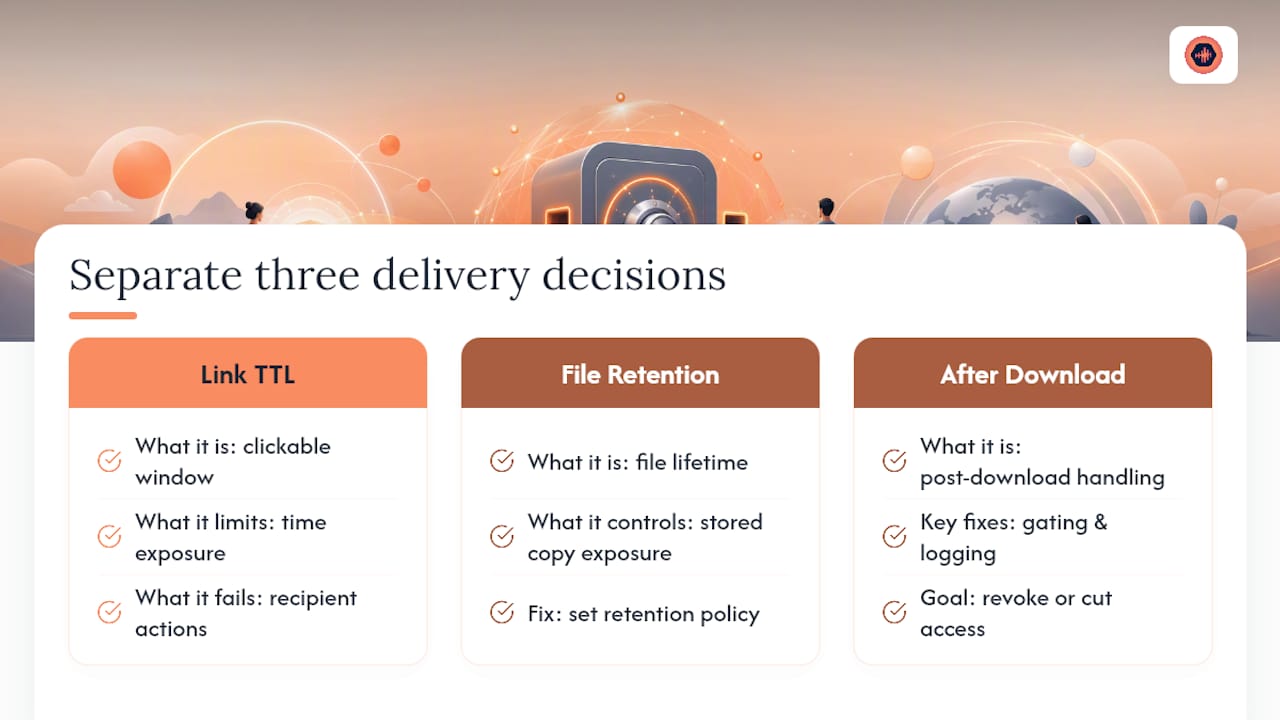
The advice that actually holds up, based on how vendors like PDFMonkey and FastSpring have built their systems, is to separate three decisions that people tend to bundle together: how long the link stays clickable, how long the underlying file is retained, and what happens to the file after someone downloads it. Those are three different problems with three different fixes. Confusing them is why teams either lock down files so aggressively that legitimate clients get frustrated, or leave them so loose that a 24-hour window provides no real protection at all.
If you’re building this for creative or client-facing work, prioritize the download-gating and logging pieces before you obsess over shaving TTLs down to the minute. Knowing who downloaded what, and being able to cut off access the moment something looks wrong, does more real-world work than an aggressively short expiry window ever will.
— Kreg
A Better Way to Deliver High-Resolution Audio Files
Audome is the alternative to juggling WeTransfer links and Dropbox folders for studio deliveries: instead of tracking which expired link went to which client, you get one workspace where downloads stay locked until you decide otherwise.

Studios delivering 96kHz/24-bit mixes need more than a countdown timer on a URL. The platform pairs download controls with version history, so clients always see the current mix instead of an outdated file from earlier revisions. Password-protected project pages replace the bare link in an email, and payment gating means final masters don’t unlock until the invoice is paid. Clients don’t need to create an account to leave timestamped feedback or access their files, which cuts down the back-and-forth that scattered file sharing tends to create.
If your current delivery process is a patchwork of expiring links, email attachments, and manual reminders to clients, take a look at Audome and see how a single project workspace handles the parts a plain download link can’t.
Sources
- Download URL – PDFMonkey
- File downloads — FastSpring developer docs
- How to make expiring download links & why they don’t stop sharing — Locklizard
- How to Add Expiring Download Links to Your App — TempDownload
FAQ
What Happens When a Download Link Expires?
The link stops resolving, typically returning a 403 Forbidden or 404 Not Found error, and the file becomes inaccessible until someone generates a fresh link or resets the existing one.
How Do I Create a Link That Expires?
Use a cloud storage provider’s presigned URL feature with a set TTL, a plugin if you’re on a platform like WordPress, or build a token-based system that checks an expiry timestamp before releasing the file, similar to the pattern in Laravel’s download-link library.
How Can I Download a File From a Link That Already Expired?
Contact the sender for a resend or regenerated link, since most platforms, including FastSpring, let admins reset or reactivate expired links without requiring a new purchase or upload.
What Does It Mean When a Link Expires?
It means the token or signature attached to that URL has passed its validity window, so the server refuses the request even though the underlying file still exists.
Do Expiring Links Stop People From Sharing a File After Download?
No. Expiry only controls access to the link itself; once a file is downloaded, stopping redistribution requires additional controls like DRM, watermarking, or platforms with built-in download gating, such as Audome’s payment-gated final delivery.