
Every finished mix or stem package needs a minimum metadata set: track title, primary artist, ISRC, contributor credits, sample rate and bit depth, and a full stems list. Embed those fields directly into the audio files and back them up with a one-page manifest, because tags get stripped constantly during reuploads and re-encodes. A workflow tool like Audome helps keep that information attached to the right version instead of scattered across email threads.
TL;DR:
- Embedding essential metadata in WAV or MP3 files, along with a PDF manifest, prevents information loss during reuploads and re-encodes.
- Accurate track, contributor, and release-level metadata are critical for royalty payments, licensing, and distribution acceptance, especially with unique identifiers like ISRC and UPC.
- Use a consistent folder structure and filename template, with proper versioning and manual tracking of ISRCs, to avoid confusion and prevent outdated or incorrect files from being delivered.
- Verify embedded tags by checking files in different apps before forwarding and always keep the manifest attached to the correct version to prevent metadata drift.
- Utilizing platforms like Audome can streamline metadata management, enforce payment holds, and secure version-control, reducing errors and safeguarding income.
Table of Contents
- How to Deliver Metadata to Clients the Right Way
- How Do You Embed Metadata in Audio Files?
- What File Formats and Export Specs Should You Send?
- Folder Structure and File Naming That Actually Holds Up
- Delivery Checklist and Manifest Template
- How Audome Streamlines Metadata Delivery and Feedback
- Payment, Delivery Timing, and the Rights Checklist
- Talking to Clients About Their Metadata Needs
- Keeping Metadata Intact After You’ve Delivered
- Why Metadata Discipline Protects Your Income
- Deliver Metadata Without Losing Track of the Files
- Sources
- FAQ
How to Deliver Metadata to Clients the Right Way
Delivering metadata to clients means sending more than a bounced mix. It means the file itself, and a companion document, both carry enough information for anyone downstream, a mastering engineer, a sync supervisor, a distributor, to know exactly what they’re holding without calling you to ask.
Three levels of metadata cover almost every delivery scenario: track-level, contributor-level, and release-level. Miss one and someone eventually pays for it, usually in the form of a missed royalty or a rejected distribution upload.
Track-level fields describe the recording itself:
- Title and primary artist name, spelled exactly as they’ll appear on platforms
- ISRC, the unique code that identifies this specific recording
- Duration, BPM, and musical key
- Genre and an explicit content flag, both required by most distributors before they’ll accept an upload
Contributor credits identify who did what and who gets paid:
- Legal names for every producer, engineer, mixer, and performer, not stage names
- Each person’s role, since “producer” and “mixer” trigger different royalty splits
- PRO affiliation (ASCAP, BMI, or SESAC) and publisher information for anyone with a writing credit
Release-level fields cover the bigger picture:
- Album or EP title, UPC code if one exists, and the release date
- Rights owner and, where relevant, the distributor of record
Sync licensing teams and royalty systems run on this information, and DropCue’s guidance for sync-ready metadata makes clear that a supervisor without a clean title, ISRC, and composer credit on file will pass on a track rather than chase down the details. The same fields that satisfy a music supervisor also keep a distributor’s automated system from bouncing an upload.
How Do You Embed Metadata in Audio Files?
Two formats handle almost every delivery: BWF with iXML for WAV files, and ID3v2 for MP3s. Which one you use depends entirely on the file type, but the goal is identical: get the essential fields traveling inside the file itself, not just in an email body that gets deleted in six months.
For WAV and BWF deliverables, the Broadcast Wave Format info chunk and iXML let you embed title, artist, ISRC, and technical notes directly into the file’s header. Any DAW or metadata tool that reads BWF will pull that information out automatically, which is exactly why film and broadcast workflows standardized on it decades ago.
For MP3 references, ID3v2 tags cover the basics, and the TXXX frame lets you stuff in custom fields like ISRC or contact info that don’t have a dedicated slot in the standard tag set.
Embed the essentials. Leave the long-form stuff, mic chains, signal chain notes, full publishing splits, for a separate manifest:
- Embed: title, artist, ISRC, contact email
- Manifest only: session notes, gear used, full contributor list with PRO details
Pro Tip: Open your final export in a completely different app than the one you mixed in, a phone music player, a different DAW, an online metadata viewer, before you send it. If the tags don’t show up there, they won’t show up for your client either.
Metadata stripping happens more often than most engineers realize. A client re-encodes a file for a podcast platform, or uploads it through a distributor that scrubs tags on ingestion, and every embedded field vanishes. That’s the entire argument for a manifest as insurance against lost metadata: even when the tags disappear, the paper trail doesn’t.
What File Formats and Export Specs Should You Send?
Get the technical specs wrong and everything downstream, mastering, distribution, sync licensing, inherits the problem. Follow these rules for every delivery:
- Export masters and stems as 24-bit WAV/BWF at the session’s native sample rate, unless the client has specified a different target rate in advance.
- Align every stem to the full song length, with one bar of silence at the head and tail so nothing shifts on import. UMG’s archival standards treat this alignment rule as non-negotiable for any stem package headed for long-term storage.
- Deliver wet stems by default, meaning stems with your mix bus processing intact, unless the client explicitly asks for dry, unprocessed versions. When you’re not sure which they need, send both.
- Include a 320kbps MP3 reference for quick client listening, and add a 16-bit/44.1kHz version if the delivery is headed for CD manufacturing or a legacy distribution channel that still requires it.
- Tag tempo and key on every stem, not just the master, so anything imported into a new session lines up without guesswork.
Skip any of these and you’ll hear about it, usually from a mastering engineer wondering why the stems don’t line up.
Folder Structure and File Naming That Actually Holds Up
A predictable folder structure saves you from answering the same “where’s the file with the ISRC” question on every project. Four folders cover most sessions:
- 01_Master: final stereo mixes and reference MP3s
- 02_Stems: individually exported stems, wet and dry as needed
- 03_Exports: alternate versions, radio edits, instrumentals
- 04_Metadata: the PDF manifest, cue sheets, and any licensing paperwork
For file names, a consistent template beats creativity every time: Artist_Song_Version_MixType_YYYYMMDD_24bit.wav. Skip spaces, slashes, and special characters, since some distribution systems reject them outright or silently truncate the filename.
Versioning deserves its own discipline. Label working files Mix-v1, Mix-v2, and so on, with a date stamp attached. Once a client signs off, rename that file with “FINAL” so nobody mistakes an earlier revision for the approved one, a mistake that’s more common than it should be when a project folder fills up with a dozen near-identical filenames. Our guide to managing revisions covers version discipline in more depth if your revision process tends to run long.
Log every ISRC against its matching filename in the manifest. Different mixes and masters of the same song need distinct ISRCs, so tracking that mapping in one place prevents accidental reuse down the line.
Delivery Checklist and Manifest Template
Run this preflight sequence before any file leaves your hands:
- Confirm embedded tags are actually present, not just typed into an export dialog you forgot to save
- Open the file in a different DAW or tool to verify the tags survived the export
- Check that all stems align sample-for-sample when reimported
- Build the README or manifest and drop it into the metadata folder
- Set download permissions so files aren’t accessible before terms are settled
A manifest template needs to answer every question a client, a mastering house, or a distributor might ask without a follow-up email. TrackBloom’s delivery guidance recommends covering the file list, technical specs, and mix notes in one document, structured roughly like this:
| Manifest Field | What to Include |
|---|---|
| File list | Every deliverable, master and stems, by exact filename |
| ISRC / UPC | Recording and release identifiers, mapped to filenames |
| Technical specs | Sample rate, bit depth, BPM, key |
| Contributors | Legal names, roles, PRO affiliation |
| Contact | Engineer or studio email for questions |
| Licensing notes | Usage rights, restrictions, any sync clearance status |
| Revision status | Mix v1/v2/Final, with date stamp |
Close the manifest with plain language on next steps: “Files are held pending final payment. Once payment clears, full-resolution downloads unlock and this version becomes the approved final mix.” That single sentence eliminates most of the back-and-forth about what happens next.
How Audome Streamlines Metadata Delivery and Feedback
Running this checklist by hand works for a handful of projects a month. It falls apart once you’re juggling a dozen active clients across different revision stages, because manifests get out of sync with whatever file actually got approved.
The platform keeps every high-resolution file attached to its own version history, so the metadata and the audio never drift apart. Feedback lands as timestamped comments directly on the waveform, tied to the exact mix version being discussed, instead of scattered across a text thread that references “the one from last Tuesday.”
- Password-protected project pages replace generic file-sharing links
- A PDF manifest attaches directly to the project rather than living in a separate email
- Integrated payment tools hold full-resolution downloads until payment clears, enforcing the hold-for-payment step automatically instead of relying on an honor system
Pro Tip: If you’re still tracking metadata in a spreadsheet and manually reminding clients not to download before paying, that’s usually the exact moment a platform starts paying for itself.
A manual system is fine at low volume. Once revisions multiply and collaborators pile up, a dedicated workspace stops feeling optional.
Payment, Delivery Timing, and the Rights Checklist
Hold full-resolution WAVs until payment clears. This isn’t about distrust, it’s about protecting the leverage that gets invoices paid on time instead of thirty days late. Send a 320kbps MP3 reference for approval, then release the 24-bit masters and stems only once funds are confirmed.
Structure the sequence like this: deliver reference mixes for sign-off, collect payment, then unlock the final files. Stripe Connect and similar payment tools automate that gate so you’re not manually tracking who paid and who’s still pending.
Alongside payment, run a rights and credits checklist before anything ships:
- Confirm every contributor’s legal name and role is documented, not just remembered
- Verify PRO affiliations and publisher splits are current, especially if a co-writer joined mid-project
- Note who owns the master recording versus who owns the composition, since those are legally distinct and matter enormously for future licensing
- Attach any sample clearances or interpolation agreements to the manifest, not buried in an old email
Skipping the rights checklist rarely causes problems immediately. It causes them eighteen months later, when a sync opportunity surfaces and nobody can confirm who’s owed what percentage. Sort it at delivery, while everyone’s memory of the session is still fresh, and you avoid the expensive scramble later.
Payment timing and rights documentation aren’t separate problems from metadata delivery, they’re the same problem. A file without clear ownership records is just as unusable to a distributor as a file missing its ISRC.
Talking to Clients About Their Metadata Needs
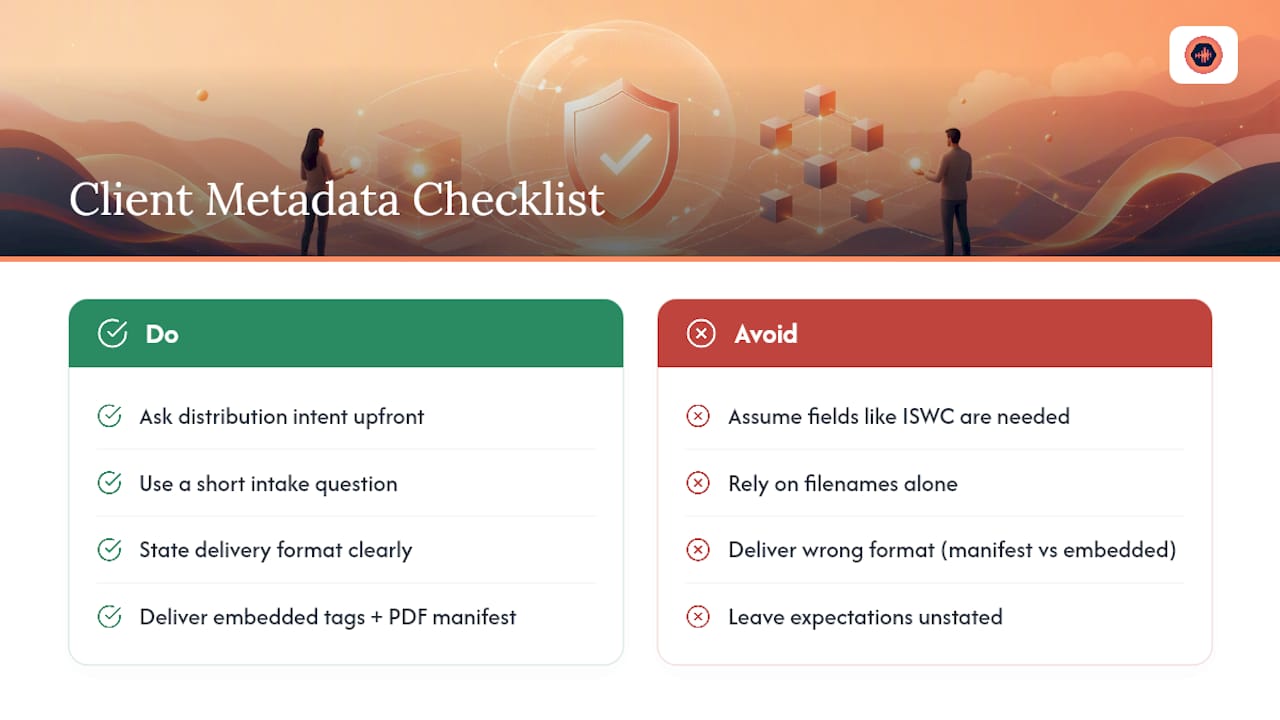
Ask before you assume. A podcast client rarely needs ISWC codes or publisher splits; a client pitching for sync placements needs both, plus a cue-sheet-ready credit list. Find out which category your client falls into before you build the manifest, not after.
A short intake question covers most of it: “Where is this going, streaming, sync licensing, broadcast, physical release?” The answer changes which fields actually matter. A track headed for a Spotify release needs accurate title and artist spelling more than anything else, since inconsistent artist name formatting is one of the most common reasons metadata gets flagged during distribution review.
Set expectations early about what you’ll deliver and in what format. If a client expects embedded metadata and you’re only sending a manifest, or vice versa, that mismatch surfaces at the worst possible time, usually right before a release deadline. State plainly in your delivery email or contract: “Final delivery includes embedded metadata on all files plus a PDF manifest covering credits, ISRCs, and technical specs.”
Clients who’ve worked with other studios sometimes carry expectations from a previous, sloppier experience. Some assume metadata is optional, or that a filename alone counts as sufficient labeling. A quick explanation of why embedded tags and a manifest both matter, in plain terms, tends to head off confusion before it starts. Our step-by-step guide to sending mixes to clients includes email language that sets these expectations without sounding like a legal disclaimer.
Keeping Metadata Intact After You’ve Delivered
Your responsibility doesn’t end at the download link. What clients do with files after delivery determines whether all that embedded information survives or evaporates the first time someone touches the file in a different application.
Tell clients directly: don’t re-encode or re-export the file through a platform that strips tags without checking first. Many upload portals, especially free ones, scrub metadata during ingestion to normalize files for their own systems. If a client needs to convert a WAV to a different format, the manifest becomes the backup record, since embedded tags might not survive the conversion.
Advise clients to keep the PDF manifest in the same folder as the audio files, not in a separate downloads folder that gets cleaned out during a laptop upgrade. File organization habits vary wildly between clients, and a manifest that’s easy to misplace is a manifest that eventually gets misplaced.
If a client plans to hand files off to a third party, a distributor, a sync agency, a mastering house, recommend they forward the manifest alongside the audio every time, not just once at the start. That habit alone prevents most of the “we don’t have the ISRC anymore” emails that surface months after a project wraps.
Why Metadata Discipline Protects Your Income
Metadata work feels like paperwork until the royalty statement comes back wrong, or a sync placement falls through because nobody could confirm the publishing split. Start capturing this information at project kickoff, not after the final mix is bounced, since documenting metadata continuously rather than reconstructing it at the end cuts down on the errors that show up later. Pull one active project this week and run the checklist against it. You’ll likely find at least one missing credit or ISRC gap worth fixing before it costs you money.
— Kreg
Deliver Metadata Without Losing Track of the Files
Every checklist in this guide assumes you’re actually managing files, versions, and manifests somewhere organized. This platform maintains unlimited high-resolution uploads, version history, and timestamped feedback tied to the same project, with a password-protected page clients can access without creating an account.

That structure directly solves the metadata-loss problem covered above: attach the PDF manifest to the project once, and it stays linked to the correct version instead of drifting apart from whatever file the client actually downloaded. Payment tools enforce the hold-for-payment rule automatically, so full-resolution masters and stems stay locked until payment clears, no manual tracking required. If your revision volume has grown past what a shared drive and an inbox can handle, see how Audome’s project workspace works and start a project with your next client this week.
Sources
- Recording Academy — Delivery Recommendations for Recorded Music Projects (guidebook excerpts)
- Music metadata best practices for sync (DropCue)
- Final mix delivery: what to send clients (TrackBloom blog)
FAQ
Do I Need a Separate ISRC for Every Mix Version?
Yes. Different mixes or masters of the same song each need their own ISRC, even if the underlying composition hasn’t changed.
Should I Embed Metadata or Just Send a Manifest?
Do both. Embed the core fields, title, artist, ISRC, contact info, directly in the file, and back it up with a PDF manifest since embedded tags frequently get stripped during reuploads or re-encodes.
What Happens if a Client Strips the Metadata by Accident?
The manifest becomes the recovery document. Send the client the original PDF or text manifest and, where possible, re-export the file with tags embedded again before it moves further downstream.
What’s the Minimum Metadata I Should Never Skip?
Track title, primary artist, ISRC, contributor credits with roles, sample rate and bit depth, and a complete stems list. Everything else depends on where the client is sending the file next.
Can a Platform Like Audome Replace Manual Metadata Tracking?
For studios juggling multiple active clients and revision rounds, yes. Audome ties version history, timestamped feedback, and manifest attachments to one project page, reducing the drift that happens when files and documentation live in separate places.