
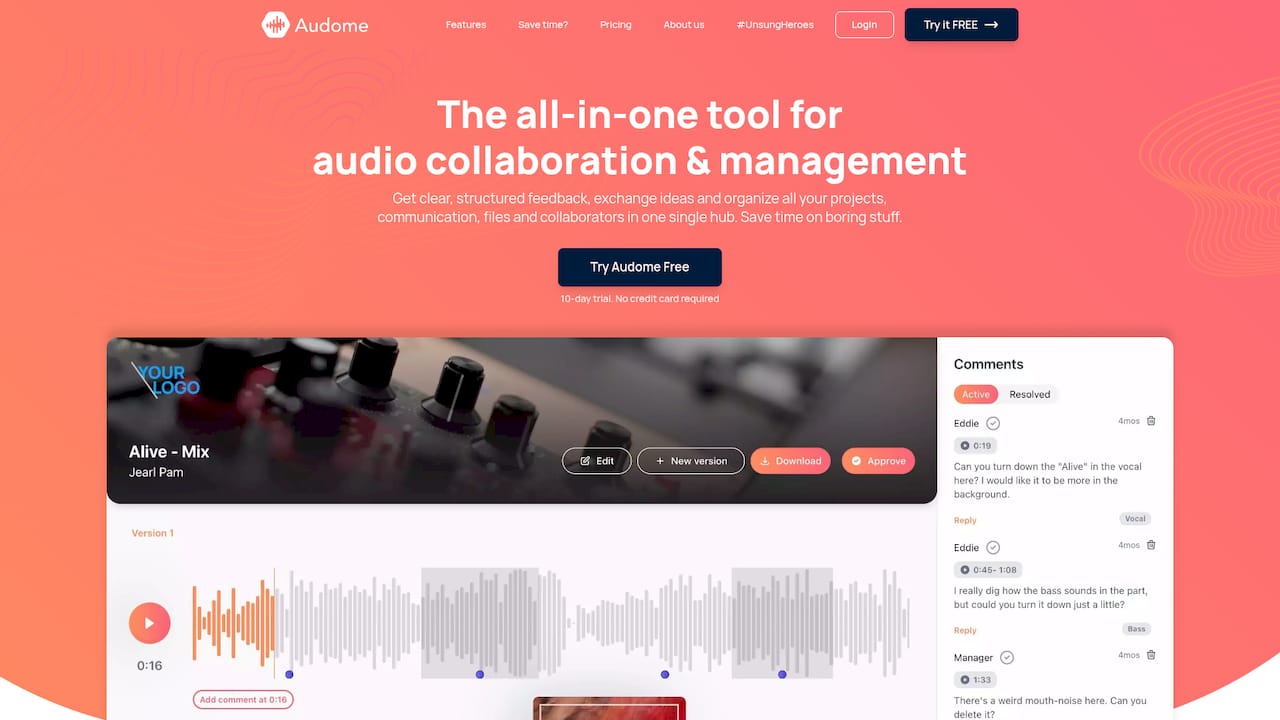
An audio engineer client portal is one private, branded place where your client hears the mix, leaves notes on the exact second they mean, and gets the final files, while you keep every version, comment and revision count in one project. If your clients now send feedback by text, email, voice memo and DM, a portal replaces all of that with a single link. Audome is built for this job: lossless uploads up to 96kHz/24-bit, time-stamped comments on the waveform, automatic version tracking and no login required for your client.
TL;DR
- A client portal gives each project one link for listening, feedback, revisions and delivery, so notes stop scattering across email, texts and chat apps.
- The features that matter most: lossless playback, time-stamped comments, clear version labels, access control, download control and a firm final sign-off.
- Clients should not need an account. Every login screen between them and the mix delays the notes.
- Set the rules before the first mix: number of revision rounds, who consolidates feedback, and what counts as approval.
- Audome’s Studio plan is $12.50 per month or $150 per year, and Pro is $48 per month or $576 per year.
Table of Contents
- What a client portal does for an audio engineer
- The features that decide whether a portal works
- How to run a project through a portal, step by step
- Why asynchronous review suits audio work
- Who gets the most from a portal
- What to check before you pick a portal
- Audome pricing and what to do next
- Our perspective
- FAQ
- Sources
What a client portal does for an audio engineer
A portal is the page your client actually sees. You upload a mix, master or episode edit, send a link, and the client plays it in a browser. They comment, approve or ask for changes in the same place. You see all of it next to the project it belongs to.
It solves the problems you already know:
- Scattered feedback. One note arrives by email, another in a text at 11 p.m., a third on a call that nobody wrote down.
- Vague notes. “The second half feels off” costs you a round of questions. A comment pinned to a timestamp does not.
- Version confusion. The client reviews v3 while you are working on v5, then asks why the bass is still loud.
- Weak previews. A compressed file played through a phone speaker leads to notes about the playback, not the mix.
- Unpaid revisions. Without a limit in the workflow, round six looks the same as round two.
A shared cloud folder holds files, but it does not tie feedback to the audio or track versions for you. A portal built for audio does both.
The features that decide whether a portal works
When you evaluate any portal, judge it on what happens in a real revision round. These are the parts that matter.
Lossless playback you can trust
Your client should hear what you exported. If the platform quietly transcodes your file, you lose the ability to say “this is the mix.” Audome supports unlimited high-resolution audio file sharing up to 96kHz/24-bit, so what you upload is what gets shared.
Time-stamped comments on the waveform
This is the feature that changes your day. Instead of describing where a problem is, the client clicks the waveform and types the note. You open the project, see every comment at its position, and work through them in order. Pair that with one pass through your session and you are done with the round. We walk through that routine in one edit pass to resolve client comments.
Version tracking that does not depend on file names
“Final_v2_REAL_final.wav” is not a system. Automated version tracking means each upload is a new version of the same project, with the history intact. Your client always knows which one is under review, and you always know which one they commented on.
Access control and download control
A password-protected, branded client portal keeps unreleased work private and looks like your studio, not a generic file-sharing site. Download controls let you decide when the client can take files home. A sensible habit is to let clients stream the review version and release the high-resolution master only at the end. That keeps an old reference from being sent to distribution by mistake, and it keeps the final files tied to the approval.
No login for the client
Your client is a singer, a label A&R, a podcast host or a producer who has ten other things to do. Asking them to create an account is the quickest way to get notes delayed by a day. Audome lets collaborators comment without a client login, so the link opens and the listening starts.
Revision limits and payment
This is where a portal pays for itself. Audome includes revision limits and billing for paid revisions through Stripe-based payment integration. The terms you set at the start are enforced by the workflow, not by an awkward email in round five. For the approval side of this, see how to lock final files until paid.
How to run a project through a portal, step by step
1. Set the rules before the first mix
Agree on how many revision rounds are included, who is the single person consolidating feedback on the client’s side, how notes should be submitted and what counts as final approval. Put a listening deadline on it if there is a release date. Doing this at the start removes most of the arguments later. The reason it fits a portal so well: you can set the revision limit in the project instead of relying on memory.
We cover the full sequence in our mix approval process guide and the end-to-end flow in the audio proofing workflow.
2. Collect the client’s files in the same place
Stems, reference tracks, session notes, voice-over reads, raw interview audio: all of it arrives by email attachments, links to three different drives or a USB stick unless you give clients one place to upload. Audome has client upload tools, so what they send lands inside the project instead of your inbox. That also helps you keep the source material and the delivered versions in one project history.
3. Upload the mix and name what it is
Upload the export and label it clearly: mix, alt, instrumental, TV track. Each new upload becomes the next version automatically. Check the level before you send it. If you normalize or loudness-match different versions inconsistently, the client will hear differences that are not in the mix.
A step-by-step version of this stage is in sending mixes to clients.
4. Send the link and ask for time-stamped notes
Tell the client what you want back: comments at the moment they hear the issue, one consolidated round, by a set day. Because the client does not need to sign in, you can send the link in the same message as your delivery note. The pinned comments take the place of the long email that starts with “around the middle.”
5. Work the comments in one pass
Open the project, read the comments in order, and make all the changes in a single session. Resist doing a small fix after every note, because each export is another version and another round. If a note conflicts with another, reply in the project so the thread stays in one place. For a method you can run in an afternoon, read how to centralize client feedback.
6. Upload the revision and keep count
The new upload is the next version. The revision count moves with it, which matters if you have set limits or paid revisions. Our mix revision management guide goes deeper on keeping rounds under control, and revisions in music production covers how to set expectations with producers and artists.
7. Get a clear sign-off, then release the finals
Approval should be an explicit step, not a thumbs-up emoji. Run through a short list before you deliver: correct version, correct sample rate and bit depth, correct file names, nothing left unchecked. Our mix approval checklist and mastering approval checklist are made for that moment. Only then do you release the high-resolution files, with download controls handling who can take what.
Why asynchronous review suits audio work
A portal is asynchronous: you and the client do not have to be online at the same time. Sound on Sound’s Andrea Pejrolo notes that asynchronous collaboration tools have lower network and internet speed requirements than live sessions, and that they make it easier for people spread across time zones to exchange detailed feedback. The same article points out that the time to think before replying reduces the damage of a heated, badly timed critique.
In practice, that means a client in another time zone can listen on their own schedule, on their own good speakers, and write a considered note. You open the project in the morning and the notes are waiting, tied to the timeline.
This is also how you avoid creating extra steps. The portal is not another app your client has to learn. It is the link they were going to open anyway, now with the comments and the files in the same place.
Who gets the most from a portal
Mixing and mastering engineers get fewer clarification emails, a clean revision history and a clear point where the master is released.
Podcast producers can share episode edits with hosts and guests, collect timestamped notes (“cut the pause at 14:32”) and receive raw audio through client uploads, all without chasing people for accounts.
Audio post-production teams deal with several stakeholders on one cut. One link with notes pinned to the timeline stops the same note from arriving three different ways.
Studio owners get a consistent, branded experience across every engineer and every client, and a single place where project status is visible.
Client portals are a well-established idea in other service businesses too, and looking at client portal options compared shows the same core pieces: a private space per client, messaging, files and payments. For audio, the difference is that the portal has to play your files back as you exported them and take feedback in the form of time-stamped comments.

What to check before you pick a portal
Use this list when you compare any tool against how you really work:
| Question | Why it matters |
|---|---|
| Does it play back the file at the quality you upload? | Notes should be about the mix, not the preview. |
| Can the client comment on a specific timestamp? | It removes guesswork and follow-up emails. |
| Is each new upload tracked as a version automatically? | Everyone knows which version is under review. |
| Does the client need to sign in? | Extra steps slow down feedback. |
| Can you protect and brand the link? | Unreleased work stays private and the page looks like your studio. |
| Can you control downloads? | You decide when finals leave the project. |
| Can you limit revisions and bill for extra ones? | The scope you agreed is the scope you deliver. |
Audome covers each of these rows: lossless audio up to 96kHz/24-bit, time-stamped waveform feedback, automated version tracking, no-login collaboration, password-protected and branded portals, download controls, revision limits and paid revisions through Stripe.
Audome pricing and what to do next

Audome is a collaboration and project management platform made for audio professionals, and it runs on a subscription after a free trial. The Studio plan is $12.50 per month or $150 per year. The Pro plan is $48 per month or $576 per year. Uploads are unlimited, and the entry price is set lower than comparable portals.
If you are replacing a mix of email, chat and file links, start with one live project: upload the current mix, send the link, and see how the comments come back. You can see the plans on the Audome pricing page or look at the whole platform on audome.com.
Our perspective
Most of the chaos in a mix approval is not about taste. It is about not knowing which version someone heard, where exactly they heard the problem, and how many rounds are left.
That is why we built Audome around three things: audio that stays lossless, comments pinned to the waveform, and versions that track themselves. When the client hears your actual export and can point at the exact second, the conversation gets shorter and calmer.
We also think the client should never be asked to sign up for anything. They get a link, they listen, they comment. Add a branded, password-protected portal, download controls, and revision limits with paid revisions through Stripe, and the way you work with clients stops depending on how well you remember what was agreed.
A portal is not extra admin. It is the place where the admin you already do finally lives in one spot.
Kreg
FAQ
Do my clients need an account to use the portal?
No. With Audome, collaborators can listen and comment without a client login. You send a link, and they open it in a browser. That keeps the first round of feedback from stalling on account setup.
What audio quality can I share through a client portal?
It depends on the tool, so check it. Audome supports unlimited high-resolution audio file sharing up to 96kHz/24-bit, with lossless quality, so your client hears the file as you exported it.
How do I stop endless revisions?
Set the number of included rounds before you send the first mix, and put it in the project. Audome lets you set revision limits and bill for paid revisions through Stripe, so extra rounds are handled by the workflow instead of an uncomfortable email.
Can I keep final files from the client until the work is approved?
Yes. Use download controls to keep high-resolution masters and other final files locked while the client reviews, and release them after sign-off. Our guide to the studio approval process shows how to tie that release to payment.
How much does Audome cost?
Studio is $12.50 per month or $150 per year. Pro is $48 per month or $576 per year. Current plans are on the pricing page.