
A branded client portal is a centralized, custom-branded hub where audio professionals deliver files, collect feedback, and manage payments under their own studio’s name instead of a generic file-sharing link. If you’re repeatedly sending mixes over email, chasing feedback across three different apps, or losing track of which version a client actually approved, you need one. Studios that handle version control, timestamped notes, or paid revisions benefit most, and Audome was built specifically to cover that workload for audio professionals rather than general business teams.
Here’s what separates a real portal from a shared Dropbox folder:
- A branded portal keeps your studio’s name and colors in front of the client at every touchpoint, not a third-party logo.
- It centralizes file delivery, feedback, and billing in one place instead of scattering them across email, text, and cloud storage.
- It gives you controls, like revision limits and payment gates, that generic file transfer tools simply don’t offer.
Key Takeaways
A branded client portal centralizes file delivery, feedback, and payment under your studio’s own identity, and it works because it removes friction, ambiguity, and unpaid revision cycles all at once.
| Point | Details |
|---|---|
| Definition matters | A branded client portal combines file delivery, timestamped feedback, and billing under your studio’s own name and domain. |
| Audio-specific features are non-negotiable | Look for 96kHz/24-bit support, waveform-anchored comments, and no-login client access before anything else. |
| Setup takes days, not months | A subdomain, basic branding, and one test project with a trusted client is enough to launch safely. |
| Revision limits protect profitability | Billing for extra revisions through Stripe before delivery cuts down on unpaid work and vague feedback. |
| Audome maps directly to these needs | Audome combines high-res uploads, waveform-timestamped feedback, and Stripe-based revision billing in one studio-built platform. |
Table of Contents
- Core Features Every Audio-Friendly Branded Client Portal Needs
- How Do You Set Up and Brand a Client Portal?
- Real Studio Workflows That Show the Portal in Action
- Security, File Ownership, and Delivery Controls to Verify
- Setting Revision Limits and Payment Rules That Protect Your Time
- Launch Checklist Before You Send Your First Portal Link
- What Studios Actually Get From Making the Switch
- How Audome Delivers on Every Point in This Checklist
- Useful Audome Resources
- FAQ
Core Features Every Audio-Friendly Branded Client Portal Needs
Not every portal on the market understands audio. A lot of them were built for design agencies or law firms and bolted on file upload as an afterthought. Here’s what actually matters for a studio workflow.
- Timestamped feedback directly on the waveform. A client saying “the vocal is too loud around 2:15” is infinitely more useful than “can you fix the vocal,” and a portal that anchors comments to the actual waveform timestamp eliminates the guesswork.
- Version history that’s actually restorable. You need to open v3 next to v7 without digging through a folder named “Mix_FINAL_v2_REAL_FINAL.wav.”
- Branded look and feel. Custom subdomain, your logo, your colors, no vendor badge staring back at the client.
- Integrated payments and gated downloads. Stripe-based billing that can require payment before a final file unlocks, plus the ability to charge automatically for extra revisions.
Pro Tip: Test your portal’s streaming preview on a mobile connection before sending it to a client. A lot of feedback delays trace back to someone trying to load a 200MB WAV file on hotel Wi-Fi instead of using a compressed preview stream.
How Do You Set Up and Brand a Client Portal?
Getting a portal live doesn’t take months. It takes a focused afternoon and one test project.
- Pick your hosting pattern. A custom subdomain like
portal.yourstudio.comreads as far more professional than a generic vendor subpath, and it reinforces your brand every time a client opens a link. Custom branding on the delivery experience increases perceived professionalism compared to sending files through a plain third-party service. - Apply minimum branding before your first share. Upload your logo, set your primary color, and write a one-line welcome message so the first thing a client sees is your studio, not a placeholder screen.
- Decide your access model. Most studios do better with one portal that generates isolated per-client workspaces rather than juggling a separate portal for every project. That keeps client files from crossing streams while still giving you one dashboard.
- Configure your integrations. Connect Stripe for payments, turn on email notifications so you’re not manually pinging clients, and confirm your backup routine covers cold storage for anything you’re not actively working on.
- Run a live test with one trusted client. Send a real project, collect timestamped feedback, restore an older version to confirm it works, and check that download gating actually blocks the final file until payment clears.
Skipping the test run is the most common mistake. You want to find a broken link or a misconfigured payment gate on a friendly client’s project, not a paying stranger’s deadline.
Real Studio Workflows That Show the Portal in Action
Two workflows cover most of what a studio actually does day to day.
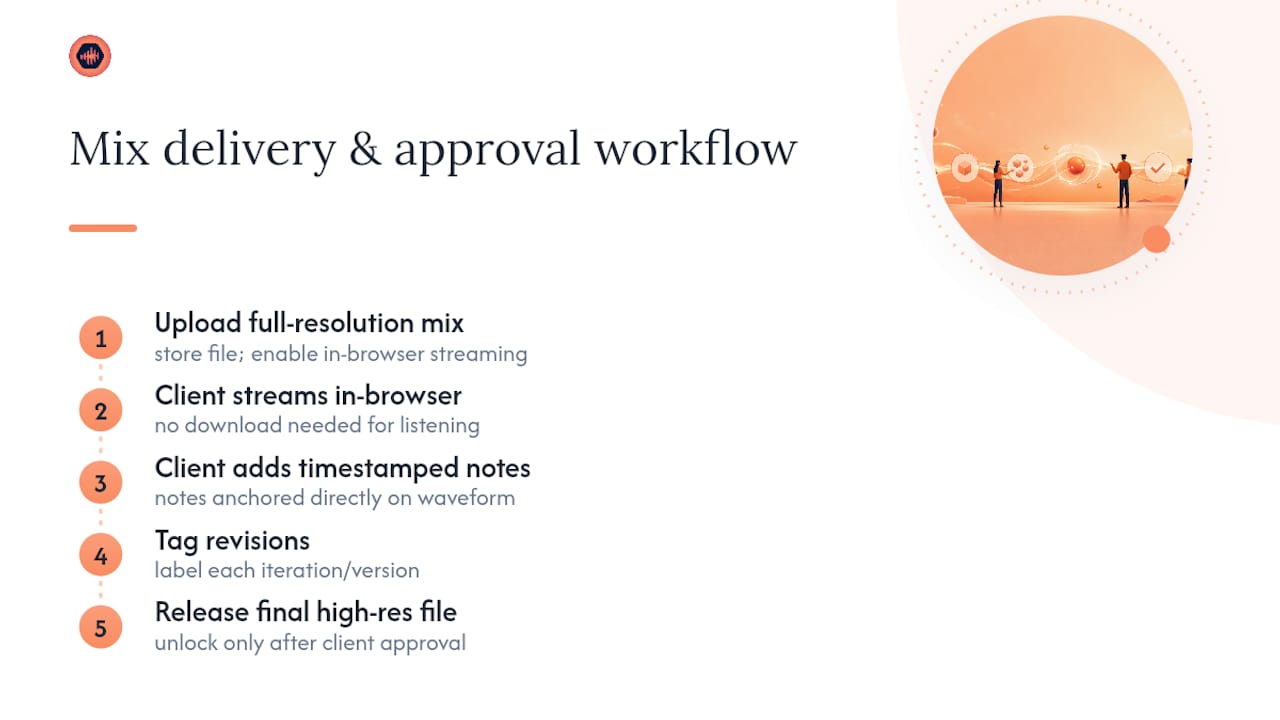
Mix delivery and approval. Upload the full-resolution mix, let the client stream it in-browser so they’re not forced to download a huge file just to listen once, and request timestamped notes directly on the waveform. Tag each revision as you iterate, and unlock the final high-res file only once the client marks the version approved.
Revision-managed mastering. Set a number of included free revisions upfront, say two, then define a flat fee or hourly rate for anything beyond that. Every revision request becomes a tracked ticket instead of a scattered text message, and extra revisions get billed through Stripe before you deliver the updated master.

Both workflows share the same payoff: fewer email threads, no more hunting for the “right” file buried in a folder, and feedback that’s specific enough to act on instead of vague notes like “make it pop.”
Security, File Ownership, and Delivery Controls to Verify
Protecting your masters matters as much as delivering them well.
- Use password-protected project pages, expiring links, and download limits on anything final, so a link that leaks doesn’t turn into unlimited unauthorized access.
- Keep an audit log of who downloaded or commented on a file and when, giving you a clear chain of custody if a dispute ever comes up.
- Spell out file ownership in your client contracts, and keep your master files on storage you control, not solely inside a client’s inbox.
- Plan a backup and storage lifecycle for large WAV and FLAC libraries before they pile up. Losing a client’s masters to an untested backup is the kind of mistake that ends relationships.
Platforms that support expiring links and hard download caps tend to see fewer unauthorized shares and a more predictable delivery process overall, since the control sits with the studio instead of trusting the client to be careful with a permanent link.
Setting Revision Limits and Payment Rules That Protect Your Time
The biggest operational shift a portal enables isn’t file transfer. It’s boundaries.
- A common structure is a flat project fee that includes two or three revisions, with additional rounds billed at a set rate or hourly.
- Automate the billing for extra revisions through Stripe Connect so the work doesn’t ship until the invoice clears, removing the awkward step of chasing payment after delivery.
- Requiring payment before the final download unlocks cuts down on unpaid deliveries and, just as importantly, pushes clients toward faster, more decisive feedback because endless “one more small tweak” requests now carry a cost.
- Pair this with simple contract language: “Project includes two rounds of revisions. Additional revisions are billed at $75 per round and must be paid before final files are released.”
Launch Checklist Before You Send Your First Portal Link
Run through this before a client ever sees the link:
- Custom domain or subdomain is live with SSL active.
- Branding applied: logo, primary color, and a clear welcome tile in place.
- Payment integration tested with an actual completed test transaction.
- Test project run end to end: feedback collected, version restore confirmed, download gate verified.
- Staff roles and access levels checked, with audit logging switched on.
What Studios Actually Get From Making the Switch
Most studios that adopt a real portal see the payoff in reduced admin time and faster client approvals, though the exact numbers depend heavily on how scattered your current process already is. Don’t expect a dramatic before-and-after overnight. Send a short explainer email to your first few clients, walk one of them through it live if you can, and track how much time you save after three completed projects before you judge whether it stuck.
— Kreg
How Audome Delivers on Every Point in This Checklist
Everything covered above, high-res uploads, timestamped waveform feedback, Stripe-based payments, password-protected project pages, isn’t theoretical. It’s what Audome was built to run.

If your studio is still emailing WAV files and hoping a client remembers which version they approved, Audome replaces that entire mess with one branded workspace: unlimited high-resolution uploads, comments pinned to the exact waveform moment, revision limits you control, and downloads that stay locked until payment clears. Start with a free trial, run one real project through it the way this article walked through above, and use Audome’s guide to the mix approval process if you want a second workflow reference while you set it up. If your studio also works with broadcast clients, a consultancy like Seeger Media is worth knowing about for that side of the business. Sign up at Audome and send your next mix through it instead of your inbox.
Useful Audome Resources
- File sharing methods for studios for a deeper look at delivery trade-offs.
- Client approval software alternatives for comparing your options.
FAQ
What Is a Branded Client Portal Used For?
It’s used to deliver audio files, collect timestamped feedback, and manage payments under a studio’s own name instead of a generic third-party link.
Does a Client Need to Create an Account to Use One?
No. Platforms like Audome allow clients to leave feedback and review files without creating an account, which speeds up approvals and reduces abandoned review sessions.
What File Quality Should a Portal Support?
Look for support up to 96kHz/24-bit so mixes and masters can be delivered without any lossy compression getting introduced along the way.
Can a Portal Stop Clients From Downloading Unpaid Work?
Yes. Portals with Stripe-based payment gating, like Audome, can lock final downloads until payment is confirmed, which reduces unpaid deliveries.
How Do I Handle Excessive Revision Requests?
Set a fixed number of free revisions in your project agreement, then automate billing for anything beyond that through Stripe Connect so extra rounds carry a real cost.