
A studio project pipeline runs intake through recording, editing, mixing, mastering, client review, and final delivery, with an archive step at the end. The single change that fixes more workflows than anything else: name one project owner and put every file and piece of feedback in one place, instead of splitting them across email, texts, and drive folders. Platforms like Audome exist specifically to hold that single source of truth.
TL;DR:
- Centralizing project files and feedback in a single platform like Audome reduces workflow errors and ensures all revisions, notes, and versions are in one accessible place.
- Implementing clear stage checkpoints with specific criteria prevents costly reworks, especially at critical transitions such as from mixing to mastering.
- Standardizing export formats, loudness targets, and delivery methods streamlines the process and minimizes last-minute surprises or re-exports.
- Using visual project management tools like kanban boards enables better tracking, prioritization, and bottleneck identification across multiple studio projects.
- Automating repetitive tasks, such as version numbering, notifications, and backups, significantly improves reliability and frees staff to focus on creative work.
Table of Contents
- What Are the Stages of a Studio Project Pipeline?
- How Do You Centralize a Studio’s Project Management?
- How Should Studios Handle Client Feedback and Revisions?
- How Do You Track and Prioritize Multiple Projects?
- What Export Specs and Delivery Controls Should Studios Standardize?
- Where Can Studios Automate Their Pipeline?
- How Audome Maps to Each Pipeline Stage
- How Do You Plan for Risk in a Studio Pipeline?
- How Should Studios Allocate Staff and Equipment?
- Where Do Quality Checkpoints Belong in the Pipeline?
- How Do Slack and Email Fit Into a Studio’s Workflow?
- Author Perspective: Implementing a Studio Pipeline
- Try Audome: Where to Start
- Sources
- FAQ
What Are the Stages of a Studio Project Pipeline?
Every stage in a studio project pipeline has a “done” condition. Skip defining it, and work slides backward: a mix gets reopened after mastering, a client asks for changes nobody logged, a session file goes missing three weeks before delivery.
Intake comes first, and it’s the stage most studios rush. A proper intake captures scope, reference tracks, source files, the due date, and payment terms before anyone touches a fader. A tight intake process that documents technical needs and deliverables up front prevents scope creep and the delays that follow it downstream.
Pre-production and recording need a session template, a mic list, and a backup routine that runs automatically, not one someone remembers to trigger at 11 p.m.
Editing covers comping, noise reduction, and take labeling clean enough that a second engineer could pick up the session cold.
Mixing needs an explicit line between a “rough” and a “final” mix, plus a stated revision limit before anyone starts. Mixing and mastering are distinct stages with different jobs, and a mix problem generally cannot be fixed at the mastering stage. That’s why loudness or balance issues need to get caught before the file ever reaches mastering.
Mastering means hitting loudness targets and exporting to the correct final formats, not applying a fix for something the mix should have solved.
Client review works best with time-coded, specific feedback rather than a paragraph of vague notes.
Delivery and archive close the loop: required files, correct metadata, and a retention plan so the project can be found again in a year.
The stages, in order:
- Intake: scope, references, files, deadline, payment terms
- Pre-production/recording: templates, mic lists, backups
- Editing: comping, cleanup, labeled takes
- Mixing: rough vs. final defined, revision cap set
- Mastering: loudness targets, final export formats
- Client review: time-coded, actionable feedback
- Delivery/archive: file checklist, metadata, retention schedule
How Do You Centralize a Studio’s Project Management?
Centralizing a pipeline doesn’t mean flattening your creative process into a rigid checklist. It means someone owns the standards, while engineers still work however they work best. Studios that pair centralized governance with decentralized creative execution tend to hit the best balance between consistency and speed.
Here’s how to set it up:
- Assign a workflow owner. This person maintains templates, onboards new engineers, and audits projects for drift from the standard process.
- Build four templates: an intake form, a session template, a deliverable spec sheet, and an approval gate checklist.
- Fix naming conventions that survive DAW quirks. Something like
ClientName_ProjectTitle_v03_MixFinalworks regardless of what your DAW wants to rename the file to on export. - Phase in centralization gradually. Start with the highest-friction points, session prep and version tracking usually show the fastest payoff, then expand from there.
A reusable intake workflow turns this from a one-time setup into something new clients can move through in minutes.
Pro Tip: Don’t centralize everything on day one. Pick the one stage where you lose the most time right now, usually version tracking, fix that first, and expand once it sticks.
How Should Studios Handle Client Feedback and Revisions?
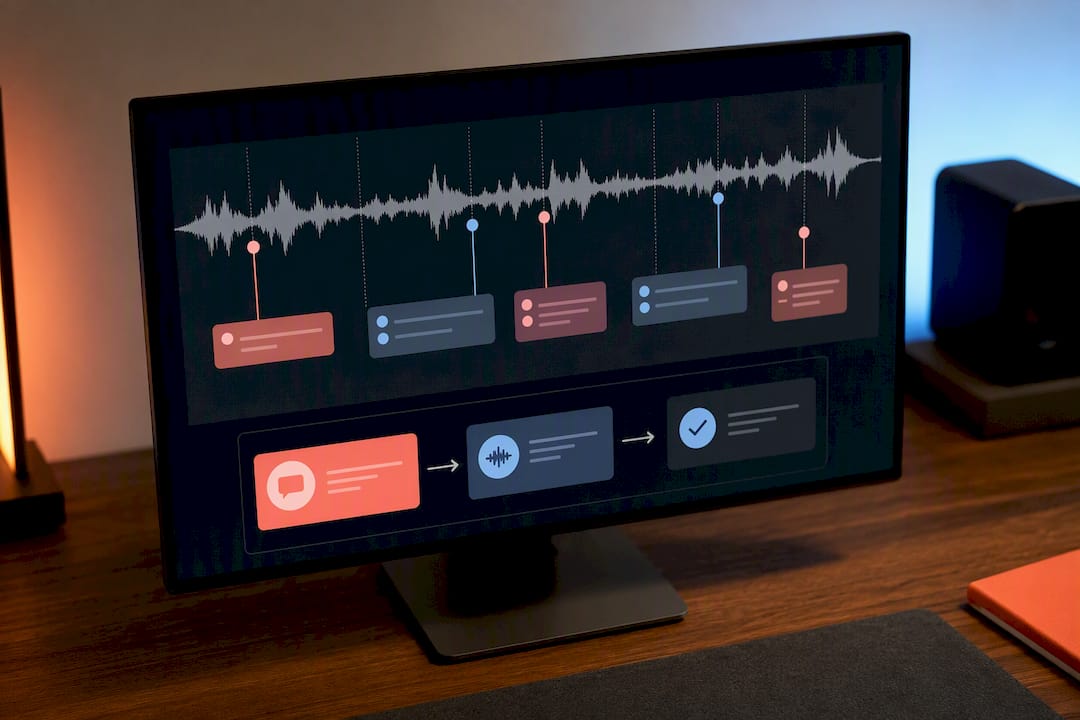
Vague feedback is the single biggest time sink in a studio pipeline. “Can you make the vocals pop more” costs you a guessing game and a wasted revision round. Timestamped comments directly on the waveform, at 1:42, raise this by 2 dB, cost you nothing.
Set the policy before the project starts, not after a client asks for a sixth revision:
- Include a fixed number of revision rounds in every quote (two or three is standard for most studios).
- Publish what happens after that: a flat fee per extra round, billed before work resumes.
- Gate the final download behind payment. If a client owes for extra revisions, they shouldn’t be able to pull the final files until that’s settled.
- Give clients a feedback template: “At [time], the [instrument] should [specific change]” beats an open-ended paragraph every time.
Structured version control and clear approval gates cut down on the confusion over which mix is actually final, which is often what triggers an unplanned extra round in the first place.
Pro Tip: Require clients to reference a timestamp for every note. If they can’t point to a moment in the track, the feedback usually isn’t specific enough to act on yet.
How Do You Track and Prioritize Multiple Projects?
Running six projects at once without a visual system means something always slips. A kanban-style board with columns matching your actual pipeline stages, Intake, Recording, Editing, Mixing, Review, Delivery, gives you an instant read on where every project sits and which stage is clogged.
A few habits make this work:
- Tag cards by priority and due date so today’s real work surfaces automatically instead of getting buried.
- Group projects by client or genre to avoid the mental cost of switching context every 20 minutes.
- Attach a one-line context note to each card (“waiting on stems from drummer”) so picking a project back up doesn’t require rebuilding memory from scratch.
Boards like this also expose bottlenecks fast. If four projects are stuck in “Mixing” and nothing has moved in a week, that’s a staffing problem, not a coincidence. Tools built for tracking audio post-production timelines make this visibility automatic rather than something you rebuild manually every Monday.
What Export Specs and Delivery Controls Should Studios Standardize?
Standardizing final outputs removes the “wait, which format do they need” scramble that happens every single delivery.
| Deliverable | What to include |
|---|---|
| Mix stems | Grouped, labeled tracks at project sample rate/bit depth |
| Final master | Format matched to platform loudness target |
| Metadata | Track title, artist, ISRC (if applicable), version tag |
| Session backup | Full project file archived, not just the bounce |
Studios that standardize export specs and loudness targets up front, rather than treating mastering as a fix for an unfinished mix, spend far less time on last-minute re-exports.
Delivery itself should run through a password-protected page with controlled downloads, not an email attachment that lives forever in someone’s inbox. Retention policy: keep final deliverables and session backups for at least a year, longer for commercial releases where a remix or reissue is plausible. A secure file-sharing setup built for studios keeps that control without adding friction for the client.
Where Can Studios Automate Their Pipeline?
Most pipeline friction is repetitive, not creative, which is exactly what makes it automatable.
- Version numbering and changelogs, autogenerated instead of manually typed, eliminate the “which version is this” question entirely.
- Revision billing, tied to a payment integration, unlocks extra rounds automatically instead of requiring an awkward invoice email.
- Notification rules flag overdue approvals and pending sign-offs without anyone checking a spreadsheet.
- Automated backups to cloud storage remove the single point of failure that is “someone forgot to back up the session.”
The same automation logic that works for content production pipelines applies just as well to audio: anywhere a human is repeating the same manual step across every project is a place to script it out.
How Audome Maps to Each Pipeline Stage
Every stage above needs a specific tool behind it, and that’s the gap most studios patch with five different apps. Audome supports lossless audio up to 96kHz/24 bit, with timestamped comments placed directly on the waveform, automatic version history, and private client portals, replacing the scattered feedback loop across email, texts, and Discord with one workspace.
- Timestamped waveform comments replace vague email notes during client review.
- Automatic version tracking removes “which mix is final” confusion.
- Intake templates and secured project pages centralize files and client instructions in one link.
- Stripe Connect integration gates final downloads behind payment, so extra revisions get billed and paid before files unlock.
A mastering engineer running four client projects a week can send one branded link per client, no login required, and see every revision request logged against the exact second it applies to.
How Do You Plan for Risk in a Studio Pipeline?
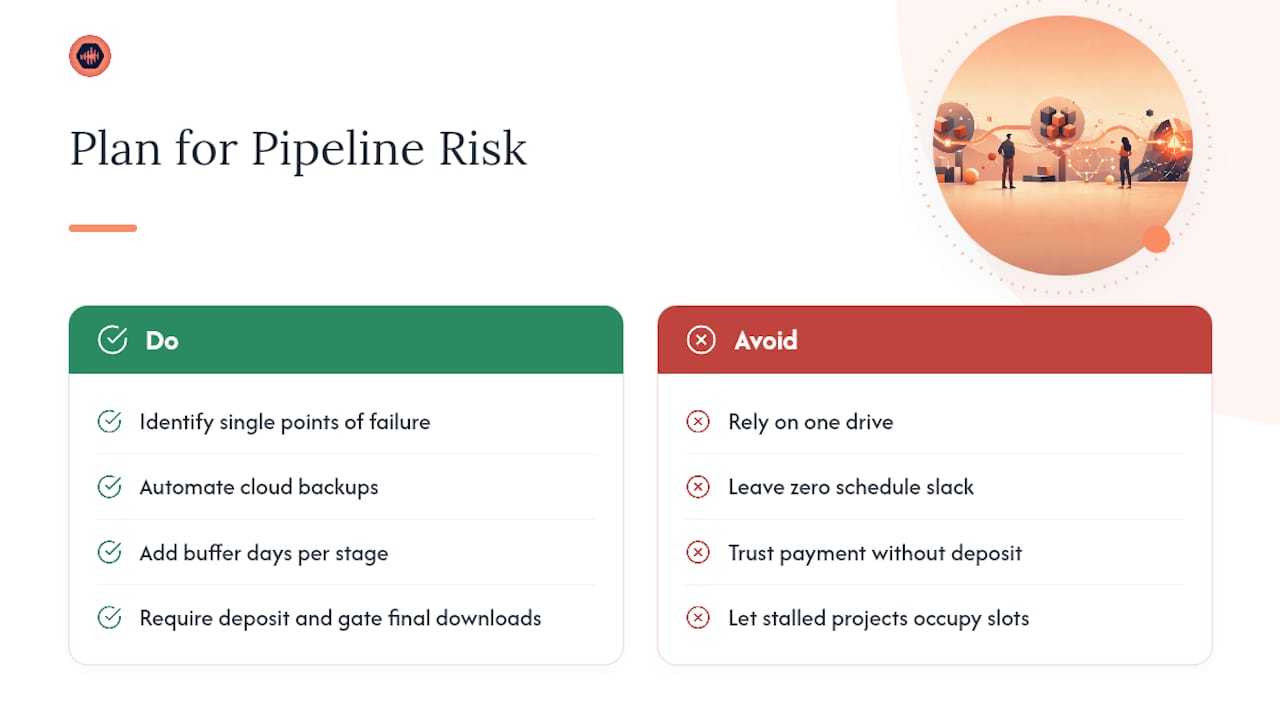
Every studio pipeline eventually breaks somewhere: a hard drive dies, a client disappears mid-revision, a session file gets corrupted, or a key engineer is out sick during a deadline week. The studios that recover fastest aren’t the ones with no problems. They’re the ones who decided in advance what happens when a problem hits.
Start with single points of failure. If only one drive holds a session, that’s a risk, not a backup plan. Automated cloud backups solve the storage half of this, but you also need a communication plan: who tells the client if a deadline slips, and how far in advance.
Build in schedule buffer on every project, even a small one. A two-week mix job with zero slack means any sick day or gear failure becomes a missed deadline instead of a manageable delay. Studios that build in even a day or two of buffer per stage absorb small disruptions without the client ever noticing.
Payment risk deserves its own plan, too. A client who vanishes after the rough mix but before final payment is a recurring problem in this business. Gating final downloads behind payment, and requiring a deposit at intake, converts that risk from “hope they pay” into a structural safeguard built into the pipeline itself.
Finally, document what happens when a project stalls past a set number of days with no client response. A default policy, like automatic pause after 30 days of silence, keeps a dead project from occupying a slot that a paying, active client could use.
How Should Studios Allocate Staff and Equipment?
Resource conflicts are usually a scheduling problem disguised as a staffing problem. Two projects both need the same vocal booth on the same Thursday, or your one mastering engineer is booked solid while three mixes sit finished and waiting.
The fix starts with visibility: know what’s booked, by whom, and for how long, before a client asks for a rush date. A shared calendar tied to your project board, not a separate spreadsheet nobody checks, keeps this current without extra admin work.
Assign personnel by stage, not just by project. An engineer who’s excellent at tracking sessions might be your bottleneck if they’re also handling every mix review call. Separating “who records” from “who mixes” from “who handles client communication” lets each person’s calendar reflect their actual specialty instead of a generic workload.
Equipment scheduling matters just as much for small studios as staff scheduling does for larger ones. If you’ve got one good vocal chain or a single mastering-grade monitoring setup, treat booking it like booking a person: visible, reserved in advance, and protected from double-booking.
Build slack into the schedule deliberately. If every engineer and every room is booked at 100 percent capacity, one sick day or one difficult client cascades into missed deadlines across three other projects. Studios that run near full capacity but keep 10 to 15 percent of scheduled time unassigned absorb these shocks without a domino effect.
Where Do Quality Checkpoints Belong in the Pipeline?
Quality checks that happen only at the very end catch problems too late to fix cheaply. A phase issue found after mastering means redoing the mix and the master. The same issue caught at the editing stage costs ten minutes.
Build a checkpoint at the end of every major stage, not just before delivery. After editing: check for clicks, pops, and phase issues before mixing begins. After the rough mix: confirm the client actually signed off on direction before moving to detailed mix work. After mastering: A/B against a reference track and check loudness against your target platform’s spec.
Each checkpoint needs a clear pass condition, not a vague “sounds good” judgment call. “Peaks below negative one, loudness within one LUFS of platform target” is checkable. “Sounds professional” is not, and it’s the kind of standard that causes arguments after delivery, not before.
Approval gates matter here too. A project shouldn’t move from mixing to mastering without an explicit client sign-off logged somewhere searchable, not buried in a text thread. That single habit, gate the stage transition on a documented approval, prevents the single most common rework cause in studio pipelines: someone assumed approval that was never actually given.
How Do Slack and Email Fit Into a Studio’s Workflow?
Communication tools like Slack and email notifications work best as alerts, not as the system of record. The moment feedback or approval history lives only in a Slack thread, you’ve recreated the scattered-files problem in message form instead of file form.
The better pattern: let your project platform generate the notification, and let Slack or email deliver it. A client leaves a timestamped comment, an automated notification fires to the assigned engineer, and the actual comment stays attached to the waveform where it belongs, searchable months later instead of buried in a channel history nobody scrolls back through.
This matters most for approval and payment events. A rule that pings your team the moment a client approves a final mix, or the moment a paid revision unlocks, means nobody’s manually checking a dashboard to see if it’s safe to start the next stage. Set these rules once per project type, and they run themselves for every project after that.
Keep client-facing notifications simple: one email when a project page updates, one when a revision request comes in, nothing more. Clients who get five notifications a day for one project tend to tune all of them out, including the one that actually mattered.
Author Perspective: Implementing a Studio Pipeline
One fix, moving all feedback onto timestamped comments instead of email threads, cut a client’s revision cycle from five rounds to two almost overnight. Audome handled the version tracking that made it stick.
— Kreg
Try Audome: Where to Start
This platform offers features including unlimited high-resolution uploads, no-login client access, automatic version tracking, and a paywall for extra revisions, consolidating multiple tools into one workspace.

Start small: build one intake template, create a single secured project page, and invite one client to test the review flow before rolling it out studio-wide. From there, the Studio and Pro plans scale with how many active projects and collaborators you’re running. Check the Audome homepage for a full feature breakdown, or head straight to pricing to start a trial and see how your next revision round actually behaves.
Sources
- Music project management — Mixvisor
- The stages of music production — Music Production Authority
- Audio production workflow — Sophistec Studio
FAQ
What Is a Studio Project Pipeline?
A studio project pipeline is the sequence a project moves through from intake to final delivery: recording, editing, mixing, mastering, client review, and archive. Studios that centralize this into one searchable system avoid the scattered-file problem that stalls most projects.
How Many Revisions Should Be Included in a Project Quote?
Most studios include two or three revision rounds in the base price, with additional rounds billed separately. Publishing this policy upfront, and gating final downloads behind payment for extra rounds, prevents open-ended revision cycles.
What’s the Difference Between Project Tracking and a Studio Pipeline?
Project tracking is the visibility layer, a board or queue showing where each project sits. The pipeline is the actual sequence of stages a project moves through; tracking just makes that sequence visible across multiple active projects.
Does Audome Handle Client Feedback and Payment Gating?
Yes. This platform collects timestamped feedback directly on the waveform and integrates payment gating to require payment before unlocking extra revisions or final downloads. Pricing details are available on the pricing page.
How Long Should Studios Keep Archived Project Files?
Keep final deliverables and full session backups for at least a year after delivery, longer for commercial releases where a remix or reissue is plausible. Automated cloud backups remove the risk of a single failed drive wiping out a project’s only copy.