
Use this pattern: YYYYMMDD_ProjectName_Part_MixType_vNN.ext (example: 20260214_Riverside_FullMix_MAIN_v03.wav). Never overwrite a file. Instead, increment the version number after every batched round of client feedback, and archive the old one. That single habit, sortable dates plus incremental versions plus one changelog, eliminates most of the version confusion studios fight with daily.
TL;DR:
- Only increment the client-facing version number after a complete review round, not for minor tweaks or internal experiments, and use leading zeros for proper sorting.
- Store all major file versions, including stems and alternate edits, in designated folders like ARCHIVE to prevent overwriting and maintain clear reference history.
- Pair filenames with a documented revision policy that defines review windows, changelog use, and clear distinctions between revision rounds and new work.
- Ensure filenames incorporate the date, project name, part, mix type, and version number in a standardized order to keep files organized across platforms and avoid confusion.
- Use timestamped feedback directly on waveform files and link comments to specific versions to eliminate ambiguity and reduce revision miscommunication.
Table of Contents
- Recommended Naming Convention: Field Order and Safe Characters
- How Should You Number and Tag Different Mix Versions?
- What Rules Should Govern Revision Rounds and Changelogs?
- Where Should Named Files Actually Live?
- A Six-Step Checklist for Adopting This System This Week
- Fitting This Into Your DAW Session Workflow
- How Do You Manage Feedback Without Losing Track of Versions?
- Best Practices for Syncing Names With Cloud Storage and Project Tools
- Handling Alternate Edits and Stems in Your Naming System
- What Actually Wastes Studio Time (And What Doesn’t)
- Put This System on Autopilot With Audome
- Sources
- FAQ
Recommended Naming Convention: Field Order and Safe Characters
A good filename tells you everything without opening the file. Break it into fields, in this order, separated by underscores:
- YYYYMMDD: the date the file was rendered, always first.
- Project or ArtistID: a short, consistent identifier with no spaces (use
Riverside, notRiverside Band Final Mix). - Part or Track: which song or section this is, especially for albums or EPs.
- MixType: a tag like
MAIN,INST,ACC, orINSTRUMENTAL. - vNN: a two-digit version number.
- Optional tag:
final,stems, or technical specs.
The date prefix matters more than it seems. Sortable filenames with a YYYYMMDD prefix keep sessions organized across platforms because that format sorts correctly whether you’re on a Mac, a Windows machine, or a cloud drive, and it sidesteps the MM/DD versus DD/MM confusion that trips up international teams.
Stick to underscores or hyphens. Skip spaces, slashes, colons, and any character your operating system reserves for something else. Cloud sync tools and older archive systems still choke on those characters, and a broken sync is a worse problem than an ugly filename. Keep the whole name under roughly 64 characters. Past that, some file browsers truncate the tail end, which is exactly where your version number lives.
When sample rate or bit depth matters, tack it on as its own field: 20260214_Riverside_FullMix_MAIN_v03_48k24b.wav. This is especially useful for mastering handoffs, where the wrong sample rate can quietly ruin a delivery.
How Should You Number and Tag Different Mix Versions?
Numbering only works if everyone follows the same rules. Here’s the short version:
- Use leading zeros (
v01,v02, notv1,v2) so files sort in the right order even in folders with more than nine versions. - Increment the client-facing version number only after a complete revision round, not after every small tweak.
- Use lettered sub-versions (
v01a,v01b) for internal experiments you haven’t sent out yet. - When you pick a sub-version to deliver, rename it to the next full version. Engineers commonly separate numeric client-facing versions from lettered internal drafts, promoting the chosen draft only at the moment of delivery.
- Put mix-type and milestone tags near the end of the filename, since that’s what shows up first in truncated views.
Some real-world examples:
20260301_MoonlitEP_Track02_MAIN_v01.wav— first client-facing mix.20260301_MoonlitEP_Track02_MAIN_v01a.wav— internal alt mix, never sent.20260305_MoonlitEP_Track02_MAIN_v02.wav— after round one feedback.20260305_MoonlitEP_Track02_INST_v02.wav— instrumental version, same round.20260305_MoonlitEP_Track02_ACC_v02.wav— acapella/vocal-only stem.20260310_MoonlitEP_Track02_DEMO_v01.wav— rough demo, separate track altogether.
What Rules Should Govern Revision Rounds and Changelogs?
A “revision round” needs a firm definition in your proposal, not a vague understanding. The clearest working definition treats one round as a single consolidated batch of client notes, addressed in one delivered version, tied to a specific deliverable and a specific turnaround time. Anything else invites endless one-off tweaks disguised as “just one more thing.”
Pair that with a changelog. It doesn’t need to be fancy, a shared spreadsheet or a text file works fine, with four columns: date, who requested the change, what changed, and any plugin or DAW notes worth remembering. A short changelog like this eliminates version amnesia, the moment six weeks later when a client asks “why does the vocal sound different now?” and nobody remembers.
- Set a review window (say, five business days) with a written policy that silence counts as approval.
- Define what counts as a revision versus new work, so a client asking for a totally different arrangement doesn’t eat a free round.
- Reference your contract’s included-rounds language directly in your proposal, and mention it again when you send v02.
Pro Tip: Store the changelog in the same folder as your mixes, not buried in email. If the file and its history live apart, someone will eventually trust the wrong one.
Where Should Named Files Actually Live?
Naming a file well doesn’t help if it’s buried in the wrong folder. Use a consistent root structure for every project:
ProjectRoot/
  MIXES/
  STEMS/
  ARCHIVE/
  SESSIONS/
Every major version that goes out the door should travel with a small bundle: the high-resolution master WAV, an MP3 reference for quick listening, stems labeled with the same naming convention as the main mix, and the changelog file covering that round.
- Attach sample rate and bit depth in the filename whenever a project moves between studios or into mastering.
- Embed metadata (BWF chunks, ID3 tags) where your DAW supports it. It survives even if the filename gets renamed downstream, which happens more often than anyone likes to admit.
- Never overwrite a prior version. Move it to
ARCHIVEand keep its original filename intact.
A Six-Step Checklist for Adopting This System This Week
You don’t need a company-wide meeting to roll this out. Do it in an afternoon:
- Pick your filename pattern and write it down somewhere permanent.
- Document the revision-round policy in your contract template.
- Build DAW export templates or presets that pre-fill the naming fields.
- Show clients a one-page cheat sheet so they reference the right file.
- Enforce it with the changelog, every single delivery, no exceptions.
- Back up and archive on a schedule, not just when you remember.
| Use case | Template |
|---|---|
| Single mix export | 20260214_Riverside_FullMix_MAIN_v03.wav |
| Final delivery bundle | 20260214_Riverside_FullMix_MAIN_v03_final.wav |
| Stems export | 20260214_Riverside_FullMix_STEMS_v03/ (folder, each stem named consistently inside) |
A shared platform that acts as the single source of truth beats a shared drive full of folders named “final,” “final2,” and “final_ACTUALLY_final.”
Fitting This Into Your DAW Session Workflow
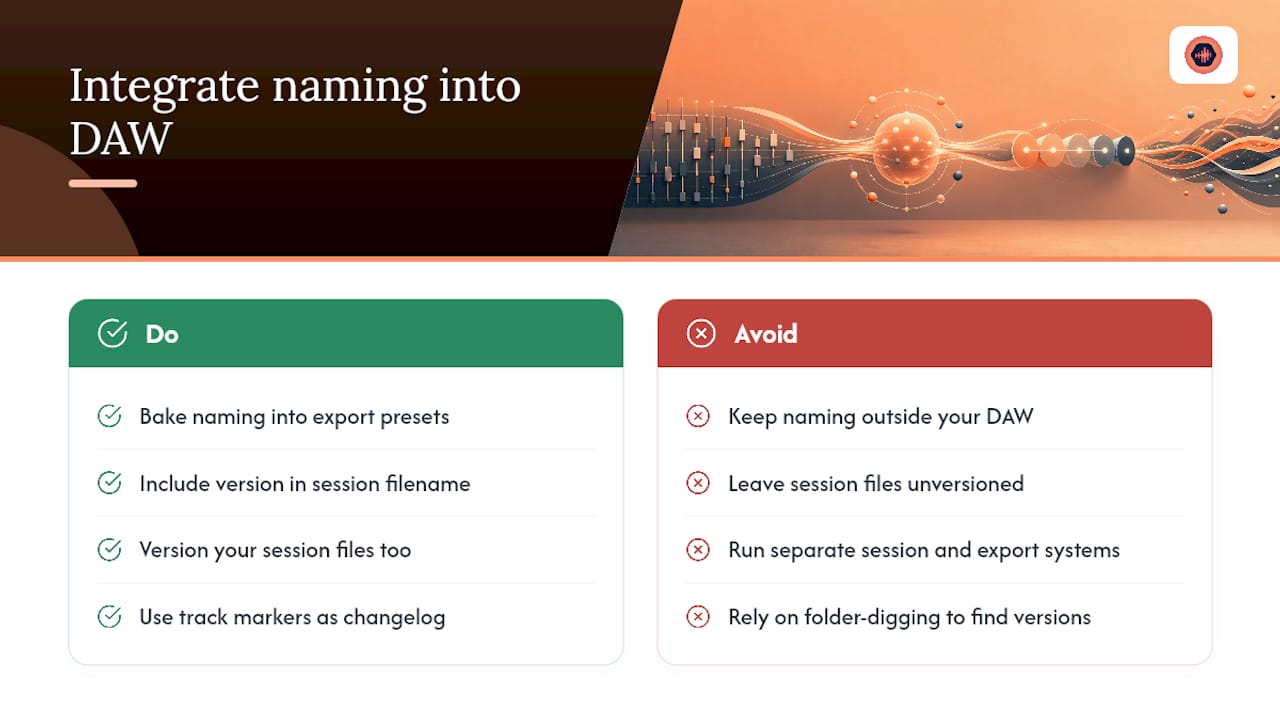
Naming discipline falls apart fast if it lives outside your DAW. Build the pattern into your session habits, not just your export dialog. Most DAWs let you save export presets or naming templates, so bake the YYYYMMDD_Project_Part_MixType_vNN structure into that preset once, and every bounce inherits it automatically.
Session files themselves deserve the same treatment. If your session file is called Riverside_Session.ptx while your exports are versioned properly, you’ll eventually open the wrong session and re-mix from an old state. Version your sessions too: 20260214_Riverside_Session_v03.ptx sitting inside SESSIONS/ keeps the working file and its rendered output in sync.
Track markers and comments inside the session can echo the changelog, useful when you reopen a project months later and need to remember which plugin chain produced the approved mix. Some engineers keep a text marker at the start of each session labeled with the current version number, so it’s visible the moment the session opens, no folder-digging required.
The goal is one system, not two parallel ones. If your session naming and your export naming diverge, you’ve just recreated the confusion the whole convention was supposed to solve.
How Do You Manage Feedback Without Losing Track of Versions?
Feedback chaos is usually a version problem wearing a communication disguise. A client emails a note, texts a follow-up, then leaves a voice memo, and now you have three sources of truth pointing at three different files.
The fix is structural, not behavioral. Route every piece of feedback through one channel tied directly to the file version it references. Timestamped comments on a waveform solve this better than any comment thread, because the note is physically attached to the second of audio it describes, and to the specific version it was left on.
- Batch feedback into rounds rather than responding to each message as it arrives.
- Require that new notes reference a version number, not just “the mix” or “the new one.”
- Close out a round explicitly, even with something as simple as marking it resolved, before starting the next.
A single source of truth for feedback and files is the simplest defense against version confusion, and it matters more than any naming convention on its own. The filename tells you what the file is; the feedback system tells you why it exists. You need both working together, or clients end up referencing version two while you’re already three rounds past it.
Best Practices for Syncing Names With Cloud Storage and Project Tools
Your naming convention needs to survive contact with whatever cloud service or project management tool your studio uses, and that’s where a lot of well-intentioned systems quietly break.
Cloud drives sometimes append “(1)” or “(copy)” to duplicate uploads, which corrupts your version numbering the moment two people upload the same file without checking first. Set a rule: only one person owns uploads for a given project, or use a platform built to prevent duplicate-file chaos in the first place.
Project management tools add another wrinkle. If your task board calls a deliverable “Riverside Mix Round 2” while the actual file is named with v02, you’ve created two labels for one thing. Match the language exactly, use “v02” in the task title too, so a quick glance at either system tells the same story.
- Confirm your cloud tool preserves exact filenames on sync; some platforms silently rename files with spaces or special characters.
- Avoid nested shared folders with inconsistent permissions, which is how old versions resurface months later and get sent to a client by mistake.
- Where possible, use one platform for both file storage and feedback, rather than syncing a folder to one tool and routing comments through another.
Handling Alternate Edits and Stems in Your Naming System
Radio edits, clean versions, extended mixes, and stem deliveries all need to sit inside the same naming logic, or you’ll build a second, incompatible system just for “special” files.
Treat an alternate edit as its own Part/Track field value rather than bolting it onto the MixType tag. A radio edit of track two becomes 20260214_Riverside_Track02Radio_MAIN_v01.wav, keeping it distinct from the album version while still following the same field order.
Stems are trickier because one version delivery produces many files. Keep the project-level version number identical across every stem in that delivery, and let the stem name itself (kick, bass, vocal, etc.) become an additional field: 20260214_Riverside_FullMix_STEM-Vocal_v03.wav. That way, anyone can look at a folder of forty stem files and know instantly which delivery round they belong to, without opening a single one.
Instrumental and acapella versions follow the same rule as any other MixType tag, just swap in INST or ACC where MAIN would normally sit. The point isn’t inventing new categories for every edit type. It’s making sure every variation fits into the same predictable slot, so nobody has to guess what a filename means six months from now.
What Actually Wastes Studio Time (And What Doesn’t)
The biggest time sink isn’t bad mixing. It’s “version amnesia,” the moment an engineer opens three files named some variation of “final” and has no idea which one the client actually approved. A five-minute changelog habit prevents hours of that kind of digging, every single week.
Timestamped feedback tied to a specific version does more to cut down back-and-forth than any naming convention alone. When a client’s note lives on the waveform at the exact second it applies, there’s no ambiguity about which version or which moment they mean. Version history and timestamped waveform comments, paired with a revision-round policy, close the loop that loose naming alone can’t.
— Kreg
Put This System on Autopilot With Audome
Writing a naming convention on a whiteboard is the easy part. Enforcing it across every client, every revision round, and every cloud folder is where most studios quietly give up, and that’s the exact gap Audome was built to close. Instead of chasing files across email, Dropbox links, and text threads, Audome gives every project one home: automatic version history, unlimited high-resolution uploads up to 96kHz/24-bit, and timestamped feedback attached directly to the waveform your client is actually listening to.

It also enforces aspects of your policy that are hardest to hold clients to. You can set a limit on free revision rounds and automatically charge for anything past it through built-in Stripe payments, while password-protected delivery pages keep final masters locked until payment clears. If you’re ready to stop managing files by hand, check the Audome pricing plans or read the studio’s guide to managing client revisions without losing your mind for a closer look at how the workflow fits together.
Sources
- DAW session organization: Pro workflow & asset management – Sonarworks Blog
- File Naming Conventions for Music Production
FAQ
What Is the Best Filename Format for Mix Versions?
The most reliable format starts with a sortable date (YYYYMMDD), followed by project name, part or track, mix type, and a two-digit version number, like 20260214_Riverside_FullMix_MAIN_v03.wav. This order keeps files sorted correctly across every operating system and cloud platform.
Should I Ever Overwrite an Old Mix Version?
No. Overwriting destroys your ability to compare versions or recover an earlier approved mix if a client changes their mind. Move superseded files to an ARCHIVE folder with their original filename intact instead.
What Counts as One Revision Round?
A revision round is one consolidated batch of client feedback addressed in a single delivered version, not a response to every individual message as it arrives. Defining this in your proposal, alongside a review window and a policy on silent approval, prevents unlimited free revisions from creeping into your schedule.
How Does Audome Help With Version Naming and Revisions?
Audome tracks version history automatically and lets clients leave timestamped feedback directly on the waveform, so naming and notes stay tied to the exact file they describe. Studios can also set paid revision limits enforced through Stripe, and pricing details are available on the Audome pricing page.
Do I Need Lettered Sub-Versions Like v01a and v01b?
Lettered sub-versions are useful for internal experiments you haven’t sent to a client yet, keeping them separate from official numbered versions. Once you choose a sub-version to deliver, rename it to the next full numeric version, such as promoting v01b to v02.