
Adopt this template today: YYYYMMDD_Project_Part_Asset_48k24b_2ch_v01_Initials.wav. It works because it packs date, project, asset type, sample rate, bit depth, channel count, and version into one scannable string that survives cross-platform transfers, satisfies vendor specs like AES TD1002 and Netflix’s partner requirements, and lets anyone on a team identify a file without opening it.
TL;DR:
- Accurate file naming must include key fields such as date, project ID, asset type, technical specifications, and version, with optional status tags to prevent delivery errors.
- Filenames for surround sound or multichannel files should be split into separate mono files with explicit channel suffixes to meet vendor standards like Netflix’s specs.
- Use a consistent naming convention across all projects, locking it into templates and export presets to ensure compliance during batch exports from different DAWs.
- Automating filename validation and enforcing version and status consistency through scripts or asset management tools helps minimize human error during high-volume production.
- Proper folder structure, clear versioning, and locking the final files with “final” tags prevent accidental overwrites and ensure clear communication with vendors and clients.
Table of Contents
- What Should a File Naming Policy Actually Include?
- What Do Vendors and Archives Expect at Delivery?
- How Should You Structure Project Folders and Versions?
- How Do You Roll Out and Enforce a Naming Policy?
- How Should You Name Localized or Alternate Versions?
- How Does Filename Metadata Connect to External Systems?
- Why Naming Consistency Breaks Down Across DAWs
- Can You Automate Naming Policy Enforcement?
- How Do You Name Work-in-Progress Files vs. Finals?
- What Studios Get Wrong About File Naming
- Run Your Naming Policy Without Chasing Files Manually
- Sources
- FAQ
What Should a File Naming Policy Actually Include?
A working naming policy is modular. Each field answers one question a collaborator or vendor system might ask, and the fields stack in a fixed order so anyone scanning a folder can parse a file in two seconds flat.
Here’s the field breakdown:
- Date (
YYYYMMDD): sorts correctly on every operating system and never gets confused across time zones. - Project ID: a short project code or client name, no spaces.
- Part/role: what the file is functionally (vocal, drum bus, FX stem, dialog).
- Asset type:
MASTER,STEM,TAKE,MIX,ROUGH. - Sample rate and bit depth: written together, like
48k24bor96k24b. - Channel configuration:
mono,2ch,6ch, or explicit surround tags. - Version:
v01,v02, or revision marks likeR01for client-requested edits. - Initials: whoever touched the file last.
- Optional tag:
final,comp, orarchivewhen it matters.
That’s nine fields, but you rarely need all of them on every file. Raw takes need fewer; delivered masters need more.
| File type | Example filename |
|---|---|
| Raw take | SpringSession_Vocals_TAKE03_48k24b_mono_JD.wav |
| Comped vocal | SpringSession_Vocals_COMP_48k24b_mono_v02_JD.wav |
| Drum stem | SpringSession_Drums_STEM_48k24b_2ch_v01_JD.wav |
| 5.1 center channel | FilmScore_Dialog_MASTER_48k24b_6ch_v03.C.wav |
| Stereo mixdown | SpringSession_FullMix_MIX_48k24b_2ch_v05_JD.wav |
| Client-approved master | SpringSession_FullMix_MASTER_48k24b_2ch_final_JD.wav |
| Podcast episode master | PodcastEp_Episode_MASTER_44k16b_2ch_v01_TR.wav |
| Archival stem bundle | 20260301_SpringSession_Stems_ARCHIVE_48k24b_2ch_v01.zip |
Audiokinetic’s naming convention guidance backs the sample-rate-and-bit-depth token specifically because it prevents playback mismatches when files move between systems that assume different defaults. UMG’s archival guidelines go further and warn that non-alphanumeric characters, accented letters, and symbols like & or # routinely break automated ingest pipelines.
Stick to letters, numbers, underscores, and hyphens only. Never use spaces, slashes, colons, or ampersands. Keep total filename length under roughly 100 characters. Some archival systems and older Windows paths still choke past 255 characters for a full file path, and a long filename eats into that budget fast. Use consistent casing, either all lowercase or CamelCase for words, and never mix conventions within the same project.
Pro Tip: Build your naming template as a DAW session template or export preset once, and every project after that inherits the structure automatically. You only have to think about it the first time.
What Do Vendors and Archives Expect at Delivery?
Vendors reject files that lack the specific fields their pipeline is coded to parse, and a rejected upload costs a studio a delivery deadline, not just a re-export.
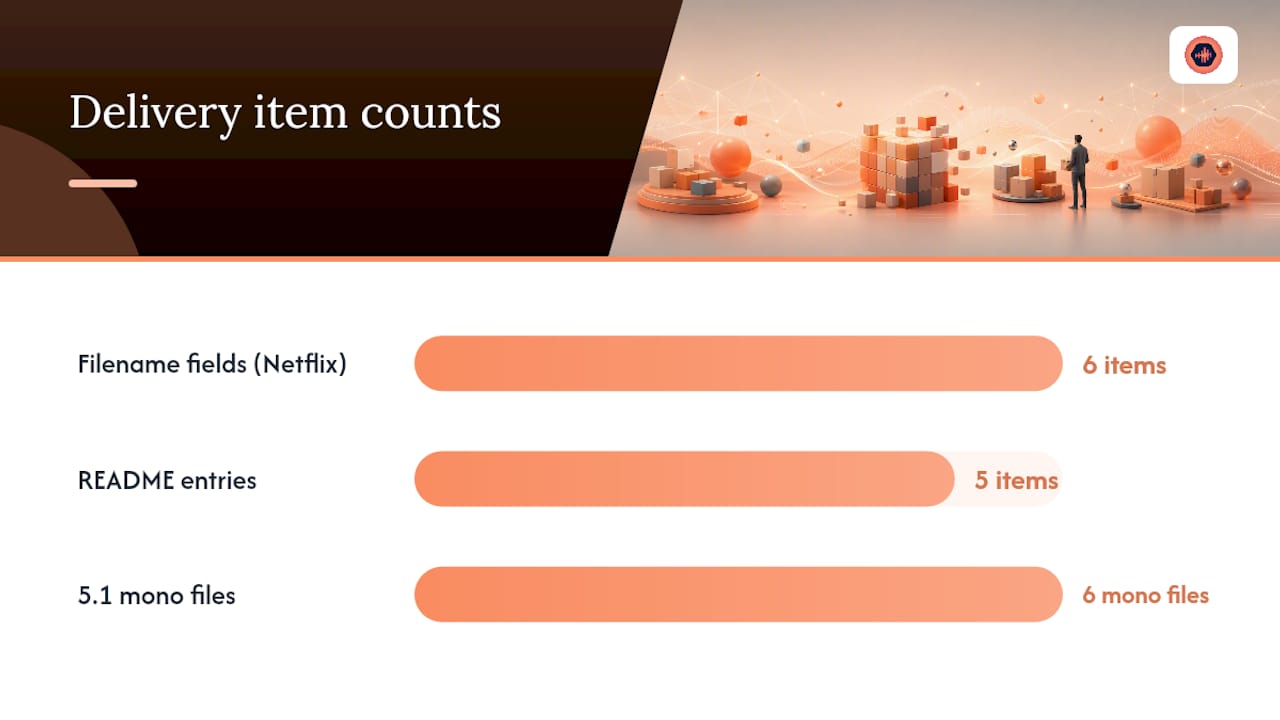
Netflix’s partner help documentation requires filenames carrying project title, asset type, sample rate, bit depth, channel count, and version, and it mandates discrete file delivery for surround elements rather than one interleaved file. That means a 5.1 mix ships as six separate mono files, each with a channel suffix:
.Lfor left.Rfor right.Cfor center.LFEfor low-frequency effects.Lsfor left surround.Rsfor right surround
AES TD1002 recommends the same discipline for music delivery: standardized names for masters, mixes, and stems so a project remains usable years after the session closes, not just at handoff.
A recurring complaint across vendor documentation is that inconsistent or missing metadata, not audio quality, is the most common reason a delivered asset gets kicked back for resubmission.
Folder packaging matters as much as the filenames inside it. Keep nesting shallow. Netflix’s own guidance favors flat, predictable folder structures over deep hierarchies that force reviewers to hunt for files. Every delivery folder should include a plain-text README noting sample rate, bit depth, tempo, key, and any known issues. For channel or take metadata that changes per file, embed it in Broadcast Wave (BWF) metadata rather than stretching the filename to cover it. Filenames should stay human-readable; BWF chunks can carry the deeper technical payload.
How Should You Structure Project Folders and Versions?
A folder tree only works if everyone on a project uses the same one, and it needs to survive a project growing from three files to three hundred.
- ProjectRoot/session_files — the live DAW session and any linked plugin state.
- ProjectRoot/audio/raw — untouched takes straight from tracking, never overwritten.
- ProjectRoot/audio/edited — comped, tuned, or time-aligned versions.
- ProjectRoot/audio/processed — files with committed processing (EQ, compression baked in).
- ProjectRoot/stems — grouped stems for mix or delivery.
- ProjectRoot/bounces — reference mixes and client-facing exports.
- ProjectRoot/docs — the README, changelog, and any client notes.
- ProjectRoot/archive — compressed, dated snapshots once a phase closes.
Version discipline lives inside session_files. Use save as with an incrementing vNN on every meaningful change, never overwrite the working file, and reserve R## for revision rounds tied to client feedback rather than your own internal passes. When a project phase wraps, zip the whole tree into a dated archive rather than leaving loose version sprawl behind. Sonarworks’ session organization guidance makes the same case: portability and consistency matter more than any single clever naming trick.
Assign one session owner per project. That person locks the master session file and merges in stems or edits from collaborators rather than letting two people save over the same file simultaneously. Back up locally and offsite, on a schedule, and actually test a restore once a quarter. A backup nobody has restored from is a guess, not a safety net.
Pro Tip: Name your compressed archives with the closing date and phase, like 20260301_SpringSession_TrackingComplete_ARCHIVE.zip, so a future search for “when did we finish tracking” actually returns something.
How Do You Roll Out and Enforce a Naming Policy?
Adoption fails when a policy lives in someone’s head. It works when it’s written down, trained once, and checked periodically rather than left to memory.
Rollout checklist:
- Pick your filename format and lock it into DAW session templates and export presets.
- Walk the whole team through it in one short session, not a buried email.
- Assign a session owner per project who is responsible for compliance.
- Spot-check a sample of deliveries each month against the format.
- Track two numbers: percentage of projects that pass a naming audit, and how many deliveries got rejected for metadata or naming issues before versus after rollout.
Here’s a policy snippet you can drop into a staff handbook or client-facing terms:
All project files follow the format
YYYYMMDD_Project_Part_Asset_SampleRateBitDepth_Channels_vNN_Initials.ext. Every save-as increments the version number. Every delivered project folder includes a README listing sample rate, bit depth, tempo, and key. Revisions beyond the included limit are billed and versioned asR##under the studio’s revision policy.
That last line does double duty. It’s not just a naming rule, it’s a tripwire that ties file versioning to your revision-limit and billing policy, which discourages the kind of endless, unversioned back-and-forth that naming chaos usually signals in the first place.
How Should You Name Localized or Alternate Versions?
Multi-language projects and alternate mixes multiply your file count fast, and that’s exactly where naming breaks down if you don’t plan for it upfront.
Add a language or region code as its own field, using standard two or three-letter codes: ENG, SPA, FRA, JPN. Place it consistently, usually right after the asset type or right before the version number, so a sorted folder groups all versions of one language together: 20260228_FilmTrailer_Dialog_MASTER_ENG_48k24b_2ch_v01.wav next to its SPA and FRA counterparts.
Alternate versions need the same discipline. A radio edit, an instrumental, a clean version, and a client’s “safe for broadcast” cut are not versions of each other in the v01/v02 sense. They are distinct assets and deserve a distinct tag in the asset-type or optional-tag field: RADIOEDIT, INSTRUMENTAL, CLEAN, EXPLICIT. Never let a language or content variant hide inside a version number. A v03 should always mean “the third iteration of the same asset,” not “the French one we made after the English one.” Mixing those two ideas is one of the fastest ways a delivery folder turns unreadable, because nobody can tell at a glance whether v03 is a fix or a completely different deliverable.
Keep a mapping table in your project README linking each language code to its target market or client requirement, especially on projects with five or more localized versions. It’s a small addition that saves a lot of guessing six months later when someone reopens the project for a re-issue.
How Does Filename Metadata Connect to External Systems?
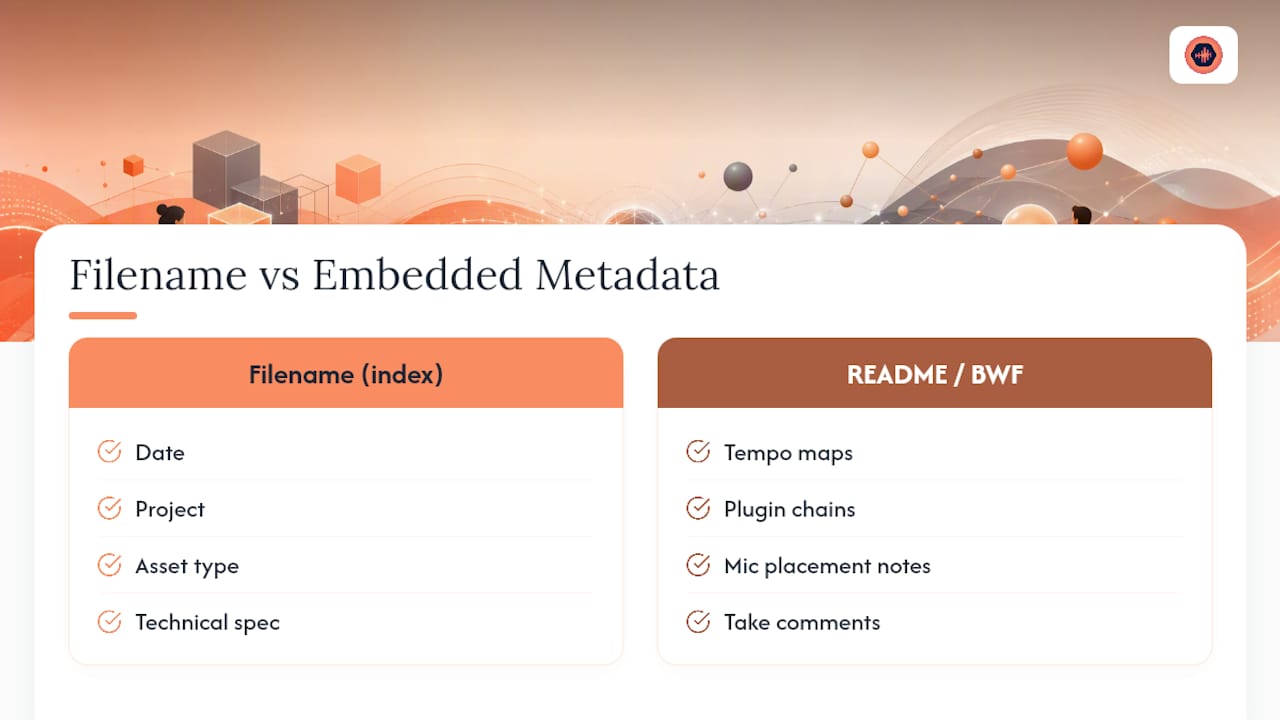
A filename can only carry so much before it becomes unreadable, which is why the smartest naming policies treat the filename as an index, not a database.
Encode only what a human needs to identify a file at a glance: date, project, asset type, technical spec, version, initials. Push everything else, tempo maps, plugin chains, mic placement notes, take comments, into either a project README or embedded BWF metadata, which travels with the audio file itself even if it gets renamed or moved. This is the same logic Netflix’s delivery spec follows: the filename tells a pipeline what the file is, and the embedded metadata or accompanying spec sheet tells it everything else.
If your studio uses a digital asset management (DAM) tool, project management software, or a client collaboration platform, treat the filename as the join key. The same string that appears in the filename should appear in the corresponding metadata record, so a search in either system returns a match in the other. A tool like Audome, for instance, can hold version history and delivery status against a project without forcing that information into the filename itself, since the platform tracks it independently of what’s written on the file.
Avoid letting metadata drift out of sync with filenames. If a mix gets renamed from v02 to v03 after a revision, update any linked metadata record at the same time, not weeks later. A mismatch between what a filename claims and what a database says defeats the purpose of naming discipline altogether.
Why Naming Consistency Breaks Down Across DAWs
Every DAW handles file paths, character limits, and auto-naming differently, and that’s usually where a clean naming policy quietly falls apart the moment a project changes hands.
Pro Tools, for example, will auto-generate names based on track names and take numbers unless you override its export naming scheme, and it handles long file paths differently than Logic Pro or Ableton Live does on the same machine. Cross-platform teams, especially ones mixing macOS and Windows systems, run into extra friction: Windows historically enforces stricter limits on special characters and total path length, so a filename that works fine on a Mac can fail to save or transfer cleanly on a PC.
The fix isn’t picking one DAW as the standard. It’s locking the naming rule at the export and bounce stage, regardless of what any individual DAW wants to auto-name a file. Set export presets in every DAW your studio uses so the final bounced filename always matches your template, even if the internal session file names are messier. Never rely on default auto-increment naming from a DAW’s bounce dialog. Those defaults vary by software version and rarely match the fields your policy requires.
Cloud storage and transfer tools introduce their own quirks too, since some strip or alter special characters automatically during sync. Sticking to underscores, hyphens, and alphanumeric characters, as UMG’s archival guidance recommends, sidesteps nearly all of these platform-specific failures before they happen.
Can You Automate Naming Policy Enforcement?
Manual enforcement works for a two-person studio. It falls apart past a handful of concurrent projects, which is where automation earns its keep.
DAW export presets are the simplest automation layer. Most modern DAWs let you build a bounce template with a naming pattern baked in, including date tokens and incrementing version numbers, so engineers don’t have to type the full filename by hand every time. Batch rename utilities, built into most operating systems or available as lightweight standalone tools, catch anything that slips through by letting you apply a naming pattern across dozens of files at once.
For studios running heavier volume, a simple script (even a basic shell or Python script) can validate filenames against a regular expression matching your template and flag anything noncompliant before it goes into an archive or gets sent to a client. That validation step doesn’t need to be sophisticated. It just needs to run automatically, ideally as a scheduled check or as part of a session close-out routine, rather than depending on someone remembering to look.
Automation should catch mistakes, not create new ones. Don’t over-engineer a script that renames files without a human final check, especially on client deliverables, since an automated rename that strips a needed field is worse than a manually inconsistent one. Use automation for validation and templating, and keep a human in the loop for anything that actually ships.
How Do You Name Work-in-Progress Files vs. Finals?
Confusing a rough bounce with a final master is one of the most common, and most avoidable, mistakes in a studio workflow, and it usually comes down to naming, not carelessness.
Work-in-progress files need a tag that makes their status unmistakable at a glance: WIP, ROUGH, or DRAFT in the asset-type field, paired with a version number that increments freely. These files can live in a working folder, get overwritten more casually than finals, and never carry a final tag under any circumstances, even if they sound close to done.
Final deliverables get the opposite treatment. Once a mix or master is client-approved, rename it with final in the optional tag field and move it into the delivery or archive folder. That file becomes read-only in practice, meaning nobody touches it again without creating a new version instead. The moment a “final” file needs a change, it stops being final and becomes a new version, v02 or a new revision round, never a silent overwrite of the file marked final. This single rule, treating “final” as a locked status rather than a description, prevents the single most common client dispute: delivering a file that quietly differs from what was approved.
What Studios Get Wrong About File Naming
Most studios treat naming as an afterthought, something to clean up “later” once a project ships. That’s backwards, and it’s the single biggest reason naming policies fail to stick. The policy has to exist before the first file gets bounced, not after the fortieth version makes the folder unreadable.
The conventional advice online treats file naming as a generic productivity habit, the same tips you’d give someone organizing spreadsheets. That framing undersells what’s actually at stake for audio work. A missing sample-rate tag or an inconsistent version number doesn’t just look messy. It gets a delivery rejected by a vendor pipeline, or worse, gets the wrong mix sent to a client as final. The AES and Netflix specs exist precisely because inconsistent naming causes real operational failures, not just cosmetic clutter.
If you take one thing from this, prioritize the version and status fields over everything else. Sample rate and channel count matter, but a WIP file mistaken for a final one is the mistake that damages client trust. Get that distinction locked first, then build out the rest of the template around it.
— Kreg
Run Your Naming Policy Without Chasing Files Manually
A naming policy only holds up if the platform underneath it tracks versions and status the same way your filenames do. Audome keeps a full version history tied to every upload, so a v02 in your filename matches what the platform shows a client, timestamped feedback lands directly on the waveform instead of scattered across email threads, and downloads stay locked until a client approves or pays for the delivery. You can cap free revisions and automatically bill for anything past your limit, which backs up the revision policy language in your naming template instead of leaving it as an unenforced rule on paper. Studios using Audome get one workspace where the file, its version, and its approval status all agree with each other. Start a trial and see whether your next delivery gets approved without a single renamed file.
Sources
- AESTD1002: Recommendation for Delivery of Recorded Music Projects
- Asset Naming: Sound Mastering and Music Archival – Netflix Partner Help
FAQ
What Fields Belong in Every Audio File Naming Policy?
At minimum, include date, project name, asset type, sample rate and bit depth, channel count, and a version number. Add initials and an optional status tag like final for delivered work.
How Do You Encode Sample Rate and Bit Depth in a Filename?
Combine them into one token, such as 48k24b for 48kHz/24bit or 96k24b for 96kHz/24bit, placed right after the asset type in the filename.
How Should Surround or Multichannel Files Be Named?
Deliver surround mixes as discrete mono files with channel suffixes like .L, .R, .C, and .LFE, following the discrete-delivery approach Netflix’s partner spec requires.
What’s the Difference Between v01 and R01 in File Versions?
v01, v02, and so on typically track internal iterations, while R01, R02 track client-requested revision rounds, which keeps internal work and billable revisions distinguishable at a glance.
Can a Collaboration Platform Enforce a Naming Policy Automatically?
A platform like Audome won’t rewrite your filenames for you, but it tracks version history and delivery status independently of the filename, so a mismatch between what’s named and what’s approved becomes visible immediately.