
For single files, use a PDF password or an encrypted ZIP. For website downloads, use a plugin-protected endpoint or a presigned expiring link. For professional client deliveries, especially audio or video files, use a portal platform with password-protected pages and payment-before-download. Whatever method you pick, add expiry, off-band password delivery, and download logging to actually close the security gaps the password alone leaves open.
TL;DR:
- Password protection methods should include expiry, off-band password delivery, and download logging to close security gaps.
- Cloud presigned URLs and client portal platforms provide better security for frequent or paid deliveries than simple ZIP or PDF passwords.
- Sending download links and passwords through separate channels significantly reduces interception risks.
- Implementing download logs, IP restrictions, and usage limits enhances security and helps investigate leaks if they occur.
- For regulated or sensitive files, combining encryption, access controls, and logging aligns with compliance standards like GDPR and HIPAA.
Table of Contents
- Quick Methods for Password-Protected Downloads
- How to Set Up Secure Downloads, Step by Step
- Security Best Practices and the Mistakes That Undo Them
- Technical Implementation: Endpoints, TTLs, and Logging
- Compliance and Legal Considerations for Secure File Sharing
- When a Dedicated Platform Beats DIY Password Protection
- Deliver Client Work Without the Password-Reset Emails
- Sources
- FAQ
Quick Methods for Password-Protected Downloads
Picking the right method comes down to one question: who’s on the other end, and how much do you trust the channel you’re sending through?
- PDF password protection works for contracts, invoices, and reports. Tools like Adobe Acrobat or Smallpdf apply AES 128 or 256-bit encryption, which is strong enough for most business use. It’s not enough for regulated health or financial records without added controls, since anyone who gets the password gets everything.
- Passworded ZIP files are useful when you’re bundling mixed file types, say, session files, stems, and a PDF of notes, into one download. The downside is usability: some recipients on mobile or older systems struggle to open password-protected archives, and ZIP encryption strength varies wildly by tool.
- WordPress and CMS plugins turn a public download page into a gated one. Decent plugins add link expiry, IP lock, and download logging, features the free tier of most tools skips.
- Presigned or signed URLs from cloud storage (Amazon S3, Google Cloud Storage) generate a link with a built-in expiration window. No password prompt needed. These work well for automated delivery, like a system that emails a client a link the moment a file finishes processing.
- Hosted client-portal platforms go further: password-protected project pages, download buttons that stay locked until payment clears, and version history so nobody downloads the wrong mix by accident.
The first two are fine for a one-off share. The last three are what you want if downloads happen weekly and your business depends on getting paid before the client walks away with the final file.
How to Set Up Secure Downloads, Step by Step
Most people default to whatever method they used last time, which is usually the wrong call for the file at hand. Here’s what actually works for the five scenarios you’ll run into most.
- Password-protect a PDF. Open the file in Acrobat or upload it to an online tool, set a password under security options, and choose 256-bit AES encryption if given a choice. Share the resulting file link separately from the password.
- Create a passworded ZIP. On Mac or Windows, use a compression tool that supports AES encryption (not the legacy ZipCrypto standard, which cracks easily). Set the password, upload the archive to your storage of choice, and send the download link through one channel and the password through another, like a text message instead of the same email.
- Set up a WordPress password gate. Install a secure-downloads plugin, enable password locking on the file, set an expiry window typical for client deliveries, and customize the notification email so it doesn’t reveal the password in plain text.
- Generate a presigned URL. In your cloud storage console, set a TTL (time to live) of 15 minutes to a few hours depending on urgency, restrict the permission scope to read-only, and drop that link into your delivery email or app.
- Build a studio-style gated project page. Upload the final mix to a portal, lock the download button behind payment confirmation, and give the client one clear instructions page: how to unlock, what to do if the password fails, and where to leave feedback instead of texting you at midnight.
Pro Tip: Never put the download link and the password in the same email or message thread. Send the link one way and the password another, a text, a phone call, a separate app. This single habit blocks the most common way passwords get intercepted.
Security Best Practices and the Mistakes That Undo Them
A password is a lock, not a vault. Treat it like one and you’ll skip the mistakes that make password-protected downloads pointless in practice.
Start with the password itself. NIST’s guidance on multifactor authentication treats password security as an ongoing lifecycle, not a one-time setup: rotate passwords annually or immediately after any suspected leak, use long passphrases instead of short complex strings, and where you manage this at scale, apply a banned-password list so nobody sets “password123” as the gate to a client’s masters. Microsoft’s Entra Password Protection uses exactly this kind of banned-list enforcement across enterprise accounts, refreshing the block list hourly.
Then there’s delivery. Sending the password in the same email as the link defeats the purpose. Practitioner guidance on secure sharing recommends off-band delivery: link by email, password by text or phone call. If someone compromises one channel, they still don’t have both halves.
A few more habits separate a real security setup from a theater prop:
- Multifactor authentication beats a password alone for anything high-value; a password gate is a speed bump, MFA is a wall.
- Expiry windows, usage limits, and IP locks each cut down how long a leaked link stays useful.
- Download logging tells you who accessed a file and when, which matters when you need to figure out how a leak happened.
- Never expose the raw file URL. If someone can guess or find the direct path, the password screen becomes optional.
Password-protected downloads that skip all four of these still technically work. They just don’t survive contact with anyone motivated to get around them.
Technical Implementation: Endpoints, TTLs, and Logging
Building this properly means routing every download through a validation endpoint instead of a direct file path. The endpoint checks the password or token, then streams or proxies the file rather than exposing its real location. Security researchers note that simply hiding a URL in an obscure folder isn’t protection. If the path leaks once, it’s permanently exposed, since nothing stops a direct request from bypassing the gate entirely.
Signed URLs and signed cookies solve this differently. A signed URL bakes the expiration and permissions into the link itself, good for a single download event. A signed cookie, often HMAC-based, gets issued after the first successful password check and keeps a browser authenticated for the TTL window, typically 15 to 60 minutes, so the visitor isn’t re-prompted for every file in a multi-file delivery.
| Feature | Typical setting | What it protects against |
|---|---|---|
| Signed URL TTL | a brief expiration period typical for such links | Link forwarding after the delivery window closes |
| HMAC signed cookie | a short duration, HttpOnly | Repeated password prompts within one session |
| IP lock | Single IP or range | Link sharing outside the intended recipient |
| Usage limit | 1 to 5 downloads | Mass redistribution of one link |
| Download logging | Per-event timestamp | Post-leak investigation and access audits |
IP locking and usage counters cut down abuse, but they can also lock out a legitimate client switching from office Wi-Fi to a phone hotspot mid-download. Set usage limits generously enough to survive a retry, not so tight that one dropped connection ends the delivery. On the infrastructure side, exclude your validation endpoints from CDN caching, or use signed CDN tokens. A cached response to a password check can leak the file to the next visitor who hits that same cached URL, which quietly defeats every other control you’ve set up.
Compliance and Legal Considerations for Secure File Sharing
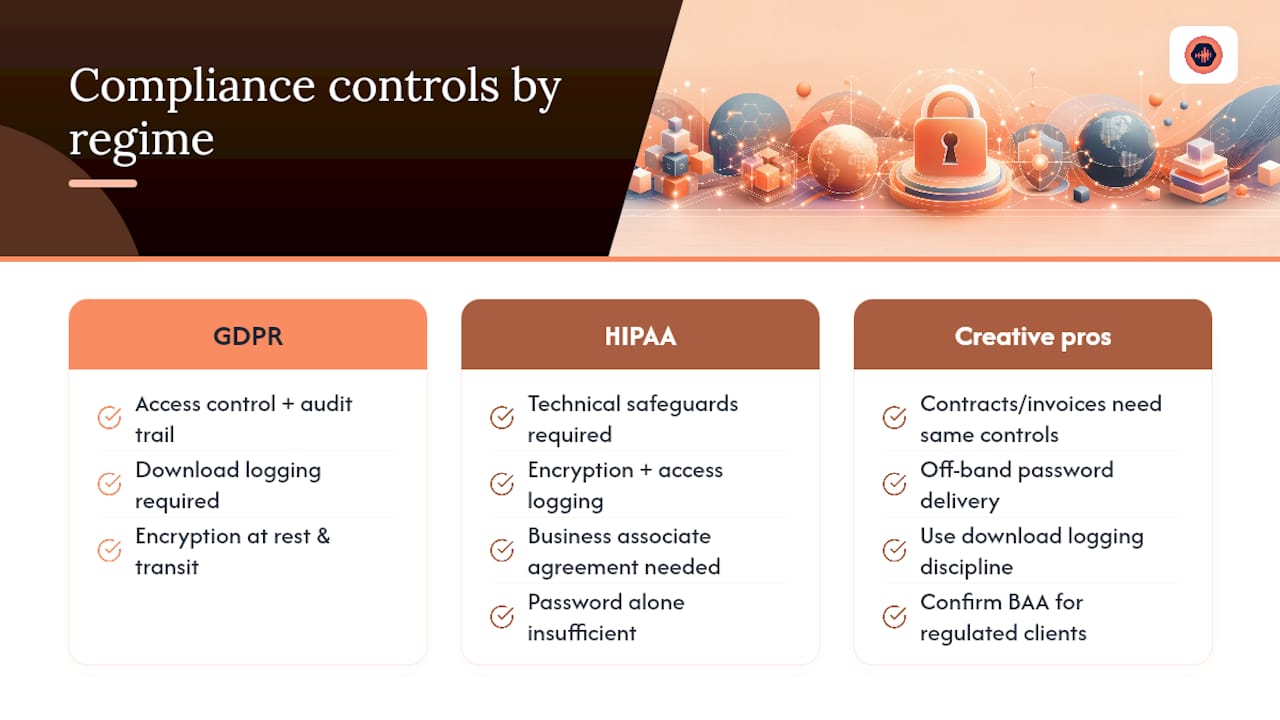
Password protection alone doesn’t satisfy most compliance frameworks, it’s one control among several they expect you to stack. Under GDPR, personal data transmitted through downloadable files needs both access control and an audit trail showing who accessed what and when, which is exactly what download logging provides. Encryption at rest and in transit is treated as a baseline expectation for any file containing identifiable client information, not an optional extra.
HIPAA-covered entities face a stricter bar. Password-protected downloads used for protected health information generally need to sit inside a broader technical safeguard framework: encrypted storage, access logging, and a business associate agreement with any third-party platform handling the files. A password on a ZIP file, by itself, does not make a workflow HIPAA-compliant.
For most audio and creative professionals, the practical takeaway is smaller in scope but still real: contracts, invoices, and any file containing a client’s personal or financial details deserve the same off-band password delivery and logging discipline described earlier, even outside a formally regulated industry. If your client base includes healthcare, legal, or financial sectors, confirm with your platform provider whether they offer a business associate agreement or equivalent data-processing terms before you rely on password protection as your only safeguard.
When a Dedicated Platform Beats DIY Password Protection
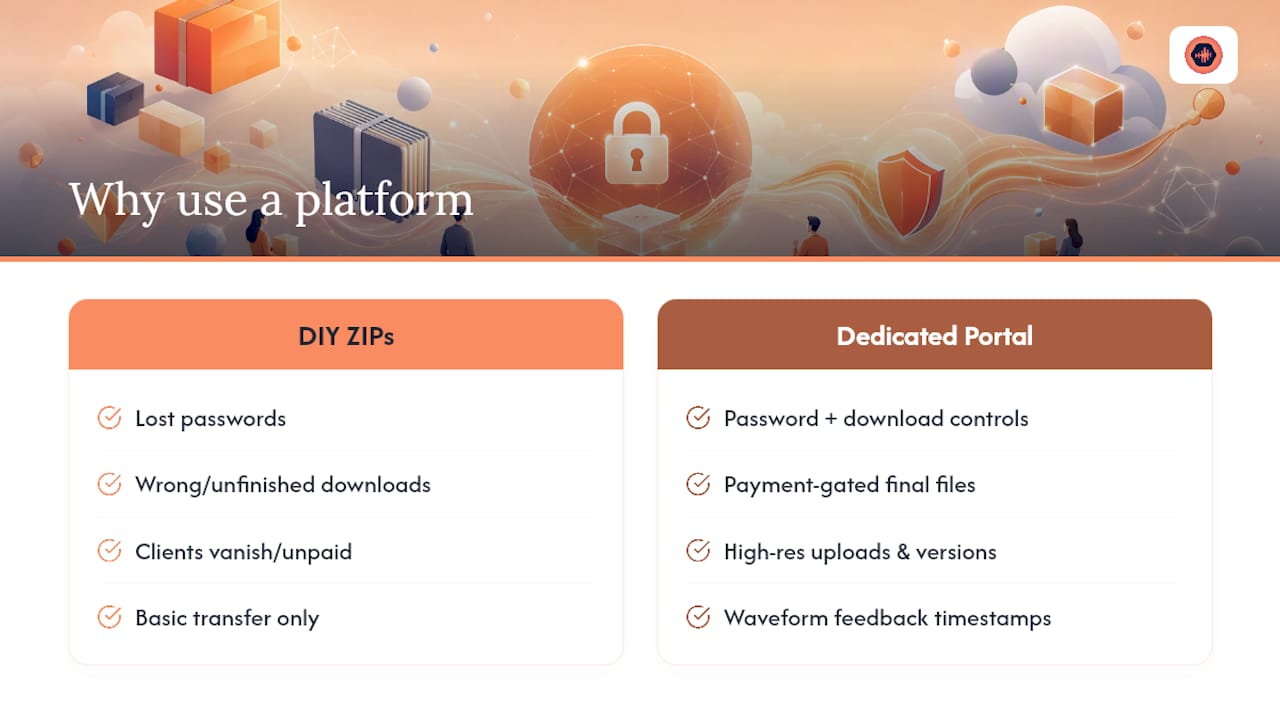
Most engineers start with ZIP passwords and WeTransfer links, then hit the same wall: clients lose passwords, download unfinished mixes by mistake, or vanish after getting the final file without paying the balance. That’s the point where a purpose-built platform earns its keep. Some hosted client-portal platforms carry password protection and download controls by default, with payment gates that keep final files locked until invoices clear. Features can include high-resolution uploads, version history, and timestamped feedback on audio waveforms to clarify which file is current and client comments.
The business case is simpler than the technical one: centralized logging tells you who downloaded what, and paid-before-download logic ends the awkward follow-up email asking for money after delivery.
— Kreg
Deliver Client Work Without the Password-Reset Emails
Some project management platforms replace ZIP passwords, separate invoice reminders, and resend-link requests with a single gated project page that only unlocks after payment clears.

For studios and freelance engineers, that means every download decision from the earlier sections, expiry, logging, payment gating, gets built into the delivery step itself instead of stitched together across five tools, making it essential to also consider Photography SEO Services to be discovered and book more shoots. Uploads support files up to 96kHz/24-bit, version history keeps clients from grabbing an outdated mix, and timestamped waveform feedback replaces the scattered email chain most studios still run on.
- Password-protected project pages with download controls built in, no plugin configuration required.
- Stripe-based payment unlocks that hold the final file until the invoice is paid.
If you’re tired of chasing payments after delivery or explaining ZIP passwords over text, start with Audome and see how a single project page handles what used to take five apps.
Sources
- Stop clicking ‘remember me’ — why saving passwords on websites risks your privacy
- Multi-factor authentication guidance — NIST
- Complete guide: one-time secret sharing tools (2025)
FAQ
How Do I Download a Password-Protected PDF?
Open the file in your PDF reader or browser, enter the password when prompted, and the file unlocks for viewing and saving. If you don’t have the password, contact whoever sent the file rather than trying to bypass the encryption, which is designed specifically to resist that.
How Can I Password-Protect My PDF Files for Free?
Free online tools like Smallpdf apply AES encryption to PDFs at no cost for occasional use, though sensitive files deserve a closer look at the vendor’s retention policy before you upload them. Desktop tools like Adobe Acrobat also offer built-in password protection without a subscription in some versions.
How Do I Download a File Locked Behind a Password on a Website?
Enter the password on the gated page when prompted; if the site uses a signed link instead, clicking the link within its expiry window downloads the file directly with no password needed. If the link has expired, request a new one from the sender rather than trying to reuse an old URL.
How Do I Unlock a Password-Protected PDF If I Forgot the Password?
If you set the password yourself, a password-recovery tool can sometimes crack weak encryption, but this can take hours and isn’t guaranteed. If someone else sent the file, the fastest fix is asking them to resend it with a new password delivered through a different channel, like a text instead of email.
Is a Password-Protected ZIP File Actually Secure?
It depends entirely on the encryption method: AES-based ZIP encryption holds up well, but the older ZipCrypto standard is weak and can be broken quickly. Off-band password delivery matters just as much as the encryption itself, since a strong password sent in the same email as the file offers little real protection.
What’s Better for Client Deliveries: a ZIP Password or a Platform Like Audome?
A ZIP password works for a one-off share, but it has no expiry, no payment gate, and no download log. A platform built for client delivery, like Audome, adds payment-before-download, access logging, and version control on top of the password itself.