
A good revision naming convention puts four things in every filename: what the file is, which revision it is, what format it is in, and whether anyone has approved it. Use a fixed field order, letters, numbers, underscores and hyphens only, a zero-padded revision number that only goes up, and a separate marker for approval. That is the pattern the industry delivery specs share, and it is what keeps “Mix_final_v2_REAL” out of your delivery folder.
This guide is for people who send audio to clients: mixing and mastering engineers, podcast producers, post-production teams and studio owners. It shows what the published standards say, then turns them into templates you can use tomorrow.
TL;DR
- Put fields in a fixed order: project, title, stage, revision, format. Keep the order identical on every file.
- Use only A–Z, a–z, 0–9, underscore and hyphen. No spaces, no symbols.
- Number revisions with zero padding (R01, v03) and never reuse or overwrite a number.
- Keep revision number and approval status as two separate things.
- Names only help if the version history behind them is tracked, which Audome does automatically.
Table of Contents
- What a revision name has to do
- What the standards put in a filename
- Build your own convention in six fields
- Naming podcast revisions
- Keep revision and approval separate
- Mastering and reference files
- Seven mistakes that cause confusion
- Where tracking beats naming
- Try it on your next project
- Perspective
- FAQ
- Sources
What a revision name has to do
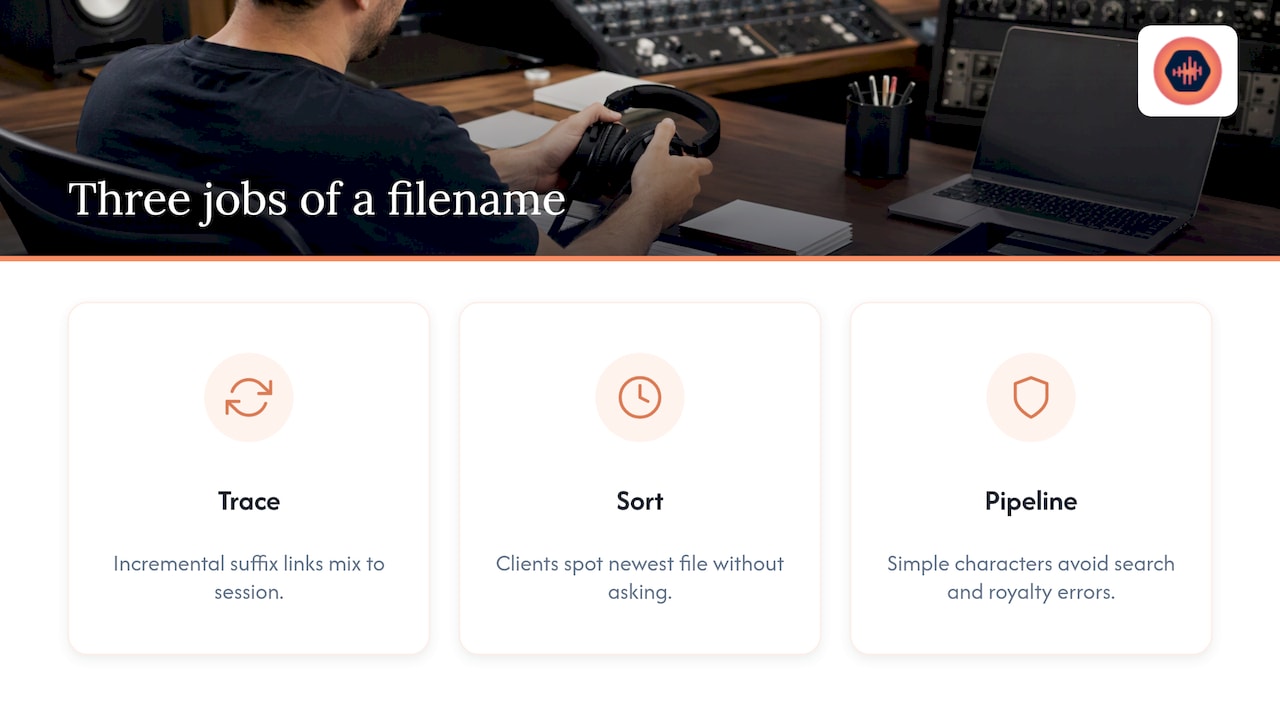
A filename is read in three places: your own folder at 11 p.m., a client’s download list, and a delivery system that may be a label, a network or a distributor. Each reader needs something different, and a convention has to serve all three.
You need to know which session produced the file. Mike Senior, writing in Sound on Sound, describes using an incremental suffix so he always knows which mix version belongs to which mix project. That matters most when a client says they preferred the earlier draft in some respect and you have to roll the settings back to match.
The client needs to tell the newest file from the old ones without asking you. And downstream systems need names that will not break. The Recording Academy’s Producers & Engineers Wing argues that special characters in filenames can introduce errors in song searches and royalty tracking, which is why it limits names to a simple character set.
So the three jobs are: trace it, sort it, survive the pipeline.
What the standards put in a filename
You do not need to invent anything. Several bodies and large buyers of audio have published conventions. They differ in detail but agree on structure.
| Source | Pattern | Example |
|---|---|---|
| Audio Engineering Society (AESTD1002) | Artist ID, title, version or stem type, sample rate, bit depth, R-number last | LH_BodyAndSoul_Master_96k_24b_R01.wav |
| Recording Academy P+E Wing, 2025 | Artist initials, title, mixer initials and mix revision, mix version, rate and depth | AI_SongTitle_MI01_Master_96k24.wav |
| ElectraCast Media podcast guidelines, 2024 | Series, episode number, identifier, version, date, attributes, editor initials | Crazy_MoFos_EP202_Robert_DeNiro_Donald_Trump_v08_091122_Advisory+Creds_(MDN).mp3 |
| Netflix sound mastering and music archival | Title, episode, version or date, asset type, soundfield, channels, rate, depth | chefs_table_s02e02_v04_PM_Nearfield_2ch_48k_24b_23976.L.wav |
Three patterns repeat. Identity fields come first, so files group together when sorted. Technical specs (sample rate, bit depth) are in the name, so nobody has to open the file to check. And the revision is its own labeled field, not buried in a word like “final.”
Character rules and length
The P+E guide limits BWF filenames to 128 characters and allows only letters, numbers, underscore and hyphen, with no spaces or emojis. The AES document is looser on length, with a ceiling of 255 characters, and suggests song titles without spaces and ideally under 15 characters. UMG’s archival guide tells you to avoid non-alphanumeric characters such as * ? < > | / : + #.
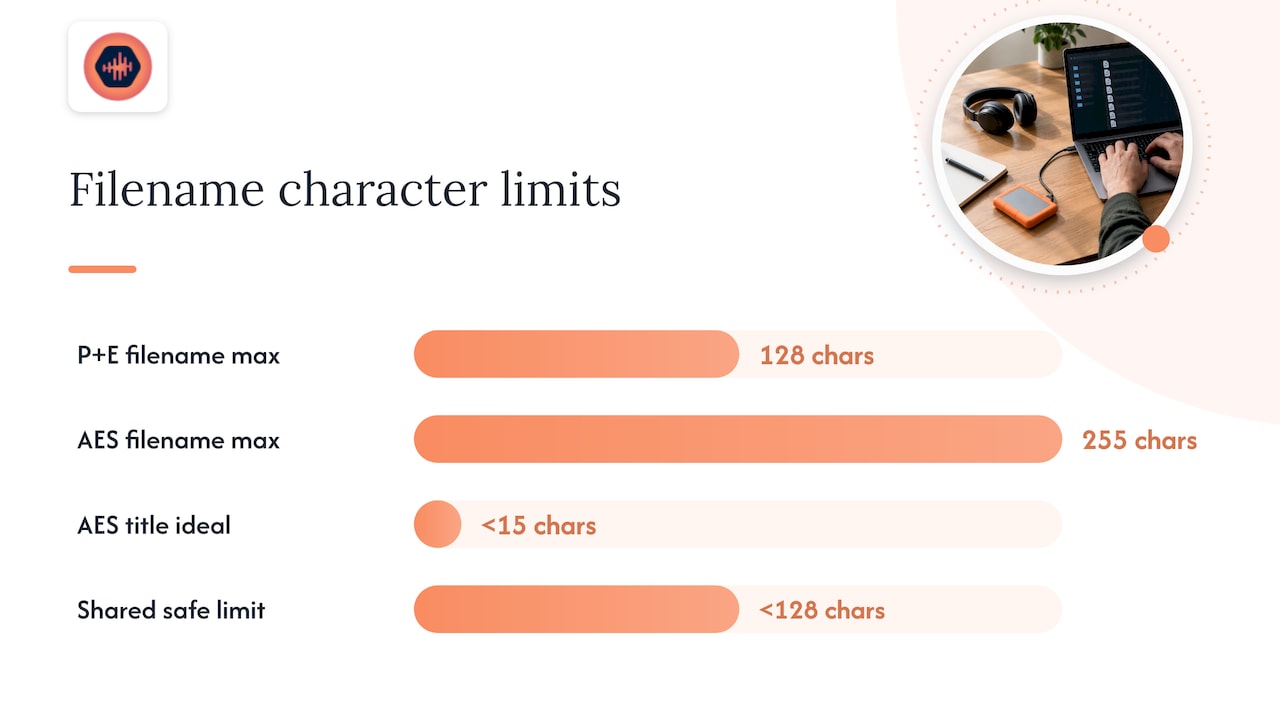
The safe rule for everyone: stay under 128 characters and stay inside that character set. A name that passes the strictest spec passes the rest.
Build your own convention in six fields
Pick the fields you actually need and fix their order. For most mixing and mastering work, this is enough:
Artist_Title_Stage_Rev_Format.wav
- Artist or client code. Two to four letters, as the AES document suggests for artist identifiers. Use the same code every time.
- Title. CamelCase or no spaces, short. BodyAndSoul, not Body and Soul (final).
- Stage or type. Mix, Master, Instrumental, TVTrack, Stem name. The AES document defines a mix version as a mix where one element’s balance has changed, such as vocal up, and a stem as a version that does not contain all the master elements. Those terms are worth using as your stage labels because clients and labels already know them.
- Revision. R01, R02. Two digits, so the list sorts correctly. The AES convention puts the R-number last and Netflix’s music archival convention does the same with R02.
- Format. 96k24 or 48k_24b. Include it when you deliver more than one resolution.
- Date, only when it helps. UMG uses MMDDYYYY, which sorts badly. If you need a date, use YYYYMMDD, which Amazon Studios’ file naming documentation uses for audio WAV files.
A full mix revision then looks like JD_NightDrive_Mix_R03_96k24.wav. The next one is JD_NightDrive_Mix_R04_96k24.wav. Nobody has to guess.
Technical revisions versus creative ones
UMG’s guide separates Technical Mix Revisions (level, dynamics, EQ and effects changes, like vocal up or guitars up 2 dB) from Creative Mix Revisions, which change the musical arrangement beyond a traditional request. It also asks for session documentation: song title, studio, date, contributors, take number, master mix, mix version and mix revision.
You do not need a formal label for each, but it is a useful discipline. If a client asks for “vocal up 1 dB” you bump the revision. If they ask for a new arrangement, that is a different scope of work, and the name should make that obvious in your records. Our guide to six-step mix version naming walks through the same split from the studio side.
Naming podcast revisions
Podcast files carry more identity than a music mix: show, episode, content type, production stage. Two published patterns are worth borrowing.
ElectraCast Media’s pattern is Series, episode number, identifier, version, date, attributes, then editor initials, with underscores instead of spaces. Its guidelines also set delivery targets: MP3 at 44.1 kHz or higher, -16 LUFS average, 1 dB true peak and a 6–9 dB range. Writing the target loudness into your delivery checklist is just as important as the filename.
For your own studio, a compact version works:
EP112_TGP_FullEpisode_Edit_v03.wav
- Three-digit episode numbers. EP099 sorts before EP100. EP99 does not.
- Stage word. Rough, Edit, Mix, Master.
- Version number that increments only on a real change. If you re-export the same content, do not bump it.
- One delivered copy with no version number. The file the client downloads or the host uploads gets a plain name, such as
EP112_TGP_FinalMix_DELIVERED.wav, and it lives in its own delivered folder.
The last point is the one that saves hours. Working files change constantly. The delivered file is a controlled asset, and it should look different at a glance.
If you also want automation, we published a regex-ready podcast episode naming template that a script can parse to sort and validate files.
Keep revision and approval separate
This is where most real-world confusion starts. “Version 4” and “approved” are different facts. A file can be revision 4 and still be waiting for feedback.
A clean way to handle it:
- The revision number says which version this is:
R04. - A status word says where it stands:
REVIEW,APPROVED,SUPERSEDED. - When a client approves R04, you either add the status or move the file to an approved folder. You do not rename it “final.”
- If they ask for a change afterward, the next file is R05. Not R04_APPROVED_NEW.
The AES document backs the logic: a mix master is the final mix approved by the artist, producer and engineer for commercial release, and a recalled mix is a new delivery that needs a new set of mix versions. If a mix is reopened, everything derived from it (vocal up, instrumental, TV track) has to be reissued. Naming each derivative with the same R-number keeps the set together.
For how to hold final files until a client has paid and signed off, see our piece on the studio approval process.
Mastering and reference files
Mastering adds a wrinkle: you handle the mix you received, your own master revisions, and often reference tracks. Name them so they cannot be mixed up. Mix inputs get the mixer’s revision (MI03, following the P+E pattern of mixer initials plus mix revision). Your masters get your own R-number. References get a prefix like REF_ so they never land in a delivery folder. If you build reference sets for a session, the approach in this piece on reference tracks in mastering shows how to pick and document them.
Stems follow the P+E pattern: numbered sequentially so they stack in order on import, then artist initials, title, mixer initials and revision, stem name, and rate and depth.
Seven mistakes that cause confusion
- Using “final.” It gets applied to the wrong file too easily. Use an approval status or a delivered folder instead.
- Overwriting a revision number. If R03 changed after you sent it, it is R04 now. A number should point to exactly one file.
- Spaces and symbols. Spaces can trip upload tools and command-line backup scripts, and the P+E Wing warns about errors in search and royalty tracking. Use underscores.
- No zero padding. v10 sorts before v2 in many file browsers. Use v02, R02.
- MMDDYYYY dates. They group by month, not by year. YYYYMMDD sorts chronologically.
- Changing field order midway through a project. One order, always.
- Naming without a record. A filename says what a file is. It does not say what changed or who asked. Keep notes per revision; our post on the fields every mix note needs lists what to capture.
Where tracking beats naming
A convention is only as good as the people following it, and with several collaborators, someone will slip. That is why the most dependable setups let software carry part of the load.
We built Audome so versioning does not depend on anyone’s typing. Uploads are tracked as versions automatically, clients leave time-stamped comments directly on the waveform, and nobody has to log in to listen and respond. Files stay lossless, up to 96 kHz/24-bit, so the file the client hears is the file you made. Your filename convention still matters for your own archive and for deliveries, but the revision history behind each project lives in one place. More on that in audio version history and how to restore a previous mix in your DAW.
For a wider look at the process around the names, read how audio engineers handle revisions and our mix revision management guide.
Try it on your next project
Audome gives you project and revision management, branded and password-protected client portals, download controls, and revision limits with billing for paid revisions through Stripe. The Studio plan is $12.50 per month or $150 per year, and the Pro plan is $48 per month or $576 per year. Plans are on the pricing page, and you can start with a free trial.

Perspective
Naming conventions are a promise you make to your future self and to your client. We have watched the same pattern play out in studio after studio: the convention is clear on day one and drifting by revision six, because a filename is only a label and labels depend on discipline.
That is why we think the right answer has two layers. Keep a strict, boring filename standard, based on the published AES and P+E patterns, for your archive and deliveries. Then let the platform hold the truth about versions: which upload came when, which comments belong to which revision, and what the client has approved.
When feedback is timestamped on the waveform and versions are tracked automatically, nobody has to decode “Mix_v3_new_FINAL2” again. Your names stay short, your history stays complete, and revision limits and paid revisions become part of the workflow rather than an awkward email.
Kreg
FAQ
What are the rules for naming audio files?
Use a fixed field order, letters, numbers, underscore and hyphen only, and keep names under 128 characters. The P+E Wing’s 2025 guide sets exactly those limits, and they also satisfy looser specs such as the AES recommendation. Include the sample rate and bit depth if you deliver more than one format.
Should I use underscores or hyphens?
Either is allowed by the P+E character set, so pick one role for each. A common choice is underscores between fields and hyphens inside a field. The key is consistency, because scripts and sorting depend on it. Avoid spaces entirely.
How do I name a revised mix?
Keep the same base name and raise the revision number: R03 becomes R04, with two digits so files sort correctly. Do not reuse the old number or add words like “new” or “final.” If the revision is approved, mark that with a status or an approved folder, not a new name.
How do I show that a file is approved?
Treat approval as a separate field from the revision number. For example, R04 with APPROVED, or a copy in an approved folder. If the client asks for further changes later, the next file is R05, and R04 is marked superseded.
Sources
- Mike Senior, Sound on Sound: Q. What’s In A Name?
- Recording Academy P+E Wing: Delivery Recommendations for Recorded Music Projects
- AES: Recommendation for delivery of recorded music projects (AESTD1002)
- UMG: Stereo Audio Archival Asset Best Practices
- ElectraCast Media: Master Production and Post-Production Guidelines
- Amazon Studios: File Naming Convention
- Netflix: Branded asset naming for sound mastering and music archival
- UpNComer: Measurement First Mastering reference tracks