
TL;DR:
- Effective audio project management involves organizing complex workflows with discipline and clear systems. Using naming conventions, centralized feedback, and detailed session documentation reduces errors and speeds collaboration. The key is implementing simple, audio-specific processes before selecting any management tools.
Intricate audio project management is the structured coordination of complex, multi-stakeholder audio workflows where non-linear processes, version control, and specialized feedback systems replace the generic task boards that fail audio pros every single time. Most engineers don’t call it that. They call it “keeping the session from turning into a dumpster fire.” But the industry term matters, and the practice matters more. Audio production project management done right reduces administrative overhead, speeds delivery, and keeps clients from sending 47 emails about which mix is the “real” final.
What is intricate audio project management, really?
It is the practice of coordinating people, files, feedback, and deadlines across audio workflows that don’t move in a straight line. A film score, a podcast series, a game audio build… none of these follow the clean start-to-finish arc that a generic project management framework assumes. You’re bouncing between stems, revisions, client notes, and DAW sessions simultaneously. Structured audio project management reduces administrative overhead by 60% per episode and saves the equivalent of three full-time engineers. That’s not a small efficiency gain. That’s the difference between a studio that scales and one that burns out its team by Q3.
The word “intricate” is doing real work here. It signals that the workflows involve interdependencies. A vocal edit affects the mix. A mix revision triggers a new master. A client approval on one stem doesn’t mean the whole track is locked. Generic project management tools treat tasks as independent boxes to check. Audio workflows are webs, not lists.
Why traditional project management fails for complex audio projects
Generic tools were built for software teams or marketing departments. They assume linear progress, text-based deliverables, and a single approval at the end. Audio workflows are non-linear and interdependent, and that mismatch is where projects fall apart.
Here’s what actually goes wrong when you force audio work into a generic system:
- No integrated playback. A client can’t hear the file inside the tool. They download it, listen somewhere else, and send feedback in a separate email. You’re now managing three channels of communication for one revision.
- No timestamped comments. “The chorus feels off” is useless feedback. “At 1:42, the snare is too forward” is something you can act on. Generic tools don’t support audio timestamps.
- Version naming chaos. Without a clear convention, you end up with files named “mix_final_FINAL_v3_USE THIS ONE.wav.” Everyone’s been there. It’s embarrassing and it costs time.
- No audio context. Tools built for text projects don’t capture sample rates, plugin versions, or tempo. That metadata matters when you’re handing a session to another engineer.
- Approval loops that never close. Without a clear system for sign-off, clients keep reopening “approved” tracks. The project never actually ends.
Pro Tip: Before picking any tool, ask whether it lets a client leave a timestamped comment directly on the audio file. If the answer is no, it’s not built for audio work.
The real problem isn’t that engineers are disorganized. It’s that they’re using tools designed for a completely different kind of work and then blaming themselves when things break down.
Core strategies for managing intricate audio projects effectively
The best audio project managers don’t start with software. They start with a system. A system is a set of rules your whole team follows, regardless of which tool holds the files. The tool is just where the system lives.
Here are the foundational strategies that actually work:
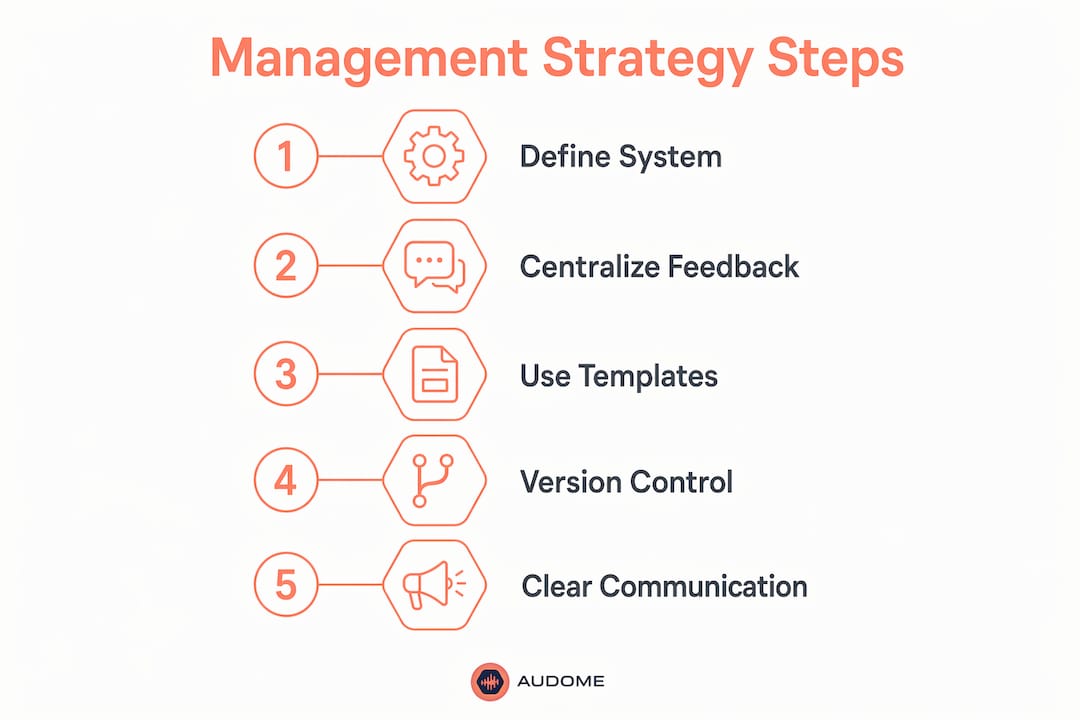
- Establish naming conventions before the first session opens. Every track, folder, and file gets a name that tells you what it is, what version it is, and when it was created. No exceptions.
- Use color coding and folder hierarchies inside your DAW. Session organization with consistent naming and color coding improves creative focus and reduces errors across collaborators. It’s not administrative fluff. It’s cognitive load management.
- Build a project manifest. A detailed project manifest tracks plugin versions, tempo, sample rates, and DAW version. When a collaborator opens your session six weeks later, they don’t spend two hours troubleshooting compatibility errors.
- Use sequential version naming. Never name a file “final.” Use v1, v2, v3. Semantic consistency in version naming prevents project stalls and the kind of confusion that makes clients think you sent them the wrong mix.
- Centralize feedback collection. Every note, every revision request, every approval lives in one place. Not email, not text, not a voice memo someone sent at midnight.
Teams using feedback-centric tracking completed projects up to 40% faster than those using generic systems. That number reflects what happens when you stop hunting for feedback across five platforms and start reading it in one place.
| Approach | What it solves | Where it breaks down |
|---|---|---|
| DAW session templates | Speeds setup, enforces naming | Doesn’t help with client communication |
| Project manifest | Prevents compatibility errors | Requires discipline to maintain |
| Sequential versioning | Eliminates “final” file chaos | Only works if the whole team follows it |
| Centralized feedback hub | Closes approval loops faster | Needs a tool that supports audio playback |
Pro Tip: Design your system for the least technically confident person on the team. If your newest collaborator can follow it without a tutorial, it’s a good system.
How does stakeholder communication affect audio project flow?
Bad communication is the number one reason audio projects stall. Not bad mixes. Not bad clients. Bad communication systems. When a client doesn’t know how to give feedback, they give bad feedback. When an engineer doesn’t know who approved what, they redo work that was already done.
Timestamped feedback and lossless audio sharing reduce client confusion and speed approval cycles. The mechanism is simple. When a client can click on a waveform at exactly the moment something bothers them, they give you a precise note instead of a vague complaint. Precise notes mean fewer revision rounds.
Managing asynchronous work across time zones and schedules adds another layer. Most audio collaborations don’t happen in real time. A mixer in Los Angeles sends stems to a mastering engineer in Nashville who sends a reference to a client in London. The handoff points are where projects break. Here’s what keeps them intact:
- Make the project logic visible. Every collaborator should be able to see what’s been approved, what’s in revision, and what’s waiting. Not just who has the files, but where the project actually stands.
- Assign task ownership explicitly. “Someone needs to handle the vocal edit” is not a task. “Jordan handles the vocal edit by thursday” is a task. Ambiguity kills momentum.
- Limit client communication channels. Pick one. Email, a shared platform, or a dedicated feedback tool. Not all three. When feedback lives in three places, something always gets missed.
- Set revision round limits upfront. Two rounds of revisions is a professional standard. Three is generous. Unlimited is a business problem disguised as a creative one.
The goal is to make the project’s status obvious to everyone involved without requiring a meeting to explain it.
Tools vs. systems: what actually drives success?
Here’s the uncomfortable truth. Sophisticated project management software often adds bureaucratic friction rather than easing workflow for audio teams. Engineers spend more time updating the tool than doing the work. That’s backwards.
The most effective setups are often the simplest. A shared spreadsheet with clear columns. A checklist that lives at the top of every session folder. A single platform where files, feedback, and versions all live together. The tool doesn’t matter as much as whether your team actually uses it consistently.
Manual, audio-tailored version control is more effective and practical than software-based systems built for software development. Git is not the answer for audio. A clearly named folder structure with a version log is. It sounds boring. It works.
Where audio-specific platforms earn their place is in the feedback and sharing layer. A platform that supports lossless playback at 96kHz/24-bit, timestamped comments, and private collaborator spaces solves problems that no generic tool can touch. Audome was built specifically for this. It consolidates file sharing, feedback collection, and version tracking into one hub, with no client login required. That last part matters more than people realize. Every extra login is a barrier. Barriers kill response rates.
The right question isn’t “what’s the best tool?” It’s “what’s the simplest system my whole team will actually follow?” Start there. Then find a tool that fits the system, not the other way around.
Key takeaways
Intricate audio project management succeeds when you build a consistent system first and choose tools that fit audio-specific workflows, not the other way around.
| Point | Details |
|---|---|
| System before software | Establish naming conventions, version rules, and feedback channels before picking any tool. |
| Audio-specific feedback | Timestamped comments on lossless audio files cut revision rounds and client confusion significantly. |
| Version naming discipline | Use sequential labels like v1, v2, v3. Never use “final” in a file name. |
| Project manifest | Document plugin versions, tempo, and sample rates to prevent compatibility errors across collaborators. |
| Centralize communication | One platform for files, feedback, and approvals keeps projects moving and prevents missed notes. |
What I’ve learned after too many sessions gone sideways
Here’s my honest take. The audio industry has a weird relationship with organization. Engineers pride themselves on knowing where everything is in their heads. And that works fine… until you bring in a second engineer, a client, a deadline, and a revision request that contradicts the last one.
I’ve watched projects collapse not because the mixes were bad but because nobody could agree on which version was current. I’ve seen clients approve a track and then “un-approve” it two weeks later because they couldn’t remember what they’d heard. I’ve been the person sending a file named “final_v2_ACTUALLY FINAL.wav” and feeling genuinely embarrassed about it.
The fix is not a fancier tool. The fix is deciding, as a team, that the system matters. That the naming convention is non-negotiable. That feedback lives in one place. That “final” is a banned word in your file naming vocabulary.
What I’ve found is that the engineers who manage complex projects well are not the most technically gifted. They’re the most disciplined about the boring stuff. They set up the folder before they open the session. They write the version number before they export. They send one link, not three attachments.
Simplicity is not a compromise. It’s the whole point.
— Kreg
Audome and the reality of managing complex audio work
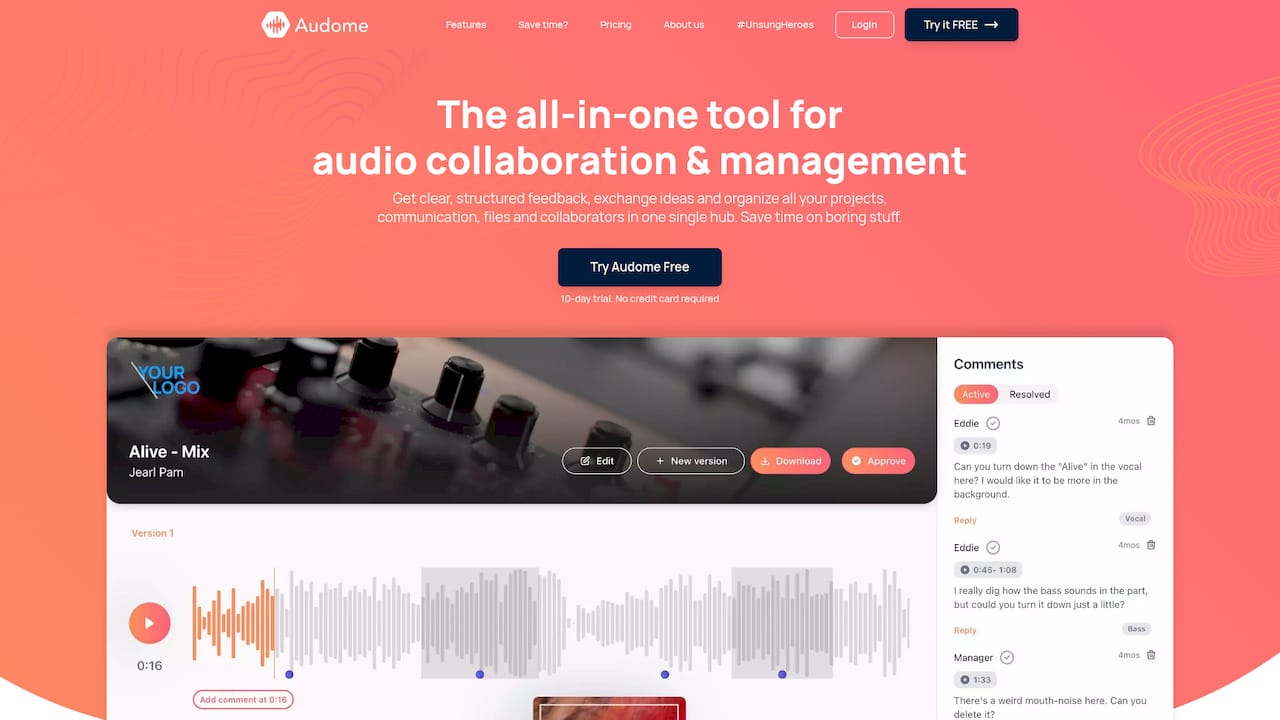
Audome is built for the exact problems this article describes. It handles lossless audio sharing up to 96kHz/24-bit, timestamped comments, version control, and private collaborator spaces in one place. No client logins. No fragmented email threads. No “which file is the real one” conversations. Audio pros managing complex post-production workflows use Audome to cut the administrative noise and keep projects moving. If your current setup involves more than one platform for sharing, feedback, and approvals, you’re doing extra work you don’t need to do. Check out Audome and see what a purpose-built audio collaboration hub actually looks like in practice.
FAQ
What is intricate audio project management?
Intricate audio project management is the structured coordination of complex, multi-stakeholder audio workflows using audio-specific feedback systems, version control, and disciplined session organization. It replaces generic project management frameworks that fail to account for the non-linear, iterative nature of audio production.
How do I manage audio projects with multiple stakeholders?
Centralize all feedback, files, and approvals in one platform that supports timestamped audio comments and lossless playback. Assign explicit task ownership and limit revision rounds upfront to prevent approval loops from stalling the project.
Why do generic project management tools fail for audio?
Generic tools lack integrated audio playback and timestamped feedback, which forces communication across multiple channels and creates version confusion. Audio workflows are non-linear, and tools built for text-based, linear projects cannot accommodate that complexity.
What is a project manifest in audio production?
A project manifest is a document that records plugin versions, tempo, sample rates, and DAW version for a session. It prevents compatibility errors when collaborators open a session weeks later or on a different system.
What is the best practice for audio version control?
Use sequential version labels like v1, v2, and v3 and never use the word “final” in a file name. Audio-tailored version control with clear naming conventions is more reliable than software-based systems built for code development.