
To stream only audio for professional client review, use a private, audio-specific portal rather than a generic file-sharing link or live broadcast tool. The recommended setup delivers lossless WAV or AIFF files up to 96kHz/24-bit, collects timestamped comments directly on the waveform, tracks every version, and gates the final download until the client approves and pays.
TL;DR:
- Lossless playback at 96kHz/24-bit is essential to ensure clients hear every detail during review, making compressed formats unsuitable for critical listening.
- Using review portals with timestamped comments and version control prevents vague feedback and confusion across multiple revision rounds.
- Secure sharing options like password protection, link expiration, and download gating protect against leaks and unauthorized downloads, especially for high-value projects.
- Limiting revisions in contracts, automating extra charge workflows, and gating final downloads uphold the value of completed work and prevent scope creep.
- Tracking link opens and playback behavior allows precise follow-up, reducing repeated check-ins and improving review efficiency.
Table of Contents
- What Does “Stream Only Audio” Mean for Delivery and Review?
- Preparing Files and Packages for Private Streaming Review
- How to Share Files Securely Without a Generic Cloud Drive
- Collecting Precise Timestamped Feedback and Managing Versions
- Billing, Revision Limits, and Gating Final Downloads
- Use Link Analytics to Run Precision Follow-Ups
- A Concise Step-by-Step Delivery Workflow
- Why Audome Matches This Workflow
- Comparing Audio Codecs for Streaming-Only Review
- Streaming Quality Versus Bandwidth: What Actually Matters
- Making Sure Playback Works Across Every Device and Browser
- Solving Latency and Buffering Before They Cost You a Client
- Best Practices Across Music, Podcasts, and Voiceover Delivery
- What Changed When I Stopped Emailing WAV Files
- Getting Started With Audome for Stream-Only Delivery
- Sources
- FAQ
What Does “Stream Only Audio” Mean for Delivery and Review?
For mixing engineers, producers, and studios, “stream only audio” isn’t about broadcasting a station or stripping video off a YouTube clip. It means giving a client a private link where they can play back a mix or master without downloading a raw file they could leak, resell, or mishear on a bad codec. The reviewer listens, comments, and approves. Nobody streams a live show here. This is delivery infrastructure, and it needs to hold up to the same standards as your session file.
A quick checklist separates a real review tool from a glorified Dropbox link. Before you hand a client anything, confirm the platform covers these five points:
- Lossless playback: supports WAV/AIFF up to 96kHz/24-bit without forced compression on playback
- Timestamped comments: lets a client click a spot on the waveform and leave a note pinned to that exact second
- Version history: keeps every round distinct, with clear labeling so “v3” never gets confused with “v3_final_final”
- Security controls: password protection, link expiration, and the ability to gate downloads until you say so
- Analytics: tells you who opened the link, how long they played it, and which sections they replayed
If a sharing method fails more than one of these, it’s costing you time somewhere down the line.
Preparing Files and Packages for Private Streaming Review
Your primary deliverable should always be a lossless WAV or AIFF, exported at the session’s native sample rate and 24-bit depth. Downsampling before review strips detail a client might need to judge, and it makes any later mastering pass harder to predict.
Leave headroom. If mastering happens after client approval, avoid brickwall limiting on the mix bus. A mix slammed to 0dBFS gives the mastering engineer nothing to work with, and it gives the client a distorted first impression of dynamics that will change anyway.
Beyond the primary file, a solid delivery package includes agreed alternates, like an instrumental or a vocal-up version, plus stems if that was part of the scope. Export stems from the absolute start to the absolute end of the session, not just where audio appears, so everything lines up automatically if the client drops them into their own session later.
Batch your delivery. Sending three to five files per review round keeps the client’s attention focused instead of scattered across a dozen options, and it creates a natural checkpoint for feedback before you move forward.
- Name files consistently: project, version number, date
- Attach a short delivery notes document explaining what changed and what you need from them
Pro Tip: Write the delivery notes file in plain language, not engineer shorthand. “Vocal pulled back 1.5dB in the chorus, added slight reverb tail on the bridge” gets a faster, clearer response than “adjusted automation, added FX.”
How to Share Files Securely Without a Generic Cloud Drive
Generic cloud drives were built for storage, not review. They lack the in-context commenting, approval tracking, and version control that make revision cycles fast, and that gap shows up as vague, hard-to-act-on feedback like “make it punchier” with no timestamp attached. An audio-specific portal solves this by pairing playback with commenting in one place.
When you set up a share, work through these decisions in order:
- Choose no-login review over account-based access when possible. Clients almost always prefer clicking a link and listening immediately over creating a password and remembering it for a one-time review.
- Match security to sensitivity. An unreleased single from a major client deserves password protection and a short link expiration window; a rough scratch vocal for internal notes might not.
- Set download gating from the start. Let clients stream and comment freely, but hold the actual file download until you’ve confirmed approval or payment.
- Consider IP restrictions for high-value projects. If a leak would cause real damage, limiting playback to specific networks or regions adds a layer most casual sharing tools don’t offer.
The right combination depends on trust level, not paranoia. A long-term client gets looser controls than a first-time sync licensing deal with six people on the approval chain.
Collecting Precise Timestamped Feedback and Managing Versions
Vague notes kill revision cycles. “The chorus feels off” could mean the vocal level, the reverb, the arrangement, or all three. Timestamped comments pinned directly to the waveform eliminate that ambiguity because the client marks the exact second and describes what they hear right there.

Tie every comment to a specific file version. When you push a new mix, the old comments should stay attached to the old version, not carry forward and confuse which round they belong to. This is where centralized version control earns its keep. Without it, you’re cross-referencing email threads to figure out if a note from Tuesday still applies to Thursday’s bounce.
Build an explicit approval step into the workflow. A client should have a clear action, a button or a marked comment, that records “this version is approved” as a permanent record. That protects you if a client tries to reopen a decision three weeks later.
- Assign comments to specific stakeholders when multiple people review the same project
- Group revision notes by version so engineers can batch similar fixes together
Pro Tip: When a client leaves five comments in one round, tackle them in timestamp order, not the order they were written. It keeps your workflow moving forward through the track instead of jumping around.
Billing, Revision Limits, and Gating Final Downloads
Scope creep starts the moment “just one more small change” becomes an unspoken standard. Set a specific revision limit in your contract before the project starts, then hold to it. A small number of rounds is typical for a mix; state the number clearly, not a vague “reasonable amount.”
Automate what happens after that limit. A workflow that charges automatically for a fourth or fifth revision removes the awkward conversation entirely; the system enforces the boundary instead of you having to.
Requiring payment before final download protects the value of finished work. Locking the final file behind an unlock action prevents the scenario where a client streams the approved version, is satisfied, and never actually completes payment because there was never a gate to begin with.
- Communicate revision limits in writing before work begins
- Automate billing for extra rounds instead of negotiating them case by case
- Gate the final download behind invoice payment, not just verbal approval
Clients respond to clear boundaries better than most engineers expect. Ambiguity, not firmness, is usually what triggers pushback.
Use Link Analytics to Run Precision Follow-Ups
Analytics on your review links turn guesswork into a targeted message. Instead of sending “did you get a chance to listen yet?” for the third time, you can see that a client opened the link, played 40 seconds of a three-minute mix, and stopped exactly at the second verse.
Tracking when links are opened and how long content is played gives you a factual basis for the follow-up. “I noticed you got through the intro and first verse, does the transition into the second verse feel right?” lands very differently than a generic nudge, and it signals you’re paying attention to their actual listening behavior, not just chasing a response.
Balance this against privacy expectations. Playback analytics on a project you’re delivering is standard practice; tracking behavior beyond that scope isn’t necessary and can feel invasive if you mention it the wrong way to a client.
A Concise Step-by-Step Delivery Workflow
Most revision chaos comes from skipping a step, not from a bad tool. Here’s the sequence that holds up across genres and project sizes:
- Export deliverables with consistent naming, correct sample rate and bit depth, and appropriate headroom.
- Upload a focused batch (3 to 5 files) to your review portal and enable timestamped commenting.
- Set revision limits and security controls: password, expiration date, and download gating, before sending the link.
- Send one clear message to the client stating what’s included and what you need from them next.
- Respond to feedback by addressing timestamped comments in order and exporting a new version.
- Lock the final files behind payment or a recorded approval, not just an email that says “sounds great.”
- Archive the version history and delivery notes so you can reference the project months later without digging through old email.
Pro Tip: Run this exact sequence on your next small project, even a single-song mix, before rolling it out across a full album. The gaps in your current process show up fast on a small scale.
Why Audome Matches This Workflow
Audome was built around this exact sequence rather than adapted from generic file storage. It supports lossless uploads up to 96kHz/24-bit, timestamped comments pinned directly to the waveform, and automatic version tracking so nothing gets mislabeled between rounds. Clients review and approve without creating an account, and every project page can carry a password.
Revision limits and paid revision billing run through Stripe Connect, so studios can gate final downloads behind payment automatically instead of chasing invoices. For engineers who want to see the full revision management setup in practice, it maps directly onto the checklist covered above rather than requiring a workaround.
Comparing Audio Codecs for Streaming-Only Review
Codec choice affects how faithfully a client hears your work, and the differences matter more than most engineers assume. WAV and AIFF are uncompressed and lossless, meaning what you exported is exactly what plays back. These are the right formats for any file where the client is judging final sonic decisions, like a mix approval or a mastering comparison.
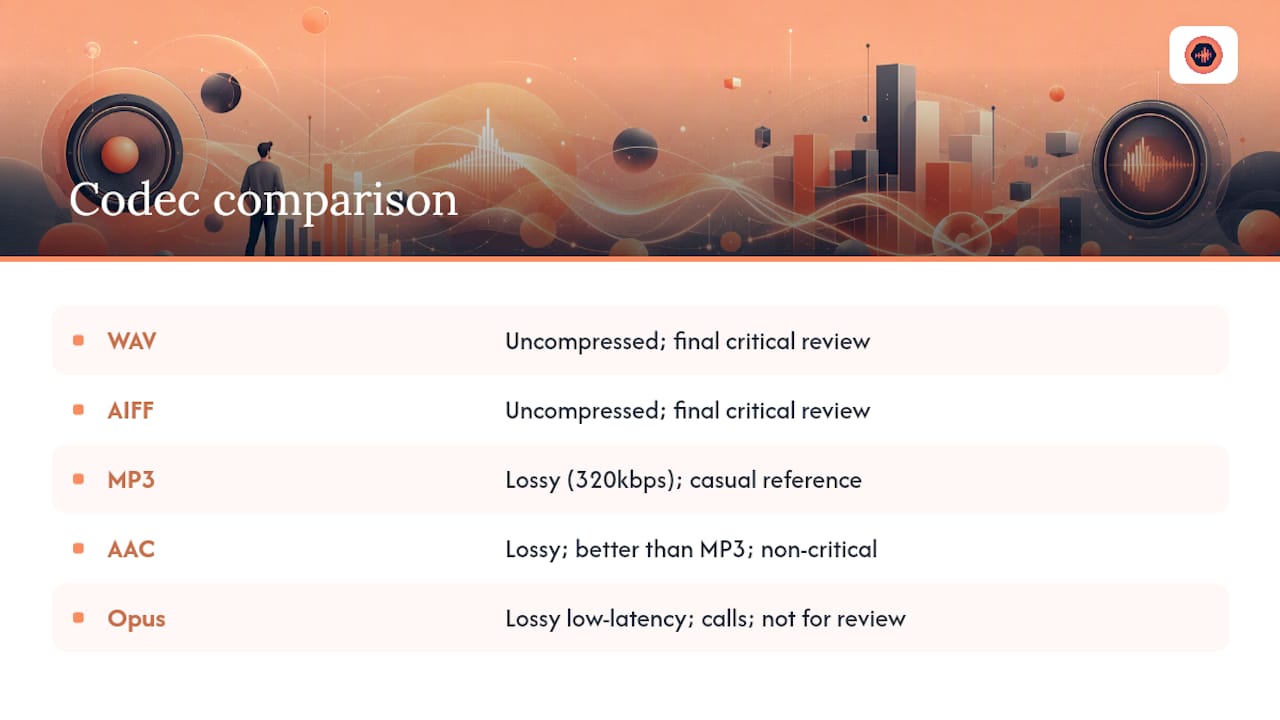
MP3 uses lossy compression, discarding audio data the codec’s algorithm predicts you won’t notice. At high bitrates (320kbps), it’s serviceable for casual listening but introduces artifacts in cymbals, reverb tails, and low-end detail that a trained ear catches immediately. Never use MP3 for a critical listening review; use it only for quick reference sends where fidelity doesn’t matter.
AAC generally outperforms MP3 at equivalent bitrates and is the default codec for Apple’s ecosystem, making it common in browser-based streaming players. It’s a reasonable middle ground for non-critical playback, but it’s still lossy.
Opus is a newer, highly efficient codec designed for low-latency streaming, often used in voice and video calls. It performs well at low bitrates but isn’t the standard for professional audio review, where the priority is fidelity, not bandwidth efficiency.
For stream-only client review, the practical rule holds steady: lossless (WAV/AIFF) for anything requiring a real judgment call, compressed formats only for casual reference. A review portal that defaults to lossless streaming removes the guesswork of choosing a codec per file.
Streaming Quality Versus Bandwidth: What Actually Matters
Streaming a 24-bit/96kHz WAV file uses considerably more bandwidth than a compressed MP3, and that tradeoff scares some engineers into compressing files they shouldn’t. The math is simpler than it seems: a three-minute WAV at 96kHz/24-bit runs roughly 50 megabytes, which is trivial for nearly any current connection, mobile or broadband.
The real bandwidth concern shows up with large batches, not single files. Sending a client 20 stems at high resolution in one go can strain a slow connection or a portal without proper streaming infrastructure. This is exactly why batching 3 to 5 files per round matters beyond just keeping feedback organized. It also keeps individual review sessions light enough to stream smoothly.
Adaptive streaming, where a platform adjusts quality based on detected connection speed, works well for casual listening apps but is the wrong instinct for professional review. A client judging a mix needs the exact file you rendered, not a version quietly downgraded because their hotel Wi-Fi tested slow. The better fix is a portal that streams the lossless file directly and lets buffering resolve naturally, rather than one that silently swaps in a lower-quality stream to save data.
If a client repeatedly reports slow loading, the fix usually isn’t lowering your export quality. It’s checking whether your review portal caches files closer to the listener geographically, since that affects load speed far more than the file’s bit depth.
Making Sure Playback Works Across Every Device and Browser
A mix that sounds perfect on your studio monitors needs to survive playback on a client’s iPhone speaker, a laptop browser, and possibly a car stereo, all in the same review cycle. Compatibility issues aren’t rare. They’re the default state unless you plan for them.
Browser-based playback is the biggest variable. Not every browser handles high-resolution WAV streaming the same way, and older browser versions sometimes fall back to lower-quality codecs without telling the client anything changed. A dedicated review portal handles this transcoding automatically in the background, so the client hears an appropriate stream regardless of whether they’re on Safari, Chrome, or a mobile app, without you needing to export multiple format versions manually.
Mobile devices introduce their own quirks. iOS and Android handle background audio playback differently, and a portal that isn’t built mobile-first can lose playback position or fail to load waveform comments correctly on a phone screen. Since a growing share of client reviews happen on a phone during a commute rather than at a desk, this isn’t an edge case worth ignoring.
Test your delivery link on at least two device types before sending it to a client for the first time on a new platform. It takes five minutes and catches embarrassing failures, like a waveform that won’t render on mobile Safari, before a client ever sees them.
Solving Latency and Buffering Before They Cost You a Client
Buffering during a critical listening session breaks trust fast. A client who has to wait for a track to load, or hears a stutter mid playback, associates that friction with your professionalism, even when the platform is technically at fault.
Latency in audio-only streaming usually comes from one of three sources: server distance from the listener, file size relative to connection speed, and how the platform handles initial buffering before playback starts. A portal built specifically for audio delivery typically preloads enough of the file to start playback instantly, then continues buffering in the background, rather than waiting for the whole file to load first.
Large stem batches are the most common trigger for buffering complaints, since loading ten or more high-resolution files simultaneously taxes both the server and the client’s connection. Staggering stem delivery, or letting the client stream one file at a time rather than loading an entire batch page, reduces this friction meaningfully.
If a client consistently reports buffering issues and you’ve ruled out their own connection, check whether your review tool caches files on a content delivery network close to major population centers. That single infrastructure detail affects perceived quality more than almost anything else in the stack.
Best Practices Across Music, Podcasts, and Voiceover Delivery
The core workflow holds across formats, but each use case has its own wrinkle worth accounting for.
Music mixes and masters need the tightest version control, since a single song can go through eight or more revision rounds with multiple stakeholders (artist, manager, label) weighing in. Timestamped comments matter most here because musical feedback is inherently precise: a specific beat, a specific word, a specific transition.
Podcast episodes usually involve fewer revision rounds but longer files, sometimes an hour or more. Batching by episode segment, rather than sending an entire 90-minute file for review, makes feedback easier to leave and easier to act on. Delivery notes matter more here too, since a producer often needs to flag specific edit points across a long runtime.
Voiceover and post-production audio frequently involves tight timing requirements tied to picture, so version labeling needs to reference the exact cut or script version the audio matches. A generic “v4” label doesn’t help if the client is also juggling three script revisions simultaneously; naming that ties audio versions to script versions prevents a mismatch nobody catches until final delivery.
Across all three, the same principle holds: whatever format you’re delivering, the reviewer needs to stream it instantly, comment precisely, and know exactly which version they’re hearing.
What Changed When I Stopped Emailing WAV Files
Before consolidating review into one portal, a typical revision cycle meant three email threads, a text message clarifying which mix version, and a client comment that just said “the bridge.” After switching to timestamped waveform comments and version-locked delivery, approval times dropped noticeably and the back-and-forth clarifying questions nearly disappeared. My honest suggestion: pick your next small project, run one focused batch of three files through a proper review workflow, and watch how much faster the client actually responds.
— Kreg
Getting Started With Audome for Stream-Only Delivery
Audome gives studios a faster path to the workflow this article just walked through, without stitching together five separate tools to get there. Instead of juggling a cloud drive for files, email for notes, and a separate invoice system for payment, you get lossless streaming, timestamped feedback, version control, and payment gating in one workspace.

Start small: upload a 3-file batch, turn on timestamped comments, and set one free revision to see how the review cycle feels compared to your current process. Onboarding a client takes a few minutes since they never need to create an account, just open the link, listen, and comment. Once a project reaches final approval, lock the download behind payment through Stripe Connect so delivery and billing happen in the same step. Check the Audome product page to start a trial and see the full feature set in action on your next project.
Sources
- Why tracking link clicks matters (Bitly blog)
- Mix Engineer File Delivery Checklist: Deliver Mixes Like a Pro
FAQ
What Does “Stream Only Audio” Mean for Professional Review?
It refers to sharing high-resolution audio privately through a review portal for client feedback and approval, not broadcasting or live streaming. The goal is secure, lossless playback paired with timestamped commenting rather than a public or downloadable release.
Which File Format Should I Use for Client Review?
Use lossless WAV or AIFF at your session’s native sample rate and 24-bit depth. Compressed formats like MP3 introduce artifacts that can mislead a client’s judgment during a critical listening pass.
How Many Revisions Should I Include by Default?
Two to three rounds is standard for most mix projects, stated clearly in the contract before work begins. Platforms like Audome can automate billing for revisions beyond that limit so the boundary enforces itself.
Can Clients Review Audio Without Creating an Account?
Yes, and it’s generally preferable for client experience. No-login review links let a client click, listen, and comment immediately, while password protection and link expiration still keep the file secure.
How Do I Know if My Review Link Actually Works Well?
Check for lossless playback, timestamped comments, version history, download gating, and open/play analytics. If a sharing method is missing more than one of these, it’s likely slowing down your revision cycles somewhere.