
Twenty-four bit audio gives you 48 more decibels of theoretical dynamic range than 16 bit, but in a finished, properly dithered file for playback, almost nobody can hear the difference. The real winner in the 24 bit vs 16 bit argument depends on context: record and mix in 24 bit for the headroom, then deliver most consumer formats in 16 bit with clean dithering. Both numbers matter, and neither tells the whole story on its own.
TL;DR:
- Human hearing and typical listening environments make it unlikely to perceive differences between 16-bit and 24-bit audio in final playback.
- Recording and mixing in 24-bit provides extra headroom and protects against clipping and processing errors, but distribution often benefits from 16-bit files.
- Proper dithering during bit-depth reduction prevents audible artifacts, making 16-bit masters sound as good as 24-bit ones at normal listening levels.
- Most real-world hardware and converters deliver significantly less than the theoretical maximum resolution, limiting the practical advantage of higher bit depths.
- Sharing high-resolution 24-bit sessions with collaborators maintains session integrity through revisions and improves workflow management.
Table of Contents
- Bit Depth Explained: What the Numbers Actually Mean
- Can You Actually Hear the Difference Between 16-Bit and 24-Bit?
- When to Record in 24-Bit vs When 16-Bit Is Fine
- Dither: The Step That Actually Protects Your 16-Bit Master
- Why People Think They Hear a Difference (When They Don’t)
- A Practitioner’s Note on Working With High-Resolution Files
- Share 24-Bit Sessions and Manage Revisions Without the File-Sharing Mess
- Sources
- FAQ
Bit Depth Explained: What the Numbers Actually Mean
Bit depth measures how many discrete amplitude steps a digital audio file can represent at any given moment. A 16-bit file has 2^16, or 65,536, possible values per sample. A 24-bit file jumps to 2^24, or 16,777,216 values. Each added bit roughly doubles the resolution, which works out to about 6.02 dB of extra dynamic range per bit.
That math produces the numbers you’ll see quoted everywhere: 16-bit audio tops out around 96 dB of theoretical dynamic range, while 24-bit reaches roughly 144 dB. On paper, that’s the difference between a quiet library and a jet engine at close range. In practice, no consumer audio chain gets anywhere close to using either ceiling.
Real hardware is the bottleneck. Analog-to-digital and digital-to-analog converters introduce their own thermal and electrical noise, and most real-world converters realistically deliver something closer to 20 to 21 effective bits of resolution, no matter what the file format claims. A few practical points worth knowing:
- 16-bit: 65,536 steps, ~96 dB theoretical dynamic range.
- 24-bit: 16,777,216 steps, ~144 dB theoretical dynamic range.
- Every bit added or removed shifts dynamic range by about 6 dB.
- Converter noise floors, not file format, usually set the real ceiling on resolution.
Bit depth is one half of digital audio’s resolution story. Sample rate handles frequency, bit depth handles amplitude precision and noise floor.
Can You Actually Hear the Difference Between 16-Bit and 24-Bit?
Mostly, no, not in a finished master played back at normal volumes. Controlled listening tests have tried repeatedly to catch trained ears distinguishing dithered 16-bit from 24-bit source material, and the results are consistent: listeners generally cannot reliably tell the two apart under realistic listening conditions once level-matching and proper dither are in place.
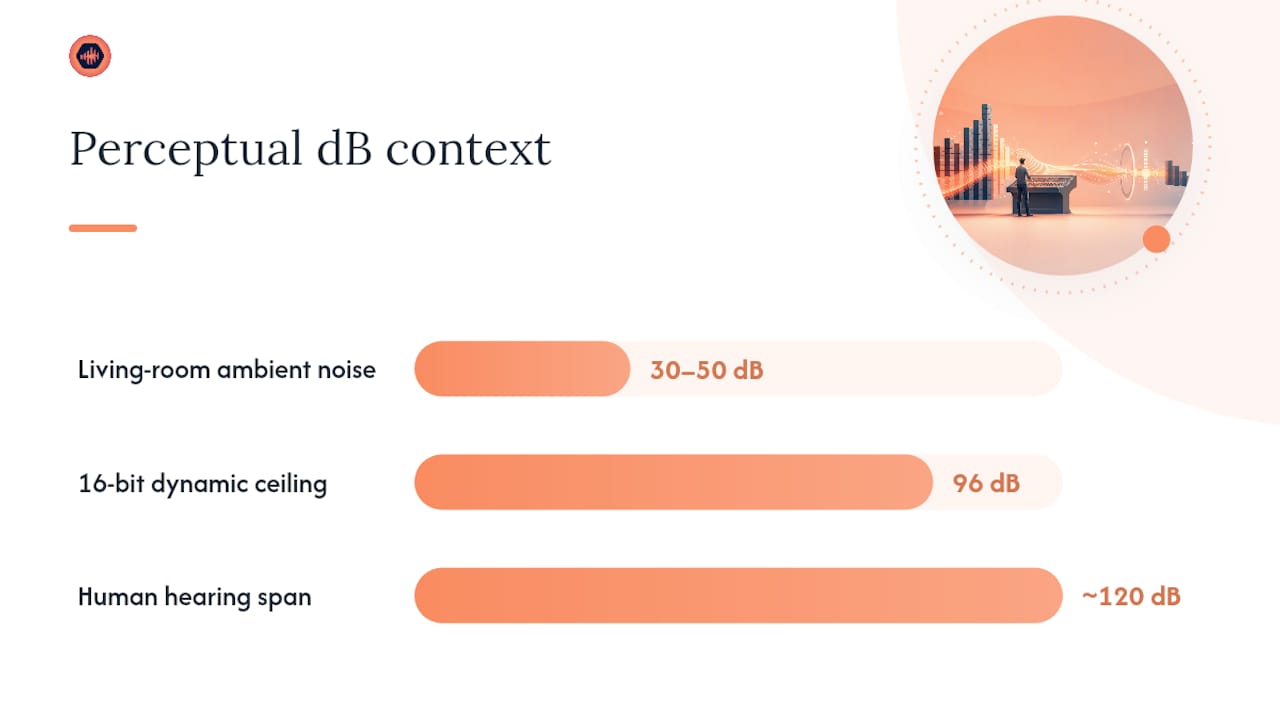
Human hearing itself caps out well within 16-bit’s range. The dynamic range of human hearing, from the threshold of audibility to the threshold of pain, spans roughly 120 dB, but comfortable listening levels compress that considerably. Add a typical living room’s ambient noise floor, usually somewhere between 30 and 50 dB SPL, and you’ve already eaten a huge chunk of 16-bit’s 96 dB ceiling before the music even starts. Streaming codecs compress the signal further, and consumer playback chains, from phone DACs to bookshelf speakers, rarely resolve anywhere near either format’s theoretical noise floor.
If you want to test this yourself instead of taking anyone’s word for it, run it properly:
- Use the exact same master, converted two ways, not two different masters or mixes.
- Level-match the files precisely; even a 0.5 dB difference will bias what you hear.
- Test in a quiet room on your best monitoring setup, not earbuds on a train.
- Confirm the 16-bit file was dithered correctly during conversion, not just truncated.
Skip any of those steps and you’re testing your equipment or your room, not bit depth.
When to Record in 24-Bit vs When 16-Bit Is Fine
The bit depth question has a different answer depending on where you are in the production chain. Treating recording, mixing, and distribution the same way is where most confusion starts.
- Recording: always 24-bit if your interface supports it. The extra headroom protects you from clipping during a hot take and gives you room to gain-stage conservatively. Aim for average peaks around negative 18 dBFS rather than pushing levels close to zero, since 24-bit gives you plenty of floor to work with.
- Mixing: stay in 24-bit or 32-bit float internally. Every plugin, EQ move, and gain adjustment introduces small rounding errors. Higher internal resolution keeps those errors below audibility even after dozens of processing passes. Most modern DAWs default to 32-bit float for exactly this reason.
- Distribution: 16-bit is usually the right call for consumer delivery. CD-quality 16-bit files remain more than sufficient once mastering and dithering are done correctly, and lossy streaming codecs compress the file to a degree that makes the extra 8 bits functionally irrelevant anyway.
Sending stems or masters between collaborators is where the choice of file format starts to matter as much as bit depth itself, since a poorly chosen codec can undo any resolution advantage you preserved during tracking.
Pro Tip: Keep your working session in 24-bit through every revision round, and only convert to 16-bit at the very final export stage. Converting back and forth mid-project multiplies rounding errors for no benefit.
Dither: The Step That Actually Protects Your 16-Bit Master
Chopping a 24-bit file down to 16-bit by simple truncation throws away the bottom 8 bits of data, and that process creates quantization distortion, a correlated, sometimes audible artifact rather than random noise. Dither fixes this by adding a tiny amount of calibrated noise before the bit reduction, which breaks up that correlated distortion and replaces it with a much less objectionable noise floor.
- TPDF (triangular probability density function) dither is the industry-standard default for most conversions.
- Noise-shaped dither can push residual noise into frequency bands your ears are less sensitive to, useful for quiet classical passages or long fade-outs.
- Skip dither only when the next step is lossy encoding (MP3, AAC), since those codecs introduce their own noise that masks the difference anyway.
The safe export order is simple: finish all processing first, apply your bit-depth conversion, add dither at that exact stage, then export and spot-check the file. Reversing that order, or dithering too early, wastes the benefit.
Pro Tip: If your master has a quiet, exposed ending, A/B it with and without noise-shaped dither before finalizing. That’s usually where truncation artifacts are easiest to catch.
Why People Think They Hear a Difference (When They Don’t)
Most “24-bit sounds better” moments trace back to something other than bit depth. A different master, a remastered EQ curve, extra compression, or a louder limiter setting will all sound different, and listeners credit the format instead of the actual change.
- Comparing two different masters, not the same file at two bit depths.
- Skipping level-matching, so the louder file simply sounds “better.”
- Testing on inconsistent monitoring chains or in noisy rooms.
- Comparing an undithered truncation against a properly dithered export, which biases the result unfairly.
Interestingly, many commercial releases actually use far less than 16 bits worth of real dynamic range, since loud, heavily compressed masters often occupy only 10 to 30 dB of usable range. Before blaming bit depth, check the master, match the level, and confirm the export was dithered.
A Practitioner’s Note on Working With High-Resolution Files
Most studios settle into 24-bit as their working standard, not because playback demands it, but because it protects the session through every revision. Preserving high-resolution files matters more for collaboration than for the final listen. When a client sends notes on a mix, having the original 24-bit session available means every fix happens from full resolution, not from a lossy round trip.
That’s the practical case for tools like Audome, which supports unlimited 24-bit uploads alongside timestamped waveform feedback and version tracking, so a studio’s high-resolution files stay intact through revision after revision.
— Kreg
Share 24-Bit Sessions and Manage Revisions Without the File-Sharing Mess
Audome gives studios a real advantage over juggling Dropbox links, email threads, and Discord messages: it lets you upload unlimited high-resolution files up to 96kHz/24-bit, collect feedback pinned directly to the waveform timestamp, and keep every version organized in one secure client portal.

Clients drop timestamped notes right on the waveform instead of writing vague comments in a text message, which cuts down the back-and-forth that eats studio time. Download controls and Stripe Connect payments mean final files stay locked until a client pays, and studios can cap free revisions before automatically billing for extras. No client account is required, so the experience stays frictionless on their end while the studio keeps full ownership of every file. If sharing large 24-bit sessions with clients has turned into a weekly headache, start a trial with Audome and see whether your revision workflow tightens up within the first project.
Sources
- Audio bit depth — Wikipedia
- Listening test – quantization noise & bit-depth — ToneStack
- 16-Bit vs 24-Bit Audio: Does Bit Depth Actually Matter? — CleverUtils
- Bit Depth Comparison – 32 Vs 24 Vs 16 – Music Guy Mixing
FAQ
Is 24-Bit Better Quality Than 16-Bit?
Numerically yes, since 24-bit carries roughly 144 dB of theoretical dynamic range versus 16-bit’s 96 dB, but in a finished, properly dithered master, listeners usually cannot hear the difference during normal playback.
Is Spotify 16 or 24-Bit?
Spotify streams using lossy compressed codecs derived from standard-resolution sources, not 24-bit high-resolution files, so bit depth beyond 16-bit provides no practical benefit on that platform.
Does 24-Bit Sound Better?
Not reliably for playback. Its real advantage shows up during recording and mixing, where the extra headroom protects against clipping and rounding errors across many processing passes.
Is It Better to Record in 16-Bit or 24-Bit?
Record in 24-bit whenever your interface supports it. The extra headroom lets you gain-stage conservatively, around negative 18 dBFS average peaks, without risking clipped takes or audible quantization issues later.