
The best way to share audio files with music clients
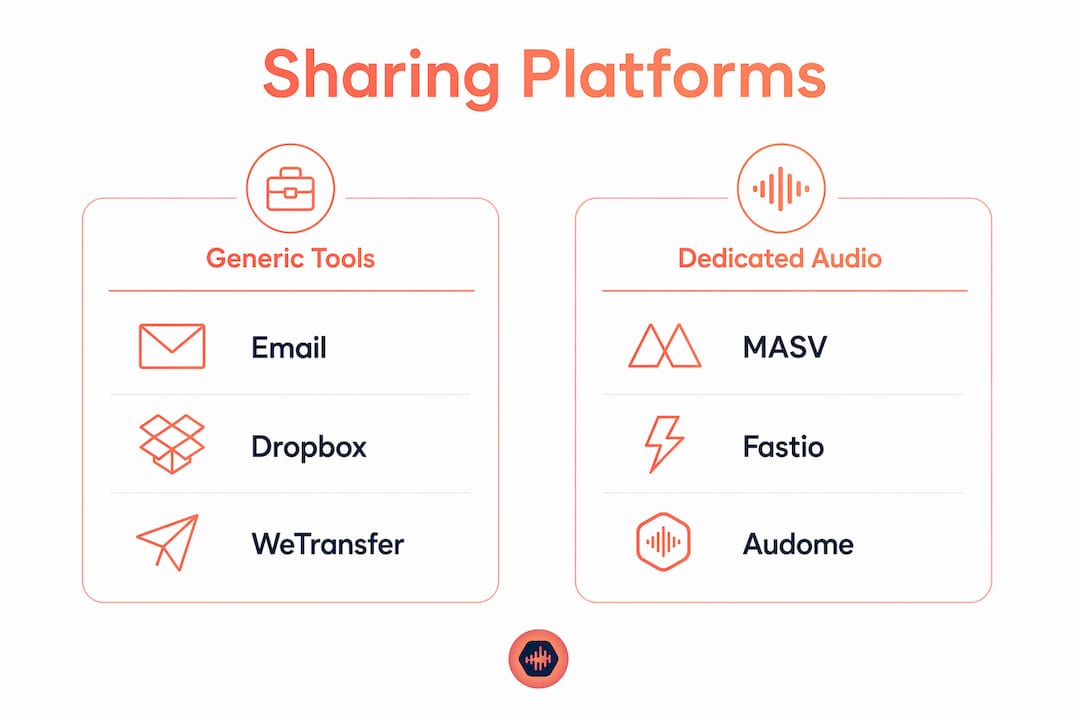
Use a dedicated music sharing platform. Not Dropbox. Not email. Not a WeTransfer link that expires before your client’s colleague gets back from vacation.
The core problem with generic tools is that they treat audio delivery as a file movement problem. It isn’t. It’s a quality, security, and communication problem. A WAV attachment bounces above typical email attachment size limits. A Dropbox folder makes the client navigate and download before hearing a single note. A WeTransfer link generates zero playback analytics, so you have no idea whether anyone actually listened.
Professional audio delivery in 2026 requires branded, trackable links with security controls like password protection and expiration dates, plus per-recipient listening analytics. The platforms below are compared on the five dimensions that matter most for audio pros: file size limits, audio quality preservation, ease of use, security features, and cost.
| Platform | File Size Limit | Audio Quality | Security | Analytics | Best For |
|---|---|---|---|---|---|
| MASV | No limit | Lossless | Strong | Basic | Large file delivery |
| Google Drive | 15 GB free | Lossless storage | Moderate | None | Internal team storage |
| OneDrive | 5 GB free | Lossless storage | Moderate | None | Microsoft/Office users |
| Dropbox | 2 GB free | Lossless storage | Moderate | Basic | Folder syncing |
| WeTransfer | 3 GB free | No re-encoding | Password, email lock | Download tracking | Quick one-off sends |
| Fastio | Large files | Lossless | Strong | Moderate | Secure media delivery |
| LucidLink | No limit | Lossless | End-to-end encrypted | Basic | Real-time collaboration |
| Facebook Messenger | Small files only | Compressed | Low | None | Casual clips only |
| Clips only | Compressed | Low | None | Previews and teasers |
The bottom of that table tells you something immediately: Facebook Messenger and Instagram compress audio and cap file sizes. They belong in your promotional toolkit, not your delivery workflow.
How each platform actually performs for audio professionals
MASV is the go-to for raw speed on large files. There are no file size limits, transfers are fast, and the interface is simple enough that clients rarely need hand-holding. For delivering full stem packs, multitrack sessions, or album masters, it’s hard to beat. The trade-off is that MASV is a transfer tool, not a collaboration platform. Once the file lands, the conversation moves back to email.

Google Drive and OneDrive are useful for internal storage and team access, but neither was built for client-facing audio delivery. Recipients have to navigate folders and download files before hearing anything. There’s no streaming player, no listening analytics, and no way to know whether your client actually opened the session. Both work fine for archiving finished projects or sharing assets within your own team.
Dropbox sits in a similar category. Its folder syncing is reliable and version history is genuinely useful for tracking revisions, but the client experience is a download list, not a listening experience. For a quick reference share between collaborators who already use Dropbox, it’s functional. For a pitch or a final delivery where first impressions count, it undersells your work.
WeTransfer punches above its weight for quick sends. Free accounts support transfers up to 3 GB with no re-encoding and no quality loss. Recipients can preview MP3 and WAV files up to 300 MB directly in the browser and leave comments on individual files before downloading. Password protection and email-restricted access are available on all plans. The Ultimate plan adds branded pages, permanent link expiry, and download tracking. The gap is analytics depth: WeTransfer tells you when someone downloaded, but not which tracks they played or for how long.
Fastio is built specifically for media professionals and handles large audio files with strong security controls. It’s a solid choice when the priority is fast, secure delivery to a specific recipient without the overhead of a full collaboration platform.
LucidLink takes a different approach entirely. Rather than transferring files, it gives distributed teams access to a shared cloud file system where audio streams directly without a full download. Zero-knowledge, end-to-end encryption means files stay private. For studios with remote engineers working on the same session in real time, LucidLink removes the upload-download cycle entirely. It’s overkill for a simple client delivery, but genuinely powerful for collaborative production workflows.
Facebook Messenger and Instagram compress audio and restrict file sizes. Messenger works for sending a quick reference clip to a collaborator in a pinch. Instagram is useful for sharing a 30-second teaser or a reel to build buzz around a release. Neither belongs in a professional delivery chain for final files.
Which audio file format should you actually send?
The format question trips up a lot of producers because the answer depends on the stage of the project, not just the quality target. Here’s how to think about it:
- WAV or AIFF at 44.1kHz/24-bit or higher: the standard for any final delivery intended for broadcast, sync licensing, film, or TV post. No compression, no quality loss, full metadata support.
- MP3 at 320kbps: acceptable for reference listens and initial pitch rounds. Never for final licensed delivery. Clients can audition it quickly on any device.
- FLAC: occasionally requested by music libraries and archival platforms as a lossless compressed alternative to WAV. Smaller file size than WAV, identical quality.
- AAC: sometimes requested by streaming platforms or mobile-first game studios. Lossy, but higher efficiency than MP3 at equivalent bitrates.
- When in doubt: deliver WAV and include a 320kbps MP3 for easy preview. One lossless, one convenient.
WeTransfer transfers any of these formats without re-encoding, so what you export is exactly what the client receives. That’s the baseline expectation for any platform you use.
Metadata is where most producers leave money on the table. Every shared file should have the composer name, BPM, key, genre, mood, and ISRC code embedded before it leaves your session; following best practices from this clear guide to digital asset delivery in photography can similarly improve your professional workflows. Embedding metadata like ISRC codes and BPM keeps your files trackable through licensing workflows and makes the music supervisor’s clearance work measurably easier. A file that arrives named “v7_FINAL_final_USETHIS.wav” with no embedded data signals that you’re not running a professional operation.
Pro Tip: Set up a metadata template in your DAW’s export settings. Every export automatically populates composer, BPM, key, and contact info. It takes 20 minutes to configure once and saves hours across a catalog.
Security at the format level matters too. For pre-release material, watermarking adds a layer of protection that survives even if a link is shared beyond the intended recipient. Byta offers one-click watermarking for pre-release audio alongside support for AIFF, ALAC, FLAC, WAV, AAC, and MP3, with the option to convert formats on the fly.
For a deeper look at choosing audio file formats for different delivery scenarios, the format decisions become clearer when mapped to specific client types.
How to choose the right sharing method for your project
The right tool depends on four variables: project size, client technical comfort, security requirements, and where the delivery sits in your workflow.
Project size is the first filter. Email attachments bounce above typical file size limits for most email services, which rules them out for anything beyond a short reference clip. For full sessions, stem packs, or album masters, you need a platform that handles large files without compression. MASV and LucidLink have no practical size ceiling. WeTransfer’s free tier covers 3 GB, which handles most individual deliveries.
Client technical comfort matters more than producers usually admit. A client who isn’t comfortable navigating a Dropbox folder will not give you useful feedback. The best platforms for client-facing delivery are the ones where the client clicks a link, the audio plays immediately, and they can leave a comment without creating an account. That frictionless experience is what separates a professional delivery from a file dump.
Security requirements vary by project stage. Reference listens during production can go out with basic password protection. Pre-release masters need expiration dates, download controls, and ideally per-recipient access. Sending the password via a separate channel from the link itself is a simple habit that protects pre-release material even if an email thread is compromised.
Workflow integration is the variable most producers overlook until it costs them time. If your studio runs on Pro Tools, Logic Pro, or Ableton, the delivery platform doesn’t need to integrate directly with the DAW, but it should fit cleanly into how you manage projects and client communication. Platforms that support version tracking, timestamped feedback, and revision history reduce the back-and-forth that eats into production time. For sending mixes and collecting approvals, a structured feedback loop matters as much as the delivery itself.
Analytics close the loop. Platforms that track when a link was opened, which tracks were played, and how long each was listened to turn every delivery into usable data. Advanced platforms track recipient behavior down to per-track play time, enabling follow-ups based on what the client actually engaged with rather than a generic “just checking in” message three days later.
Workflow practices that separate professional studios from everyone else
The delivery itself is only part of the job. How you organize, present, and follow up on shared audio shapes whether clients come back.
- Organize files for the client’s workflow, not yours. A flat list of 40 WAV files is not a delivery. For a sync pitch, order tracks by mood or tempo. For a film score, organize by scene. Put the strongest, most on-brief track first.
- Send a branded streaming link, not an attachment. A link that opens a polished page with your logo, bio, and waveform previews reads as professional. A Dropbox folder reads as a file cabinet. Delivering via branded pages that stream instantly improves client impression versus generic cloud folders.
- Send the password separately. If the playlist is password-protected, send the link in one message and the password via SMS or a different channel. A compromised email thread should not negate the access control you set up.
- Check analytics before you follow up. If the link hasn’t been opened after three business days, that’s your signal to follow up. If specific tracks were played multiple times, lead your follow-up with those tracks. Analytics allow follow-up with precision instead of guessing.
- Maintain consistent file naming and metadata. Every file that leaves your studio should follow the same naming convention: Artist_Title_BPM_Key_Version. Combined with embedded metadata, this makes your catalog searchable and your deliveries easy to log.
- Use download controls deliberately. Turn off downloads for reference listens. Turn them on only when the delivery is final and licensed. This single setting prevents unauthorized copies of pre-release material.
Pro Tip: Customize the track order and playlist selection for each client. A trailer house supervisor and an advertising agency producer have completely different needs. A playlist assembled for one says nothing useful to the other, and supervisors know immediately when they’ve received a generic blast.
For a full breakdown of file sharing methods for studios, the workflow decisions become clearer when mapped to specific studio sizes and client types.
Audome brings the whole workflow into one place
Most studios running on a combination of Dropbox, WeTransfer, email, and text messages are managing the same project across four or five different places. That’s where things get lost.

Audome is built specifically for audio professionals who want to stop stitching together generic tools. It handles audio collaboration and project management in one workspace: upload high-resolution files up to 96kHz/24-bit, collect timestamped feedback directly on the waveform, manage version history, and deliver final files with payment gates through Stripe Connect. Clients don’t need to create an account. Studios can cap free revisions and charge automatically for additional rounds, which changes the economics of revision-heavy projects. If you’re spending more time chasing feedback and managing files than actually mixing, Audome addresses the operational side of running a studio, not just the file transfer side.
FAQ
What is the best way to share an audio file with a client?
Use a dedicated music sharing platform that streams audio in the browser, preserves lossless quality, and provides download tracking or listening analytics. Generic email attachments bounce above typical size limits and offer no confirmation of receipt.
What are the best audio sharing platforms for professionals?
MASV handles large file transfers with no size limits. WeTransfer covers quick sends up to 3 GB free with browser previews and password protection. LucidLink suits real-time collaborative workflows. Audome is built for full studio collaboration with feedback, version control, and payment integration.
Is it better to send WAV or MP3 to a client?
Send WAV for any final or licensed delivery. WAV at 44.1kHz/24-bit is the broadcast and sync standard. MP3 at 320kbps is acceptable for reference listens and initial pitches, but never for final delivery of licensed music.
Is sharing MP3s with clients illegal?
Sharing MP3s of your own original work with clients is legal. Sharing copyrighted recordings you don’t own the rights to without a license is copyright infringement, regardless of the format.
How do I keep pre-release audio secure when sharing?
Password-protect the link and send the password via a separate channel such as SMS. Set an expiration date for pitch-stage material, and turn off downloads until the delivery is final and licensed.
Key Takeaways
Dedicated music sharing platforms outperform generic cloud storage for professional audio delivery because they preserve quality, provide security controls, and generate listening analytics that inform smarter client follow-up.
| Point | Details |
|---|---|
| Use a dedicated platform | Generic tools like email and Dropbox lack streaming previews, analytics, and professional access controls. |
| WAV for finals, MP3 for previews | Deliver WAV at 44.1kHz/24-bit for licensed work; 320kbps MP3 is acceptable for reference listens only. |
| Embed metadata before sending | Composer name, BPM, key, genre, and ISRC codes should be embedded in every file before delivery. |
| Send passwords via a separate channel | A password and link sent in the same message negate the access control you set up. |
| Audome for full studio workflows | Audome combines file delivery, timestamped feedback, version control, and Stripe-gated downloads in one workspace. |