
TL;DR:
- Purpose-built studio management software enhances audio workflows by including waveform feedback and revision billing tools. It offers predictable flat-rate pricing, which is more cost-effective than modular systems with hidden add-on expenses. Selecting the right platform depends on your studio’s size, workflow, and specific administrative needs.
Studio management software is defined as an integrated platform that handles scheduling, invoicing, client communication, and project tracking within a single workspace built for creative professionals. For audio studios, the best studio management software goes further by adding audio-specific tools: version tracking, waveform-level feedback, file delivery controls, and revision billing. Generic project management apps miss these entirely. The result is a fragmented workflow where feedback arrives by text, files live in Dropbox, and invoices go out by email. This article breaks down what separates purpose-built studio tools from generic alternatives, how pricing models work, and how to choose the right fit for your studio.
What are the essential features of the best studio management software?
The core job of any studio management tool is to reduce the time you spend on administration so you can spend more time on audio work. The features that actually deliver on that promise fall into five categories.

Scheduling and calendar management covers booking sessions, blocking studio time, and coordinating multiple engineers or rooms. The best platforms sync with external calendars and send automated reminders to clients, cutting no-shows without a single manual follow-up.
Invoicing and payment processing is where most studios lose money through slow collection. Banking-level financial automation embedded directly in studio workflows reduces manual bookkeeping and payment reconciliation. Platforms that calculate sales tax automatically and collect payment before releasing final files protect your revenue without awkward conversations.
Client portals and project management give clients a single place to review work, leave feedback, and approve deliverables. This replaces the scattered back-and-forth across email, Discord, and text that most studios still rely on.
Audio-specific workflow tools are the real differentiator. Timestamped feedback directly on the waveform, version history, high-resolution file support up to 96kHz/24-bit, and revision limits with automatic billing for overages are features generic platforms simply do not offer. Audome is built around exactly these capabilities.
Reporting and analytics round out the picture. Knowing which projects are most profitable, which clients request the most revisions, and how your studio’s revenue trends over time turns gut decisions into informed ones.
- Automated session scheduling with calendar sync
- Integrated payment collection with Stripe or equivalent processors
- Client portals that require no client account creation
- Timestamped waveform feedback and version tracking
- Revision limits with automatic billing for additional rounds
- Sales tax automation and financial reporting
Pro Tip: Before evaluating any platform, list the three administrative tasks that cost you the most time each week. Use that list as your minimum feature requirement, not the vendor’s feature checklist.
How do pricing models and scalability affect your choice?
Pricing structure matters as much as the feature list, especially as your studio grows. Entry-level tools start around $9/month, while mid-range platforms with CRM capabilities run $19–$36/month, with annual billing typically saving around 20%.
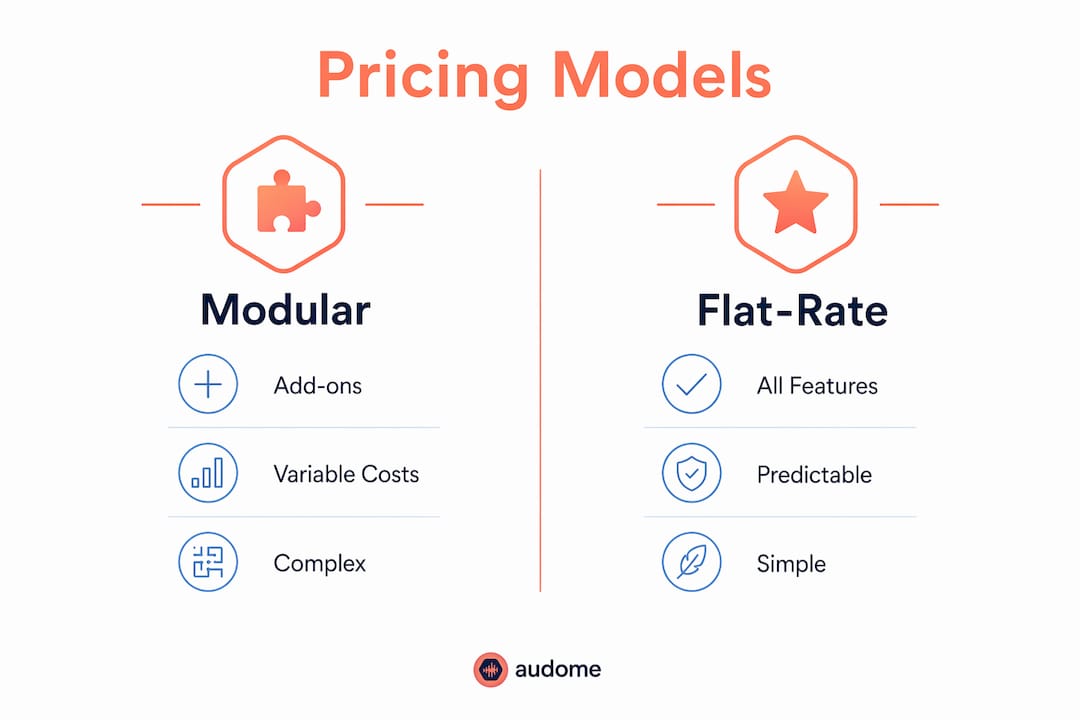
The more important distinction is between modular pricing and flat-rate all-in-one pricing. Modular systems can cost €200–700+ per month depending on member count, while flat-rate all-in-one platforms run €89–289/month for comparable studio sizes. That gap widens fast as you add team members or unlock features.
The hidden cost of modular pricing
Modular pricing looks affordable at entry. The problem is that paid add-ons for core features often double your monthly cost once you scale beyond 200 members or projects. A platform that charges $15/month at signup can easily become $60/month once you add invoicing, client portals, and reporting as separate modules.
Flat-rate platforms avoid this trap by including all features at one price. For a boutique U.S. studio with one to five engineers, a flat-rate platform in the $30–$60/month range typically covers every core need without surprise charges.
Why rate locking matters for long-term budgeting
Some specialized platforms offer lifetime rate locking as long as your account stays active. This protects you from price increases after onboarding, which is a real risk with platforms that raise rates annually. Always check the subscription terms before committing.
Pro Tip: Ask vendors directly: “Will my rate change if you raise prices for new subscribers?” A clear “no” in writing is worth more than any feature comparison.
Why audio-specific software outperforms generic tools
Generic project management platforms are built for software teams, marketing agencies, or construction firms. Adapting them to audio workflows requires workarounds that create new inefficiencies. Purpose-built studio software avoids bloated generic features and focuses on niche needs like session notes, asset tracking, and audio project versioning.
The practical advantages of audio-specific platforms show up in four areas:
-
Waveform-level feedback. Clients can leave timestamped comments directly on the audio file instead of writing “around 2:30 the bass feels muddy.” This eliminates the most common source of miscommunication in mix revisions.
-
Version control built for audio. Every revision is stored and labeled automatically. You can pull up version 3 of a mix in seconds without digging through a folder named “Final_FINAL_v3_USE_THIS.”
-
Revision billing automation. Setting a free revision limit and automatically charging for additional rounds is a feature generic platforms cannot replicate without custom development. Audome handles this natively through Stripe Connect.
-
Client experience without friction. Clients should not need to create an account or download an app to review your work. Audio-specific platforms like Audome let clients access project pages with a simple link, which improves response times and reduces back-and-forth.
-
File delivery controls. Locking final downloads behind payment confirmation prevents the common scenario where a client downloads the finished master and then disputes the invoice.
The efficiency gains from these features are concrete. Studios using purpose-built workflow tools can reduce project turnaround times from weeks to hours on the delivery and approval side alone. That time goes back into billable work.
How to select and implement studio management software
The right platform depends on your studio’s size, team structure, and the specific workflows that cost you the most time. A solo mixing engineer has different needs than a commercial recording studio with three rooms and a staff of five.
Start with an honest assessment of your current workflow:
- How do you currently send files to clients?
- Where does client feedback arrive, and how often is it unclear or scattered?
- How long does invoicing and payment collection take per project?
- Do you lose track of revision counts or deliver extra rounds for free?
Smaller studios benefit most from polished client experience and simple automation, while larger studios need scalability and complex hierarchy management. This is not a one-size-fits-all decision.
For solo producers and freelance engineers, start with the basics. Beginners should prioritize ease of use for core tasks like invoicing and scheduling before layering in complex automation. Over-automating too early slows adoption and creates more problems than it solves.
For studios with multiple engineers or client-facing staff, prioritize platforms that support multiple collaborators, offer role-based access, and include client portals that work without requiring client accounts. Check whether the platform supports producer workflow automation at the level your volume requires.
Pro Tip: Run a free trial with a real active project, not a test project. The friction points that matter only show up under actual working conditions.
Common implementation mistakes to avoid:
- Migrating all historical projects before testing the platform on new work
- Choosing a platform based on the longest feature list rather than the most relevant features
- Skipping vendor support evaluation until you actually need help
- Ignoring mobile usability if you or your clients review work on phones
For a deeper look at how project management tools for mixing engineers compare on audio-specific criteria, the differences between platforms become clearer when tested against real session workflows.
Key Takeaways
The best studio management software is purpose-built for audio workflows, combines flat-rate pricing with rate locking, and automates client feedback, revision billing, and file delivery in one place.
| Point | Details |
|---|---|
| Audio-specific features matter most | Timestamped waveform feedback and revision billing automation are absent from generic platforms. |
| Flat-rate pricing beats modular | Modular add-ons can double monthly costs after scaling; flat-rate platforms keep budgets predictable. |
| Start simple, then automate | Solo studios should master invoicing and scheduling before adding complex automation layers. |
| Rate locking protects long-term costs | Confirm lifetime rate locking in writing before committing to any subscription. |
| Client experience drives adoption | Platforms that require no client account creation get faster responses and fewer revision delays. |
What I’ve learned after years of watching studios choose the wrong software
The most common mistake I see audio professionals make is choosing software based on what looks impressive in a demo rather than what solves their actual daily problems. A platform with 40 features is worthless if the three features you use every day are buried in menus or require a paid add-on.
The second mistake is underestimating the cost of modular pricing. I have watched studios sign up for a $12/month platform and end up paying $80/month eighteen months later after unlocking invoicing, client portals, and reporting as separate modules. The math is never obvious at signup.
The third mistake is treating software selection as a one-time decision. Your studio’s needs at 10 projects per month are different from your needs at 50. The platform that works perfectly as a solo engineer may not support a two-person team without a painful migration.
My honest recommendation: if you work in audio, do not use a generic tool and try to adapt it. The workarounds cost you more time than the software saves. Purpose-built platforms designed around audio workflows, like Audome, exist precisely because the generic options fall short. Start with a free trial on a live project, test the client experience from your client’s perspective, and check the pricing terms before you commit.
— Kreg
Audome brings audio collaboration and project management together
Audio professionals who want to stop managing files across Dropbox, email, and Discord have a direct alternative in Audome. The platform is built specifically for music producers, mix engineers, mastering engineers, recording studios, and post-production professionals.

Audome centralizes every stage of client collaboration: file delivery, timestamped waveform feedback, version tracking, revision billing through Stripe Connect, and password-protected client portals. Clients access projects through a simple link with no account required. Studios set free revision limits, automatically charge for additional rounds, and lock final downloads behind payment confirmation. If you are ready to replace scattered workflows with one audio collaboration platform built for how studios actually work, Audome is worth a close look.
FAQ
What is studio management software for audio professionals?
Studio management software is an integrated platform that handles scheduling, invoicing, client communication, file delivery, and project tracking in one workspace. Audio-specific versions add waveform feedback, version control, and revision billing tools that generic platforms do not include.
How much does studio management software typically cost?
Entry-level tools start around $9/month, with mid-range platforms running $19–$36/month. Modular systems can cost significantly more once essential features are unlocked as paid add-ons.
What features should audio studios prioritize?
Timestamped waveform feedback, version tracking, automated revision billing, client portals that require no account creation, and integrated payment collection are the features that deliver the most direct value for audio workflows.
Is purpose-built audio software better than generic project management tools?
Yes. Purpose-built platforms avoid bloated generic features and include audio-specific tools like session notes, asset tracking, and revision management that generic platforms cannot replicate without custom workarounds.
What is the biggest pricing mistake studios make when choosing software?
The most common mistake is choosing a low entry-price modular platform without checking add-on costs. Paid add-ons for core features routinely double monthly costs after scaling, making flat-rate all-in-one pricing the safer choice for long-term budgeting.