
What are the best decibelpeak.com alternatives in 2026?
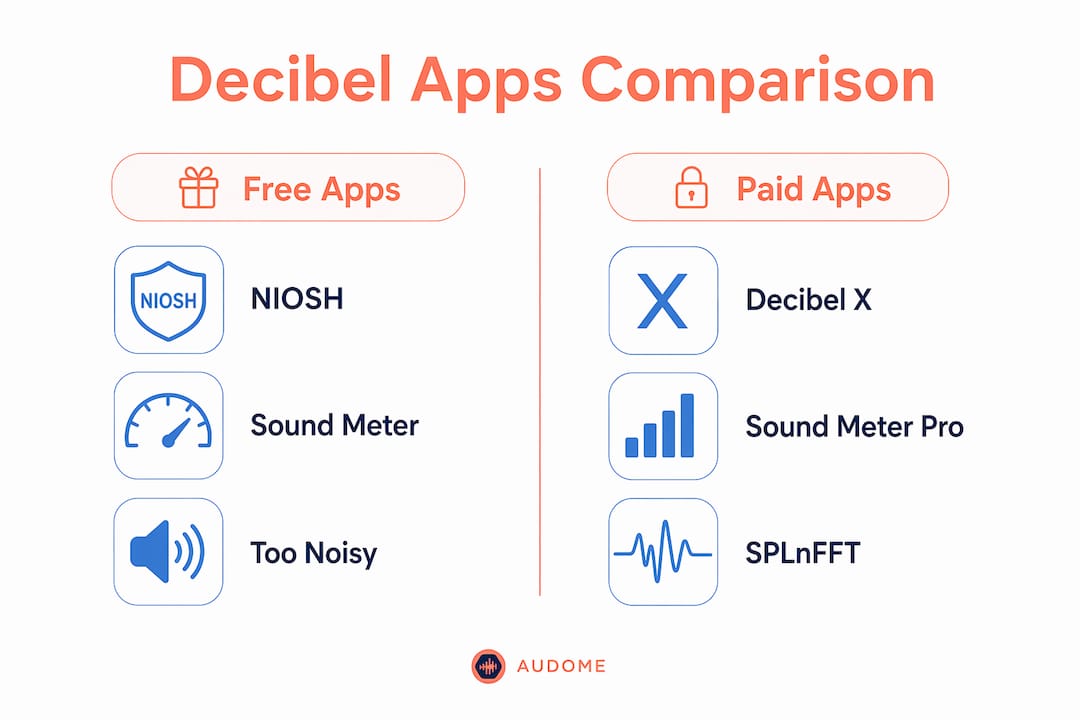
If you’re searching for decibelpeak.com alternatives, several strong options are available including Sound Meter Professional, NIOSH Sound Level Meter, Decibel X, SPLnFFT Noise Meter, and Decibel Pro. Each covers a different slice of the market, from free government-backed tools to paid apps with frequency analysis. Before diving into individual profiles, here’s how the full field stacks up.
| App | Platform | Measurement Range | Calibration | Free/Paid | Best For |
|---|---|---|---|---|---|
| Sound Meter Professional | iOS, Android | 0–140 dB | Yes | Paid | Professional-grade smartphone measurement |
| NIOSH Sound Level Meter | iOS | 0–140 dB | Limited | Free | Trusted, no-cost iPhone measurement |
| Decibel X | iOS, Android | 0–140 dB | Yes | Free/Paid | Frequency analysis and ease of use |
| Sound Meter & Noise Detector Pro | Android | 0 to 140 dB | Yes | Paid | Android noise tracking with session logs |
| SPLnFFT Noise Meter | iOS | 0–140 dB | Yes | Paid | Spectral analysis for audio professionals |
| Too Noisy | iOS, Android | — | No | Free/Paid | Classrooms and child-friendly alerts |
| Sound Meter | Android | — | No | Free | Quick casual noise checks |
| NIOSH SLM (Sound Level Meter) | iOS | 0–140 dB | Limited | Free | Occupational health and safety use |
| Sound Meter & Noise Detector | Android | 0 to 140 dB | Yes | Free/Paid | Continuous monitoring with session stats |
| Decibel Pro | iOS, Android | 0–140 dB | Yes | Paid | Sound measurement plus hearing tests |
How accurate are decibel meter apps compared to professional devices?
Mobile decibel apps are useful, but they carry a real accuracy ceiling. Smartphone microphone hardware varies widely across device models, and none of these apps are calibrated to ANSI or OSHA standards. That means you cannot use them for certified workplace noise surveys or legal compliance purposes.
What they do well is subjective monitoring. If you want to know whether your apartment is louder than a normal conversation, or whether a concert venue is pushing into hearing-damage territory, a well-designed app gives you a reliable ballpark. The gap between a calibrated sound level meter and a smartphone app can be several decibels depending on the device.
Key factors that affect accuracy:
- Microphone quality: Built-in mics on budget Android phones perform noticeably worse than those on recent iPhones.
- Calibration offset support: Apps that let you enter a manual offset against a known reference source get closer to real readings.
- Algorithm design: Some apps apply frequency weighting (A-weighting is the standard for hearing risk); others do not.
- Background noise handling: Apps without background audio ducking can misread levels when the screen locks.
- Developer disclaimers: Nearly every app in this category explicitly states it is not a replacement for a calibrated instrument.
OSHA’s hearing conservation program requires calibrated Type 1 or Type 2 sound level meters for compliance measurements. No smartphone app currently meets that bar.
What features should you look for in a decibel meter app?
Calibration support is the single most important feature if accuracy matters to you. An app that shows only a live number with no way to adjust against a reference is essentially a rough estimate. Beyond that, the features that separate genuinely useful apps from throwaway ones are:
- Timeline visualization: A 30-second or longer history graph shows how sound levels fluctuate, which a single number cannot capture. Effective apps provide a timeline of sound intensity alongside peak tracking.
- Session logging: The ability to record a full session and review averages afterward is critical for workplace or event monitoring.
- Peak tracking: Knowing the highest level hit during a session matters more than the current reading for hearing safety assessments.
- Noise classification labels: Apps that display reference categories like “whisper,” “busy street,” or “jet engine” help non-experts understand what a reading actually means.
- Platform compatibility: iOS and Android support matters if you switch devices or share data with colleagues.
- Pricing transparency: Free apps often lack calibration and logging; paid tiers typically unlock the features professionals need.
Pro Tip: Prioritize apps that show a timeline graph over those displaying only a live number. Session averages and peak badges give you far more useful data for any real noise exposure assessment.
A closer look at the top alternatives to DecibelPeak
Sound Meter Professional measures from 0 to 140 dB with real-time graphing and manual calibration tools. It’s the strongest pick for users who want professional-grade analytics on a smartphone without buying dedicated hardware.
NIOSH Sound Level Meter and NIOSH SLM are both developed under CDC occupational health protocols and are free on iOS. The NIOSH app is the most credible free option available, backed by federal health authority research rather than a commercial developer. It covers a broad measurement range and includes dose calculations for exposure tracking.
Decibel X stands out for its interface and multi-platform support. It runs on both iOS and Android, offers A-weighted measurements, and includes a frequency spectrum display in its paid tier. Audio professionals who want a polished experience without committing to a desktop tool often land here.
SPLnFFT Noise Meter goes deeper on spectral analysis than most competitors. It displays a full frequency spectrum alongside the dB reading, which matters for audio engineers diagnosing specific problem frequencies in a room. For home studio work, it’s one of the few apps that bridges casual measurement and professional analysis.
Sound Meter & Noise Detector Pro and Sound Meter & Noise Detector are the strongest Android options. The Pro version adds background audio ducking and session logging, two features that continuous monitoring scenarios require. The free version handles real-time graphs and basic stats.
Decibel Pro adds a hearing test feature alongside standard dB measurement. If you’re monitoring noise exposure over time and want to track whether it’s affecting your hearing, this is the only app in the group that addresses both sides of that question.
Too Noisy takes a completely different angle. It’s built for classrooms and family settings, with visual alerts that trigger when noise crosses a set threshold. No calibration, no spectral analysis, just a clear signal that the room is getting too loud.
Sound Meter (the basic Android app) is the simplest entry in the group. It gives you a fast reading with no setup required, which suits anyone who just needs a quick check rather than a detailed analysis.
How to interpret decibel readings for hearing safety
The decibel scale is logarithmic, meaning each 10 dB increase corresponds to roughly a tenfold increase in sound intensity. This relationship is important when assessing potential hearing risk.
Common reference points from the CDC’s noise and hearing loss guidance:
- 30 dB: Quiet library or whisper
- 60 dB: Normal conversation
- 85 dB: Heavy traffic or a loud restaurant; prolonged exposure at this level can cause hearing damage
- 110 dB: Live music concert
- 140 dB: Jet engine at close range; immediate pain threshold
Safe exposure guidelines to keep in mind:
- OSHA sets the permissible exposure limit at 90 dB for an 8-hour workday.
- The CDC recommends limiting exposure to 85 dB or above to under two hours without hearing protection.
- Every 3 dB increase above 85 dB cuts the safe exposure time roughly in half.
Apps that display noise classification labels alongside the raw number make these thresholds easier to act on in real time.
What do user reviews say about reliability?
Across app store reviews, the NIOSH Sound Level Meter consistently earns high marks for trustworthiness, largely because users know it comes from a federal health agency rather than an independent developer. Decibel X draws praise for its interface and the consistency of readings across multiple iOS devices. SPLnFFT Noise Meter gets strong feedback from audio professionals but occasional complaints about its learning curve from casual users.
The apps that attract the most criticism are those that show only a live number with no history or logging. Users who need more than a snapshot quickly find those apps inadequate. Sound Meter & Noise Detector Pro’s session logging feature is frequently cited as the reason Android users stick with it over free alternatives.
Privacy and data security in decibel meter apps
Decibel apps require microphone access, which puts them in a sensitive permission category. Most reputable apps in this group process audio locally on the device and do not transmit recordings to external servers. NIOSH Sound Level Meter, as a government-developed tool, publishes its data handling practices openly.
Before installing any app, check its privacy policy for two things: whether audio data is stored beyond the session, and whether it is shared with third parties for advertising. Free apps with ad-supported models are more likely to collect usage data. Paid apps generally have cleaner data practices, though that is not a universal rule.
Do these apps connect to smart home systems?
Most decibel meter apps in this category operate as standalone tools with no native smart home integration. A few Android apps support Tasker automation, which lets you trigger actions when noise crosses a threshold, but that requires manual setup. Too Noisy offers classroom-specific alert integrations, and some professional apps export CSV data that can feed into home automation dashboards.
For users building a connected home studio or monitoring setup, the more practical route is pairing a dedicated hardware sensor with a platform like Home Assistant rather than relying on a phone app for continuous background measurement.
How often do these apps get updated?
NIOSH Sound Level Meter and NIOSH SLM receive updates tied to CDC development cycles, which tend to be less frequent than commercial apps but are well-documented. Decibel X and SPLnFFT Noise Meter have active development histories with regular iOS compatibility updates. Sound Meter & Noise Detector Pro on Android has a consistent update cadence that tracks Android OS releases.
The apps most likely to fall behind are smaller free tools with single developers. Before committing to any app for ongoing use, check the “last updated” date in the app store. An app that hasn’t been updated in over a year may break on newer operating systems or miss microphone API improvements that affect accuracy. For audio post-production contexts, staying current with developer support matters as much as the feature set itself.
Audome works differently from every app on this list

Every app compared here measures sound in the moment. Audome solves a different problem: once you’ve recorded, mixed, or mastered audio, getting client feedback and delivering files without the chaos of email threads, Dropbox links, and revision confusion. If you’re a producer, mix engineer, or studio owner, Audome’s collaboration platform replaces the scattered back-and-forth with timestamped waveform feedback, version tracking, and Stripe-integrated payment before final downloads unlock. It’s not a sound meter. It’s what comes after the meter, when the real work of client management begins.
Key Takeaways
The best decibelpeak.com alternatives combine calibration support, timeline visualization, and clear noise classification to give you more than a live number.
| Point | Details |
|---|---|
| NIOSH apps are the most trusted free options | Both NIOSH Sound Level Meter and NIOSH SLM are CDC-developed and free on iOS. |
| Calibration support separates useful apps from rough estimates | Apps with manual offset tools get closer to real readings than those without. |
| 85 dB is the key hearing safety threshold | The CDC recommends limiting exposure above 85 dB to under two hours without protection. |
| No smartphone app meets ANSI or OSHA standards | Mobile apps suit subjective monitoring only; certified compliance requires dedicated hardware. |
| Audome handles the workflow after measurement | For audio professionals, Audome organizes client collaboration, revisions, and file delivery in one place. |
FAQ
What is the most accurate decibel app?
SPLnFFT Noise Meter and Decibel X are consistently rated among the most accurate smartphone options, with calibration support and A-weighted measurements. No mobile app matches a calibrated hardware sound level meter, but these two come closest for professional use.
Is there a free decibel meter for iPhone?
Yes. The NIOSH Sound Level Meter is free on iOS and developed by the CDC, making it the most credible no-cost option for iPhone users.
Does Apple have a built-in dB meter?
Apple does not include a dedicated decibel meter in iOS. The Health app tracks headphone audio levels, but measuring environmental sound requires a third-party app like NIOSH Sound Level Meter or Decibel X.
What is the best brand of sound level meter for professional use?
For certified workplace measurements, dedicated hardware from brands like Larson Davis or Quest Technologies meets ANSI Type 1 and Type 2 standards that smartphone apps cannot. For casual or semi-professional use, the apps above are practical alternatives.