
That one rule, applied consistently across every project, is what separates studios that protect their margin from studios that quietly eat hours they’ll never recover.
Every revision policy needs five things in writing before a project starts:
- Number of included rounds (e.g., “2 rounds of consolidated feedback”)
- Definition of one round (one batch of feedback submitted within a defined window, not a rolling stream of individual notes)
- Overage rate and unit (flat per-round fee or hourly, with the dollar amount stated)
- Approval and payment trigger (client signs off in writing; payment clears before the next file releases)
- Where the policy appears (Statement of Work and kickoff deck, both)
The reason this protects you on both sides: clients who understand the structure upfront give better, more consolidated feedback, and you have a paper trail when they don’t.
Pro Tip: *Write the overage rate as a dollar amount, not just a percentage.
Key Takeaways
Revision pricing works when the policy is written, stated at kickoff, and enforced with a payment gate before extra files release.
| Point | Details |
|---|---|
| Standard inclusion | Include 2–3 revision rounds in the base price for most deliverables. |
| Overage pricing | Charge extras at 15% of the project fee per round, or at your hourly rate ($75–$200/hour depending on studio type). |
| Definition matters | One round = one consolidated feedback batch submitted within a defined window, not a rolling stream of notes. |
| Enforce in writing | Require written client approval and invoice payment before starting any extra-round work. |
| Audome automates enforcement | Audome sets revision caps, collects timestamped feedback, and gates final file delivery behind Stripe Connect payment. |
Table of Contents
- What counts as a revision vs. a scope change?
- How many revision rounds should you include by deliverable?
- Three pricing models for extra revision rounds
- Worked billing examples you can copy into proposals
- How and where to communicate your revision policy
- How to price and process true scope changes
- Operational controls that enforce your revision policy
- Copy-and-paste templates for your SOW, kickoff, and invoices
- Common mistakes that cause revision-cost leakage
- Why clear revision pricing is both ethical and profitable
- Audome automates the revision policy you just built
- Sources
- FAQ
What counts as a revision vs. a scope change?
This is where most billing disputes actually start. Not because the studio forgot to charge, but because nobody agreed on what “a revision” meant.
A revision round is one consolidated batch of feedback delivered within a defined window (typically 48–72 hours after a deliverable is shared). The client reviews, compiles all notes into a single document or message, and submits once. The studio addresses everything in that batch. That’s one round, regardless of how many individual comments it contains.
A scope change is anything that adds to, replaces, or restructures what was originally agreed. New deliverables, format swaps, added segments, a complete creative direction pivot — these are not revisions. They require a separate change order and a new estimate.
A quick classification checklist
When a client request comes in, run it through these questions:
- Does it change what was originally scoped (deliverable count, format, length, platform)?
- Does it require new assets, new research, or new creative development?
- Would completing it take longer than addressing the original brief?
If the answer to any of those is yes, it’s a scope change. If the answer is no and the client is simply refining what already exists, it’s a revision.
Three cross-discipline examples:
- Branding: Adjusting the weight of a typeface and tweaking a color value = revision. Requesting a second logo concept in a completely different style = scope change.
- Web: Rewriting a headline and moving a CTA button = revision. Adding a new landing page that wasn’t in the original sitemap = scope change.
- Audio/video: Tightening an edit and adjusting the mix level on a vocal = revision. Adding a new interview segment that requires a new recording session = scope change.
Pro Tip: Build a one-page “revision vs. scope change” reference card and share it with clients at kickoff. When they see the distinction in writing before the project starts, they’re far less likely to push back when you apply it mid-project.
How many revision rounds should you include by deliverable?
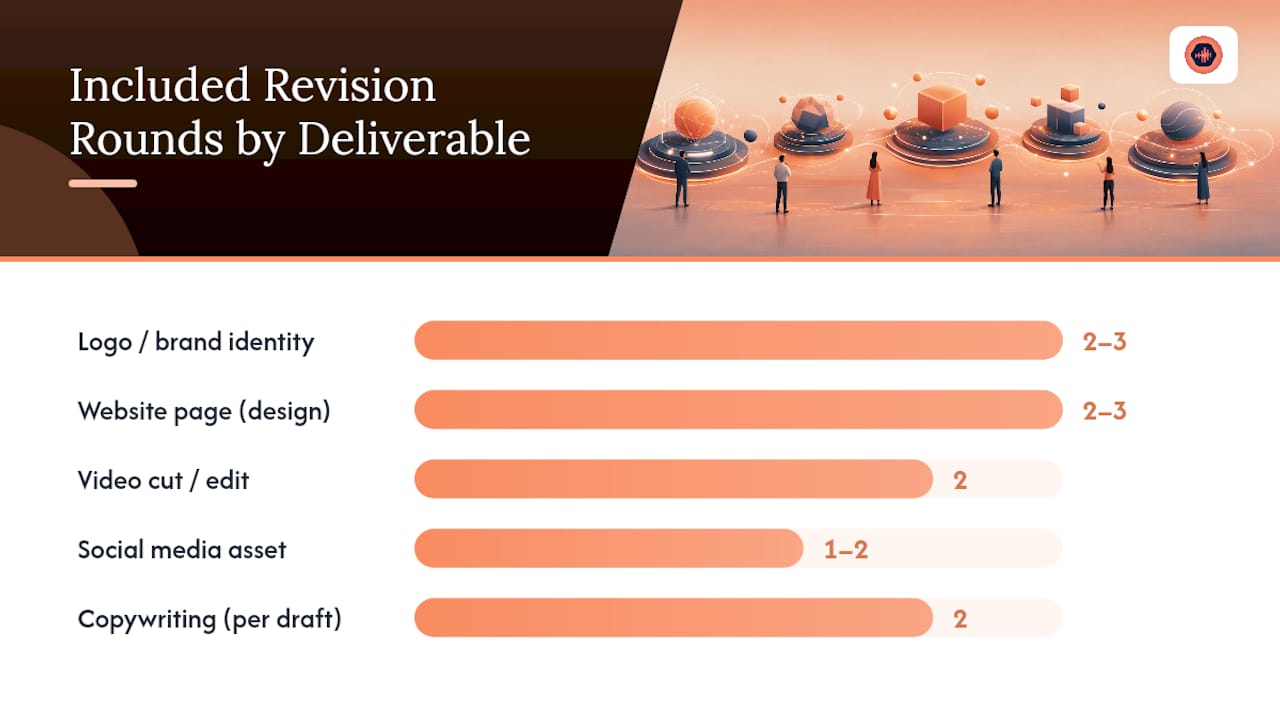
The 2–3 round standard holds across most creative disciplines, and there’s a practical reason it works: most projects complete within that window when the brief is clear and checkpoints are structured. Going below two rounds signals inflexibility; going above three without a price adjustment invites scope drift.
Here’s a compact reference by deliverable type:
| Deliverable | Included Rounds | Notes |
|---|---|---|
| Logo / brand identity | 2–3 | 3 rounds for full identity systems |
| Website page (design) | 2–3 | Per page or per template, not per element |
| Video cut / edit | 2 | Per-cut billing is common in post-production |
| Podcast episode | 2 | See discipline-specific guidance for podcast editors |
| Social media asset | 1–2 | Short turnaround; 1 round for templated assets |
| Copywriting (per draft) | 2 | Treat each draft as a round; cap at 3 total |
| Music production / mix | 2–3 | Mixing engineers often use 2 rounds standard |
| Mastering | 1–2 | 1 round is common; 2 for complex projects |
When to increase the included cap:
- Multiple stakeholders with no single decision-maker (add one round per additional approval layer)
- Highly subjective creative direction with no reference provided upfront
- Enterprise clients with internal legal or compliance review built into their process
Even when you increase the cap, state the new number explicitly in the SOW. “Up to 4 rounds” is a contract term; “as many as needed” is a liability.
Three pricing models for extra revision rounds
Studios that charge for overages consistently use one of three models. Each has a different risk profile and fits different project types.
Model A: Flat per-round fee
Formula: Extra round fee = a fraction of the total project fee, typically between a low and moderate percentage.
For example, on a moderately priced project, one extra round costs an amount proportional to that. Simple to quote, simple to invoice, and the client can calculate it themselves before requesting more changes. This model works best for fixed-scope projects where the deliverable is well-defined and rounds are roughly equal in effort.
Pros: Predictable for both parties; easy to include in the SOW; no time-tracking required.
Cons: A round that takes 30 minutes and a round that takes 4 hours cost the client the same, which can feel unfair in either direction.
Model B: Hourly billing for extras
Formula: Extra round cost = hourly rate × estimated hours per round.
Typical overage rates run $75–$150/hour for freelancers and $125–$200/hour for studios. Track time in 15-minute increments and send an itemized invoice. This model fits projects where revision complexity varies significantly — a minor copy tweak versus a full layout restructure shouldn’t cost the same.
Pros: Fair to both sides; reflects actual effort; works well for ongoing retainer clients.
Cons: Requires time-tracking discipline; clients sometimes push back on hours logged.
Model C: Per-change or per-deliverable add-on
Formula: Flat fee per discrete change item (e.g., $50 per additional copy revision, $150 per additional social asset).
This model fits disciplines where “rounds” don’t map cleanly to the work. Copywriting, social media, and templated design work often involve discrete deliverables rather than iterative passes on a single file. Price each additional deliverable as a line item.
Pros: Granular and transparent; clients know exactly what they’re buying.
Cons: Requires a clear menu of add-on prices upfront; can feel transactional for relationship-based clients.
Comparing the three models on the same $4,000 project:
- Model A (20% flat): One extra round = $800
- Model B (hourly at $150/hr, 4 hours estimated): One extra round = $600
- Model C (per-deliverable at $200/item, 3 items): One extra round = $600
The revision cost calculator from Teamz Lab lets you plug in hours per round, your hourly rate, and a rush multiplier to stress-test these numbers before you quote. Worth running before you set your rates.
Capping revisions is the single biggest lever for protecting margin. Unlimited revision packages are a margin trap unless priced at a meaningful premium — and even then, they should carry a time limit (e.g., “unlimited revisions within 30 days of delivery”).
Worked billing examples you can copy into proposals
Example 1: Small project ($800 social campaign asset)
- Base price: $800 (includes 2 revision rounds)
- Extra round rate (Model A, 20%): $160 per round
- Client requests 2 extra rounds: $320 in overages
- Total: $1,120
At hourly (Model B, $100/hr, 1.5 hours per round): 2 extra rounds = $300. Total: $1,100.
Example 2: Medium project ($4,000 website template)
- Base price: $4,000 (includes 3 revision rounds)
- Extra round rate (Model A, 20%): $800 per round
- Extra round rate (Model B, $150/hr, 4 hours): $600 per round
- Client requests 1 extra round:
- Model A: Total $4,800
- Model B: Total $4,600
The flat-per-round model costs the client slightly more here, but it’s easier to approve in advance because the number is fixed.
Example 3: Large project ($50,000 production)
- Base price: $50,000 (includes 3 revision rounds)
- Extra round rate (Model A, 15%): $7,500 per round
- One extra round at 15% adds $7,500 to the project, or roughly 15% margin erosion if the studio absorbs it instead of billing it.
- At hourly ($200/hr studio rate, 20 hours estimated): $4,000 per round
On large projects, the flat-per-round model can overcharge relative to actual effort. Hourly billing with a stated cap (“not to exceed $5,000 per round”) is often the cleaner approach.
On a $600 extra round, that’s $900. State the rush threshold and multiplier in the SOW so it’s not a surprise.
| Project Size | Base Price | Included Rounds | Extra Round (Flat 20%) | Extra Round (Hourly) |
|---|---|---|---|---|
| Small | $800 | 2 | $160 | $100–$150 |
| Medium | $4,000 | 3 | $800 | $600 |
| Large | $50,000 | 3 | $7,500 | $4,000 |
How and where to communicate your revision policy
The policy fails when it lives only in the studio’s head. It needs to appear in two mandatory places and get spoken aloud at least once.
Two mandatory places:
- Statement of Work / proposal — written, signed, referenced in the invoice
- Kickoff deck or kickoff email — verbal confirmation that the client has read and understood it
Placing revision limits in the SOW and flagging clients in the moment when they reach included rounds is standard agency practice. The surprise invoice is what damages relationships, not the charge itself.
What the SOW clause must include
- Definition of one revision round (consolidated batch, 48-hour window)
- Number of included rounds
- Overage rate (dollar amount, not just percentage)
- Approval trigger (written sign-off required before work begins on any extra round)
- Payment trigger (payment clears before the next file releases)
- File delivery and license language tied to payment completion
Kickoff script bullets
At the kickoff meeting, cover these points in plain language:
- “This project includes [X] rounds of revisions. A round is one consolidated batch of feedback.”
- “When you hit your included rounds, I’ll send a quick note before starting any additional work.”
- “Extra rounds are billed at [$X per round / $X per hour], and I’ll need written approval and payment before I proceed.”
The flag-in-the-moment message
When a client hits their included rounds, send this before touching another file:
Enforcement tactics that actually work:
- Payment-gated delivery: Final files don’t release until the invoice clears. Tools that automate this remove the awkward conversation entirely.
- Version locks: Archive each approved version so clients can’t retroactively claim a change was “part of the last round.”
- Written approval before extra work: Never start an extra round on a verbal “yeah, go ahead.” Get it in writing, even a reply email.
- Automated invoicing: Generate the overage invoice at the moment of approval, not at the end of the project when the client has forgotten the conversation.
Delivery and file-release conditions should also address licensing: the client’s right to use the final deliverable typically transfers only after full payment, which reinforces the payment-gate model.
How to price and process true scope changes
A scope change is not a revision with a bigger price tag. It’s a separate work order that needs its own estimate, approval, and scheduling.
The five-step process:
- Intake: Client submits the request (email, Slack, project portal). You acknowledge receipt and note that it falls outside the original scope.
- Estimate: Calculate hours required, assign a rate, and note any scheduling impact on the current timeline.
- Change order: Issue a written change order with a description of the work, the estimated cost, and the revised delivery date.
- Client sign-off: Client approves in writing. No work starts until this is received.
- Schedule and invoice: Add the work to the production schedule and invoice at the agreed amount before or upon delivery.
How to estimate hours for a change order:
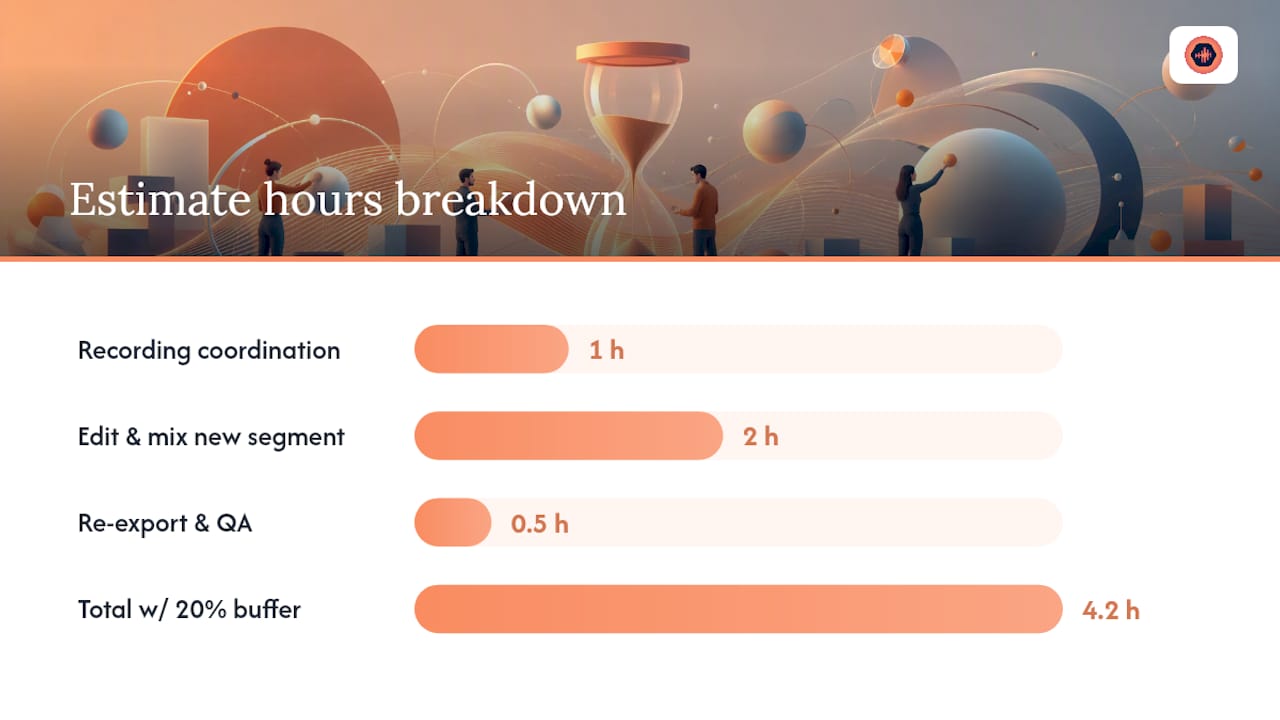
Break the request into discrete tasks. Assign hours to each. Multiply by your rate.
Example: A client wants to add a new 60-second segment to a podcast episode already in post-production.
- New recording coordination: 1 hour
- Edit and mix new segment: 2 hours
- Re-export and QA: 0.5 hours
- Subtotal: 3.5 hours × 20% buffer = 4.2 hours
- At $125/hour: $525
Present the client with three options: accept the estimate, revise the scope of the change to reduce cost, or drop the request. That framing keeps the decision in their hands.
Sample change-order form fields:
| Field | Content |
|---|---|
| Project name | [Project name] |
| Change description | [What is being added or changed] |
| Estimated hours | [X hours] |
| Rate | [$X/hour or flat fee] |
| Estimated cost | [$X] |
| Revised delivery date | [Date] |
| Client approval signature | [Signature / email confirmation] |
Operational controls that enforce your revision policy
A policy written in a contract is only as strong as the tools enforcing it. Studios that rely on memory and goodwill to track rounds and collect overages consistently undercharge. The ones that automate enforcement collect more and argue less.
Tool features that do the heavy lifting:
- Revision caps: Set a hard limit on included rounds at the project level; the system flags when the cap is reached.
- Version history: Every file version is logged with a timestamp, so “which version did we approve?” is never a debate.
- Timestamped feedback: Client comments are tied to a specific point in the file and a specific date, which makes it easy to show which round a note belongs to.
- Pay-gates: Final files are locked behind a payment requirement; the client can’t download until the invoice clears.
- Automated overage invoicing: When a client requests an extra round, the system generates the invoice automatically rather than waiting for the studio to remember.
A workflow example:
Client submits feedback after round 2 on a project that includes 2 rounds. The system flags the cap. The studio sends the templated approval message with the overage estimate. The client approves and pays. The studio completes the round and releases the updated file. No chasing, no awkward conversation, no forgotten invoice.
Audome is built specifically for this workflow. Studios can set revision caps per project, collect timestamped waveform feedback from clients (no client account required), lock final files behind Stripe Connect payment gates, and track version history in one place. For audio professionals managing multiple projects, that kind of operational control replaces the scattered email-Dropbox-text-message loop that makes revision tracking nearly impossible.
Pro Tip: Log every informal “quick tweak” request as it arrives, even if you decide to absorb it. Context switching adds real cost beyond logged hours — psychological research suggests it can add 20–40% to lost productivity. Knowing what you’re absorbing is the first step to pricing it correctly next time.
Copy-and-paste templates for your SOW, kickoff, and invoices
SOW clause
Revision Policy: This project includes [X] rounds of revisions. A revision round is defined as one consolidated batch of feedback submitted within 48 hours of delivery. Additional rounds are billed at [$X per round / $X per hour], invoiced prior to commencement of the additional work. Written client approval is required before any extra-round work begins. Final files are released upon receipt of full payment.
Kickoff slide bullets
- Project includes [X] revision rounds
- One round = one consolidated feedback batch (48-hour window)
- Extra rounds: [$X per round or $X/hour] — invoiced before work starts
- Written approval required for all overages
- Final delivery gated on full payment
Flag-in-the-moment message (Slack / email)
Invoice line items
Use clear, non-confrontational language:
- Revision Round 1 (included): $0
- Revision Round 2 (included): $0
- Revision Round 3 (additional, per SOW): $[X]
- Rush fee (48-hour turnaround, +50%): $[Y]
Keeping the included rounds as $0 line items on the invoice reinforces that the client received value within the agreement and is only paying for what exceeded it.
Common mistakes that cause revision-cost leakage
Most studios don’t lose money on revisions because they priced them wrong. They lose it because the policy breaks down somewhere between the proposal and the final delivery.
Red flags to watch for:
- No revision clause in the SOW (the most common and most expensive omission)
- Surprise invoices sent at project close for rounds the client forgot happened
- No version control, so “which version did we approve?” becomes a recurring argument
- Accepting ad-hoc “quick tweaks” via text or DM without logging them
- Verbal approvals for extra rounds with no written confirmation
- Offering volume discounts on extra rounds, which removes the friction that encourages clients to consolidate feedback
Best-practice checklist for weekly project reviews:
- [ ] Every active project has a revision count logged against its included cap
- [ ] All informal requests received this week are logged, even if absorbed
- [ ] Any project at or near its cap has a flag-in-the-moment message drafted and ready
- [ ] No extra-round work started without written approval and an issued invoice
- [ ] All delivered files are version-locked and archived
Pro Tip: Track context-switching costs by logging every time you stop work on one project to address a revision request on another. Those interruptions rarely appear on invoices but consistently erode your realized hourly rate. A simple running note in your project log is enough to see the pattern within a month.
Why clear revision pricing is both ethical and profitable
Studios sometimes treat revision pricing as a necessary awkwardness, something to apologize for or bury in the fine print. That framing gets it exactly backwards.
A clear, upfront revision policy is one of the most client-friendly things a studio can offer. It tells the client exactly what they’re buying, what happens if they need more, and how much it costs before they’re in a position to feel surprised. Clients who understand the structure give better feedback because they know each round costs something, even if it’s included. That friction is productive.
The studios that resist clear revision pricing usually do so because they’re afraid of the conversation. But the conversation is far easier at proposal stage than it is when you’re staring at a project that’s consumed twice the budgeted hours and the client thinks everything is still included. Operational discipline here isn’t about being rigid. It’s about being honest about what your time is worth and giving clients the information they need to make good decisions.
Audome automates the revision policy you just built
Enforcing a revision policy manually means remembering to send the flag message, generating the invoice at the right moment, and making sure the client can’t download the final file before paying. That’s three places the system can break down on a busy week.

Audome handles all three. Studios set a revision cap per project, and the platform flags when a client hits it. Clients leave timestamped feedback directly on the waveform, so every note is tied to a specific moment and a specific round. When a client requests an extra round, Stripe Connect processes payment before the updated file unlocks. Version history is automatic, so there’s no debate about which pass was approved.
For audio professionals managing multiple projects across mixing, mastering, podcast production, and composition, Audome replaces the Dropbox-email-text-message loop with one workspace where revision tracking, client communication, and payment collection happen together. Start with Audome and see how much time you recover in the first week.
Sources
- How to Price Revisions & Extra Rounds | WhatShouldICharge
- Revision Cost Calculator — Teamz Lab Tools
- How to Track Creative Projects, Revisions, and Client Approvals | Deelo Blog
- Creative Revision Cost Calculator | FileFeedback
FAQ
How much should I charge for design revisions?
For most studios, that puts a single extra round at a flat fee or hourly rate depending on complexity.
How do I price revisions in a proposal?
State the number of included rounds, define what one round means (one consolidated feedback batch), and list the overage rate as a dollar amount in the SOW. Clients process a fixed dollar figure faster than a percentage, and it reduces disputes.
How much does it cost to edit a 2-minute video?
Video editing rates vary by scope, but extra revision rounds on a short-form video typically run $75–$150 for freelancers or $125–$200 per hour for a studio. Many video editors also bill per cut rather than per round, which can be cleaner for short deliverables.
How much does it cost to have someone update a website?
Website update costs depend on scope. Minor copy or layout revisions on an existing site typically run $75–$200/hour. If the update falls outside the original project scope, it should be handled as a change order with its own estimate and written approval before work starts.
How does Audome help studios enforce revision limits?
Audome lets studios set a revision cap per project, collect timestamped client feedback on audio files, and gate final file delivery behind Stripe Connect payment. When a client hits the included rounds, the platform flags it so studios can send an approval request before starting extra work.