
A good password policy for client links comes down to five rules. Use a long passphrase of at least 15 characters, with no complexity rules. Give every project its own password. Send the password on a different channel than the link. Set an expiry date. Turn the link off once the client has what they need. That keeps unreleased mixes safe and doesn’t make your clients jump through hoops to hear a revision.
This guide is for studios, mixing and mastering engineers, podcast producers and post-production teams who send audio to clients and need a written rule they can follow every time. It is not an IT department policy for employee logins. It covers the shared links you send to artists, labels, hosts and editors.
TL;DR
- Make link passwords at least 15 characters. Allow long passphrases and skip rules like “one symbol and one capital letter.”
- Use one password per project or per client, never one password for everything.
- Send the link and the password through two different channels, for example email for the link and a text message for the password.
- Add an expiry date, prefer stream-only access for reviews, and disable the link once delivery is done.
- Write the rules down in a one-page standard so every engineer at the studio does it the same way.
Table of Contents
- Why client links need their own policy
- Rule 1: Set the minimum length at 15 characters
- Rule 2: One password per project, never one for everything
- Rule 3: Send the link and the password separately
- Rule 4: Expire links and stream first
- Rule 5: Disable the link when the job is done
- What not to put in the policy
- Common mistakes that leak unreleased audio
- A one-page policy you can adopt
- Making it easy on clients
- Doing this inside Audome
- Perspective: why we think the policy should live in the tool
- FAQ
- Sources
Why client links need their own policy
Most password advice is written for employee accounts: a person logs in every day, has a username, and can be forced to enroll in multi-factor authentication. A client link is different. The client opens it a few times, probably from a phone, often while someone else is talking to them. There is usually no username, and no second factor. The password is the only gate between the public internet and a record that may not be released for months.
That changes what matters. Length matters more than ever, because nothing else backs the password up. Delivery matters, because the link and password travel to a person you cannot see. And lifespan matters, because a link that lives forever is a leak waiting for a forwarded email.
The music industry says the same thing. The RIAA’s 2026 security recommendations tell people sharing music to use password-protected links with expiration dates that are available only to the intended recipient. Those three properties, password, expiry and a single intended recipient, are the skeleton of the policy below.

Rule 1: Set the minimum length at 15 characters
OWASP’s Authentication Cheat Sheet, which draws on NIST guidance, treats passwords under 15 characters as weak when there is no multi-factor authentication, and under 8 characters as weak when there is. A client link has no second factor, so the 15-character line is the one that applies to you.
The same sheet says to allow a maximum length of at least 64 characters, so people can use passphrases. In practice, that means you can give clients something like four unrelated words. It is long, easy to read over the phone, and easy to type on a phone keyboard.
Other bodies land in the same neighborhood. The UK data regulator’s guidance sets a minimum of no less than 10 characters and no maximum length for online services. The IRS moved its public password policy to a 14-character minimum in line with NIST. Pick 15 for client links and you are at or above all of them.
A passphrase beats a “complex” password
The old habit was to demand a capital letter, a number and a symbol. NIST’s guidance says length is a primary factor in password strength, and that requirements beyond those recommended significantly increase user frustration. It also says other defenses, such as blocklists and rate limiting, are more effective against modern brute-force attacks than composition rules.

Baymard’s usability research makes the cost concrete: it warns that overly strict password-creation rules cause severe usability problems and abandonment. For a studio, “abandonment” means a label A&R who gives up and asks you to email the WAV instead. That is the worst outcome for security, because an attachment has no password at all.
Compare two options:
| Password | Length | Easy to read aloud | Easy to type on a phone | Strength |
|---|---|---|---|---|
| Mx7!q | 5 | Hard | Hard | Weak |
| Studio2026! | 11 | Medium | Medium | Weak, predictable pattern |
| canyon-marble-lantern-orbit | 27 | Easy | Easy | Strong |
The third row is the model. Four random words with hyphens are strong because of their length, not because of symbols. Use a generator or pick the words truly at random. Do not build the phrase from the artist’s name, the song title or the studio name, since those are the first things anyone would guess.
Block the obvious
Both OWASP and NIST recommend screening against lists of common and leaked passwords. If you let clients set their own link passwords, reject dictionary words, sequences like 123456, repeated characters, and the project or artist name. If you generate the passwords yourself, this takes care of itself.
Rule 2: One password per project, never one for everything
A single “studio password” used on every link is a policy with one point of failure. If a client forwards it, if an intern writes it on a whiteboard, or if it shows up in an old email thread, every project you have ever shared is exposed.
A workable standard:
- One password per project. The album, the podcast season or the film reel gets its own.
- One password per audience when it matters. The artist and the label may need different links with different passwords, so you can turn one off without touching the other.
- A new password for a new phase. When a project moves from mix review to mastering review, change it.
- No reuse across clients. Ever.
A per-audience setup also tells you who forwarded what. If a pre-release track surfaces early, you know which link to look at first.
Rule 3: Send the link and the password separately
This is the rule studios break most often. They paste the link and the password into the same email, and the email becomes the key and the lock in one place.
The General Services Administration’s IT security guide, a U.S. federal document, states that user IDs and passwords must never be distributed together and must go through separate channels when not handed over in person. It also says passwords must not be sent by email. That is a federal agency standard for its own systems, so treat it as the strict end of the range. A client link has a password but no user ID, so the practical version is: the link and the password travel separately.
A simple routine for a studio:
- Link: email, to the named recipient only.
- Password: text message, a messaging app, or read out on a call.
- Never: the same message, the same thread, or a shared group chat with people who are not meant to hear the record.
If a client’s inbox is compromised, an attacker who finds the link still lacks the password. If someone forwards the email, the password does not go with it.
Rule 4: Expire links and stream first
A password protects a link at the moment someone opens it. It does nothing about a link that is still live a year from now. That is why the RIAA pairs passwords with expiration dates, and why it adds two more steps: send links that only permit streaming rather than downloading, and use tools that embed a watermark when sharing pre-release content.
Translate that into defaults:
- Review links are stream-only. Clients need to hear the mix and comment on it. They do not need the file on their phone. Our walkthrough on stream-only audio for client reviews covers how this works at full resolution.
- Delivery links are separate. When the job is approved or paid, a distinct link carries the final files. See how studios restrict file downloads until that point.
- Every link has an expiry. Review links might last two weeks. Delivery links might last a few days after the final payment. Our piece on expiring download links goes through sensible windows.
- Pre-release content gets watermarked. If a mix is not out yet, a marked copy lets you trace a leak. Read more on audio watermarking for producers.
The expiry date is not a punishment for the client. Say so when you send it: “This link is open until the end of the review round, and I’ll refresh it if you need more time.” Clients accept that readily when it is presented as protecting their record.
Rule 5: Disable the link when the job is done
The RIAA’s recommendation goes one step further than expiry: after the recipient has the file, disable the link and remove or rename the file. Many studios never do this, so old links stay live for years.
Build an offboarding checklist and attach it to the project folder:
- Client confirms they received the final files.
- Delivery link disabled or expired.
- Review links disabled.
- Passwords for the project retired, not reused.
- Archive copy kept in the studio’s own storage.
It takes under two minutes per project and closes the door on forgotten links.
What not to put in the policy
Some rules look safe but hurt more than they help.
Forced password changes on a schedule. The IRS dropped its 60-day change requirement and moved to a longer minimum, matching NIST, which says passwords should not be changed periodically without a reason. For client links, change the password when a project phase ends or when you suspect exposure, not on a calendar.
Mandatory symbols and capitals. As covered above, they frustrate clients and add little strength compared with length.
Long lists of rules in the email. A client who gets a paragraph of security instructions is a client who calls you. Keep the email to the link, the expiry and a sentence that the password is coming separately.
Email-only passwords. If the password and link sit in the same thread, you have no second channel at all.
Common mistakes that leak unreleased audio
These are the failures that a written policy is meant to prevent:
- Same password on every link. One forward exposes everything.
- Password in the link email. The key sits next to the lock.
- Links that never expire. A link from a project finished two years ago is still a door.
- Downloads enabled on review links. Anyone with the password can keep a copy of an unreleased mix.
- Shared links in group chats. The more people on the thread, the less “intended recipient” means anything.
- Guessable passwords. The artist’s name plus the year is the first thing anyone tries.
- Making clients create accounts. Friction pushes people to ask for attachments, which carry no protection at all.
- No one owns the policy. If every engineer does it differently, the weakest habit sets your real standard.
The seventh one is worth dwelling on. A policy that is too tough to follow does not make a studio safer. It sends clients and staff back to email attachments and consumer cloud folders. The goal is a rule so smooth that the secure route is also the easiest one.
A one-page policy you can adopt
Copy this into your studio handbook and adjust the numbers to your workflow.
Scope. Applies to every link used to share audio with clients, collaborators and vendors outside the studio.
Passwords.
- At least 15 characters; passphrases encouraged.
- Randomly generated, not based on names, titles or dates.
- Unique per project and, where needed, per audience.
- No scheduled rotation; change on phase change or suspected exposure.
Delivery.
- Link goes to the named recipient by email.
- Password goes by a different channel.
- No group chats for passwords.
Access.
- Review links are stream-only.
- Final delivery links are separate and released after approval or payment.
- Pre-release content is watermarked.
Lifespan.
- Every link has an expiry date.
- Links are disabled after confirmed delivery.
- Old passwords are never reused.
Ownership. One named person reviews active links monthly and retires any that should be gone.
Making it easy on clients
A policy only works if clients go along with it. A few habits help.
Tell clients up front what to expect. A short line in your onboarding email, such as “You’ll get a link by email and the password by text,” turns a possible surprise into a normal step.
Choose passwords that are easy to say. Four common words are easier to read over the phone than a string of mixed characters, and the client will not mistype them.
Offer a refresh without fuss. When a link expires before the client has listened, send a new one the same day. Treat it as routine.
Keep client access light. Where possible, let clients listen and leave comments without creating an account. Account creation is the point where busy people drop off.
Doing this inside Audome
The routine above can be run on a mix of tools: a storage service for the files, an email for the link, a messaging app for the password and a spreadsheet to track expiry. Each handoff is a place for a step to slip.
Audome puts these pieces in one place. It offers password-protected, branded client portals and download controls, and clients can collaborate without logging in. Clients leave time-stamped comments on the waveform, and projects keep their revisions and versions organized. Files are shared at up to 96kHz/24-bit with unlimited uploads, so the version your client hears is the version you mixed. If you want to take a payment before the final files go out, revision billing runs through Stripe.
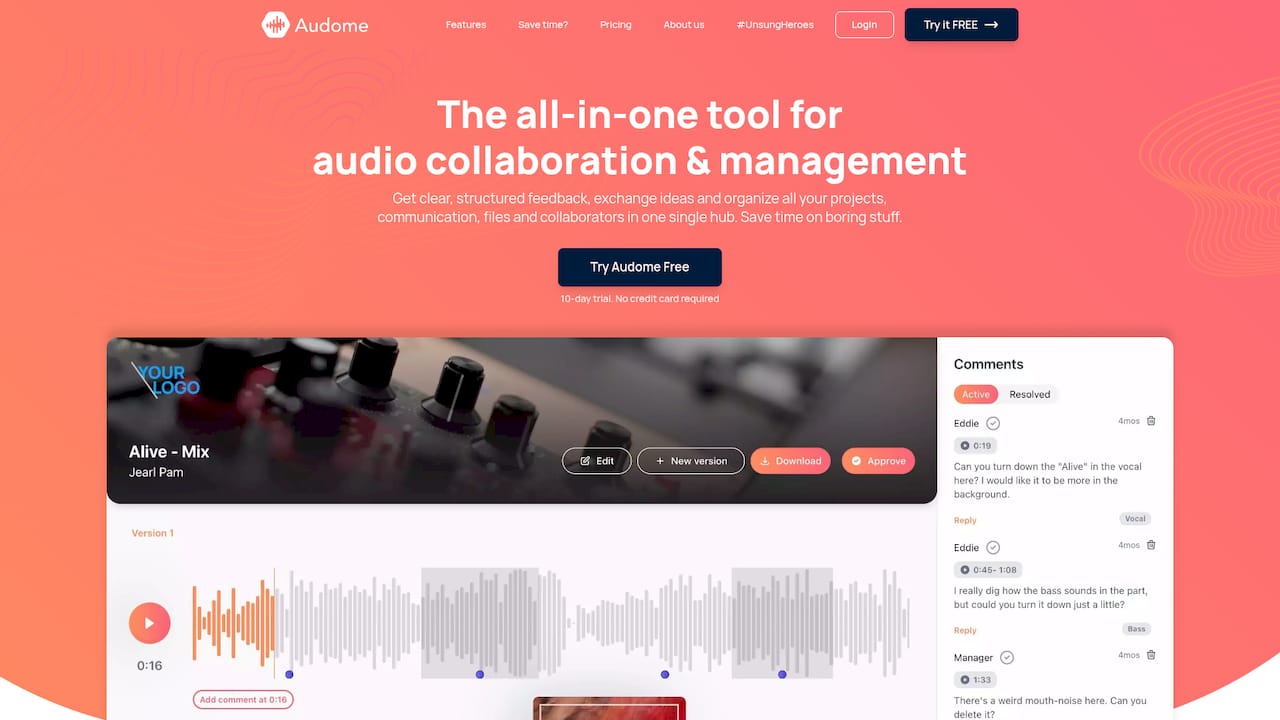
The Studio plan is $12.50 per month or $150 per year, and Pro is $48 per month or $576 per year, with a free trial before you subscribe. Details are on the Audome pricing page, and the Audome homepage shows the full set of tools.
Perspective: why we think the policy should live in the tool
Most studios we talk about this with already know the rules. They know a password should be long, that it should not travel with the link, and that old links should die. The problem is not knowledge. It is that the rules sit in someone’s head and depend on a busy engineer remembering them at 11 p.m. before a deadline.
That is why we built Audome around the client experience. A client should be able to open a branded portal, hear the mix at full quality, and leave a comment at the exact second that bothers them, without making an account. When access is that simple, nobody asks for an attachment, and the attachment is where passwords stop working.
We also think download controls belong at the center of a password policy, not on the side. A password answers who can open the link. Download controls answer what they can do once inside. Combine them and a mix review stays a review.
Our advice: write the one-page standard, then pick a tool that makes it the default path. A rule that takes effort will be skipped on the worst day. A rule built into the workflow gets followed on every one.
Kreg
FAQ
How long should a password for a client link be?
Aim for at least 15 characters. OWASP, drawing on NIST, treats shorter passwords as weak when there is no multi-factor authentication, and a client link has none. A four-word passphrase meets that bar and is easy to read aloud.
Should I make clients choose a password with symbols and numbers?
No. NIST says extra composition rules raise user frustration without adding much protection, and favors length plus blocklist checks. Generate a long random passphrase for the client instead, and skip the symbol requirement.
Is it safe to send the password in the same email as the link?
It is better to split them. Federal security guidance says credentials should travel through separate channels. Send the link by email and the password by text message or on a call, so one compromised inbox does not open the files.
How often should I change client link passwords?
Change them when something happens, not on a timer. NIST-aligned guidance, including the IRS’s updated policy, moves away from periodic forced changes. Set a new password when a project moves to a new phase, when a recipient list changes or when you suspect a leak.
When should I turn off a client link?
Turn it off once the client confirms they have the final files, or when the expiry date arrives, whichever comes first. The RIAA’s 2026 recommendations advise disabling the link after the recipient has received the file. Give review links and delivery links separate lifespans.
Sources
- RIAA Security Best Practices Recommendations, 2026
- OWASP Authentication Cheat Sheet
- NIST SP 800-63B: Strength of Passwords
- ICO: Passwords in online services
- Baymard Institute: Avoid Complex Password-Creation Requirements
- GSA IT Security Procedural Guide: Identification and Authentication
- FedScoop: IRS changes public password policies to match NIST guidance