
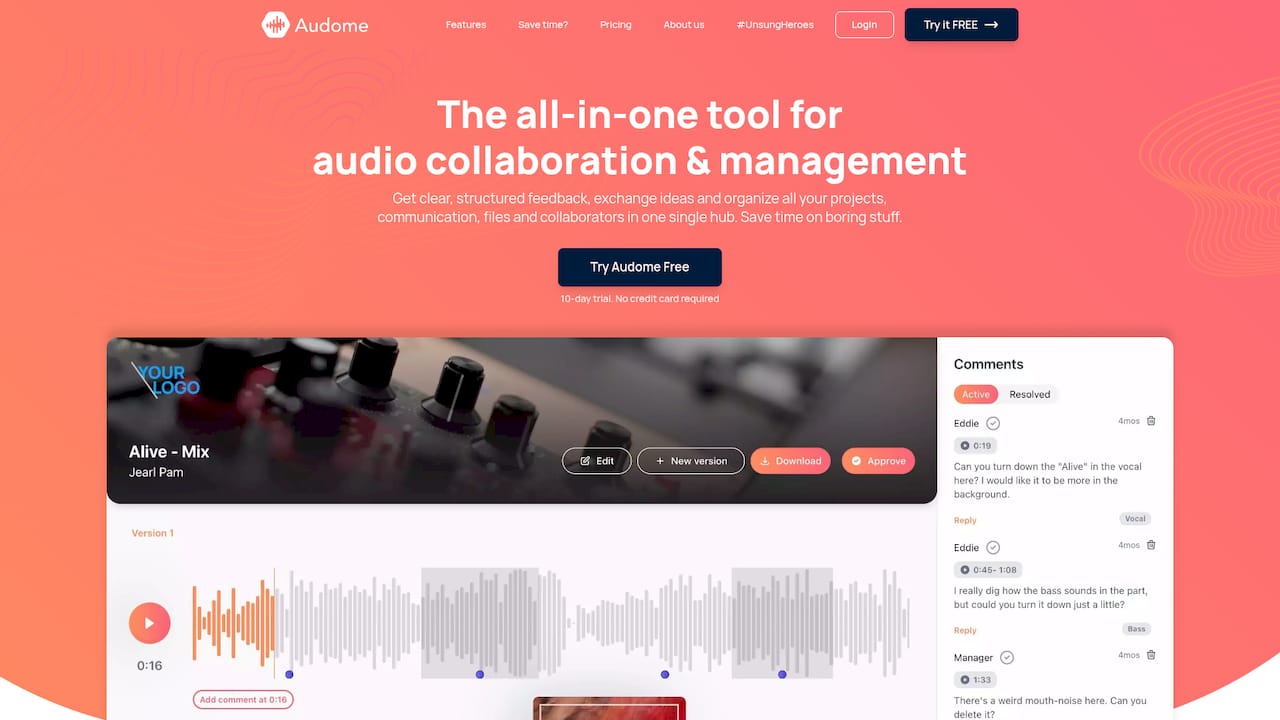
An audio post timecode note is a comment tied to one exact moment in a program: a timecode address plus a short instruction, such as “01:04:12:08, dialogue clipped on the P, use take 3.” It works only if the other person can land on the same moment in the same version. That takes four things: a frame rate, a start point, a precise address and a version label. Below is how to write notes that get fixed on the first pass, and how to keep them attached to the right mix as revisions pile up. When the work is audio-only, such as mixes, masters and podcast episodes, we built Audome so notes sit on the waveform at the exact second, with the version already attached.
TL;DR
- A timecode note is a comment pinned to a position. Sync timecode is the clock that locks devices together. They are related, but not the same job.
- Every note needs three things: the address, the version it refers to and one clear action.
- State the frame rate, drop-frame or non-drop, and the start timecode once per session. Most “wrong spot” problems come from these.
- Check alignment at the head, middle and tail of a file, because drift builds up quietly.
- Keep notes with the version they were written against, or the next round of feedback lands in the wrong place.
Table of Contents
- Timecode notes vs. sync timecode
- What a good timecode note contains
- Settle the timeline reference first
- How to write notes while you review
- Check for drift before you trust any address
- Moving notes through your workflow
- Keep notes tied to the right version
- A simple note template
- Where the tools fit in
- Our view on timecode notes
- FAQ
- Sources
Timecode notes vs. sync timecode
The phrase covers two different things, and mixing them up causes confusion.
Sync timecode is the clock. SMPTE timecode is a digital method that encodes values like 01:02:03:04 (hours, minutes, seconds, frames), and it can be recorded on digital tracks or embedded in file formats. LTC is the analog version, recorded as continuous audio tones on a separate track. The job of this clock is to make cameras, recorders and workstations agree on where they are.
Timecode notes are the comments. They are feedback, markers or questions attached to a point or a range on that clock. The clock gives you the address. The note tells someone what to do there.
One point from ProSoundWeb’s explainer on timecode synchronization is worth keeping in mind: timecode is a positional reference that names each moment, and it is not wordclock, which only marks time passing. A note is only as good as the reference it is written against.

What a good timecode note contains
A note a dialogue editor, mixer or composer can act on without a phone call has five parts:
- Address. Full timecode, hours to frames, not “around four minutes in.”
- Range, when needed. An in and an out, so nobody guesses how long the problem lasts.
- Location in the session. Track or stem: “DX 2,” “M&E,” “Foley.”
- One action. “Lower 2 dB,” “replace with ADR line 14,” “remove click.”
- Version. Which export or mix the note was written against.
Compare two versions of the same note.
| Vague | Actionable |
|---|---|
| Dialogue too quiet in the kitchen scene | 01:12:40:00 to 01:13:05:10, DX 2, Mara’s lines sit 3 dB under the music bed. Raise 2 to 3 dB. Mix v4. |
| Weird noise here | 01:21:07:15, DX 1, low thump on the door close. Cut or replace with take 2 room tone. Mix v4. |
| Check sync | 01:34:50:12, lip flap on “tomorrow” reads about 2 frames early. Slip dialogue 2 frames later. Mix v4. |
The left column takes a back-and-forth to decode. The right column can be worked through top to bottom.
A useful habit is one issue per note. Two problems in one comment means one of them gets fixed and the other gets forgotten. Our guide to writing timecoded feedback for voiceover goes deeper on phrasing notes so the performer or editor knows what to change.
Settle the timeline reference first
The most common failure is a note that is correct against the reviewer’s timeline and wrong against yours. Before anyone writes a note, agree on three decisions. Deckmatics’ sync guide names them as frame rate (match the source material), numbering format (drop-frame or not, at 29.97 or 59.94 fps) and start time (usually a whole hour, to avoid negative hours).
Put them in the first line of every notes document or review thread:
23.976 fps, non-drop. Program start 01:00:00:00. Notes against mix v4.
Frame rate and drop-frame
Frame rate is inherent to the medium. Ableton’s SMPTE FAQ notes that it can differ between film and digital, and that in audio-only work the smallest division is the sample, not the frame. Drop-frame timecode is conventionally written with a semicolon before the frame count (01:00:00;00), non-drop with a colon. If a note leaves the separator off, ask which one it is.
Start timecode
A program that starts at 01:00:00:00 and a bounce that starts at 00:00:00:00 differ by exactly one hour. A note written against one and opened in the other lands an hour off. Say which start you used.
The Academy Digital Preservation Forum’s audio delivery specification shows the convention for home video: file start at 00:59:52:00, head pop at 00:59:58:00 and the first frame of picture at 01:00:00:00. The pops sit exactly two seconds before the first and after the last frame of picture, and each pop is one frame long. Use those marks as your own check that a file lines up with picture before you write a single note.

Spotting notes need the same discipline
US delivery specs for post facilities ask for this up front. Nada Sound Studio’s delivery specs require clients to list spotting-session notes by exact timecode before the session. They also set out a 2-pop at 00:59:58:00 and picture start at 01:00:00:00. If your notes come from a spotting pass, our spotting notes workflow turns them into cue lists a composer can use.
How to write notes while you review
The habit that separates fast reviewers from slow ones is simple: note as you listen, then clean up once.
- Listen in passes. One pass for dialogue, one for music and effects, one for overall balance. Notes from three passes are sharper than one scattered pass.
- Stamp, then describe. Capture the timecode the moment you hear the issue and finish the sentence afterward. Your ear loses the exact spot faster than it loses the description.
- Back up a beat. Place the address a second or so before the problem so the listener hears the lead-in.
- Use a fixed vocabulary. “Raise,” “lower,” “cut,” “replace,” “fix sync,” “query.” A short list of verbs makes notes sortable.
- Mark queries separately. A question needs an answer, not an edit. Label it so it does not get mixed into the to-do list.
- Read once before sending. If a note needs a second reading to understand, rewrite it.
If the work is a stereo mix, master or podcast episode rather than a picture-locked program, there is no frame clock to refer to. The address is simply the position in the file, in minutes and seconds. That is where time-stamped comments on the waveform replace a typed address. Our timestamped feedback process guide covers it step by step.
Check for drift before you trust any address
A note can be perfectly written and still point at the wrong moment if the files have drifted. Deckmatics’ advice is to check alignment at the beginning, middle and end of a file, because drift accumulates without warning. It also recommends a single reference (timecode on every track, or sync points marked in the first and last relevant shots) and one sample rate, 48 kHz, set when the project is created.
When addresses seem off, work out which of these you have:
- Constant offset. Every note is off by the same amount. Check the start timecode, or whether a head pop was trimmed.
- Offset that grows. Notes are fine at the top and late at the end. That points to a frame-rate or sample-rate mismatch, such as 23.976 against 24.
- Irregular errors. Some spots are right and some are not, which often means edits or dropouts in a file.
- Compressed reference video. Nada Sound Studio’s specs warn that H.264 .mp4 is not frame accurate and compression can push audio off by a quarter to half a frame. They prefer Apple ProRes or Avid DNxHD with burnt-in timecode. If you must use an .mp4, a 2-pop and tail pop make it checkable.
A parsing mistake is also possible. In one SoundFlow forum thread, a note at 00:00:06:09 in an exported CSV was read as 00:06:09:00 in a 23.976 fps session. When notes move between tools as text, open a few and confirm the addresses before you act on all of them.
Moving notes through your workflow
Timecode notes pass through several hands: the reviewer, the editor, the mixer, sometimes a mastering engineer. Each handoff is a chance for the address to slip.
Between a DAW and a timeline
MTC (MIDI timecode) is used to synchronize DAWs and sequencers to picture in music and post work, as Tools for Film explains in its timecode primer. ProSoundWeb’s guide to using timecode with a modern DAW shows the tape-based version: timecode striped onto channel 24 of a 24-track machine before recording, then patched to the LTC input so the workstation waits for it and its transport jumps to the right time. The principle holds in any setup: one source of timecode, and everything else chases it.
Into markers
Most editors want notes as markers or memory locations. That works when the export keeps frame rate and start time intact. Confirm both before you import a hundred markers.
Between people
Emailed lists and spreadsheets are the usual way, and they work until the third round, when nobody is sure which version a line refers to. Our piece on what post-production collaboration means for audio pros explains why one shared place for files and feedback is worth setting up.
Keep notes tied to the right version
This is where most workflows break. A note written against mix v3 means nothing if the engineer is working in v5 and the note has no version label.
Practical rules:
- Name every export with a version number and never reuse a name.
- Write the version at the top of the notes list and on each note if the list is shared.
- Mark each note open, done or queried, so the next round starts from what is left.
- When a new version arrives, list what changed, so reviewers listen for those changes first.
- Keep old versions and their notes. A client who says “the first mix was better” needs the first mix and its notes within reach.
Our guides to audio version history and mix revision management lay out the full routine, and resolving client comments in one edit pass shows how to turn a pile of notes into a single clean round. For the wider route from first mix to approval, see our audio proofing workflow.
A simple note template
Copy this for any session:
Project: Episode 112 / Reel 2
Frame rate: 23.976 non-drop  |  Start: 01:00:00:00
Version reviewed: Mix v4  |  Reviewer: J. Ortiz  |  Date: 11/18/2026

01:04:12:08  DX 2   Raise 2 dB, line is buried under music.   [open]
01:09:31:00  M&E    Cut music out 2 sec early at scene end.      [open]
01:15:44:20  DX 1   Query: is this the alt take or the original? [query]
It takes under a minute to fill in the header, and it removes the usual wrong-spot questions.
Where the tools fit in
A spreadsheet and a PDF can carry timecode notes. They cannot play the audio for the reader, hold the version, or tell you who has seen what. For finished mixes, masters and episodes, we built Audome so the comment lives on the waveform at the exact second. Files stay lossless, up to 96kHz/24-bit, and each new upload is tracked as a version, so a note never floats free of the audio it was written about. Clients do not need to log in to listen and comment.
The Studio plan is $12.50 per month or $150 per year, and Pro is $48 per month or $576 per year. See the Audome pricing page for what each includes.
For project-level tracking across several episodes or releases, our guide to project tracking for faster audio post-production shows how to keep each job’s status in one view.
Our view on timecode notes
Timecode solved the hard problem of getting machines to agree on where they are. People still disagree about what to do there, and that is where hours go missing.
We built Audome around the second problem. A comment is only useful if it sits exactly where the sound is, on the version being discussed, and the person reading it can hear that moment in one click. That is why feedback is time-stamped on the waveform, why every upload is tracked as a version, and why clients can listen and comment without creating an account.
We also keep audio lossless, up to 96kHz/24-bit, because a note about a 2 dB dip or a faint click is meaningless if the file a client hears is not the file you made. Add custom branded portals, download controls and paid-revision limits, and the review round stops being a pile of emails and becomes a process you control.
Write your notes with a clear address and one action, and put them next to the audio. The edit pass that follows gets shorter every time.
Kreg
FAQ
What is a timecode note in audio post?
It is a comment tied to a specific timecode or range, such as “01:04:12:08, raise dialogue 2 dB.” The timecode gives the exact location, and the comment says what to change. It is written against a stated frame rate and start time so another person lands on the same spot.
What should I include in a timecode note?
Include the full timecode (hours, minutes, seconds, frames), an out point if the issue has length, the track or stem, one clear action and the version you reviewed. Note the frame rate and start timecode once at the top of the document.
Why do my timecode notes land in the wrong place?
Usually one of four causes: a different start timecode (often exactly one hour), a frame-rate mismatch such as 23.976 vs. 24, drop-frame vs. non-drop numbering, or a drifting file. Check the head, middle and tail of the file against your reference to see whether the error is constant or growing.
How do I keep notes matched to the right version?
Label each export with a unique version number and write that number on every notes list. Mark notes open or done, and keep old versions and their notes. Tracking versions in one place stops feedback from being applied to the wrong mix.
Sources
- Difference Between SMPTE Timecode and LTC Timecode, RØDE
- In Sync: Understanding Timecode Synchronization For Audio Production, ProSoundWeb
- Deckmatics: Audio/video sync, timecode, deliverables, stems and broadcast
- SMPTE Timecode FAQ, Ableton
- Audio File Delivery Specification, Academy Digital Preservation Forum
- Delivery Specs, Nada Sound Studio
- SoundFlow forum: exporting notes as Memory Locations from a CSV file
- Timecode in Film Production, Tools for Film
- Not Just For Video: Using Timecode With A Modern DAW, ProSoundWeb