
TL;DR:
- An approval request email is a single-step decision tool aimed at getting approval, rejection, or revision from stakeholders. Using clear subject lines, explicit decision options, and a specific deadline helps speed up the process and reduce delays. Automating and standardizing templates with all necessary details ensures quicker, more efficient approvals.
Here is a copy-paste ready approval request email you can send today:
Subject: Approval needed: [Project Name] by [Date]
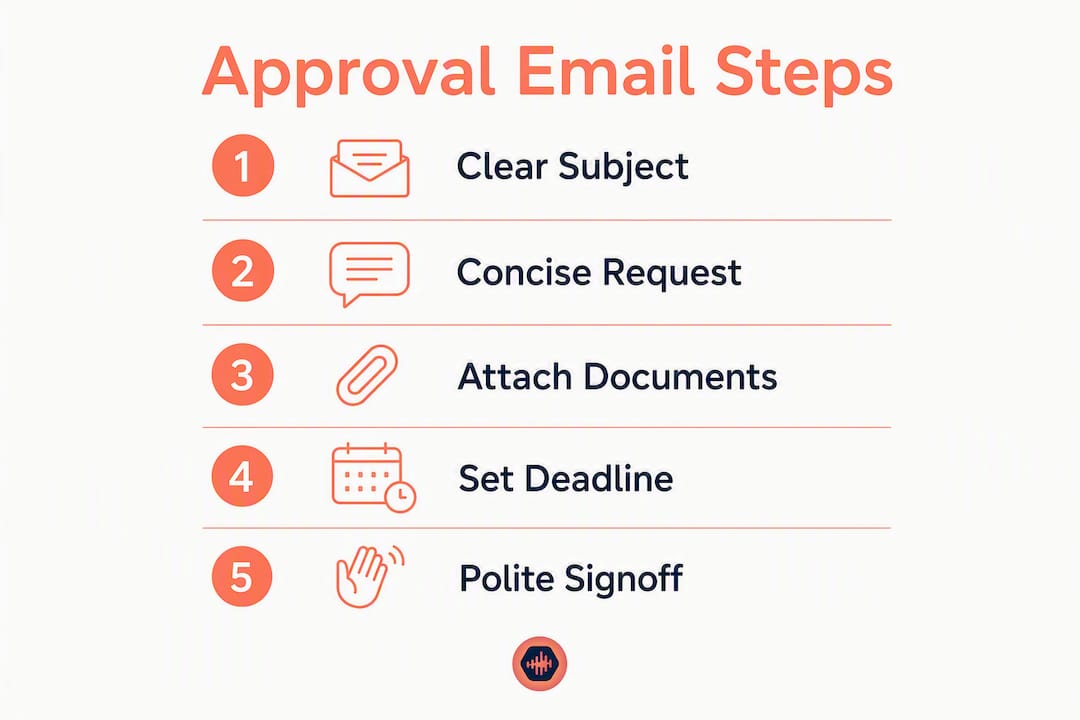
Body: Please review the attached [document/deliverable] and reply with your approval, requested changes, or rejection by [specific date] — a delay past that date will push the [milestone/launch] by [X days].
Signoff: Thank you, [Your Name]
Before you hit send, run this quick check: the attachment is included and labeled with a version number, the deadline is a specific date (not “soon”), the decision options are explicit (approve / reject / revise), and the email makes sense without any prior context.
Subject line variants worth keeping in rotation:
- Internal: “Approval needed: Q3 Budget Proposal — by Friday, July 18”
- External/client: “Please approve: Final Mix v3 — response needed by July 20”
- Urgent: “Urgent approval required: Contract signature by EOD today”
Table of Contents
- What is an approval request email, and when should you send one?
- Which scenarios call for an approval request email?
- How do you write and format an approval request email?
- Ready-to-use approval email templates
- Research-backed ways to get faster approvals
- Key Takeaways
- The habit that actually moves approvals faster
- Tired of chasing approvals over email? Audome handles it differently
- Useful sources and further reading
- FAQ
What is an approval request email, and when should you send one?
An approval request email is a self-contained message designed to produce a single-step decision: approve, reject, or revise. That distinction matters. It is not a status update, a check-in, or a general FYI. Every element in the email should serve one purpose — giving the approver everything they need to decide without asking a follow-up question.
Use email for approval requests when the decision is asynchronous, the approver is not in the same room, and a written record of the sign-off matters. When the approval is part of a recurring workflow with multiple stakeholders, a dedicated workflow or collaboration tool often handles it more cleanly than a thread.
Common stakeholders who receive these requests:
- Managers and directors for project sign-offs, budget spend, and hiring decisions
- Clients for creative deliverables, contracts, and final deliveries
- Procurement and finance teams for purchase requisitions and vendor contracts
- HR for leave requests, policy exceptions, and onboarding approvals
- Legal or compliance for contract language and regulatory sign-offs
Which scenarios call for an approval request email?
Most approval requests fall into a handful of categories; to optimize your workflow for audiovisual content creation, matching the right template to the right scenario saves time and reduces the chance of a vague, non-committal reply. Matching the right template to the right scenario saves time and reduces the chance of a vague, non-committal reply.
| Scenario | Template to use | Why it fits |
|---|---|---|
| Project deliverable sign-off | Creative deliverable approval | Needs version number, revision summary, and asset attached |
| Budget spend / purchase requisition | Budget approval | Requires consequence of delay and spend breakdown |
| Contract signature | Contract approval | Needs document attached, signature deadline, and legal contact |
| Hiring / headcount request | Requisition approval | Requires role description, business case, and start date |
| Leave / HR request | Leave request | Short, factual, with coverage plan noted |
| Creative asset (design, audio, video) | Creative deliverable approval | Revision summary and version label are non-negotiable |
| Urgent / time-sensitive | Urgent approval | Opens with the deadline, states consequence immediately |
| Missed deadline / no response | Polite follow-up | Reiterates original ask, adds updated consequence |
A note on approver seniority: Senior stakeholders — VPs, C-suite, external clients — get shorter emails. Lead with the ask and the deadline in the first two sentences. Save the supporting detail for an attachment. Peer-level approvers or teammates can handle a bit more context inline, but the same rule applies: if they have to scroll to find the actual request, the email is too long.
How do you write and format an approval request email?
The structure below applies to every scenario. Follow it in order and the email almost writes itself.
Step-by-step formatting checklist
- Subject line: State “Approval needed” or “Please approve,” name the deliverable, and include the deadline date. Example: “Approval needed: Homepage Copy v2 — by July 25.”
- Greeting: Match the register to the relationship. “Hi [Name],” works for most internal requests. “Dear [Name],” for formal external or legal contexts.
- One-sentence ask: State exactly what you need, from whom, and by when. “Please review the attached proposal and reply with your approval or requested changes by Friday, July 18.”
- Decision options: List the choices explicitly — Approve, Reject, or Request Revisions — and note what happens next with each. This alone cuts most back-and-forth.
- Context summary: Two to three sentences maximum. What is this, why does it need approval now, and what stage of the project is it?
- Attachments: Name each file in the body (“Attached: Homepage_Copy_v2_July2026.pdf”). Never attach a file without referencing it inline.
- Deadline: Give a specific date, not a range. “By EOD Friday, July 18” beats “sometime this week.”
- Consequence of delay: One sentence. Templates that include this line get reviewed faster on budget and procurement requests. Example: “Approval after July 18 will delay the vendor contract by two weeks and increase costs by $4,000.”
- Next steps after approval: Tell the approver what happens the moment they say yes. “Once approved, I’ll send the contract to legal for execution.”
- Signoff: “Thank you, [Name]” or “Best regards, [Name]” — keep it clean.
Subject line patterns
| Request type | Pattern | Example |
|---|---|---|
| Internal | “Approval needed: [Item] — by [Date]” | “Approval needed: Q3 Headcount — by July 22” |
| External/client | “Please approve: [Deliverable] — [Date]” | “Please approve: Brand Video Final Cut — July 25” |
| Urgent | “Urgent: [Item] approval required by [Time]” | “Urgent: NDA signature required by 3 PM today” |
Phrasing: soft vs. firm CTA
Soft (peer or client): “When you get a chance, could you review the attached and let me know your thoughts by Friday? Happy to jump on a quick call if anything needs clarification.”
Firm (deadline-sensitive or senior stakeholder): “Please reply with your approval or requested changes by EOD Thursday, July 17. Approval after that date will delay the campaign launch by one week.”
Pre-send checklist
Run through this before sending:
- [ ] Subject line includes “Approval” and a specific date
- [ ] One-sentence ask is in the first paragraph
- [ ] Decision options (Approve / Reject / Revise) are stated
- [ ] All attachments are named in the body and actually attached
- [ ] Deadline is a specific date, not a vague timeframe
- [ ] Consequence of delay is one sentence
- [ ] Next steps after approval are clear
- [ ] Version number is on the file name if it is a creative asset
Pro Tip: Run the self-containment test before sending: if the approver cannot make a final decision without asking you for more information, the email is not ready. Add what is missing before you send.
Ready-to-use approval email templates
Each template below is labeled with its use case. Copy, fill in the brackets, and send.
Template 1: Project deliverable sign-off
Subject: Approval needed: [Project Name] Deliverable — by [Date]
Hi [Name],
I’m requesting your sign-off on [deliverable name], which completes the [milestone name] phase of [project name].
Please reply with one of the following by [specific date]:
- Approve — I’ll move to the next phase immediately.
- Request revisions — Please note specific changes and I’ll turn them around within [X days].
- Reject — Please include the reason so I can reassess scope.
Attached: [Filename_v1_Date.pdf]
Delaying past [date] will push the [next milestone] by [X days].
Thank you,
[Your Name]
Template 2: Creative deliverable approval (audio, design, video)
Subject: Please approve: [Asset Name] v[#] — response needed by [Date]
Hi [Name],
[Asset name] v[#] is ready for your review. Since the last version, I’ve addressed [specific feedback point 1] and [specific feedback point 2] — the revision summary is on page 1 of the attached PDF.
Your options:
- Approve — I’ll prepare the final export and send the download link.
- Request revisions — Note the timestamps or sections and I’ll revise within [X days].
Attached: [AssetName_v2_July2026.wav / .pdf]
For audio professionals: a version-labeled file and a one-paragraph revision summary reduce clarifying questions significantly. Label the file with the version number every time.
Please respond by [date]. Approval after that date will delay the final delivery by [X days].
Best,
[Your Name]
Template 3: Budget / spend approval
Subject: Approval needed: [Budget Item] — $[Amount] — by [Date]
Hi [Name],
I’m requesting approval to spend $[amount] on [item/vendor]. This covers [brief description of what it funds and why it is needed now].
Please reply by [date] with:
- Approve — I’ll issue the PO immediately.
- Reject — I’ll explore alternatives and return with a revised proposal.
- Request more detail — Let me know what you need and I’ll send it within 24 hours.
Attached: [Vendor_Quote_July2026.pdf], [Business_Case_Summary.pdf]
If approval is not received by [date], [specific consequence — e.g., “the vendor rate increases by 15% and the project timeline shifts by three weeks”].
Thank you,
[Your Name]
Template 4: Contract approval
Subject: Please approve: [Contract Name] — signature needed by [Date]
Hi [Name],
The [contract name] with [vendor/client] is ready for your signature. Key terms: [one-line summary — e.g., “12-month SaaS license at $X/year, auto-renews with 30-day notice”].
Attached: [ContractName_Final_July2026.pdf]
Please sign and return by [date]. Missing that date will [specific consequence — e.g., “void the agreed pricing and require renegotiation”].
Questions? Contact [legal contact name] at [email].
Best regards,
[Your Name]
Template 5: Urgent approval
Subject: Urgent: [Item] approval required by [Time/Date]
Hi [Name],
I need your approval on [item] by [specific time today / tomorrow morning]. [One sentence on why it is time-critical — e.g., “The vendor closes bidding at 5 PM ET today.”]
Please reply: Approve or Reject.
Attached: [Filename.pdf]
If I don’t hear back by [time], I’ll [escalation step — e.g., “escalate to [Name] for a decision”].
Thank you,
[Your Name]
Template 6: Polite follow-up
Subject: Follow-up: Approval needed for [Item] — original deadline [Date]
Hi [Name],
I’m following up on my [date] email requesting approval for [item]. The original deadline was [date].
[A brief consequence update: e.g., “Approval by [new date] will still allow us to meet the project deadline. After that, we’ll need to adjust the timeline by [X days].”]
Please reply with your approval, requested changes, or any questions. Happy to jump on a quick call if that is easier.
Thank you,
[Your Name]
Customization notes
| Approver type | Tone adjustment | What to emphasize |
|---|---|---|
| Senior executive / C-suite | Formal, very brief | Lead with ask and deadline; put detail in attachment |
| Peer / teammate | Conversational | Context inline is fine; decision options still required |
| External client | Professional, warm | Revision summary and version label are critical |
| Procurement / finance | Formal, data-driven | Consequence of delay and cost impact up front |
| HR | Neutral, factual | Coverage plan and dates are the priority |
Research-backed ways to get faster approvals
Approval delays are rarely a tone problem. They are almost always a preparation problem. The approver cannot decide because something is missing: the file, the deadline, the context, or a clear statement of what “yes” means.
The most reliable fix is the self-containment test: before sending, ask whether the approver can make a final decision with only what is in the email. If the answer is no, add what is missing.
Standardized templates enforce this discipline across teams. When every approval request follows the same structure, deadlines, attachments, and decision options stop getting accidentally omitted. Teams that maintain a shared template library report fewer clarifying questions and shorter approval cycles.
Follow-up timing matters. Follow up within two business days of a missed deadline, not a week later. Keep the tone neutral and tie the follow-up to project impact, not personal urgency. “The vendor deadline is now [date]” lands better than “I still haven’t heard back.”
Framing the request as a formal project milestone also increases response speed. “This sign-off completes Phase 2 and unblocks the dev team” gives the approver a reason to prioritize it over the 40 other emails in their inbox.
Statistic callout: Email etiquette research recommends following up on non-responsive approval requests within two business days of the original deadline, keeping the message polite and focused on project impact rather than personal frustration.
Pro Tip: Build a shared template library in your team’s documentation tool (Notion, Confluence, or Google Docs). A small library of three to five standardized templates means no one on the team accidentally omits the deadline, the consequence of delay, or the decision options.
Key Takeaways
A well-structured approval request email gets a decision in one interaction by combining a clear subject line, an explicit one-sentence ask, stated decision options, a specific deadline, and a consequence of delay.
| Point | Details |
|---|---|
| Subject line clarity | Include “Approval needed” or “Please approve,” the deliverable name, and a specific date. |
| One-sentence ask | State the exact action, the approver’s name, and the deadline in the first paragraph. |
| Decision options | List Approve, Reject, and Request Revisions explicitly so the approver can act without asking. |
| Follow-up timing | Follow up within two business days of a missed deadline, tied to project impact. |
| Audome for audio workflows | Audio professionals who send repeated approval emails can replace scattered threads with Audome’s timestamped feedback and version-tracked project delivery. |
The habit that actually moves approvals faster
Most approval email advice focuses on phrasing. Get the tone right, be polite but firm, don’t be too pushy. That is fine as far as it goes, but it misses the real bottleneck.
The approvals that stall are almost never stalling because the email was too casual or too formal. They stall because the approver opened the email, realized they needed the v2 file (not v1), or the budget breakdown, or the vendor quote, and then closed it to deal with something else. That email never gets answered.
The single habit worth building is this: before you send any approval request, ask yourself whether the approver could make a final decision using only what is in that email. Not “could they probably figure it out” but “could they decide right now, with zero follow-up.” If the answer is no, the email is not ready.
For creative projects specifically, a one-paragraph revision summary attached to the asset is the difference between a fast approval and a week of back-and-forth. Approvers do not remember what they asked for in the last round. A three-line summary that says “v3 addresses the timing note at 1:42, the level balance on the chorus, and the client’s note about the intro length” removes every reason to delay.
The consequence-of-delay line feels uncomfortable to write, but it converts a subjective request into an objective business requirement. “Approval after July 18 delays the vendor contract and increases costs by $4,000” is not a threat. It is information the approver needs to prioritize correctly.
Tired of chasing approvals over email? Audome handles it differently
If you are a mix engineer, mastering engineer, or studio owner, you already know what it feels like to send an approval email, wait three days, get a vague reply, send a revised file, and repeat the whole cycle. The email thread grows, the version numbers blur, and somewhere in a Dropbox folder there are four files all named “Final_Mix.”
Audome is built specifically for that problem. It replaces the scattered email-and-file-sharing workflow with a single project workspace where clients leave timestamped feedback directly on the waveform, version history is tracked automatically, and the approval is tied to the actual file, not buried in a thread. Clients do not need to create an account. You control downloads, set revision limits, and collect payment through Stripe before the final file is released.

For studios managing multiple active projects, Audome also removes the need to manually track which version a client has reviewed and whether they have actually approved it. The mix approval process becomes a documented, version-controlled checkpoint rather than a best-guess based on the last email you can find.
Start a free trial at audome.com and see how much of your approval workflow can move out of your inbox.
Useful sources and further reading
The research and templates in this article draw from the following sources. Each is worth bookmarking if you want to go deeper on any specific scenario.
- Approval request emails: How to write, format, and streamline approval communication — Moxo’s guide covers the single-step decision framework and milestone framing in detail.
- Approval Request Email Template — WordFields offers a fillable template with built-in consequence-of-delay prompts, particularly useful for budget and procurement requests.
- Sending a creative request for approval: 11 best practices — Punchlist’s breakdown of subject line patterns and prioritization signals for creative teams.
- Email approvals: Effective ways — Yoroflow’s post on standardizing approval templates across teams to reduce omission errors.
- Approval Email: copy-paste examples and free template — MailMaestro’s examples of decision-option phrasing (Approve / Reject / Revise) with practical copy.
- How to write an approval email — Getmage’s step-by-step format guide covering subject lines, introductions, and closing statements.
- Written email example — Intonetic’s guidance on revision summaries and version labeling for creative asset approvals.
- The mix approval process: A no-fluff guide for audio pros — Audome’s practical guide to approval checkpoints in audio production workflows.
- Sending mixes to clients: A step-by-step guide — Audome’s operational guide for audio professionals on file delivery and sign-off collection.
- Why streamlined communication is vital for creative teams — Audome’s analysis of how approval back-and-forth affects creative team productivity.
FAQ
How do you write an approval request email?
Open with a clear subject line that includes “Approval needed” and a specific date, then state the exact action you need in the first sentence. Include decision options (Approve / Reject / Revise), attach all relevant files named with version numbers, and add one sentence on the consequence of delay.
How do you politely ask for approval in an email?
Use a direct but courteous opening: “Please review the attached [item] and reply with your approval or requested changes by [date].” Soft phrasing like “When you get a chance” works for peer requests; for deadline-sensitive asks, state the impact of delay factually rather than apologetically.
What is a good sentence to open an approval request?
“Please review the attached [deliverable] and reply with your approval, requested changes, or rejection by [specific date]” covers the ask, the decision options, and the deadline in one sentence, which is the standard recommended by email approval best practices.
When should you follow up on an unanswered approval email?
Follow up within two business days of the original deadline, keeping the message brief and focused on project impact. Reference the original email date and include an updated consequence of delay if the timeline has shifted.
Can a collaboration tool replace approval request emails?
For recurring creative workflows, yes. Platforms like Audome replace email threads with version-tracked project workspaces where clients leave timestamped feedback directly on audio files, approvals are tied to specific file versions, and the entire history is documented in one place rather than scattered across an inbox.