
File ownership control means knowing exactly who legally owns a master, who can access or download it, and under what conditions it gets released to a client. For every project, name one session owner, put ownership and delivery rules in writing with a split sheet, and lock final downloads until approval or payment clears. Tools like Stripe Connect and some collaboration platforms make that last step automatic instead of a trust exercise.
TL;DR:
- Clear documentation, including signed split sheets and detailed ownership agreements, prevents ownership disputes by explicitly defining rights and percentages upfront.
- Automating access controls, such as expiring links and payment gating through integrated platforms, greatly reduces leaks by locking final files until payment or approval is confirmed.
- Maintaining a structured workflow with consistent filename conventions, version control, and detailed feedback timestamps minimizes revision confusion and eases dispute resolution.
- Using selective watermarked previews and separate backup folders safeguards against leaks and unauthorized sharing during the review process.
- Implementing a standardized policy for file management, regular backups, and automatic access revocation ensures control and reduces human error across all projects.
Table of Contents
- What Does File Ownership Control Actually Cover?
- Practical Controls Checklist: The Minimum Setup for Every Project
- Who Owns the Master, and How Do You Record It?
- Technical Access Controls: Links, Passwords, and Audit Trails
- Version Control and Feedback: How to Stop Revision Confusion
- Delivery Gating: How to Enforce Payment Before Release
- Studio Policy: Intake, Validation, and Incident Response
- Methods to Transfer or Assign File Ownership Safely
- Handling Ownership Disputes When They Come Up
- Implementing Digital Rights Management for Ownership Protection
- Automation Tools for Enforcing Ownership and Access Policies
- Privacy Laws and Data Protection Around File Ownership
- Why Audio-First Tools Change the Ownership Equation
- How Audome Puts These Controls Into Practice
- Sources
- FAQ
What Does File Ownership Control Actually Cover?
Most producers think about file ownership only after something goes wrong. A client downloads a watermark-free mix before paying the final invoice. A collaborator claims a songwriting credit nobody discussed. A “final” file turns out to be v3 when v7 was the approved take. File ownership control is the practice that prevents all three: it governs who owns the master, who can touch the files, and when a download is even allowed to happen.
That last piece, “when a download is allowed,” is where most studios leak money and control. It’s not a legal question. It’s a workflow question, and it’s solvable with the right combination of documentation, technical access limits, and payment gating.
Practical Controls Checklist: The Minimum Setup for Every Project
A clear folder structure and consistent filename conventions, backed by regular backups, prevent most of the version confusion and asset loss that derails projects, according to Audome’s guide to producer file management. Treat your shared folder like the physical studio itself: one collaborator who ignores the naming rules contaminates the whole session for everyone else.
Here’s the baseline every project needs before a single file gets shared:
- Designate a session owner in a README file at the top of the project folder, so there’s never a question about who has final say.
- Use a standard folder structure separating previews, stems, and masters, with filenames that include initials, a version number, and a date.
- Build a permission matrix: who gets preview access, who gets stems, who gets the finished master, and when each tier unlocks.
- Set a delivery gating rule (nothing final ships unpaid) plus an archival rule requiring both a local and an offsite backup.
Pro Tip: Put your naming convention on a sticky note above your monitor for the first month of using it. Habits form faster than most producers expect, but only after the rule gets applied to fifteen or twenty files in a row.
Who Owns the Master, and How Do You Record It?
Master rights and publishing rights are not the same thing, and confusing them causes most ownership disputes. Master rights cover the actual recording, who paid for the session, who engineered it, who owns the physical or digital file. Publishing rights cover the underlying composition, the melody and lyrics, regardless of which recording it appears on. A mix engineer can own zero publishing and still have a contractual stake in the master.
A split sheet is the simplest document that settles this before it becomes a problem. According to guidance on collaborating online as a producer, your split sheet and one-page collaboration agreement should include:
- Full legal names and roles of everyone who touched the session (writer, producer, engineer, featured vocalist).
- Percentage splits for both master ownership and publishing, listed separately.
- The date the agreement was signed, ideally before the track is released or distributed.
- Contact and payment information for royalty distribution.
- A signature line, digital or physical. A signed PDF or a service like DocuSign is generally acceptable for these purposes.
Attach the signed agreement and a credits sheet as PDFs bundled with the final delivery. That way, ownership travels with the file forever, not just in someone’s inbox.
Technical Access Controls: Links, Passwords, and Audit Trails
Leaks rarely happen because someone hacked a system. They happen because a preview link never expired, or a password never got set in the first place. Least-privilege sharing solves most of this: keep promo files, client previews, and final masters in physically separate folders with separate access rules, never one folder with everything dumped together.
- Set expiring links and passwords on preview files, and lock the download button entirely until the project reaches final approval.
- Keep access logs and review them periodically. Audio-specific platforms track who opened what and when, which general file-sharing tools often skip entirely.
- Revoke access immediately for any collaborator who leaves the project, whether they were fired, quit, or simply finished their part.
- Label and freeze the “final” folder the moment a master is approved. Nobody uploads a new version into a folder marked final.
Pro Tip: Watermark or downsample every preview you send before payment. A client can approve a rough mix based on a 128kbps watermarked file just as easily as a pristine one, and it removes the temptation to just keep the “unfinished” copy.
Version Control and Feedback: How to Stop Revision Confusion
Ambiguous feedback is the single biggest driver of wasted revision cycles. “Make the vocal louder” means nothing precise. A timestamped comment at 1:42 on the actual waveform means everything, because it removes the guesswork about which section, which element, and which take the client is even referring to.
Naming conventions solve the other half of the problem. A file named Project_v02_JR_20260610.wav tells you the project, the version number, who touched it last, and when, at a glance, without opening a single file.
- Keep a running changelog in your README noting what changed between versions and why.
- Use timestamped waveform comments for every round of feedback, so approvals are tied to an exact point in the audio, not a vague email thread.
- Lock a version as “final” only after explicit sign off, then archive every prior version rather than deleting it.
- Snapshot the approved link and store it separately, in case a client later disputes what they actually signed off on.
Pro Tip: Never delete an old version, even after final approval. Storage is cheap. A dispute six months later about “which mix did I actually approve” is not.
Delivery Gating: How to Enforce Payment Before Release
Preview and final are not the same file at different quality settings. They’re two different products with two different access rules. Previews should be low-res, watermarked, sent freely for feedback. Final masters, full resolution, stems included, should never leave your system until payment clears or a client signs a written approval.
- Send previews in a compressed or watermarked format specifically built for listening, not reuse.
- Require payment or a signed approval before unlocking high resolution masters and stems.
- Publish your included revision count and your per-revision pricing for extras up front, in the contract, not after the third “just one more tweak.”
- Automate the gate with a payments integration. Tools that support payment-gated downloads let studios require payment before the final master unlocks, which removes the awkward step of manually chasing invoices before hitting send.
Studio Policy: Intake, Validation, and Incident Response
Controls only work if they’re applied the same way on every project, which means turning them into a checklist rather than a memory exercise.
- Intake checklist: capture the session owner, the rights split, the preview access rules, and the included revision count before work starts.
- Delivery validation: confirm filenames follow convention, all stems are present, sample rate matches the brief, and the license or credits PDF is attached. Delivery systems should validate naming and completeness before anything final leaves your system, which turns shipping into a quality check instead of a guess.
- Archive and access policy: set a retention window for project files, and revoke client access automatically once that window closes.
- Incident response: if a leak happens, revoke access first, document exactly what happened and when, then reissue new links and passwords before resuming work.
Methods to Transfer or Assign File Ownership Safely
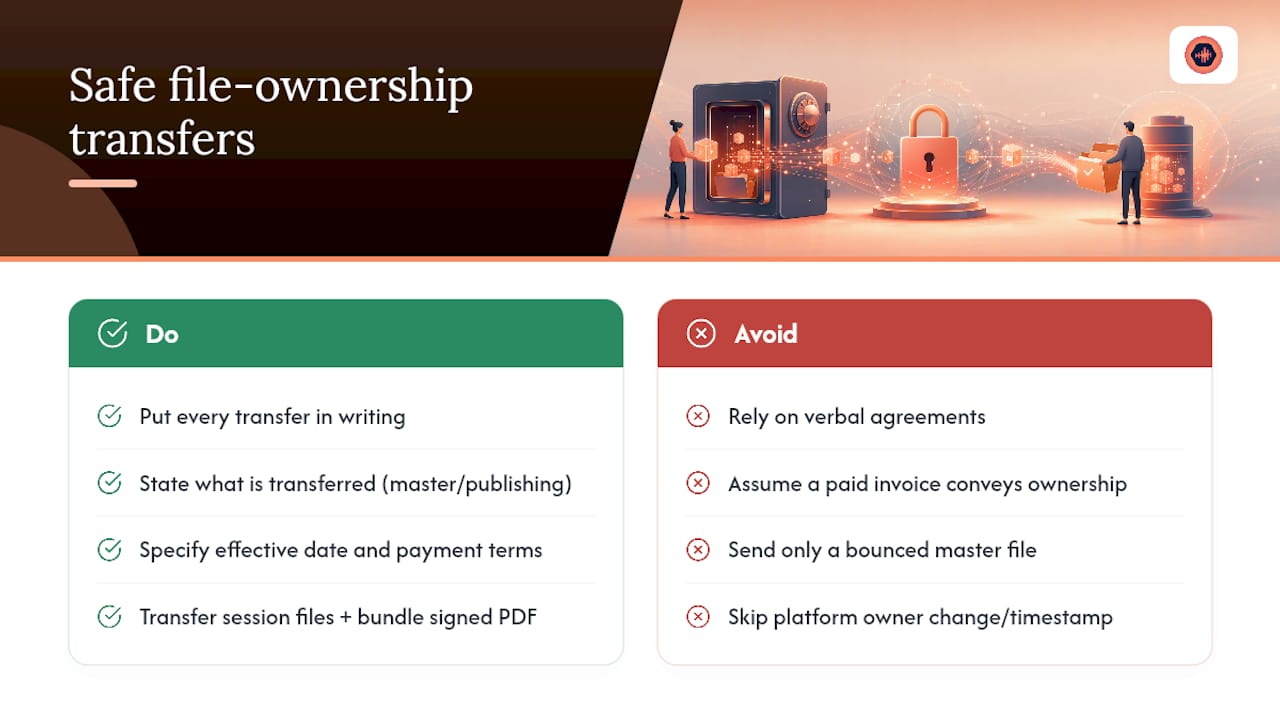
Ownership sometimes needs to change hands after a project ships, a producer sells a beat outright, a studio buys out a session musician’s stake, or a client acquires full rights to a custom score. Doing this safely means putting the transfer in writing every time, never relying on a verbal agreement or an implied understanding from a paid invoice alone.
A proper assignment document should state exactly what is being transferred (master only, publishing only, or both), the effective date, and the payment terms tied to that transfer. If the transfer is a buyout, both parties should sign an agreement that explicitly waives future royalty claims from the seller, since silence on that point is a common source of disputes years later.
For digital delivery, transfer the actual working files, not just the bounced master. That means stems, session files where agreed, and any plugin or preset notes needed to recreate the mix. Bundle a signed transfer agreement PDF with that delivery, the same way you’d bundle a split sheet with a standard delivery.
Where a platform supports it, changing the designated project owner inside the tool itself, rather than just emailing files, creates a timestamped record of when control formally passed from one party to another. That record matters far more than people expect once a dispute surfaces eighteen months later and nobody remembers the verbal terms.
Small transfers (a one-off sample license, for instance) don’t need this level of formality. Full master or publishing transfers always do.
Handling Ownership Disputes When They Come Up
Most ownership disputes trace back to one root cause: nothing was written down before the work started. A collaborator assumed a verbal “we’ll split it evenly” was binding. A client assumed a paid invoice meant they owned the master outright, when it actually only covered a licensing fee.
The first move in any dispute is documentation, not negotiation. Pull the split sheet, the collaboration agreement, the delivery timestamps, and the access logs showing who approved what and when. If those exist, most disputes resolve in a single conversation because the paper trail settles the question before anyone has to argue about memory.
If no written agreement exists, and this happens more often than any studio wants to admit, the fallback is reconstructing intent from behavior: who paid for studio time, whose name appears on prior credits, what the messaging history shows about expectations. This is slower, messier, and far more likely to end in a stalemate or legal fees, which is exactly why the split sheet step earlier in this article isn’t optional for serious work.
For disputes that can’t resolve through direct conversation, a short mediation session with a neutral third party, sometimes just another engineer both sides trust, resolves more conflicts than people expect before anyone needs a lawyer. Reserve actual legal counsel for cases involving real money: sync licensing, commercial releases, or master ownership on a track that’s already generating revenue. At that point, the cost of an entertainment lawyer is trivial compared to the cost of an ongoing rights dispute on a earning asset.
Implementing Digital Rights Management for Ownership Protection
Digital rights management, DRM, for audio typically means one of three things in a studio context: watermarking, encrypted or access-limited file delivery, and download gating tied to payment or approval status. None of these are about locking files forever. They’re about controlling the window during which an unpaid or unapproved copy can circulate.
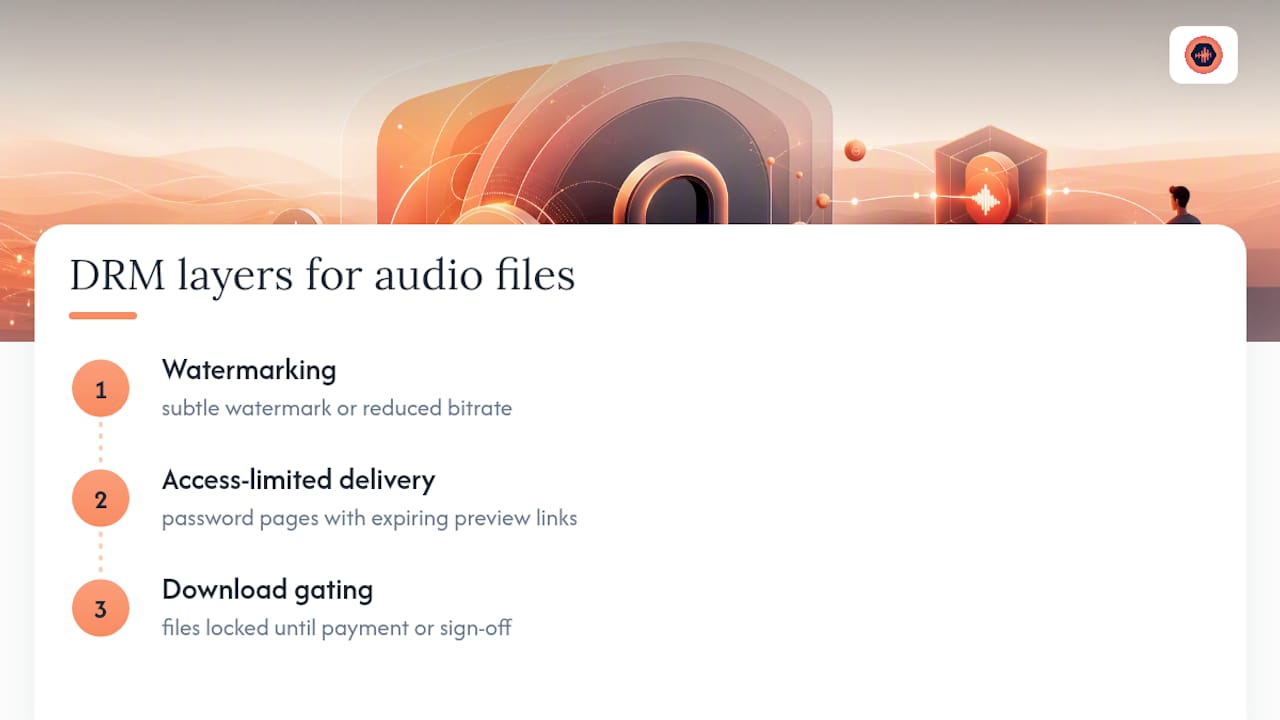
Watermarking is the simplest layer. A rough mix sent for approval gets a subtle audio watermark or a reduced bit rate, enough for accurate feedback, not enough to be usable as a final product if it leaks. This costs nothing beyond a render setting change and stops the most common leak: a “temporary” preview file getting passed around as if it were finished.
Access-limited delivery is the second layer. Files live behind a password-protected project page rather than a public link, with expiration dates set on preview links specifically. This doesn’t require enterprise software, most audio collaboration platforms build it in as a standard setting.
Download gating is the strongest layer, and the one most studios skip because it requires connecting payment processing to file delivery. This is where a full-resolution master or stem set stays locked entirely until payment clears or a client signs off in writing. It’s the DRM equivalent of a paywall, and it’s the single most effective control against the specific problem of “client got the final file and stopped answering invoices.”
None of these layers require legal enforcement to work. They work because they remove the opportunity for the leak or nonpayment to happen in the first place, which is a far better outcome than winning a dispute after the fact.
Automation Tools for Enforcing Ownership and Access Policies
Manual enforcement fails eventually, not because studios are careless, but because remembering to revoke an old collaborator’s access or manually checking whether an invoice cleared before sending a download link doesn’t scale past a handful of projects running at once.
Automation closes that gap in a few specific ways. Payment gating tied directly to delivery, rather than a manual “did they pay yet” check, means the final download button simply doesn’t activate until Stripe Connect or an equivalent processor confirms the transaction. No engineer has to remember to hold the file back.
Access expiration works the same way. Instead of a producer manually deleting a shared link a month after a project wraps, an expiring link setting handles it automatically on a schedule set once at project creation. Audit logging follows the same logic: instead of trying to reconstruct who downloaded what after a dispute surfaces, the log already exists, timestamped, because the platform tracked it the whole time rather than relying on someone’s memory of an email thread.
The pattern across all of these is the same: automation doesn’t replace the policy decisions covered earlier in this article, revision limits, ownership documentation, delivery validation. It just removes the human failure point where a good policy exists on paper but nobody enforces it consistently on the fortieth project of the year.
Privacy Laws and Data Protection Around File Ownership
File ownership control isn’t purely a contracts question. Client audio files, session notes, and contact information tied to a project can fall under data protection obligations depending on what’s stored and where the client is located, and studios that treat client data casually risk more than an awkward conversation.
The practical baseline for most independent studios is straightforward: don’t collect more client information than the project requires, store what you do collect behind access controls rather than in an open shared drive, and have a clear policy for how long client files and personal data are retained after a project closes. If a client requests their data be deleted, that request should be actionable, not something that requires digging through a decade of scattered Dropbox folders to fulfill.
Platforms that centralize project data with defined access logs and retention settings make this easier to demonstrate if a client or a regulator ever asks how their information was handled. A scattered workflow across email, texts, and five different cloud drives makes it nearly impossible to prove what data exists, where it lives, or who can see it, which is itself a compliance risk independent of any specific law.
This doesn’t require a legal department. It requires the same discipline already recommended for file ownership generally: know what you have, know who can access it, and have a written policy instead of an improvised one.
Why Audio-First Tools Change the Ownership Equation
Generic cloud storage moves files. It doesn’t validate them, track approval status, or distinguish a preview from a paid final master. That gap is exactly where ownership disputes and unpaid downloads tend to originate, not from malice, but from tools that were never built for this specific job.
Timestamped waveform comments and built-in version history do something a shared Dropbox folder can’t: they turn feedback into a permanent, precise record. When a client says “approved” on a specific version at a specific timestamp, that approval is tied to precise, actionable feedback rather than a vague email that could mean almost anything six months later.
Lossless transfer and download toggles matter for a similar reason: a mix delivered at reduced quality because a platform compressed it isn’t actually the master, and a download button that unlocks before payment clears isn’t actually gated. Better tools remove both failure points. But no platform replaces the split sheet, the intake checklist, or the discipline to freeze a “final” folder. The tools reduce risk. The process still has to exist.
— Kreg
How Audome Puts These Controls Into Practice
Every control this article recommends maps to a specific feature, not a hope that everyone follows the rules. Version history tracks every revision automatically, so there’s never a question about which file was actually approved. Timestamped comments sit directly on the waveform, turning vague feedback into precise, dated markers. Password-protected project pages and download toggles keep previews separate from paid final masters, and Stripe Connect gating means the final download simply doesn’t unlock until payment clears, no manual invoice-chasing required.

For studios, that combination adds up to fewer unpaid downloads, revision limits that actually get enforced instead of quietly ignored, and an audit trail that settles a dispute in minutes instead of weeks of digging through old email threads. If you’re still managing masters and client feedback across Dropbox links and text messages, Audome’s platform is built specifically to close those gaps. Visit Audome’s site to start a trial and see how ownership control looks when the tool actually enforces it instead of just hoping everyone remembers the rules.
FAQ
Who legally owns a mix or master by default?
Whoever creates and pays for the recording session typically holds master rights unless a written agreement states otherwise, which is exactly why a signed split sheet before release matters.
What’s the difference between a preview and a final delivery?
A preview is a lower resolution or watermarked file sent for feedback, while a final delivery is the full resolution master and stems released only after payment or signed approval.
How many revisions should a studio include by default?
There’s no universal number, but publishing a fixed revision count in the contract and charging for extras beyond it, something platforms like Audome can automate through payment gating, prevents open-ended revision requests from eating into profitability.
Can a client dispute ownership after paying an invoice?
Yes, if the invoice never specified what rights the payment covered, which is why every delivery should include a clear license or credits document alongside the audio files.
Do expiring links actually stop leaks?
Expiring links and passwords significantly reduce the window for unauthorized access, though they work best combined with watermarked previews and locked final folders rather than as a standalone fix.