
A client signoff form is a short document your client signs to confirm a project or deliverable is complete and accepted, which triggers your invoice and releases you from further scope. Send it as soon as the work is ready, give a firm review deadline, and save the signed result as a static PDF, not just a link that can expire.
TL;DR:
- Using a signed acceptance form with clear signer authority prevents future disputes over approval capacity and strengthens legal standing in case of disagreements.
- Deliverables should be listed directly from the scope of work on a single-page form, with specific toggle options for approval or rejection, and a space for detailed comments.
- Attach a firm revision deadline immediately after rejection to avoid delays, and route re-approvals through the same form to maintain clarity and record integrity.
- Digital signatures are legally valid when recorded as static PDFs, which should be stored securely with consistent naming conventions and appropriate retention periods.
- Centralizing signoff, feedback, and files within collaboration platforms streamlines project closure, reduces friction, and ensures signoffs tie directly to specific versions and timestamps.
Table of Contents
- What Is a Client Signoff Form and When Do You Use One?
- What Fields Belong on a Signoff Form?
- What Happens After Approval or Rejection?
- Are Digital Signatures Legally Valid for Signoffs?
- Copy-Ready Signoff Templates You Can Use Today
- How Do You Actually Get a Client to Sign Off?
- How Studios Turn Signoff Forms Into a Working System
- Why Short, Contract-Linked Forms Beat Long Ones
- An Adjacent Way to Handle Approvals: Audome
- Sources
- FAQ
What Is a Client Signoff Form and When Do You Use One?
A client signoff form exists for one reason: to convert a verbal “looks good” into documented acceptance you can point to later. That acceptance does three things at once. It marks a liability cutoff (the client can’t come back in six months claiming the work was never approved), it starts your billing clock, and it tells you it’s safe to reallocate your team to the next job.
You have two real options for timing. Use a single final acceptance form when the project is small and delivered as one package. Use deliverable-by-deliverable signoffs on longer engagements, so each milestone closes on its own instead of piling risk onto one final approval at the end.
Signer authority matters more than people assume. If the person signing isn’t authorized to approve spending or accept deliverables on the client’s behalf, the signoff carries far less weight in a dispute. Confirm who has that authority before you send the form, not after.
What Fields Belong on a Signoff Form?
Most downloadable sign-off templates share a common backbone, and you can build your own version in Word or Google Docs in under ten minutes. Keep it to one page.
- Header block: project name, unique project ID, contract or SOW reference number, client’s legal entity name, and primary contact.
- Deliverables list: each item tied directly to the language in your statement of work, not a vague summary.
- Acceptance section: a clear “Approved” or “Not approved, revisions required” toggle, plus a comment field for specifics.
- Signature block: printed name, job title, a one-line authority statement (“I have the authority to approve this deliverable on behalf of [Client]”), and the date.
That last field does more work than it looks like. Without it, a client can later argue the signer had no standing to approve anything, which reopens the whole project for debate. One-page templates that mirror the SOW word for word also close faster, since there’s nothing to interpret or negotiate.
What Happens After Approval or Rejection?
An acceptance declaration isn’t just paperwork. Under commercial law principles reflected in the UCC’s treatment of acceptance, a buyer who signals that goods or services conform, or who fails to reject them within a reasonable window, has effectively accepted them. A signed form is strong, direct evidence of that acceptance, which is exactly why it holds up better than an email thread or a verbal “we’re good.”
Signer authority language does more here too. Building in a line stating the signer has authority to approve on the client’s behalf removes a common dispute vector before it ever comes up. Pair that with a short dispute-resolution pointer (referencing the arbitration or mediation clause in your master contract) so both sides know the path if something goes sideways later.
For “Not approved” responses, structure the next steps clearly:
- Capture specific revision requests in writing, not a summary.
- Set a firm deadline for the revised deliverable.
- Route the revised work through the same form for re-approval, rather than starting a new document from scratch.
Pro Tip: Never leave “Not approved” open-ended. Attach a revision deadline right on the form itself, so rejection doesn’t quietly stall the project for weeks.
Are Digital Signatures Legally Valid for Signoffs?
Yes. E-signatures carry legal weight in the United States under the E-SIGN Act, but the law’s real requirement is often missed: you need to preserve the electronic record so it can be accurately reproduced later, not just collected once and forgotten.
Platforms like DocuSign and Adobe Sign generate a timestamped final version at signing, and best practice is to save that signed form as a static PDF rather than relying on a portal link that can expire or get revoked.
A few habits keep your records audit-ready:
- Name files consistently:
ProjectID_ClientName_Signoff_Date.pdf. - Store signed PDFs in a dedicated folder separate from working files, with a retention period matching your contract terms.
- Reserve certified or notarized signature workflows for high-value contracts where the stakes justify the extra step.
Form builders like Jotform route signoffs into searchable tables automatically, which matters once you’re juggling more than a handful of active projects.
Copy-Ready Signoff Templates You Can Use Today
A one-line acceptance statement you can paste directly into any form: “By signing below, [Client Name] confirms that the deliverables listed above meet the requirements of the agreed scope of work and are hereby accepted.”
Three template variants cover most situations:
- One-page final signoff: project summary, contract reference, deliverables list, acceptance block. Best for short projects with one delivery point.
- Per-deliverable checklist: the same structure repeated per milestone, used on longer projects where scope ships in stages.
- Change-order approval: documents scope changes and additional cost before work continues, separate from the final acceptance form.
Draft in Word or Google Docs so edits are easy, convert to PDF once signed for the permanent record, and use Excel or a form builder table to track deliverable status across multiple active projects. Attach the form as a PDF via email or, better, deliver it through a client portal that stores everything in one place instead of a scattered inbox thread.
How Do You Actually Get a Client to Sign Off?
Getting a signature is rarely the hard part. Getting one fast, without three follow-up emails, comes down to sequencing.
- Confirm the finished deliverables match the language in your SOW before you send anything.
- Populate the form with the project ID, contract reference, and itemized deliverable list.
- Send it with a clear review window (three to five business days works for most projects) and a named contact for questions.
- Collect the signature and timestamp, then immediately save a static PDF copy.
- Invoice or release final files per your contract terms, and log the signoff date in your project records.
Partial approvals don’t have to stall momentum. If four of five deliverables are approved and one needs revision, invoice for the approved items and route only the outstanding piece back through the same form.
Pro Tip: Build the review window into your original proposal, not just the signoff form. Clients who agree to a five-day turnaround in writing upfront rarely push back on it later.
How Studios Turn Signoff Forms Into a Working System
Most of the friction in client signoff doesn’t come from the form itself. It comes from the form living in one place while the actual files, feedback, and version history live somewhere else entirely.
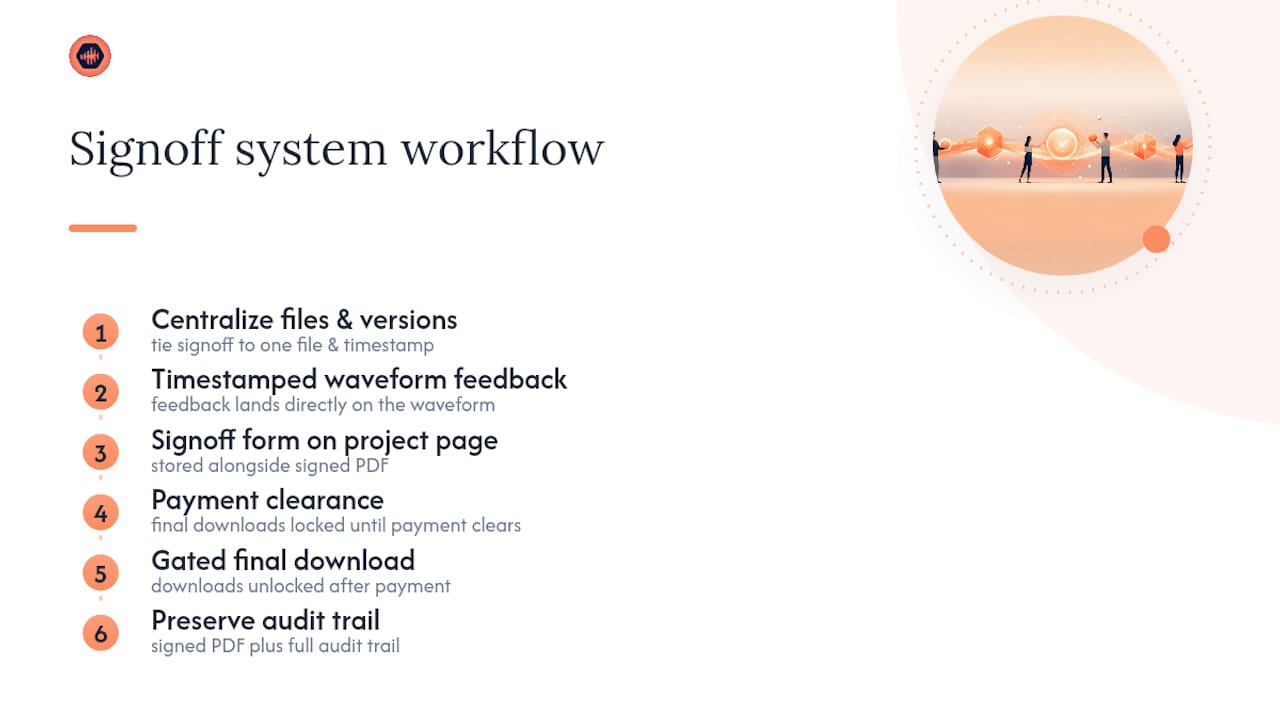
Collaboration platforms centralize deliverable lists and version history so a signoff ties to one specific file and one specific timestamp, not “the mix sent last Tuesday, or maybe the one after that.” Timestamped feedback can land directly on the waveform, free revisions may be capped, and final downloads can stay locked until payment clears. Password-protected project pages can hold the signoff form itself alongside the signed PDF and the full audit trail, so there’s no separate folder to dig through when a client disputes a delivery date months later. A workflow like the one outlined in this mix approval checklist maps almost directly onto the fields a signoff form needs.
Why Short, Contract-Linked Forms Beat Long Ones
Long signoff forms feel thorough and close slower. The forms that actually get signed the same day are one page, use the exact language from the contract, and make the “Approved” box impossible to miss. Signer-authority text stops a specific, recurring dispute before it starts, and that’s worth more than any additional clause you could add. The tradeoff worth weighing: a form this lean asks you to keep your SOW language tight upfront, because a vague scope makes even a perfect signoff form useless.
— Kreg
An Adjacent Way to Handle Approvals: Audome
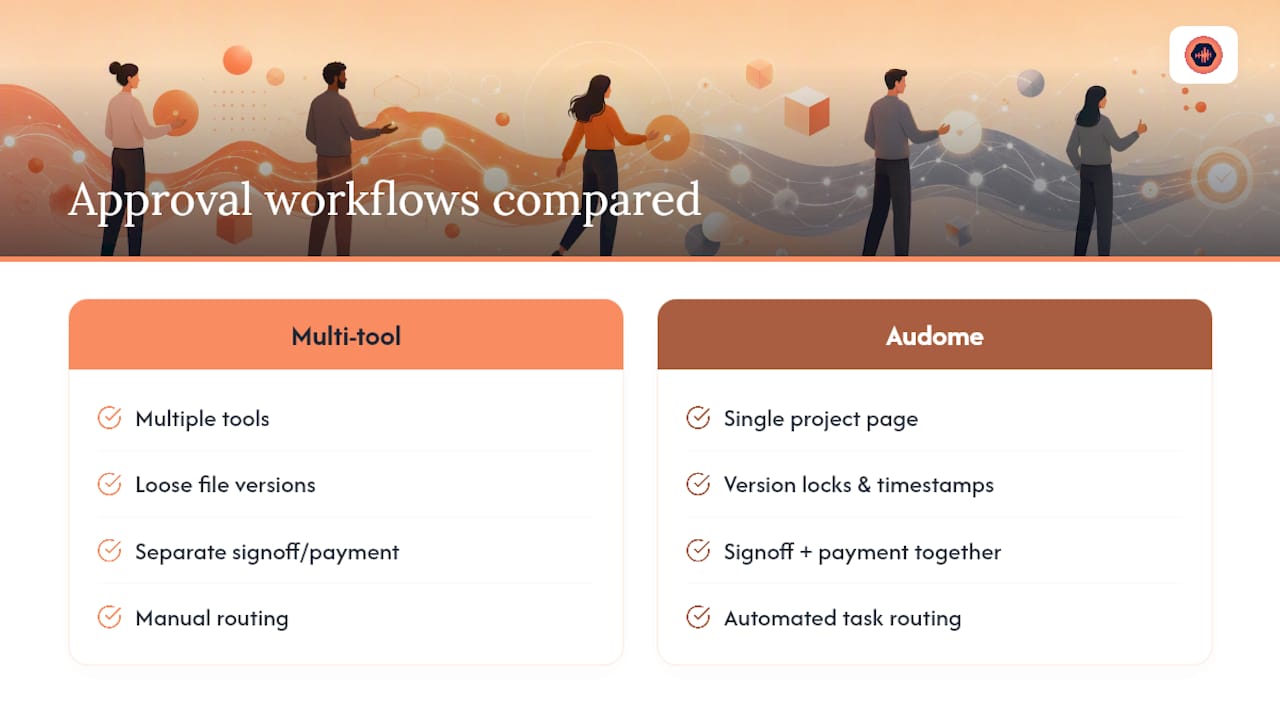
If you’ve been stitching together email threads, a signed PDF folder, and a separate invoicing tool just to close one project, some collaboration platforms replace that whole chain with a single approval to payment path. The form elements covered above (deliverable lists, acceptance blocks, signature and date) map directly onto integrated project pages, where version locks and timestamped feedback replace guesswork about which file the client actually approved. Final downloads can stay gated behind payment processing, so signoff and payment happen in the same motion instead of two separate follow-ups.
This fits producers, mixing and mastering engineers, studios, and audio post professionals who want reviews, signoff, and delivery living in one workspace instead of five. Pairing a tight review workflow with automated task routing, an approach also explored in AmmarAI’s productivity workflow guide, can shave real time off a closeout process that currently eats a Friday afternoon. Start a trial at Audome and send your next signoff form from inside the same project page where the final files already live.
Sources
- Free Project Sign-Off Templates | Smartsheet
- How to Create and Use a Customer Approval Form Template | Legal Clarity
- Project Sign-Off Checklist Form Template | Jotform
FAQ
What Is Client Sign-Off?
Client sign-off is a client’s documented confirmation, usually a signature on a form, that a project or deliverable meets the agreed scope and is formally accepted.
What Is Project Signoff?
Project signoff is the closing step of a project where stakeholders sign a document confirming goals and deliverables were met, which allows resource release and invoicing to proceed.
What Are the Steps to Closing a Project?
A practical closeout sequence includes confirming deliverables against the SOW, sending the signoff form with a clear deadline, collecting a signature and timestamp, saving a static PDF, invoicing, and logging the signoff date, as outlined in the process above.
How Do You Announce a Project Is Complete?
Send the client a short completion notice alongside the signoff form itself, stating the deliverables are finished and inviting review within a set window, rather than announcing completion before the form goes out.
Can a Signoff Form Be Signed Electronically?
Yes. Electronic signatures are legally valid in the United States under the E-SIGN Act, provided the signed record is stored in a reproducible format like a static PDF rather than an expiring link.