
ADR notes management is the practice of capturing cue ID, accurate timecode, reason for replacement, and performance direction for every line sent to the stage, then keeping that data versioned so it survives picture reconforms. The single most important rule: never log a cue without cue ID, timecode, reason, performance direction, and picture version attached. Skip one field and someone downstream loses an hour guessing what you meant.
Paste this into your session notes before you start spotting:
CUE: 042 | CHAR: Maya | TC: 00:14:32:08–00:14:34:12 | PIC: v3 | REASON: intelligibility | DIRECTION: tighter, less breath
That’s the whole format. Everything else in this guide builds on it.
Key Takeaways
ADR notes survive picture changes and client rounds only when cue ID, timecode, reason code, performance direction, and picture version travel together as one unit from spotting through delivery.
| Point | Details |
|---|---|
| Attach picture version always | Never log a cue’s timecode without the picture version it belongs to, since cuts move constantly. |
| Use consistent filenames | Follow a pattern like <CueID>_<Character>_T<take>_P<v#>_<YYYYMMDD> so any take is findable months later. |
| Keep a master ADR bible | Maintain one spreadsheet tracking every flagged line and its current revision status for audits. |
| Set a soft checkpoint | Pause and re-negotiate scope once included revision rounds are used, before doing more free work. |
| Centralize notes in one workspace | Audome ties timestamped comments, version history, and revision billing to one project instead of scattered tools. |
Table of Contents
- What Fields Belong in Every ADR Cue Entry
- How Do You Capture ADR Notes During Spotting Sessions?
- Naming and Versioning ADR Takes So Nothing Gets Lost
- How Should Studios Handle Revision Rounds and Client Requests?
- Which Tools Actually Fit a Professional ADR Workflow?
- Copy-Ready Templates for Your Next Session
- Common Challenges in ADR Notes Management (and How to Fix Them)
- Security and Confidentiality Considerations for ADR Notes
- What Does a Well-Run ADR Workflow Look Like in Practice
- Why Disciplined ADR Notes Save Time and Money
- How Audome Puts This Workflow Into Practice
- Sources
- FAQ
What Fields Belong in Every ADR Cue Entry
A cue sheet that can’t travel between editorial, the stage, and the mix is just a private to-do list. The Forte guide on Pro Tools ADR workflow lays out the minimum fields any cue list needs, and after years of watching sessions stall over missing data, these are the ones that actually prevent rework:
- Cue number: sequential ID tied to the reel or scene, never renumbered mid-project.
- Character: matches the cast list exactly, including nicknames actors might use on set.
- Timecode in/out: frame-accurate, pulled from the locked picture, not eyeballed.
- Picture version: the cut this timecode belongs to (v1, v2, v3), because timecodes drift between cuts.
- Line text: both as scripted and as actually performed on set, since production audio rarely matches the script word for word.
- Reason code: intelligibility, performance, or technical (a plane flying over, a boom bump).
- Emotional direction: what the actor needs to deliver, not just what words to say.
- Priority: whether this cue blocks the mix or can slide to a pickup pass.
Optional but valuable: expected take count, actor-specific notes (an actor who runs hot on take three), a room tone reference, and production audio handles for pitch and timing reference.
A real cue-sheet row reads like this: Cue 042 | Maya | 00:14:32:08–00:14:34:12 | v3 | "I said I'd handle it" | intelligibility | frustrated but controlled | priority 2. A matching marker comment in your DAW should mirror that same string exactly, so nothing gets lost in translation between the spotting document and the session.
How Do You Capture ADR Notes During Spotting Sessions?
Spotting is where most cue lists fall apart, because notes get scribbled on paper or typed into a chat thread that nobody reopens. Build the habit of writing directly into the tool that will export the data.
- Place a marker at the exact frame the line needs replacing, using the standard comment format from the section above.
- Export the marker list as a CSV or TTAL file the moment spotting wraps, so the ADR stage has a working document instead of a verbal handoff.
- At the record stage, use a three-beep cue or visual streamer for every take. The Forte guide notes editors routinely nudge takes by a few frames to match lip movement, so log every take to its own marker or playlist lane, not one merged track.
- Flag the nominated “best” take in the comment field the moment the director calls it, not the next morning when memory has faded.
Picture versions move. If your locked cut changes after ADR is scheduled, every timecode you logged is now wrong unless you tagged the picture version alongside it. Handles that run too short are one of the most common causes of resync headaches on reconform day, so build in 6 to 10 seconds of handle on each cue rather than cutting tight to the line.
Pro Tip: Export your marker CSV the same day you spot, even if the ADR session is weeks away. Spotting notes written from memory a month later are never as accurate as the ones written in the room.
Naming and Versioning ADR Takes So Nothing Gets Lost
A take with no naming standard is a take nobody can find in six months. Use a consistent filename pattern across every project: <CueID>_<Character>_T<take>_P<v#>_<YYYYMMDD>. So cue 042 for Maya, take 3, picture version 3, recorded on March 12, 2026, becomes 042_Maya_T3_P3_20260312. Every element tells you something at a glance: which line, which actor, which attempt, which cut of the picture, and when it happened.
File names alone aren’t enough. Keep three layers of metadata alongside your audio:
- Clip and marker comments inside the session itself, matching the cue sheet language word for word.
- Playlist names that identify take groupings without forcing anyone to open the session to find “best” versus alternates.
- An exported cue CSV that lives outside the DAW, so IT survives even if the session file corrupts.
Practitioners who run high-volume ADR schedules commonly maintain what’s known as an “ADR bible,” a master spreadsheet tracking every flagged line alongside its cue metadata and current revision status. This single document becomes the audit trail when a producer asks “did we ever fix line 42 in reel 3” six weeks after delivery.
Version management gets harder once picture locks start moving. Preserve the original production guide audio for every cue, since it’s your only reference for timing and inflection once the set is gone. Export a complete ADR stem for each picture version rather than overwriting the previous one, and archive prior picture-version exports rather than deleting them. On a typical one-hour television episode generating 40 to 80 ADR cues, losing track of which stem matches which cut turns a two-hour fix into a two-day forensic exercise.
How Should Studios Handle Revision Rounds and Client Requests?
Most studios that get burned on ADR aren’t losing money on the recording itself. They’re losing it on unlimited “just one more pass” requests that never got defined upfront. Set the number of included revision rounds in the contract before the first session, and decide now whether pickups required by a late picture change count against that number or get billed separately, since a director’s cut change is not the same liability as a performance note you missed.
Once a client burns through the included rounds, introduce what’s sometimes called a soft checkpoint: a scheduled pause where you present current cue status and ask the client to confirm scope before any further work begins. A soft checkpoint after included rounds creates a natural negotiation point instead of a confrontation, because you’re not saying no to a request, you’re pointing at a line item both sides already agreed to.
Practical steps for running this without friction:
- Log every client change request with a date stamp and a direct link to the cue number it affects.
- Separate “new note” requests from “revision of an existing note” in your tracking, since what counts as a revision is often the actual point of disagreement, not the work itself.
- Bill for extra rounds at the moment the checkpoint is crossed, not at final invoice, so the client isn’t surprised weeks later.
Pro Tip: Send the checkpoint notice as a short written summary, not a phone call. A dated message referencing specific cue numbers is far harder to dispute than a verbal “we talked about this.”
Which Tools Actually Fit a Professional ADR Workflow?
DAW markers remain the backbone of most sessions. Pro Tools handles this through markers and CSV exports that carry cue data straight to the stage, while Nuendo 15’s ADR panel adds built-in transcription and streamer overlays that cut down manual note transcription considerably. Either way, embed the picture version in every marker comment, because a cue list without it becomes unusable the moment the cut changes.
For cue-sheet generation specifically, a dedicated tool like EdiCue stores cue and department note data directly inside Pro Tools or Nuendo sessions and exports editable PDFs for stage use, which matters when you need paper in an actor’s hands that doesn’t require opening a DAW.
None of that solves client communication and revision accountability. That’s where a workspace like Audome fits: timestamped comments tied to the actual waveform, automatic version history per picture cut, and revision limits that enforce the rounds policy you already negotiated.
Copy-Ready Templates for Your Next Session
Drop this marker comment format directly into your DAW: CUE 042 | Maya | v3 | intelligibility | frustrated, controlled. For a cue-sheet row: 042 | Maya | 00:14:32:08–00:14:34:12 | v3 | intelligibility | priority 2.
Session-day checklist before anyone hits record:
- Confirm the streamer or three-beep cue is loaded and firing on the correct frame.
- Check handle length on every cue; reject anything under 6 seconds.
- Set mic gain with roughly 6 dB of headroom below full scale to leave room for louder takes.
- Confirm the picture version loaded in the room matches the version on the cue sheet.
Export checklist before you send anything to the stage: Use proven playlist outreach templates to distribute session paperwork efficiently.
- Export the CSV or PDF cue sheet and confirm every field from the checklist above is filled in.
- Distribute to the ADR stage supervisor and to actors’ reps with picture version clearly marked in the file name.
Common Challenges in ADR Notes Management (and How to Fix Them)
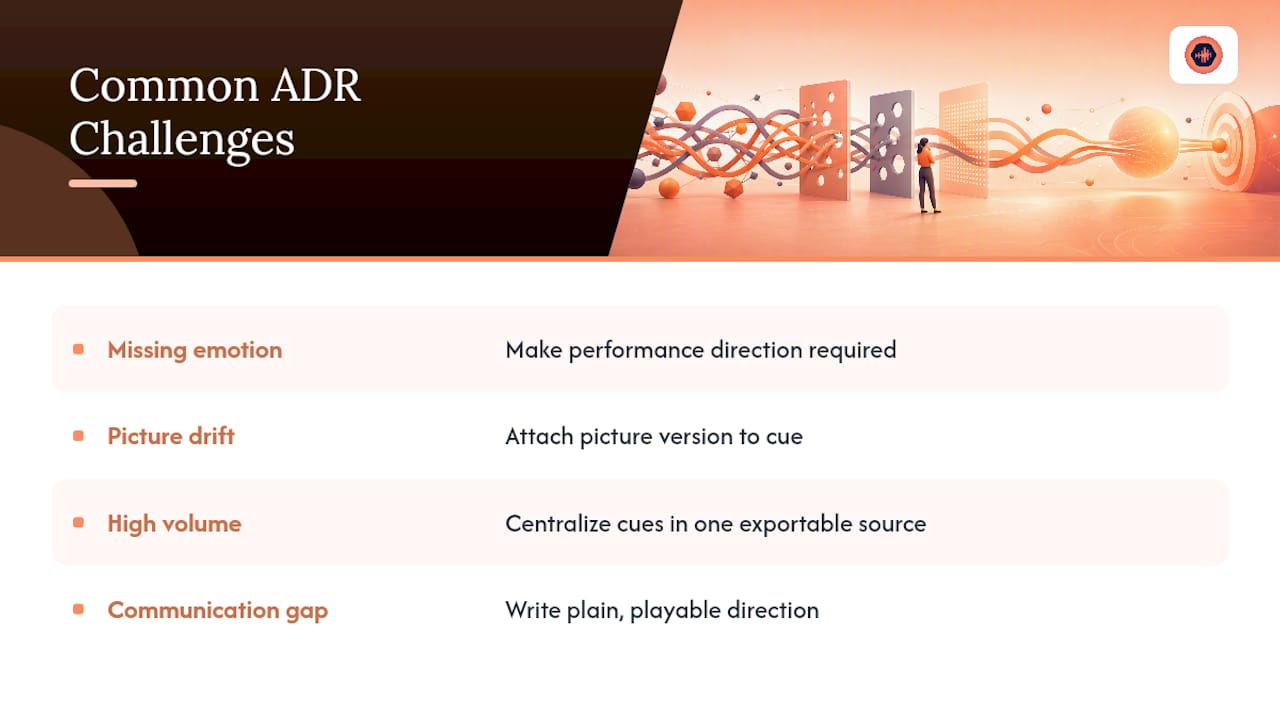
The most frequent failure isn’t a missing cue. It’s a cue with a reason code but no emotional direction, which means the actor gets sync-perfect audio that sounds nothing like the scene. Practitioners refer to this gap as failing to track “emotional ADR” separately from purely technical replacements, and it shows up constantly on rushed schedules where editors log the technical reason and skip the performance note because there’s no time.
Fix it by making performance direction a required field, not optional, even if the note is just two words: “more scared.”
The second recurring problem is picture drift. A cue list built against v2 of the picture becomes partially wrong the moment v3 locks, and nobody notices until the mix stage flags timecodes that don’t line up with anything on screen. The fix isn’t more vigilance, it’s structural: never let a cue exist without its picture version attached, so a version mismatch is visible on sight rather than discovered during a mix session.
A third challenge is simple volume. With 40 to 80 cues per episode and dialogue replacement running close to 30% on average productions (higher on action-heavy shoots), spreadsheets maintained by hand start breaking down around episode three of a season. Centralizing cue data in one exportable source, whether that’s an ADR bible or a shared project workspace, keeps the volume from outrunning your ability to track it.
Communication breakdown between editor, director, and talent rounds out the list. A cue that makes sense to the editor who wrote it can read as vague to an actor standing in a booth. Writing direction in plain, playable language, “tighter, less breath,” rather than technical shorthand, closes that gap.
Security and Confidentiality Considerations for ADR Notes
ADR notes are unreleased dialogue, unreleased picture references, and often unreleased plot information, which makes them a real leak risk long before a project ever ships. Cue sheets shared over open email threads or unsecured chat tools sit in inboxes and message histories indefinitely, with no way to revoke access once a project wraps or a freelancer rotates off.
Password-protected project pages and access controls that don’t rely on every collaborator creating a full account cut down that exposure considerably, since fewer accounts means fewer places credentials can leak. Download controls matter just as much: a cue sheet or reference stem sent as a raw attachment can be forwarded indefinitely, while a controlled link can be revoked the moment a contractor’s engagement ends.
Treat picture version references the same way you’d treat any unreleased visual asset. If your ADR notes include frame grabs or scene descriptions tied to a specific cut, restrict who can view that material to the people actually working the session, not the whole production’s contact list. Studios juggling multiple projects should also keep client data segmented by project rather than in one shared folder structure, so a permissions mistake on one job doesn’t expose another client’s unreleased material.
None of this requires exotic security measures. It requires treating cue lists and revision notes with the same access discipline you’d apply to an unreleased cut of the picture itself, because functionally, that’s what they are.
What Does a Well-Run ADR Workflow Look Like in Practice
The clearest signal that an ADR workflow is working is a high first-review pass rate, the percentage of ADR lines that clear the mix stage without needing a second recording session. Professional teams that match performance, sync, and acoustic character consistently target consistently target high pass rates above 90%, and that number tracks directly with how disciplined the notes were going into the session.
A season of episodic television with 40 to 80 cues per episode makes the pattern obvious fast. Productions that log reason codes and performance direction for every cue tend to see pickups cluster around genuinely difficult lines, the ones with overlapping dialogue or heavy emotional shifts, rather than lines that simply got lost in a disorganized spotting document. Productions running loose notes see pickups scattered everywhere, including lines that should have been simple technical swaps.
The pattern holds at the studio level too. Teams that adopt a consistent filename standard and a shared cue export process report fewer “which version is this” conversations during mix, because the file name and the marker comment already answer the question. The teams still fighting that battle are almost always the ones passing notes through email threads and verbal handoffs instead of a structured export.
None of this is about fancier tools. It’s about whether the cue ID, timecode, reason, and picture version travel together as one unit from spotting through delivery, or whether they scatter across five different documents that someone has to reconcile by hand under deadline pressure.
Why Disciplined ADR Notes Save Time and Money
The failure mode I’ve seen most often isn’t a bad take. It’s a great take logged against the wrong picture version, discovered at the mix stage when nobody has time to fix it cleanly. One habit prevents almost all of it: never write a cue without its picture version attached, full stop.
Studios that build this discipline into their tools, not just their memory, ship faster and argue with clients less. The tooling matters because willpower runs out around cue 60.
— Kreg
How Audome Puts This Workflow Into Practice
Everything in this guide points to one problem: cue data, revision history, and client communication live in different places until someone forces them together. Audome exists to close that gap for audio post teams specifically.

Timestamped comments land directly on the waveform, so a director’s note about cue 042 sits exactly where cue 042 lives, not in a separate email thread you have to cross-reference by timecode. Every upload keeps full version history at up to 96kHz/24-bit, meaning a picture-version reconform doesn’t mean hunting through old exports to find which stem matches which cut. Revision limits and paid revision gating through Stripe Connect turn the soft-checkpoint policy from this guide into something automatic rather than an awkward conversation you have to initiate manually, and clients never need to create an account to leave feedback or download a final mix.
Getting started takes one afternoon: import your cue CSV, create a project, set the included revision rounds your contract already specifies, and invite collaborators through a private, password-protected portal. If your studio is still running ADR notes through email and shared drives, try Audome and see what changes in your next revision round.
Sources
- ADR Workflow in Pro Tools: Picture Lock to Mix | Forte
- ADR Workflow: Replacing Dialogue Without Losing Performance – SonusGearFlow
- EdiCue – Cue ADR and Department Note with customised PDF layouts
FAQ
What fields must an ADR cue sheet include?
At minimum: cue number, character name, timecode in/out, picture version, line text, reason code, and performance direction. Priority level and expected take count help but aren’t strictly required.
How many ADR cues are typical for a TV episode?
A one-hour episode typically generates 40 to 80 cues, with overall dialogue replacement averaging around 30% and running higher on action-heavy productions.
What’s the best file naming standard for ADR takes?
Use a pattern like <CueID>_<Character>_T<take>_P<v#>_<YYYYMMDD>, which encodes the cue, actor, take number, picture version, and recording date in one glance.
How do studios prevent unlimited revision requests on ADR projects?
Define included revision rounds in the contract upfront, then introduce a soft checkpoint once those rounds are used to re-negotiate scope before continuing free work, a policy tools like Audome can enforce through revision limits and paid gating.
Should ADR notes include emotional direction, not just technical reasons?
Yes. Logging only a technical reason code without performance direction is a common cause of sync-perfect but emotionally flat ADR takes.