
All stems must be delivered as 24-bit WAV or AIFF files at the session’s native sample rate (44.1kHz or 48kHz), consolidated from bar 1 with identical durations, peak headroom of -6 dB to -10 dB, no master-bus processing, and accompanied by a stereo reference mix and a metadata-tagged manifest. Recipients are given a defined period from delivery to confirm acceptance or submit a repair request in writing.
Minimum requirements at a glance:
- File format: WAV or AIFF, uncompressed, 24-bit
- Sample rate: match the session (44.1kHz or 48kHz — no resampling)
- Peak headroom: -6 dB to -10 dB; no clipping, no normalization, no master limiter
- Alignment: consolidated from bar 1, beat 1; identical durations; silent padding where elements enter late
- Reference stereo mix: included in every package
- Manifest: metadata-tagged CSV or JSON, one row per file
- Acceptance window: 48 hours; silence = acceptance
Table of Contents
- What does a solid stem delivery policy cover?
- Technical specs, folder layout, and naming conventions
- What to print, what to leave off, and how to set levels
- Why metadata and a manifest matter for every package
- How to deliver stems securely and verify file integrity
- Timelines, fees, and revision policy
- Copy-ready stem-delivery policy template
- Why stems matter for sync licensing
- What recipients should check when stems arrive
- Key Takeaways
- The policy nobody reads until they need it
- Audome makes this policy automatic, not aspirational
- FAQ
What does a solid stem delivery policy cover?
A stem delivery policy is a short, enforceable contract specifying how stems are exported, packaged, labeled, and accepted. Think of it as the spec sheet that travels with every deliverable. Without one, recipients spend hours guessing which files are wet, which are dry, and whether the kick drum stem was exported with the master limiter still engaged. That guesswork is billable time someone else is eating.
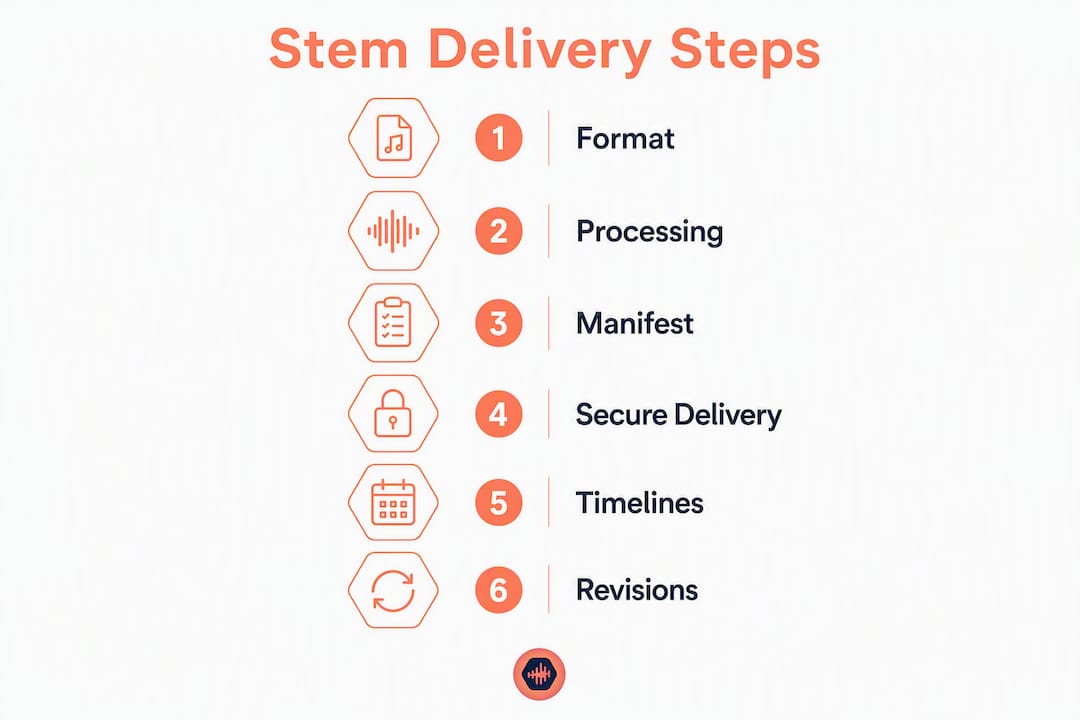
The policy covers six areas: technical specs, processing rules, metadata and manifest, secure delivery, timelines and fees, and acceptance criteria. Each section below gives you the exact language to copy.
Technical specs, folder layout, and naming conventions
File format and resolution
Deliver stems as uncompressed WAV or AIFF files at 24-bit depth and the session’s native sample rate. Resampling introduces artifacts; match the session exactly. Common rates are 44.1kHz (music) and 48kHz (post/sync).
Consolidate every stem from bar 1, beat 1. If a string pad enters at bar 17, the file still starts at bar 1 with 16 bars of silence. Every file in the package must share the exact same duration so they drop into any DAW session and align on the first frame.
Recommended folder structure
ArtistName_SongTitle_Stems/
  ├── 01_Drums_ArtistName_SongTitle_48k24b.wav
  ├── 02_Bass_ArtistName_SongTitle_48k24b.wav
  ├── 03_LeadVocal_Wet_ArtistName_SongTitle_48k24b.wav
  ├── 03_LeadVocal_Dry_ArtistName_SongTitle_48k24b.wav
  ├── 04_BackingVocals_ArtistName_SongTitle_48k24b.wav
  ├── 05_Instruments_ArtistName_SongTitle_48k24b.wav
  ├── 06_FX_ArtistName_SongTitle_48k24b.wav
  ├── REF_ArtistName_SongTitle_MasterRef.wav
  └── MANIFEST_ArtistName_SongTitle.csv
| Export field | Recommended value |
|---|---|
| Format | WAV (preferred) or AIFF |
| Bit depth | 24-bit |
| Sample rate | Match session (44.1kHz or 48kHz) |
| Dither | Off (dither only at final mastering stage) |
| Normalization | Off |
| Start point | Bar 1, beat 1 |
| Duration | Identical across all stems |
Pro Tip: Sequential numbering (01, 02, 03…) prevents alphabetical sorting from scrambling your stem order on import. Add the sample rate and bit depth as a suffix token (48k24b) so any engineer can confirm specs at a glance without opening the file.
What to print, what to leave off, and how to set levels
Processing rules
Print group-level processing: bus compression on the drum group, parallel saturation on bass, reverb and delay returns where those choices are intentional and final. Remove everything on the master bus, especially the master limiter. A stem package with a baked-in limiter cannot be mixed or mastered correctly downstream.
Universal Music Group’s content guidelines specify that stems should be delivered “wet” with all FX applied so files play back as the main mix with faders at 0 dB, and that both wet and dry vocal stems should be included. Follow that convention: supply a dry vocal stem alongside the wet one whenever tuning or reverb choices might be revisited.
Processing checklist before export:
- Master bus chain: bypassed or removed
- Master limiter: off
- Group FX (compression, EQ, sends): printed
- Vocal stems: wet AND dry versions included
- Headroom: peak at -6 dB to -10 dB; verify in your DAW’s clip gain view
- Clipping: zero red clips across all stems
- Normalization: off
Pro Tip: After export, open a blank session, import all stems, and play them together. They should sum to the reference mix. If something sounds wrong — a missing low end, a rogue limiter artifact — catch it now, not after the client downloads the files.
Why metadata and a manifest matter for every package
Missing a manifest is the single fastest way to get a sync placement rejected. Editors and supervisors use the reference mix and manifest to confirm assemblies; without them, a package sits in a queue until someone manually audits it.
Essential manifest fields:
- Filename, stem group label, mono/stereo, sample rate, bit depth
- Duration (HH:MM:SS:FF), printed processing state (wet/dry), intended use
- MD5 or SHA256 checksum, version number, delivery date
| Column | Example value |
|---|---|
| filename | 01_Drums_ArtistName_SongTitle_48k24b.wav |
| stem_group | Drums |
| channels | Stereo |
| sample_rate | 48kHz |
| bit_depth | 24 |
| duration | HH:MM:SS:FF |
| processing | Wet (bus compression printed) |
| intended_use | Full mix, sync |
| checksum_md5 | MD5 or SHA256 checksum |
| version | version number |
Include a short README.txt in the root folder. List what was printed, what was bypassed, the reference mix filename, and a contact name. Three sentences is enough.
How to deliver stems securely and verify file integrity
Email attachments are not a delivery method for stems. A 24-bit, 48kHz stereo stem set for a four-minute song runs well over 100 MB; email corrupts large attachments and leaves no audit trail.
Include MD5 or SHA256 checksums in the manifest and instruct recipients to verify them on arrival. A checksum mismatch means the file was corrupted in transit and must be re-sent before any work begins.
Delivery security checklist:
- Use a secure cloud link, password-protected project page, or signed upload form
- Zip the folder and include the manifest and reference mix inside the archive
- Name the zip:
ArtistName_SongTitle_Stems_v1.zip - Generate MD5/SHA256 checksums for every file; include them in the manifest
- Set a download expiry or password on the link
- Keep an archived copy of exactly what left your workstation
Timelines, fees, and revision policy
Stems are a billable service, not a courtesy. Mixing engineers commonly charge a stem-prep or cleanup fee when stems are requested after the final mix is delivered. Set that expectation in writing before the project starts.
Standard timeline language:
Stems are delivered within two business days of final mix approval. Recipients have 48 hours to confirm receipt and flag technical issues. Creative revision requests after acceptance are billed separately.
Common pricing approaches:
- Basic stem set (drums, bass, lead vocal, full instrumental): included as a paid add-on at project booking, typically $50–$150 depending on session complexity.
- Full stem package (all groups, wet + dry vocals, FX stems): priced as a separate line item, typically $150–$300.
- After-the-fact cleanup: charged at the engineer’s hourly rate with a one-hour minimum.
Payment-before-download: Hold the final hi-res stem package behind a download gate. Release it only after the invoice is paid in full. Two policy examples:
- (A) Stems as a paid add-on: “Stem delivery is available for an additional fee agreed at booking. Files are released upon payment confirmation.”
- (B) Invoice-first release: “Final stems are delivered via a password-protected link. The download password is provided upon receipt of full payment.”
Copy-ready stem-delivery policy template
Paste this into your quote template, contract, or onboarding email. Adjust bracketed fields.
Stem Delivery Policy — [Studio Name]
Deliverables: Stems delivered as 24-bit WAV files at [44.1kHz / 48kHz], consolidated from bar 1, with a stereo reference mix and metadata-tagged manifest.
Headroom: Peak levels between -6 dB and -10 dB. No master-bus processing or limiting printed to stems.
Alignment: All stems share identical duration and start at bar 1, beat 1.
Manifest: One CSV or JSON manifest included per package, with checksums.
Acceptance window: Client has 48 hours from delivery to report technical issues. Silence constitutes acceptance.
Revisions: [X] technical correction rounds included. Additional rounds billed at [$X/hour].
Credit: Engineer credit as “[Name, Role]” on all released versions using these stems.
Session files: Printed stems only are delivered unless a session-file license is separately agreed.
Archival: Studio retains a copy of all delivered files for [12 months / 24 months].
Pre-delivery checklist:
- Master bus and limiter bypassed
- All stems consolidated from bar 1, identical durations
- Peak headroom verified at -6 dB to -10 dB
- Wet and dry vocal stems both exported
- Manifest completed with checksums
- Reference mix included in the archive
- Zip named and password set
- Invoice sent (or download gate enabled)
Pro Tip: Save this checklist as a DAW session note or a pinned message in your project management tool. Running it takes under three minutes and prevents the most common rejection reasons.
Why stems matter for sync licensing
Most producers think a sync placement is won on the track. It often comes down to what happens after the music is chosen: a supervisor asks for stems, and if you can’t deliver them cleanly within 24 hours, the placement goes to someone who can.
Music supervisors and picture editors need stems to mute elements for dialogue, create alternate versions, and hit exact timing cues. A well-labeled stem package with a reference mix lets an editor start cutting immediately. A folder of files named “track_final_FINAL_v3.wav” does not.
Metadata priorities for sync:
- Cue title, BPM, key, total duration
- Publisher name, ISRC (if registered), composer PRO affiliation
- Contact email for licensing inquiries
- Intended-use labels on each stem: “TV clean,” “instrumental,” “vocal up”
Sync packaging checklist:
- Stereo reference mix included
- Stems labeled with intended use
- ISRC and publisher info in the manifest
- Contact info in the README
- Stems and reference mix in a single zip, named clearly
Include stems in the initial pitch when the submission platform allows it. Supervisors who receive a complete package on first contact are far more likely to move quickly.
What recipients should check when stems arrive
Import the stems into a blank session before you do anything else. Play them together. They should sum to the reference mix; if the low end is missing or the mix sounds pumped, a master-bus processor was printed and the package needs to be corrected.
QA checklist for recipients:
- File format: WAV or AIFF, 24-bit confirmed
- Sample rate: matches the project session
- All stems share identical duration
- Alignment: all start at bar 1, beat 1
- Peak levels: -6 dB to -10 dB, no clipping
- Reference mix: present and labeled
- Manifest: present, checksums verified
- Wet and dry vocal stems: both present
If any item fails, send a repair request within the acceptance window. Keep it short and specific:
Use timestamped waveform feedback to flag specific moments rather than describing them in prose. One contact person per project, one feedback document per round. That single habit cuts the average repair cycle from days to hours.
Key Takeaways
A complete stem delivery policy requires 24-bit WAV files consolidated from bar 1, peak headroom of -6 dB to -10 dB, no master-bus processing, a metadata-tagged manifest with checksums, and payment-before-download enforcement.
| Point | Details |
|---|---|
| File format and resolution | Deliver 24-bit WAV or AIFF at the session’s native sample rate (44.1kHz or 48kHz); no resampling. |
| Alignment and headroom | Consolidate from bar 1, identical durations; peak at -6 dB to -10 dB with no master limiter printed. |
| Manifest and checksums | Include a metadata-tagged CSV or JSON manifest with MD5/SHA256 checksums in every package. |
| Stems are a billable line item | Price stem prep upfront; charge a cleanup fee for after-the-fact requests. |
| Audome enforcement | Audome’s password-protected project pages, version tracking, and Stripe-based download gating let studios enforce payment-before-download and manage revisions in one place. |
The policy nobody reads until they need it
Most studios skip a formal stem-delivery policy until a client delivers a folder of 16-bit MP3s labeled “final_stems_USE_THIS_ONE.zip” — and by then, the mix session is already open and the clock is running.
The real cost of missing policy isn’t the cleanup hour. It’s the precedent. Once a client learns you’ll fix their mess for free, every future project arrives the same way. A written policy, sent at booking and referenced in the contract, changes that dynamic before it starts. Clients who receive a spec sheet with their quote take the requirements seriously. Those who don’t get one assume anything goes.
The other thing most articles miss: a stem policy is also a quality signal. Sending a client a clean, numbered, manifest-tagged package tells them something about how you run your business. It’s the audio equivalent of showing up to a session with your cables labeled. The work speaks, but so does the packaging.
Audome makes this policy automatic, not aspirational
Enforcing a stem-delivery policy manually means chasing emails, re-sending passwords, and hoping clients download the right version. Audome replaces that with a purpose-built workspace where the policy is built into the project itself.

Upload unlimited hi-res stems (up to 96kHz/24-bit), organize them inside a password-protected project page, and collect timestamped waveform feedback directly on the files. Version tracking keeps every delivery logged. Stripe-based download gating holds the final package until the invoice clears — no manual follow-up, no unpaid downloads. Set revision limits upfront and bill additional rounds automatically.
Add the policy template from this article to your Audome project template, enable download gating for final stem releases, and your policy enforces itself. Start a free trial at Audome and have the whole system running before your next delivery.
FAQ
What file format should stems be delivered in?
Deliver stems as uncompressed 24-bit WAV or AIFF files at the session’s native sample rate (44.1kHz or 48kHz). Compressed formats like MP3 are not acceptable for professional stem delivery.
Should master-bus processing be printed to stems?
No. Remove all master-bus processing and limiters before exporting. Print only group-level FX; a baked-in master limiter prevents correct mixing and mastering downstream.
How do you charge for stems?
Stem prep is a billable line item, typically priced as a paid add-on at booking. After-the-fact cleanup requests are billed at the engineer’s hourly rate with a one-hour minimum.
What should a stem manifest include?
Each row should cover filename, stem group, channel count, sample rate, bit depth, duration, processing state (wet/dry), intended use, MD5/SHA256 checksum, and version number.
How does Audome help enforce a stem delivery policy?
Audome provides password-protected project pages, unlimited hi-res uploads, version tracking, and Stripe-based download gating so studios can require payment before releasing final stem packages and manage revisions without manual follow-up.